Development of Neustream Multistreaming Platform

Mohammad Farseen Manekhan


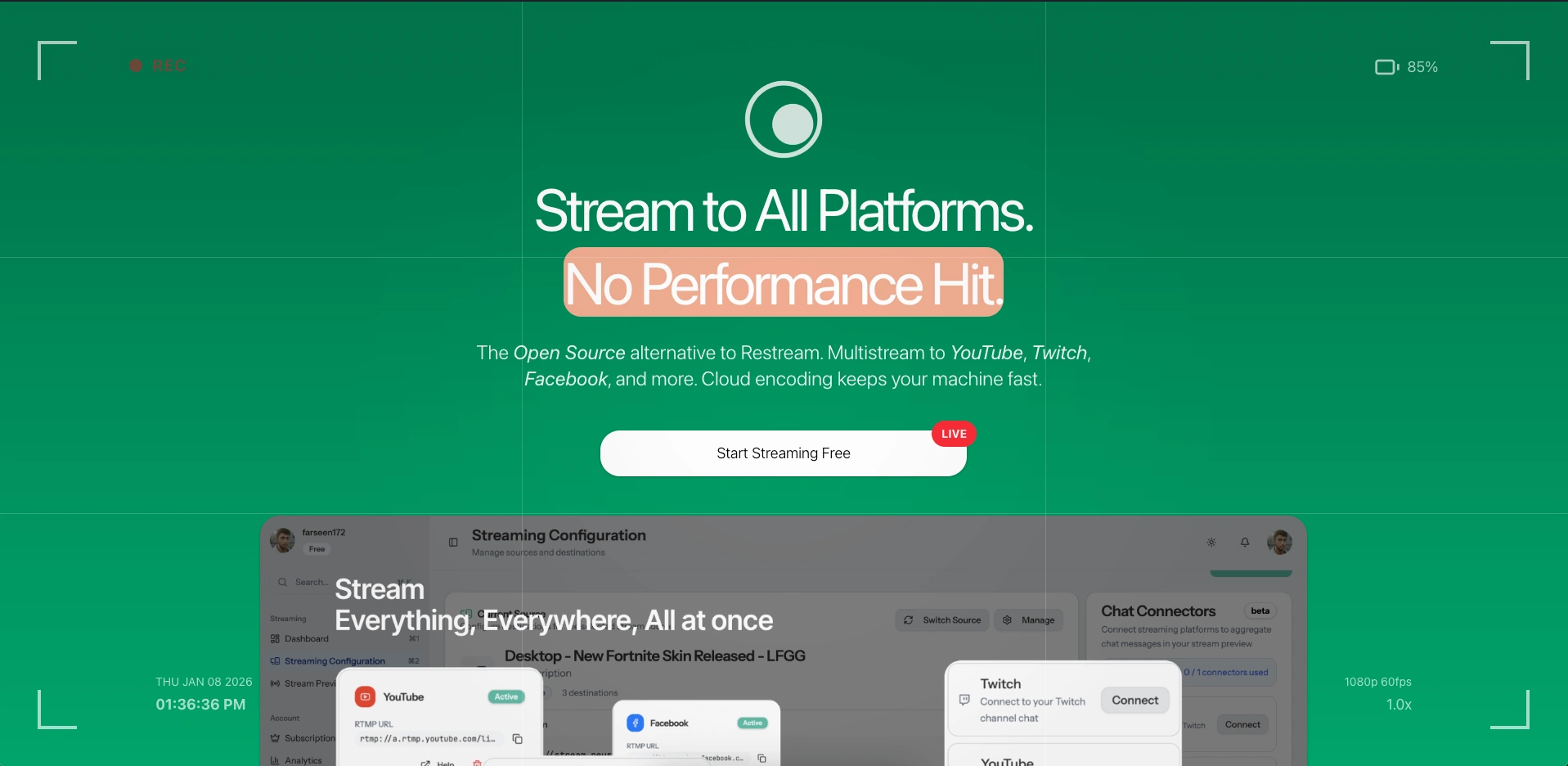
Neustream - A platform that lets streamers broadcast to YouTube, Twitch, Facebook, and other platforms at the same time, from one OBS connection.
My Role: Built everything myself
Time: 2 months
Status: Live at neustream.app
The Problem
If you stream on Twitch, YouTube, or Facebook, you can only stream to one platform at a time with OBS. Tools like Restream solve this, but they cost $20-40/month and you don't control anything.
I wanted to build a free, open-source version that anyone could use or run on their own server.
The Main Challenges
Building this wasn't simple. Here's what made it hard:
Handling live video - Taking a stream from OBS and sending it to multiple platforms without lag
Security - Making sure only the right person can stream to their account
Not breaking - Streams can't drop when someone adds a new platform or changes settings
Multiple streams at once - System needed to handle many people streaming at the same time
Monitoring everything - Users need to see if their stream is actually working on each platform
How I Built It
I split Neustream into 4 parts that each do one job:
The 4 Parts
1. Media Server This receives the video stream from OBS and sends it out to all the platforms. Uses FFmpeg (industry standard video tool) to handle the actual streaming.
2. Control Plane (Backend) This is the brain. It handles:
User accounts and login
Which platforms each user wants to stream to
Checking if stream keys are valid
Storing all the settings
Built with Node.js, PostgreSQL (database), and Redis (fast memory storage).
3. User Dashboard The website where streamers set up their accounts, connect platforms, and watch their stream status in real-time.
Built with React and Tailwind CSS.
4. Admin Panel A simple dashboard I use to monitor the whole system and help users if something breaks.
How It Actually Works
Here's what happens when someone streams:
Streamer opens OBS and connects to Neustream's server
Neustream checks their stream key - is this person legit?
If yes, Neustream looks up which platforms they want (YouTube, Twitch, etc.)
For each platform, Neustream starts a separate FFmpeg process to send video there
User's dashboard updates in real-time showing which platforms are live
Why I Built It This Way
Keeping things separate
The video handling lives on one server, the user accounts and settings live separately. This means if I need to restart one part, the other keeps working.
One process per platform
Instead of one big process handling everything, each platform (YouTube, Twitch, etc.) gets its own process. If one fails, the others keep going.
Real-time updates
Used WebSockets so when something changes (stream goes live, platform disconnects), users see it on their dashboard within 2 seconds.
Tech I Used
Backend:
Node.js, Express, PostgreSQL, Redis, Socket.IO
Video stuff:
MediaMTX, FFmpeg, Linux shell scripts
Frontend:
React, Vite, Tailwind CSS
Hosting:
Docker, GitHub Actions for deployment
Problems I Solved
Problem 1: Slow stream starts
Stream keys took 2-3 seconds to verify with the database, which delayed streams starting.
Fix: Used Redis to cache valid stream keys. First connection checks database, next ones use cache - now it takes less than 100ms.
Problem 2: Too many processes eating memory
One stream going to 5 platforms = 5 FFmpeg processes running. This could crash the server.
Fix: Built a manager that watches how much memory each process uses, automatically kills processes when streams end, and restarts failed ones without touching the working ones.
Problem 3: Changing platforms mid-stream
If someone added YouTube while already streaming to Twitch, the whole stream would restart.
Fix: Made it so the system can add/remove individual platforms without touching the ones already working. Only the new platform starts up.
Problem 4: Different login for each platform
YouTube, Twitch, Facebook all have different ways to log in and different formats for stream URLs.
Fix: Created templates that convert all platforms into one standard format internally. Users just click "Connect YouTube" and it handles the messy OAuth stuff automatically.
What It Does Now
Handles multiple people streaming at the same time with no lag
Updates user dashboards in under 2 seconds when something changes
Works with 6+ streaming platforms per person
Hasn't crashed in months of testing
Totally free and open-source
What I Learned
How to build systems where different parts talk to each other reliably
How live video streaming actually works (RTMP protocol, FFmpeg)
Managing processes that run for hours without crashing
Building real-time dashboards with WebSockets
Handling logins for multiple platforms (OAuth)
The hardest part wasn't the video streaming itself - FFmpeg does that. The hard part was making sure everything stayed coordinated: user settings, authentication, process management, and real-time updates all working together without breaking.
What's Next
If I keep working on it, I'd add:
Cloud recording - Auto-save streams to cloud storage
Better quality options - Different video quality for different platforms
View counts - Show how many people are watching across all platforms
Combined chat - See chat from all platforms in one place
Scheduled streams - Set streams to auto-start at specific times
Links
Try it: neustream.app
Source code: github.com/farseenmanekhan1232/neustream
Like this project
Posted Jan 18, 2026
Developed Neustream, an open-source multistreaming platform using OBS.