AI-Powered Replit Clone Development

Prankur Pandey



I’ve been coding for about a decade now. And over the years, I’ve tried my fair share of development tools—especially IDEs like Sublime Text, Atom, and even NetBeans back in my college days. But when VS Code came along, it completely changed the game for me. It’s lightweight, fast, and packed with features that just make life easier as a developer. It quickly became my favourite tool.
With all the recent advancements in AI, I wanted to build something that’s not just fun but also a meaningful learning experience. That’s how this project was born—a simple Replit-inspired clone for the web. It combines AI to generate code, lets you run React files, and displays the output seamlessly, just like Replit. On top of that, you can edit files and save your work in real-time, so nothing ever gets lost.
In this tutorial, we’ll build an AI-powered Replit clone—a web-based IDE. This IDE will enable you to generate React code files, edit them in a VSCode-like environment, preview the final output, and save the code in real time. It will also support CRUD operations on the generated files.
For this project, I’ll leverage some tools I’ve used in the past, including those from my SQL Query Data Extractor project. Below are the tools and technologies we’ll use:
The database is the backbone of any application—it stores data and serves it as needed. For this project, I’ll use my all-time favourite, MongoDB Atlas.
I chose MongoDB Atlas because it integrates seamlessly with Next.js, and since it’s a cloud-based database, I don’t need to host it manually—making it a plug-and-play solution. Performing CRUD operations with MongoDB Atlas is straightforward and efficient.
The code editor is the core of this project, as it powers the IDE experience. For this, I’ll use the legendary Monaco Editor, the same editor that drives VSCode. Monaco Editor handles files effortlessly and supports a wide range of file types. In this project, it will allow users to view and edit code files.
Once we generate and edit code in the Monaco Editor, we’ll need a way to preview its output. For this, I’ll use CodeSandbox’s Sandpack, a free and powerful tool for live code previews.
Sandpack supports various frameworks and file types, whether you’re working with static HTML/CSS files or frameworks like React. It displays files and their real-time output seamlessly.
The AI Agent will be responsible for generating code using Natural Language Processing (NLP). Acting as a bridge between your ideas and the code, it will take user prompts and translate them into functional code files.
For this, I’ll use CopilotKit, my favourite free and open-source tool for AI-powered code generation. CopilotKit will take your ideas and create the corresponding code files based on your input.
The AI Agent relies on an underlying AI model to process user inputs and generate code. For this project, I’ll use GroqAI, a flexible and reliable platform that supports various popular AI models. GroqAI’s versatility makes it perfect for this project’s requirements.
Next.js
To build a robust web application that combines both frontend and backend functionalities, I’ll use Next.js. It’s an excellent framework for creating scalable applications, offering server-side rendering and other powerful features that are ideal for this project.
Deployment
For deployment, you can choose any service. I prefer Vercel, as it integrates seamlessly with Next.js and is free for hobby projects.
By combining these tools, you’ll build a powerful, user-friendly application that effortlessly produces the code and provides a live preview like Replit does.
What We’ll Do Here
In this tutorial, you’ll follow these steps to build our app:
Step 1 – Set Up the Database:
Set up a database either locally or on the cloud. For seamless integration, use an online database tool that supports data access and extraction via REST APIs.
Step 2 – Obtain Cloud API Keys:
Retrieve the necessary API keys for your AI model to enable smooth and secure integration.
Step 3 – Build the Web Application:
Develop a web application and configure the backend to integrate CopilotKit. Ensure it’s properly set up for efficient functionality.
Step 4 – Train CopilotKit with Your Database:
Provide your database data to CopilotKit so it can understand and utilize the information for natural language processing.
Step 5 – Integrate the CopilotKit Chat Interface:
Embed the CopilotKit chat interface into your application and configure it to work seamlessly with your app’s workflow.
Step 6 – Test Locally:
Run the application on your local machine, thoroughly testing each feature to identify and resolve any issues.
Step 7 – Deploy the Application:
Once testing is complete and the app is working as expected, deploy it to a hosting platform for public use.
How Does the App Work?
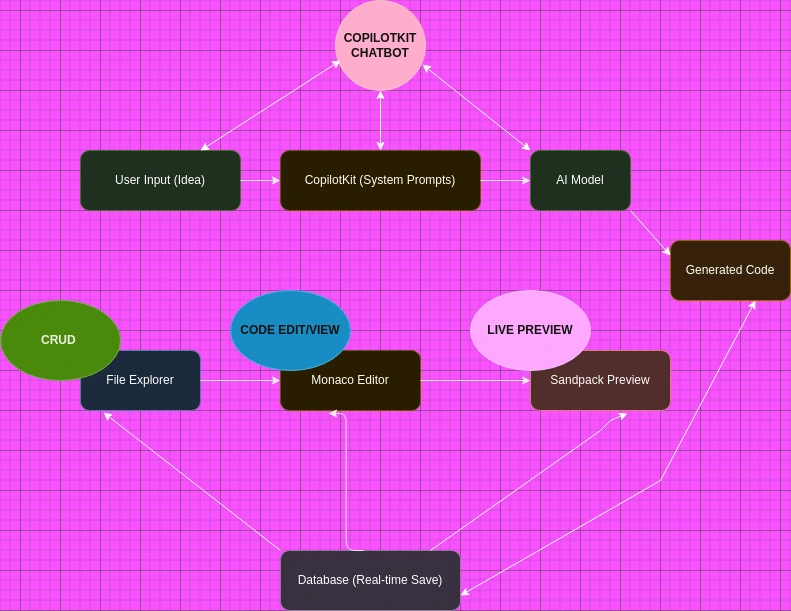
This project is a fun experiment and a step toward my long-term goal of building something around code editors, particularly inspired by VSCode.
The real magic happens with CopilotKit. As soon as you input an idea into CopilotKit, it uses predefined system prompts that adapt to your project requirements. These prompts allow CopilotKit to interpret plain English instructions and transform them into meaningful outputs. In this tutorial, I’ll show you how to configure these system prompts effectively to maximize results.
For example, if you enter the idea “build a simple React app”, CopilotKit passes that idea to the integrated AI model. The AI model, working in coordination with CopilotKit’s system prompts, generates the necessary code files based on your input.
The generated files are then displayed in the File Explorer on the left side of the screen. You can easily browse through the files created by CopilotKit.
To preview the code, simply click on a file like
App.js. The file’s code will load into the Monaco Editor on the left, while the Sandpack preview on the right will render a real-time output of the file.You can now experiment with the files—tweak the code, change colours, fonts, or text, and even write your own logic, just like working with regular HTML, CSS, or React files. Any changes you make will be saved in real time to the database. So even if you accidentally close the project, your progress will be intact. Simply refresh the page, and your code will be right where you left it.
How to Set Up Your Tools
Now we’ll go through everything you need to set up the project.
Install Next.js and dependencies:
First, you’ll need to create a Next.js app. Go to the terminal and run the following command:
Replace
my-next-app with your desired project name and use TypeScript.Navigate to the project folder:
Start the development server:
Open your browser and navigate to
http://localhost:3000 to see your Next.js app in action.Install CopilotKit and dependencies
Navigate to the project’s root folder in the terminal and run the following command. This will install all the necessary dependencies for CopilotKit along with other essential packages, such as dotenv, groq-sdk, sandpack, Monaco Editor, Lucide React, Socket and Mongoose.
CopilotKit: This dependency handles all operations and configurations related to CopilotKit.
Dotenv: Used for managing environment variables, and keeping sensitive keys secure within the project.
GroqSDK: Facilitates access to various LLM models through a single API key.
CodeSandbox Sandpack (React): Provides the ability to display real-time previews of the code.
Monaco Editor: Powers the VSCode-like environment, enabling real-time code editing.
Lucide React: An icon library used to display icons for files and folders.
Mongoose: Manages MongoDB schemas for storing and retrieving data from the database.
socket.io: A very powerful tool for real-time data syncing between client and server.
socket.io client: Extra socket.io client package for data communication.
This step is crucial for the project, as it involves setting up the LLM (Large Language Model) to convert natural language (plain English) queries into a React framework working code.
There are many LLMs available, each with its unique strengths. Some are free, while others are paid, making the selection process for this project a bit challenging.
After thorough experimentation, I chose the Groq Adapter because:
It integrates multiple LLMs into a single platform.
It offers access via a unified API key.
It’s fully compatible with CopilotKit.
To get started with Groq Cloud, visit its website and either log in if you already have an account or create a new account if you’re new. Once logged in, navigate to the Groq Dashboard.
This is the homepage of Groq cloud:
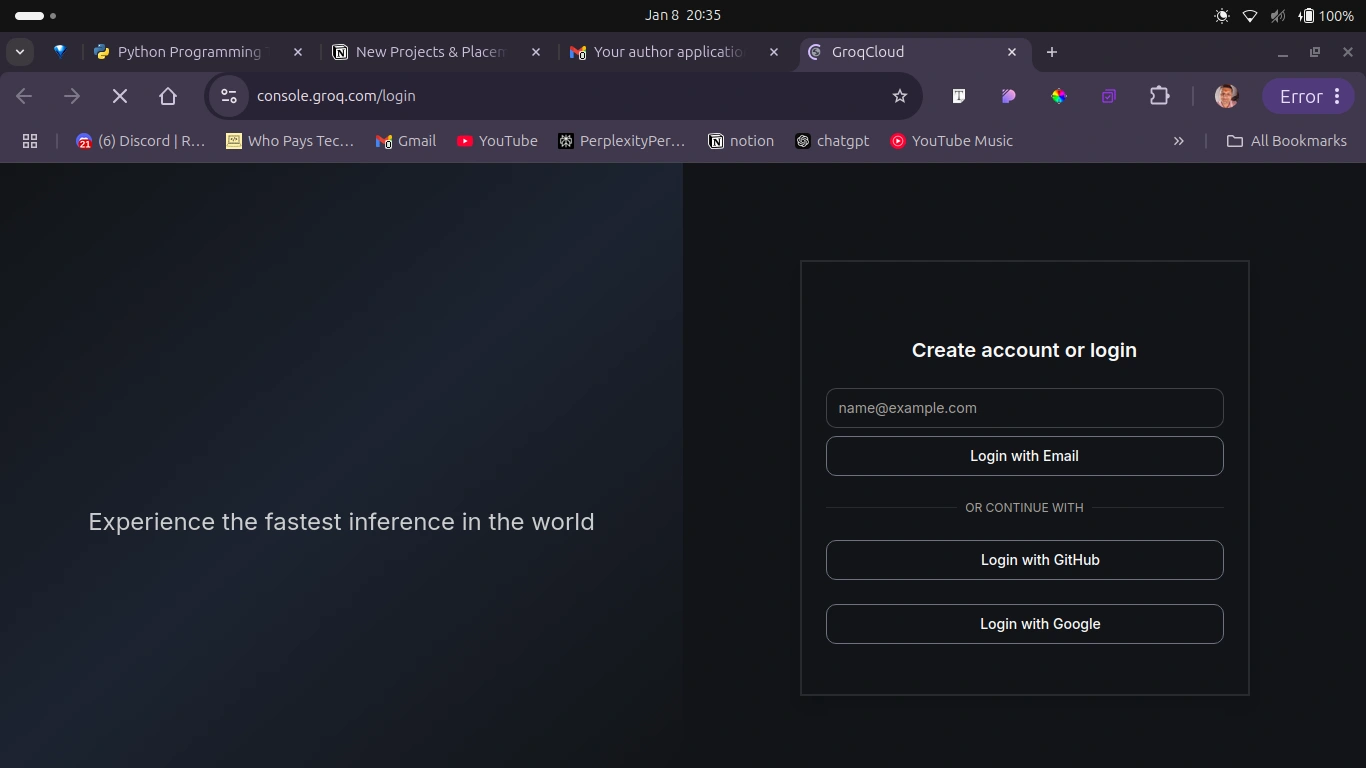
Once logged in, a new page will open that’ll look like this:
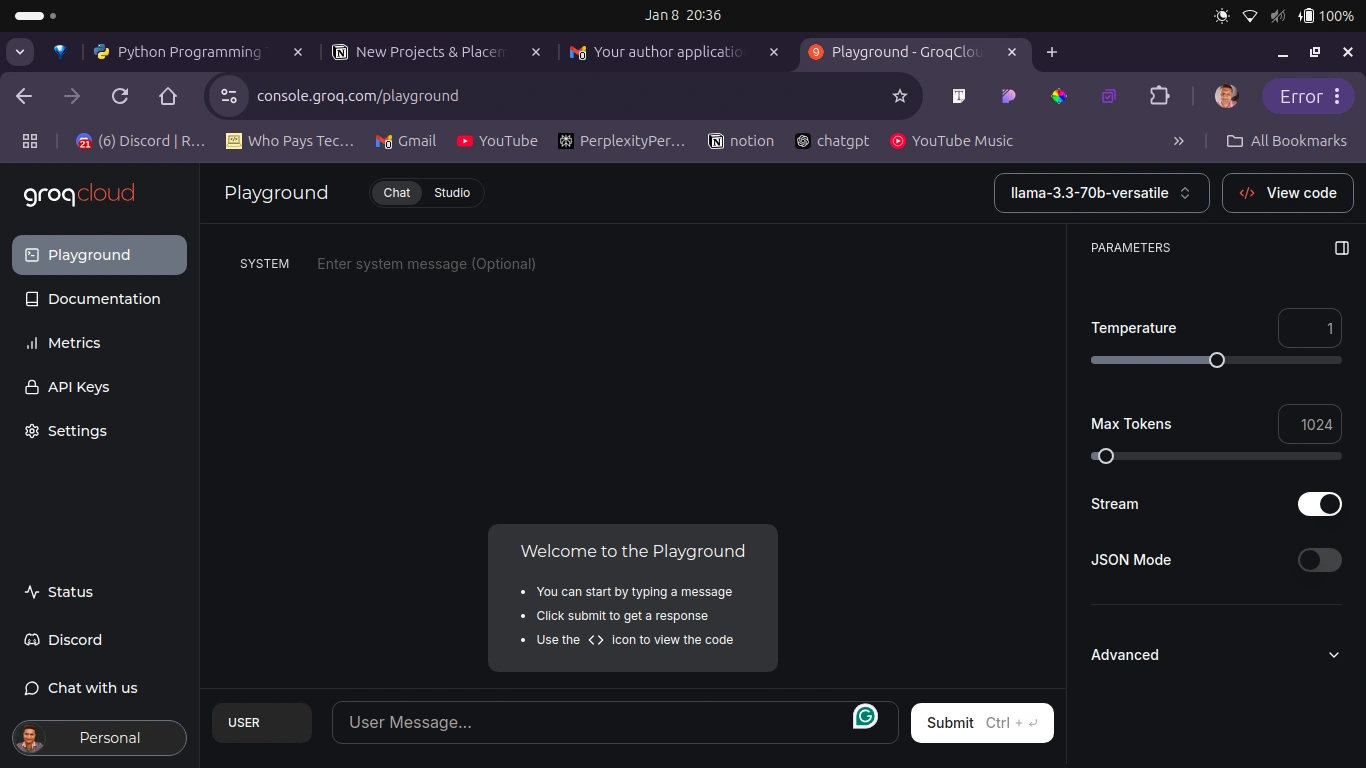
As you can see, the sidebar has an API Keys link. Click on it, and it will open a new page as shown in the image below. You can also select any LLM of your choice which is given at the top right before the view code option.
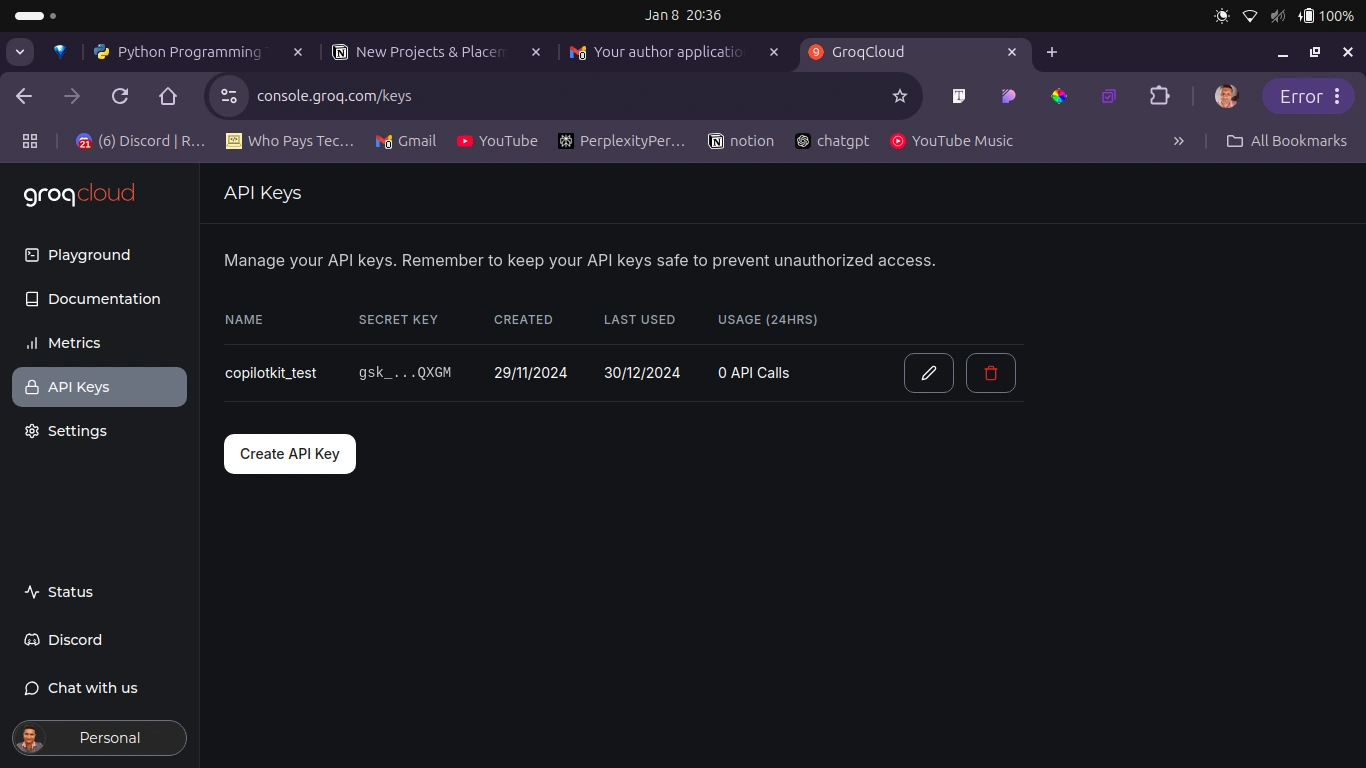
Here, click on the Create API Key button it will open a pop up like you see below. Just enter the name of your API key and click on Submit to create a new API key for you. Then copy this API key and paste it inside your
.env file.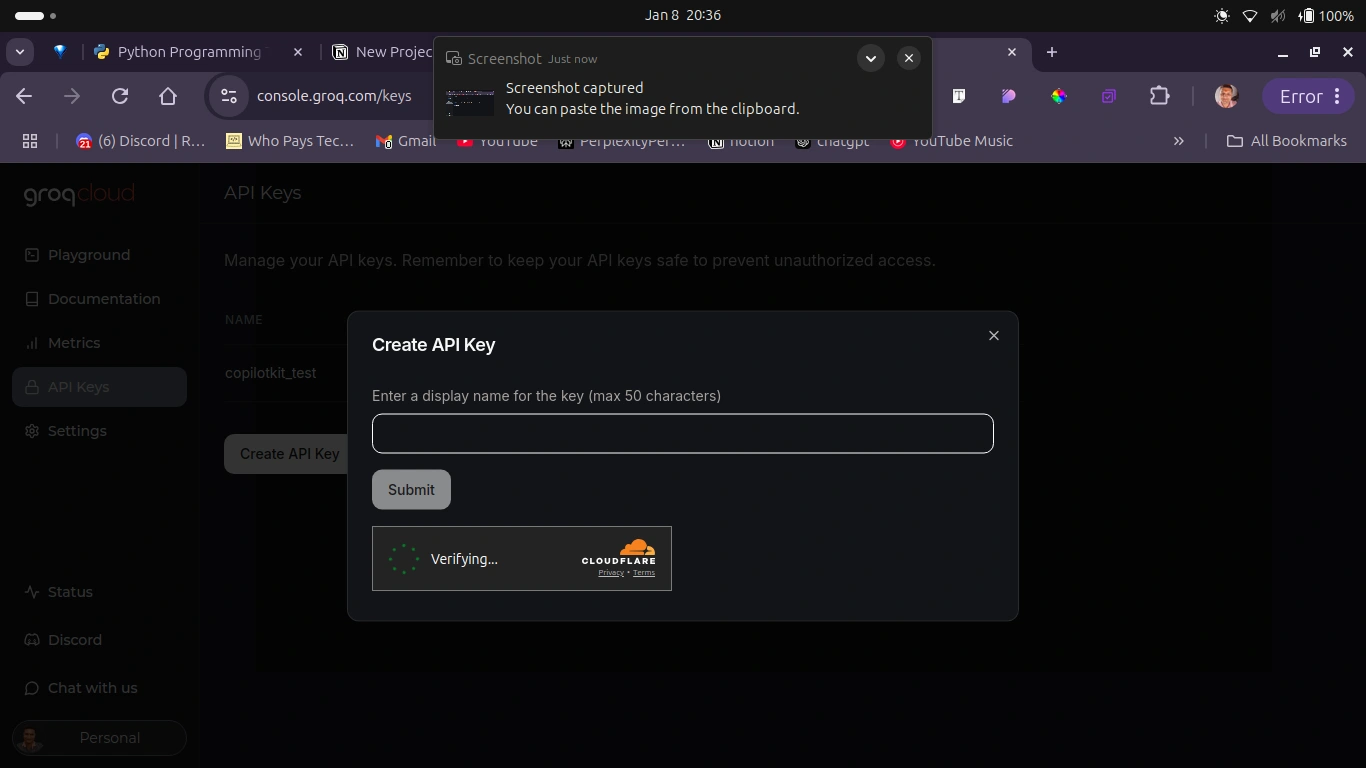
To enable seamless access to various LLMs on Groq Cloud, generate an API key by going to the Groq API Keys section. Create a new API key specifically for the LLM, ensuring that it is properly configured.
With the LLM set-up and all components ready, you are now prepared to build the project.
How to setup the database
Step 1: Create a MongoDB Atlas Account
Click on "Try Free" or "Sign Up".
Fill in your details (name, email, password) to create an account.
Verify your email address by clicking the link sent to your inbox.
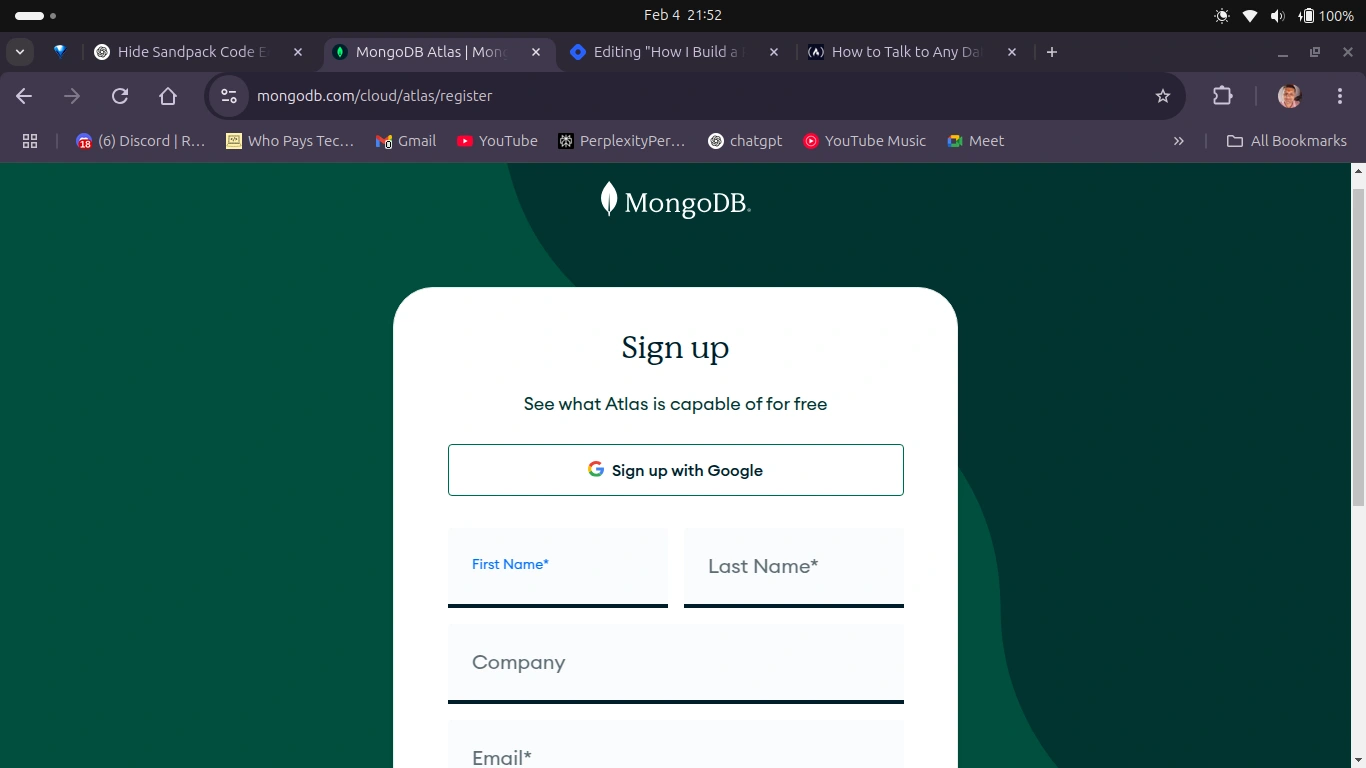
mongodb signup/login page
Step 2: Create a New Project
After logging in, you will be directed to the MongoDB Atlas dashboard.
Click on the "New Project" button. This will take you to the Create a Project page.
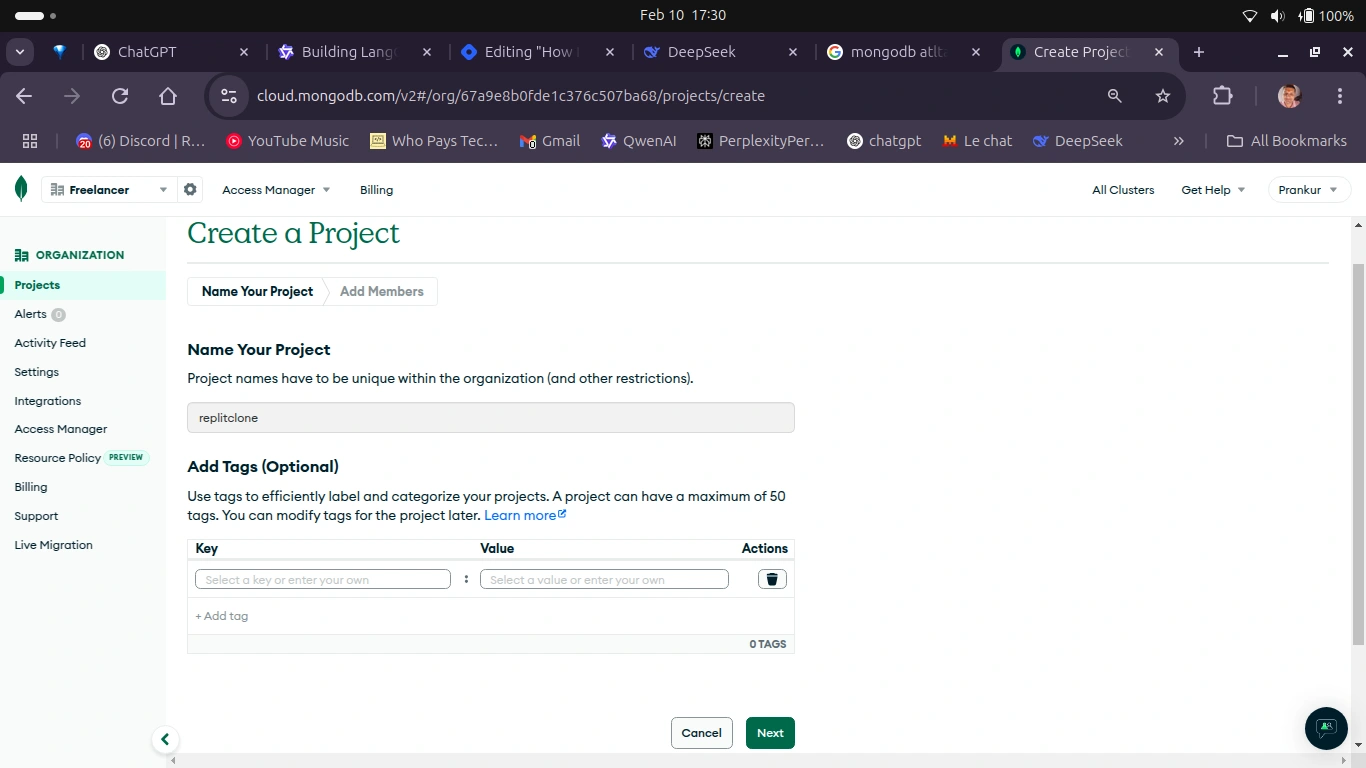
mongodb create project page
Fill in the Project name and click on the next button, and it will open a new page to show the project owner's information.
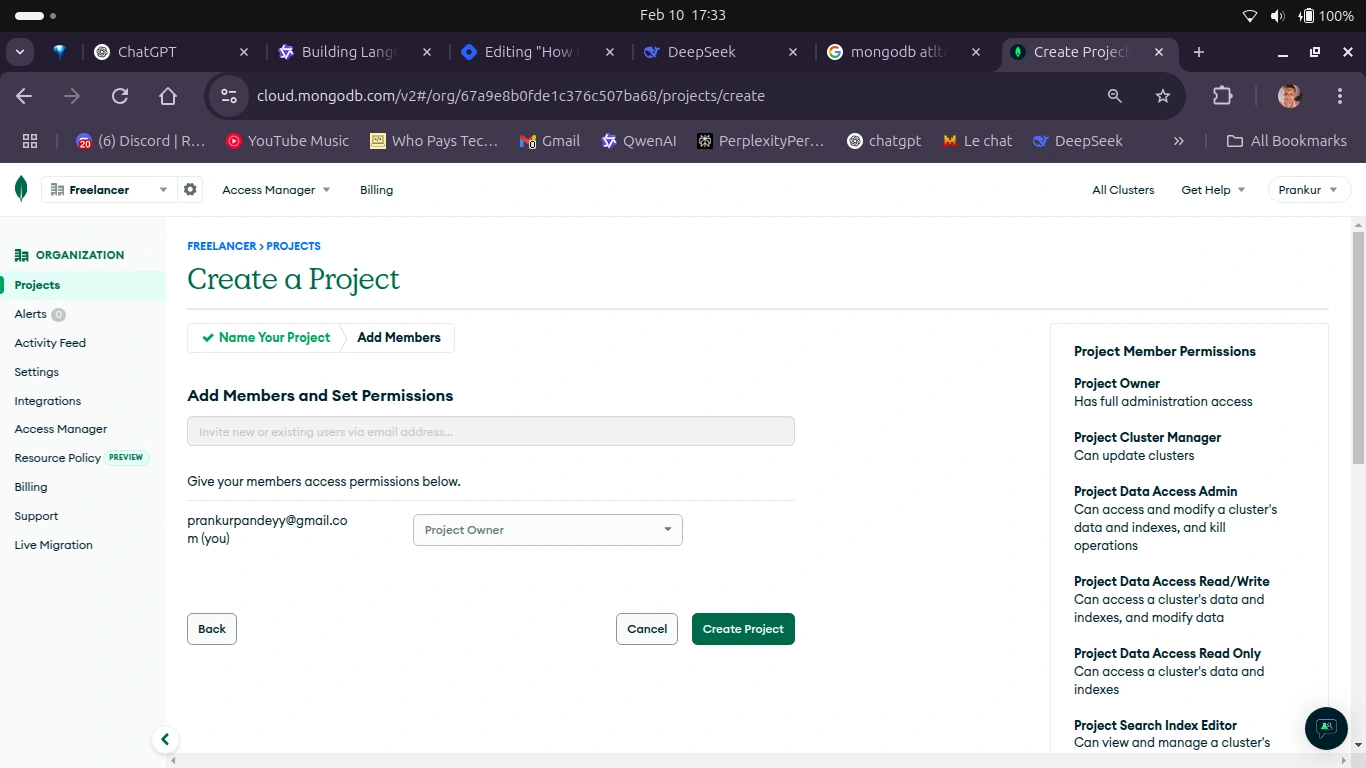
mongodb create project page
Now click on the Create Project Button. This will take you to the main dashboard of the project where you will get the option to create the database.
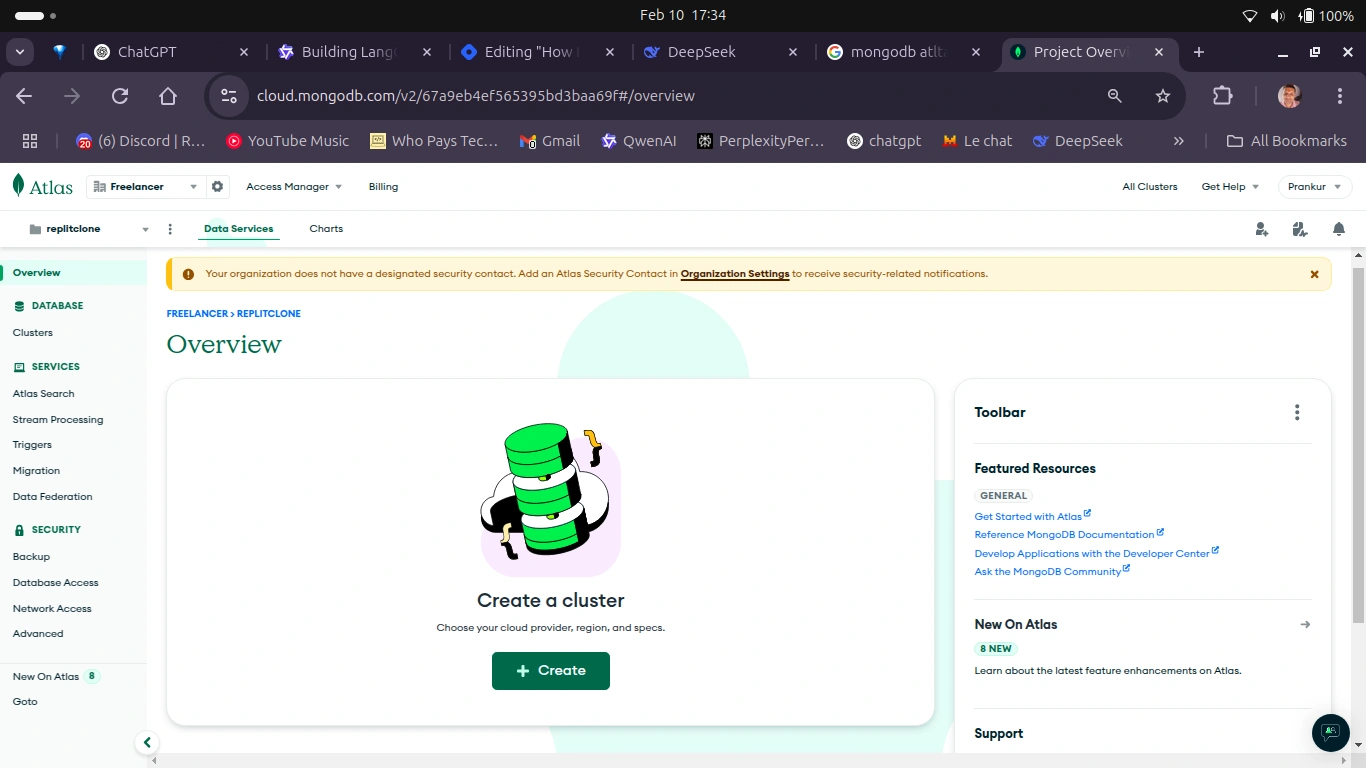
mongodb overview page
Now Click on the Create Button to open a new page with details of deploying your cluster.
Choose a cloud provider (AWS, Google Cloud, or Azure) and a region closest to your location.
Select the "Free Tier" (free forever, but with limited resources) or a paid tier for larger projects.
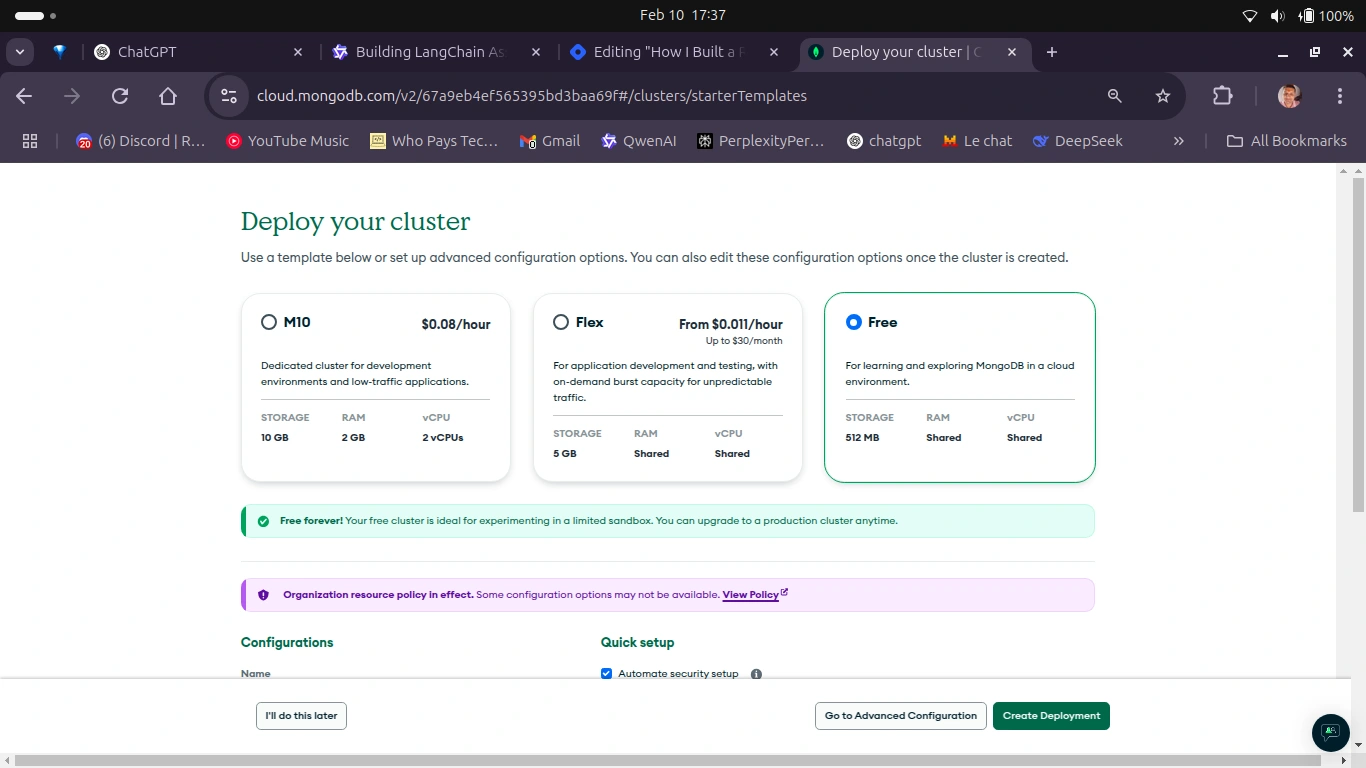
mongodb cluster selection page
Give your cluster a name (for example,
MyCluster).Click "Create Deployment". It will take a few minutes for the cluster to be provisioned.
Then It will ask you to connect your cluster to the database through a service. You should see your username and password – keep this somewhere.
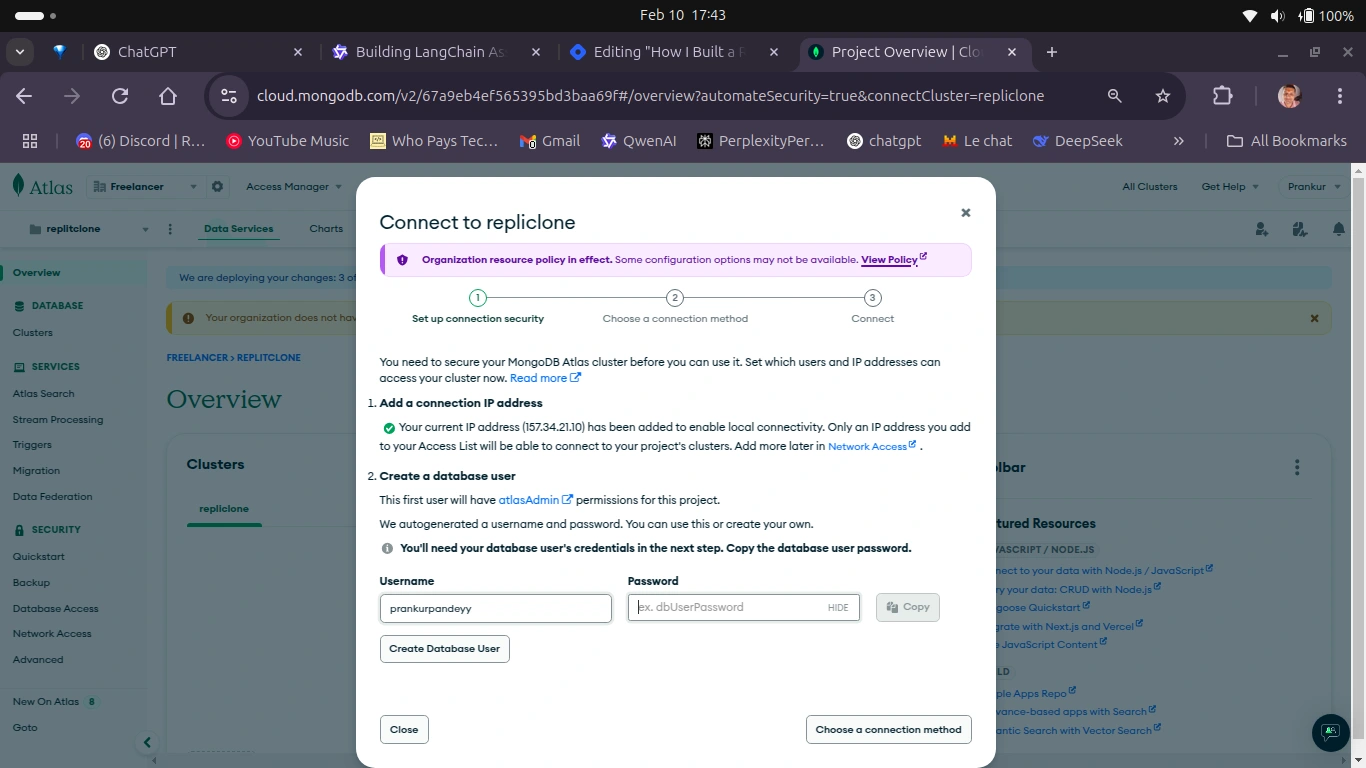
mogodb database connection page
Here, you will have to make yourself a database user, so click on the Create Database user button.
It will take a few seconds to complete this process. Once it’s done, close the pop-up and return back to the dashboard.
On the dashboard page you can see Get Connection String button. Go on and click on it.
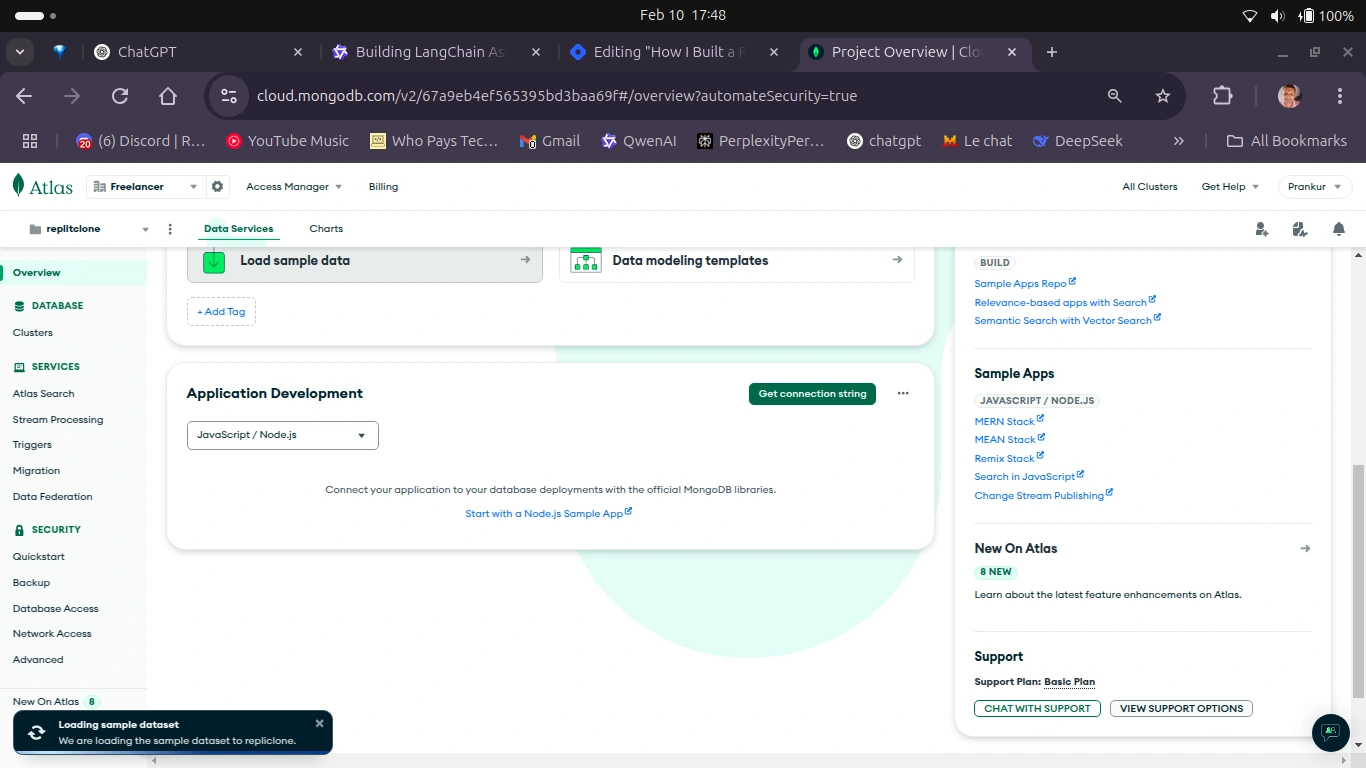
mongodb db setup page
It will open a new popup containing your MongoDB atlas URI. Simply copy the string, put it into your
.env file and use the password you created in step 14.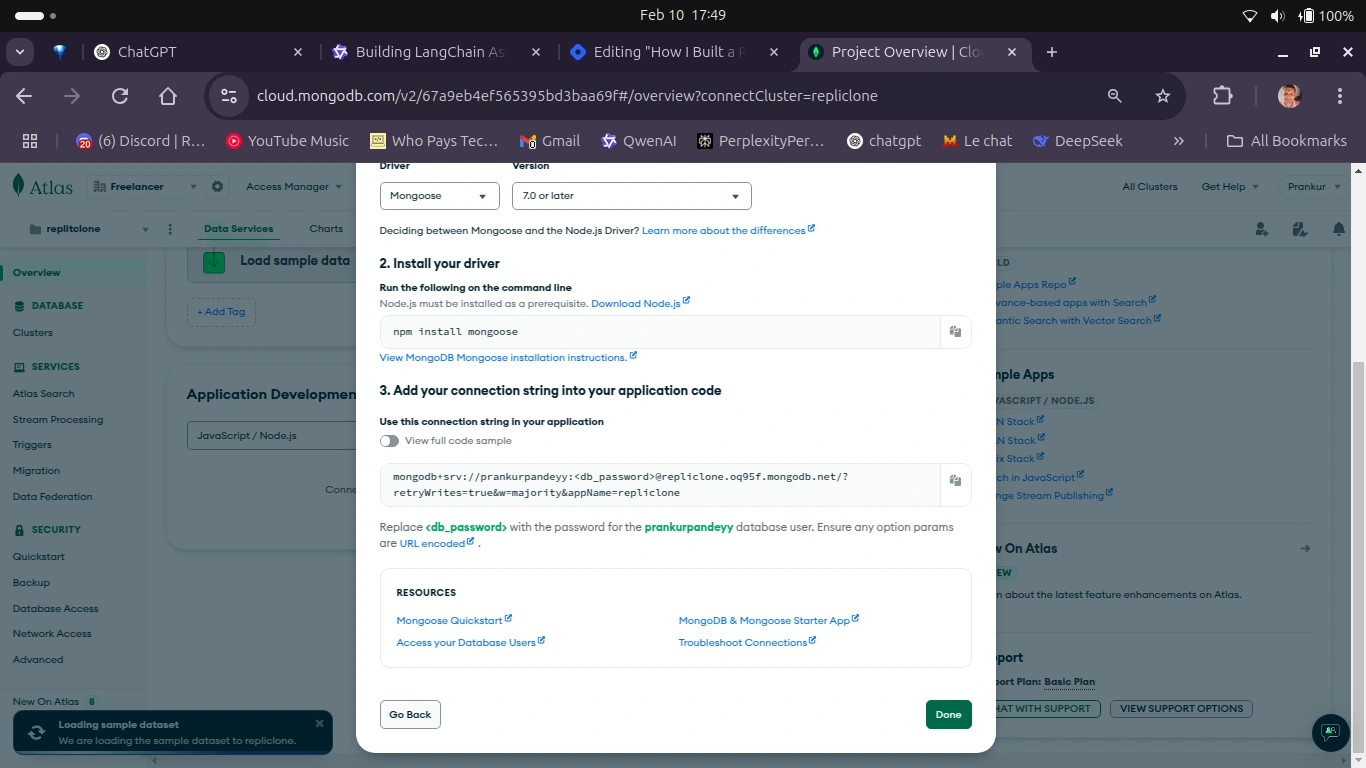
mongodb URL view/hide page
Structure and Features of the App
The focus of this project is on simplicity and functionality, to replicate Replit's core features like code editing and real-time previews. The idea is to create a straightforward web application that lets you:
Host three essential components: a File Explorer, the Monaco Editor, and a Sandbox.
Open files generated by CopilotKit in the Monaco Editor and perform CRUD operations on them.
See the real-time output of your code as you work.
Chat with the CopilotKit chatbot, which will be fully integrated into the front end.
The plan is to keep the implementation clean and practical while delivering a smooth coding experience.
Webpage Structure
Since we’ve already set up the Next.js app, the next step is to create a minimalistic webpage with the following components:
File Explorer: Displays the files generated by CopilotKit.
Monaco Editor: A versatile code editor that handles various file types and displays the content.
Sandbox: Shows the real-time output of the code.
CopilotKit Chatbot: Generates code files based on natural language prompts.
Error Handling: Any failures, such as API or database issues, will be highlighted with red text for immediate visibility.
Data Presentation: Data is presented in two parts: first in the File Explorer for code files, and second in the Monaco Editor for viewing the content of those files.
CopilotKit Chatbot Integration: The chatbot will allow natural language interactions with the database. The blue-coloured ball on the page represents the CopilotKit chatbot, which serves as the key interface for interacting with the database.
Users can ask questions about the database using natural language.
The chatbot processes these queries, converts them into SQL, and fetches the results seamlessly.
How to Build the Back End
Before we start building the back end, you’ll need to put all important credentials into your
.env file, which should look like this:These are environment variables used to configure sensitive or environment-specific settings in an application:
NEXT_PUBLIC_GROQ_CLOUD_API_KEY:This is a public API key for accessing the Groq Cloud API.
It is prefixed with
NEXT_PUBLIC_, which means it is exposed to the client-side code in a Next.js application.Replace
<your-key-here> with the actual API key provided by Groq Cloud.MONGODB_URI:This is the connection string for a MongoDB database.
It includes the database URL, credentials, and other connection details.
Replace
<your-mongodb-url> with the actual MongoDB connection string.Open your Next.js app in any code editor—I prefer VSCode—and go to the root folder, which looks like this:
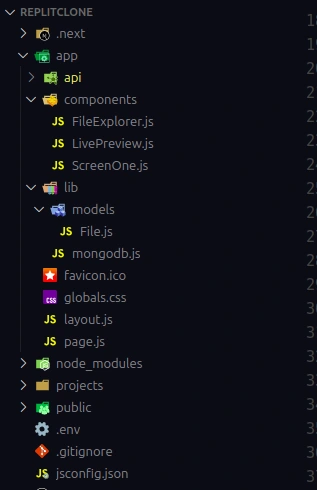
Inside the
app folder, make a new folder called api. Inside the API folder, make another folder called copilotkit. Then in there, make a new file called route.js and paste this code inside the file:Here’s a detailed explanation of each part:
This code defines a CopilotKit Runtime integration with Next.js, designed to process requests for generating and managing code files in a web-based IDE environment. It connects to the
Groq cloud service for additional functionalities and processes file-based outputs from AI-generated responses.This code sets up a
CopilotRuntime integration with Groq's AI model to generate and process code files in response to user requests. Here's a breakdown:Groq Initialization:
The
Groq SDK is initialized using the NEXT_PUBLIC_GROQ_CLOUD_API_KEY environment variable.The model used is
llama-3.3-70b-versatile.CopilotRuntime:
A
CopilotRuntime instance is created with a custom onResponse handler.The
onResponse function processes the AI's response:Extracts file blocks (separated by
---) from the message.Formats the response to trigger a
processFiles action if file blocks are detected.GroqAdapter:
A
GroqAdapter is configured to interact with the Groq API.It includes a system prompt that instructs the AI to generate code files in a specific format:
Files are marked with
FILE: and CODE:.Multiple files are separated by
---.The AI is instructed to generate complete, syntactically correct code with proper explanations.
API Endpoint:
A
POST the endpoint is exposed using Next.js App Router.It uses
copilotRuntimeNextJSAppRouterEndpoint to handle incoming requests, passing them to the CopilotRuntime and GroqAdapter.Request
A POST request to
/api/copilotkit might look like this:AI Response (Processed by
onResponse)AI might return this response:
Response to Client
The API wraps the response into the formatted structure:
AI-Powered Code Generation with copilotkit popup:
The system generates complete project files based on user instructions.
Ensures proper formatting (for example,
FILE: and CODE: markers).File Handling:
Splits multi-file responses into manageable blocks using
---.Supports actions like
@processFiles for integration with the IDE.Scalable API:
Modular design with
CopilotRuntime and GroqAdapter allows easy extension and customization.Error Handling:
Logs errors without interrupting the workflow.
Defaults to returning the unprocessed message on failure.
So far, we've covered how to integrate CopilotKit into the backend. Now, we need to handle file operations, so we'll create another route to manage files with the database.
To develop the backend for file handling, I'll create a new folder inside the API folder and name it
files. Inside the files folder, I’ll create a simple route.js file. Here’s the code I’ll be using inside the file:app/api/files/route.tsxThis code defines API routes for handling CRUD operations (Create, Read, Update, Delete) on a MongoDB collection called
File in a Next.js application. Each route is connected to MongoDB using Mongoose and we used NextResponse to format the responses.1. Imports
NextResponse: Used for creating HTTP responses in Next.js API routes.connectDB: Connects to the MongoDB database.File: A Mongoose model representing the File collection.2. Fetch All Files (GET)
Purpose: Retrieves all documents in the
File collection.Flow:
Connects to MongoDB.
Uses
File.find({}) to fetch all files.Returns the files with a
200 status or an error with a 500 status.Purpose: Creates a new document in the
File collection.Flow:
Parses the
name and content fields from the request body.Validates the required fields.
Creates and save the file in MongoDB.
Returns the new file with a
201 status or an error with a 400 status.4. Update a File (PUT)
Purpose: Updates an existing document in the
File collection.Flow:
Parses the
id, name, and content from the request body.Validates the
id using Mongoose's ObjectId.Updates the document using
File.findByIdAndUpdate() (updates only provided fields).Returns the updated document with a
200 status, or an error with 400 or 404.5. Delete a File (DELETE)
Purpose: Deletes a document from the
File collection.Flow:
Parses the
id from the request body.Validates the
id format.Uses
File.findByIdAndDelete() to remove the document.Returns a success message with a
200 status or an error with 400.Example API Requests: How to test API in local
GET All Files
Create a File (POST)
Update a File (PUT)
Delete a File (DELETE)
Now, create a
lib folder inside the app folder. This lib folder will handle essential database tasks, such as database schema and connectivity. Inside the lib folder, create another folder named models. Within this models folder, create a new file called File.js and paste the following code into it.This version simplifies the instructions and improves clarity while maintaining the original meaning.
Code Explanation
This code defines a Mongoose schema and model for a
File collection in a MongoDB database. It specifies the structure and rules for documents in the collection.This code defines a Mongoose schema and model for a File document in MongoDB. Here's a brief explanation:
Key Components:
Interface (
IFile):Defines the structure of a
File document with:name (string, required).content (string, required).createdAt and updatedAt (automatically managed by Mongoose).Schema (
fileSchema):Maps the
IFile interface to a MongoDB schema._id: Auto-generated MongoDB ObjectId.name and content: Required fields.timestamps: true: Automatically adds createdAt and updatedAt fields.Model (
File):Creates or retrieves the Mongoose model for the
File collection.Ensures type safety using the
IFile interface.Half of the work is done! Now, it’s time to connect our app to the database. To do this, I’ll create a new file inside the
lib folder, where we previously created the database schema. I’ll name the file mongodb.tsx and paste the following code inside it:Code Explanation
This code sets up a MongoDB connection using the
mongoose library in a Node.js or Next.js application. It ensures that the database is connected efficiently and prevents redundant connections.This code sets up a MongoDB connection and defines a Mongoose schema and model for a
File document. Here's a brief explanation:Key Components:
MongoDB Connection:
Uses the
MONGODB_URI environment variable to connect to MongoDB.Implements a caching mechanism to reuse the connection and avoid multiple connections.
Throws an error if
MONGODB_URI is not defined.Schema (
fileSchema):Defines the structure of a
File document with:name (string, required).content (string, required).Automatically adds
createdAt and updatedAt timestamps.Model (
File):Creates or retrieves the Mongoose model for the
File collection.Ensures type safety using the
IFile interface.This code avoids multiple MongoDB connections by checking the
readyState.It's reusable and modular, making it easy to maintain.
Always secure the
MONGODB_URI in-environment variables to avoid exposing sensitive credentials.Since we are using TypeScript, we will have to declare the file type
files , socket and an index. To do so, create a new folder in root directory of the project and name it types and make three files socket.ts ,files.ts and index.ts inside the folder. Inside each file, paste the given code for their respective file.How to Build the Front End
For the front end, we’ll keep it simple, aiming for a UI that closely resembles Replit. The key components we need for this project are a File Explorer, Monaco Editor, and Sandbox component.
File Explorer: This component will display and manage the code files, positioned on the left side of the screen.
Monaco Editor: This component will allow users to view and edit the content of the code files.
Sandbox: This component will render the live preview of the content inside the code files.
To build these components, we won’t use any third-party UI libraries; instead, we’ll rely solely on TailwindCSS, which is pre-configured with Next.js.
Now, let’s build the components:
Open your VS Code.
Open the Next.js folder where you created your project.
Since I work without a
src folder, you’ll find only an app folder. Inside the app folder, create a new folder called components.After creating the folder, your project structure should look something like this:
FileExplorer.js -This is our file explorer
ScreenOne.js- This is our Monaco editor
LivePreview.js- This is our sandbox component
Let’s see how I build these components and you can too,
The
FileExplorer is a React component that displays a list of files fetched from a backend (MongoDB) and allows users to select, create, edit, and delete files. It uses React Hooks for state management and lifecycle effects, Tailwind CSS for styling, and lucide-react icons for UI actions.Code Explanation
The
FileExplorer component is a React component designed to manage and display a list of files in real time. It uses Socket.IO for real-time updates, allowing users to add, delete, and edit files dynamically.Key Features:
1. State Management
The component uses React's
useState Hook to manage the following states:files: List of files displayed in the File Explorer.socket: The active Socket.IO connection.loading & error: Manage the state of file loading.newFileName, editingFile, and editedFileName: Manage file creation and editing processes.Establishes a real-time connection to a Socket.IO server.
Listens for events like
new-file, delete-file, and update-file to update the file list dynamically.Cleans up the socket connection when the component unmounts.
3. Real-Time File Updates
Handles real-time events for creating, deleting, and updating files.
4. CRUD Operations
Fetch Files: Retrieves the initial list of files from the server.
Create File: Sends a POST request to add a new file.
Delete File: Sends a DELETE request to remove a file and updates the UI optimistically.
Edit File: Sends a PUT request to update a file's name and performs optimistic updates.
This code defines a FileExplorer React component that allows users to manage and interact with files in a file system.
Note: All the operations on the application get saved in real-time for the demo you can refresh the page to see the changes don’t get removed.
The
ScreenOne component is a code editor panel that dynamically displays and updates code for a selected file. It integrates the Monaco Editor to highlight syntax based on the file type (for example, JavaScript, HTML, CSS).The component shows the selected file's name, allows users to edit its content, and sends updates back to the database in real time. It also offers a clean, user-friendly interface with a dark theme and configurable editor options. This is ideal for coding environments like IDEs or code playgrounds.
Code Explanation
This React component,
ScreenOne, represents a code editor screen where users can edit files in a specified programming language. The editor dynamically adjusts its syntax highlighting based on the selected file's type. It uses the @monaco-editor/react library for the editor interface.This code defines a ScreenOne React component, which is a code editor using the Monaco Editor (used in VS Code). Here's a brief explanation:
Key Features:
Code Editor:
Uses the
@monaco-editor/react library to render a code editor.Supports syntax highlighting for various languages (for example, JavaScript, HTML, CSS, JSON).
Dynamic Language Detection:
Detects the programming language based on the selected file's extension (for example,
.js → JavaScript).Defaults to
plaintext for unsupported file types.Props:
selectedFile: The currently selected file (contains the file name).code: The current code content to display in the editor.onChange: A callback function to handle code changes.UI:
Displays the file name and a title ("Code Editor").
Styled with Tailwind CSS for a dark theme and rounded corners.
Editor Configuration:
Uses the
vs-dark theme.Disables the mini-map and enables line numbers and word wrap.
The
LivePreview component dynamically generates a live code preview for either static projects (HTML, CSS, JS) or React-based projects. It detects the type of project, and sets up the required files (for example, index.html, App.js), and renders a real-time preview using CodeSandbox's Sandpack. The preview adapts to the selected file and updates as the code changes, providing a seamless coding experience.Code Explanation
Explanation of the Code:
The
LivePreview component provides a real-time live preview environment for static HTML/CSS/JS files or React-based projects. It uses the CodeSandbox Sandpack library to dynamically render code files in a browser-like preview window. The component automatically adjusts its behavior based on the file types and content to determine if the project is static or React-based.This code defines a LivePreview React component that uses Sandpack (from CodeSandbox) to provide a live code editor and preview environment. Here's a brief explanation:
Key Features:
Sandpack Integration:
Uses
@codesandbox/sandpack-react to render a code editor and live preview.Supports both React and vanilla JavaScript/HTML/CSS projects.
Dynamic File Handling:
Converts a list of files (
files prop) into a format compatible with Sandpack.Automatically detects if the project is React-based (e.g., contains
.jsx or React imports).Ensures necessary files (for example,
App.js, index.js, index.html, package.json) exist for React projects.Template Switching:
Sets the Sandpack template to
"react" for React projects or "vanilla" for static HTML/CSS/JS projects.Code Injection:
For vanilla projects, injects linked CSS and JS files into the HTML file.
Loading State:
Displays a loading message while processing files.
UI:
Shows a code editor and live preview side by side.
Displays a message if no file is selected.
Running sockets in the app
Now it is time to eat that big frog. As you know we are using sockets for real-time data communication so we need a
server.tsx file in the root directory of the app (outside of the src folder) and paste this code:Code Explanation
This code sets up a Next.js server with Socket.IO for real-time communication. It:
Initializes a Next.js app and prepares it to handle HTTP requests.
Configures CORS dynamically for Socket.IO, allowing connections from
localhost:3000 in development or all origins in production.Broadcasts events to all connected clients except the sender.
Starts the server on a specified port (default: 3000).
It’s a basic real-time server for file management with Next.js and Socket.IO.
To do this we will have to tweak the
page.tsx. Just copy the given code and paste it into the page.jsState Management:
Tracks files (
files), the currently selected file (currentFile), code in the selected file (code), real-time file contents (fileContents), and a socket connection (socket).Establishes a connection to a server using
Socket.IO, and handling real-time file updates like file creation, updates, and deletions.Listens for events such as
file-update, new-file, and delete-file to update the UI and propagate changes across users.Fetching Files:
On component mount, it fetches all files from an API and populates the state with the files and their contents.
Upon selecting a file, the content is either retrieved from the cached state or fetched from the server.
Code Changes:
When code in the Monaco Editor is updated, the new content is saved locally and sent to the server and other connected clients via the socket.
File Processing by AI:
When AI generates code, the
processFiles function parses the generated content, creates files on the backend, and updates the frontend. These files are stored in MongoDB and synchronized with the client via Socket.IO.CopilotKit Integration:
Uses the
useCopilotAction hook to integrate AI-driven file generation and updating functionality.Provides instructions for creating and updating files via the
CopilotPopup.Always give detailed instructions to the
CopilotPopup .UI Components:
The UI includes components like
FileExplorer, ScreenOne, and LivePreview, which displays files, allows editing, and provides a live preview of the code.The
CopilotPopup acts as an assistant to guide the AI in generating or updating files.This setup creates a collaborative, real-time code editing environment with support for both static and React-based projects.
Configuring CopilotKit for the Whole App
This is going to be the last step of building the application. Navigate to the
layout.tsx file and add this code:Here’s what’s going on in this code:
This code defines a
RootLayout component, which serves as the root layout for a Next.js application. Here's a brief explanation:Key Features:
CopilotKit Integration:
Wraps the entire application with the
CopilotKit component from @copilotkit/react-core.Configures the
runtimeUrl to /api/copilotkit, which is the endpoint for handling Copilot-related functionality.Global Styles:
Imports global CSS styles (
globals.css) and CopilotKit UI styles (@copilotkit/react-ui/styles.css).Metadata:
Sets metadata for the application (title:
"Replit Clone", description: "Copilotkit Replit Clone").Layout Structure:
Uses the
html and body tags to structure the document.Renders
children (the rest of the application) inside the CopilotKit wrapper.Designing and deploying a database can vary depending on the tools and requirements. For this project, I’ve chosen the simplest and most accessible approach.
CopilotKit is a powerful tool that converts natural language processing (NLP) queries into actionable backend code that runs on meta LLM. If you have an alternative that serves a similar purpose, feel free to use it. It effectively bridges the gap between natural language input and technical execution, making it an ideal choice for projects like this.
I selected GroqCloud because it’s free and offers access to multiple large language models (LLMs) with a single API key. While alternatives like ChatGPT are available, they may require paid plans. GroqCloud’s versatility and affordability make it the perfect fit for this tutorial.
Security Best Practices
Never expose your credentials publicly. Always store sensitive information like API keys in an
.env file to keep your project secure.Future Enhancements
While this tutorial focuses on setting up and working with React files, CopilotKit has a much broader range of capabilities that I will explain in the upcoming blog posts.
I aim to build at least 15 AI products in 2025.
Support for static files is coming soon.
As promised in the previous tutorial, I’ve implemented the CopilotKit CRUD feature in this tutorial as well.
In my next tutorial, I will demonstrate how to build something more cool with CopilotKit to create a more dynamic and functional application.
Playing with the Replit Clone
You can explore the live project via the following link and ask the chatbot to build something in React. Live Project Link.
For a deeper understanding of the code, check out the GitHub repository here: GitHub Repository.
Also, here’s a screenshot showcasing its practical use. In this example, instead of manually creating project files, you can simply ask the CopilotKit chatbot to generate those files for you. You can then edit and play around with them.
For example, you can give the CopilotKit chatbot commands like: “Create a React app”.
File Explorer Delays: Occasionally, due to database or Vercel deployment issues, files may be generated but not immediately visible in the File Explorer. In such cases, simply refresh the page, and the missing components will appear. This applies to all CRUD operations on files and their content as well.
Real-Time Saving: Any changes you make to files are saved to the database in real-time, ensuring that your work is never lost.
Command Errors: If the chatbot shows an error when processing your commands, simply retry the command until you receive a response.
Adding Extra Files:To add new files to the current project, simply ask the chatbot:
“Add a new file to the current project with the file name and extension.”
For example: “Add a new file named
readme.md in this project”Conclusion
I hope you’ve enjoyed building this simple Replit AI clone. In this project, we used a MongoDB database, but the approach can easily be applied to other databases, as long as you can retrieve the data.
I plan to create many more projects involving AI and other cutting-edge tools. AI is truly a game-changer in the IT field, and I’m excited to share more insights and practical implementations of the latest technologies.
That’s all from my side. If you found this article helpful, feel free to share it and connect with me. I’m always open to new opportunities:
Learn to code for free. freeCodeCamp's open source curriculum has helped more than 40,000 people get jobs as developers. Get started
Like this project
Posted Oct 3, 2025
Developed an AI-powered Replit clone with real-time code editing and preview.
Likes
0
Views
10