Sentiment Analyzer Application Development

Hashir ahmed


Sentiment Analyzer
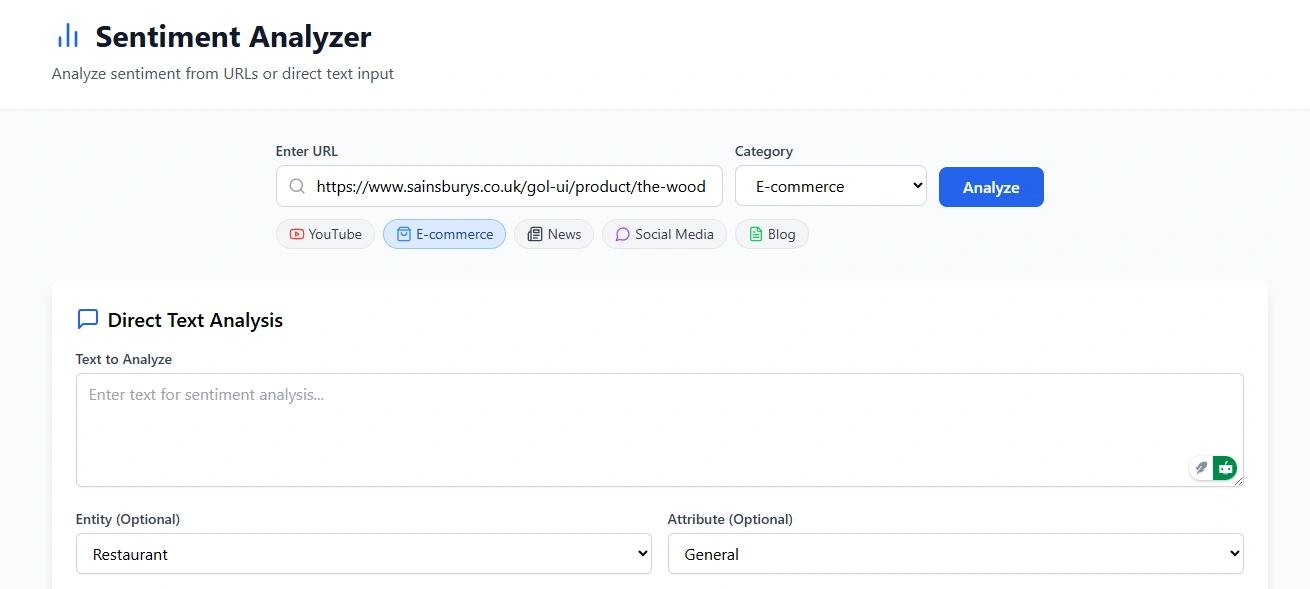
A modern sentiment analysis application that analyzes text from various sources including direct input, YouTube, e-commerce, news, social media, and blogs.
Overview
This application uses a custom sentiment analysis model to detect positive, negative, and neutral sentiments in text content. It features a React frontend and a Supabase Edge Function backend that performs the sentiment analysis using a custom implementation.
Features
Direct Text Analysis: Analyze any text input for sentiment
URL-based Analysis: Mock integration with various platforms:
YouTube videos
E-commerce product reviews
News articles
Social media posts
Blog content
Sentiment Visualization: Clear visual representation of sentiment with confidence scores
Responsive Design: Works on desktop and mobile devices
Technology Stack
Frontend:
React with TypeScript
TailwindCSS for styling
Vite for development and building
Backend:
Supabase Edge Functions (Deno runtime)
Custom sentiment analysis model
Sentiment Analysis Model
The application uses a custom sentiment analysis model that:
Identifies positive, negative, and neutral sentiments
Handles negations (e.g., "not good" as negative)
Processes intensifiers like exclamation marks
Provides confidence scores
Returns normalized sentiment scores from -1 (negative) to +1 (positive)
Installation
Prerequisites
Node.js 16+
npm or yarn
Deno (for local Edge Function development)
Supabase CLI (for deploying Edge Functions)
Setup
Clone the repository:
Install dependencies:
Set up environment variables:
Edit
.env.local with your Supabase URL and anon keyRun development server:
In a separate terminal, run the Edge Function locally:
Usage
Direct Text Analysis
Enter text in the "Text to Analyze" field
Click "Analyze Text"
View the sentiment results, including:
Sentiment classification (positive, negative, or neutral)
Confidence score
Visualization of sentiment score on a scale
URL Analysis (Mock)
Enter a URL in the input field
Select the appropriate category (YouTube, e-commerce, etc.)
View the aggregated sentiment analysis for the content
Browse through sample comments/reviews with individual sentiment ratings
Deployment
Frontend
Deploy to Vercel, Netlify or any static hosting service:
Then deploy the contents of the
dist folder.Edge Function
Deploy to Supabase:
Project Structure
Future Improvements
Implement real API integrations for YouTube, news, and blog platforms
Add user authentication for saving analysis results
Enhance the sentiment model with more advanced NLP techniques
Add support for multiple languages
Implement aspect-based sentiment analysis
License
MIT License
Acknowledgements
Supabase for the serverless backend
React for the frontend framework
TailwindCSS for styling
Like this project
Posted Aug 2, 2025
Created a sentiment analysis app using React and Supabase.