
One system from the table to the till
MenuNerds Restaurant is MenuNerds, WeebPal’s restaurant ordering product, set up for one venue: the website and menu, takeaway ordering, ordering at the table by QR code, a POS for the floor, kitchen dockets and tax invoices, bookings, gift cards and the reports of the day, in one Drupal system.
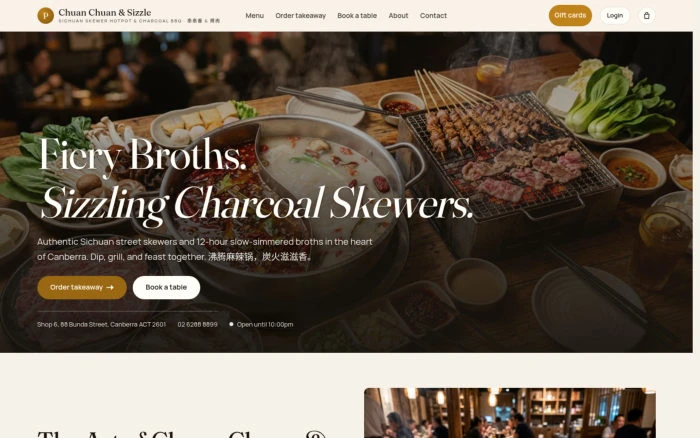
It is shown on Chuan Chuan & Sizzle, a sample Sichuan skewer hotpot and charcoal BBQ restaurant, so you can walk through every role before anything is signed. Screens on this page are recorded views of that demonstration site; their dishes, accounts and other visible records are sample content.
Functions that connect the restaurant
The guest menu, floor service and management tools support different parts of the same working day.
MenuDishes and options: Photos, categories, dietary filters, prices and kitchen notes
QROrdering at the table: Guests send a round; a waiter approves or rejects it
POSFloor service: Tables, service status, rounds and a shared order record
PickupTakeaway orders: Online and counter orders with collection details
PrintDockets and bills: Browser printing for kitchen rounds and tax invoices
PayPayment records: Counter tenders, split payments and gift-card redemption
ReviewReports and day close: Sales, GST, payments, bookings and CSV exports
ManageVenue settings: Opening hours, menu, tables, staff and recorded changes
From the table’s QR code to a closed bill
Guest rounds move through waiter approval, kitchen preparation and payment, with the same order retaining the table’s service history.
Scan the table’s QR code
The poster on the table opens Order at your table, with the table number and no sign-in.
Choose dishes
The same menu, with search and categories; options such as Spice Level and Pot Type, and a note for the kitchen.
Send to waiter
Review your order shows every line and the total; the guest changes or removes lines, then sends the round.
The waiter approves
Guest orders to approve lists the round; the waiter approves it, or rejects it with a reason.
The kitchen docket
The approved round goes to the kitchen; the waiter prints its 80 mm docket from the table’s ticket.
Another round
More dishes from the table become a new round on the same order, with a docket marked NEW ITEMS.
The bill
Bill preview, then Print bill: a tax invoice with the ABN, GST included and a receipt number.
Take payment
A manager takes EFTPOS, cash, other or a gift card, split across several payments if needed.
The table is free
Paid in full, the order is archived with its history and the table shows Free on the floor map.
The floor, the kitchen and the takeaway counter
Waiters work from the POS floor map, on a tablet or a computer. They open a table, send each round to the kitchen, approve what guests send from their phones and keep the takeaway counter moving.
The floor map: every table with its seats, zone and status, filtered by Waiting approval, In service, Bill printed or Free
Rounds sent to the kitchen, each with an 80 mm docket of only the new dishes
Guest orders to approve, with Approve or Reject and a reason
The Sold out board: hide a dish from the public menu and lock it on the POS; restore it manually or through the first scheduled check after Sydney midnight, with checks every three hours
Counter and phone takeaway, the takeaway queue and Pause online ordering
Menu, prices and the numbers of the day
Managers change the menu and prices themselves, set the hours and the rules for ordering and booking, close table bills and the day, and read the reports.
Dishes with price, photo, category, bill and kitchen labels, dietary flags and option groups
Price changes logged; orders already placed keep the price they were sold at
Opening hours, ordering and booking rules, gift cards and promotions
Close and take payment, split payments, voids, reopen within 24 hours and refund records
Eight reports with CSV export, then Close the day
Staff, settings and a record of who did what
Administrators look after the staff accounts and the restaurant’s settings, and can switch to a staff member’s account to see the system exactly as that person does.
Staff accounts with one role each, a set-up email and an alert when a privileged role is given
Restaurant profile, ABN, GST, receipt header and footer
Payment, print and feature-flag settings in Drupal’s own administration
An audit log of price changes, voids, reopens, refunds, QR rotations and role changes
Switch user, filtered by role, with every switch and switch back logged
0 likes · 0 views · Oct 22, 2026
Implemented MenuNerds system for restaurant operations and guest interaction.


