
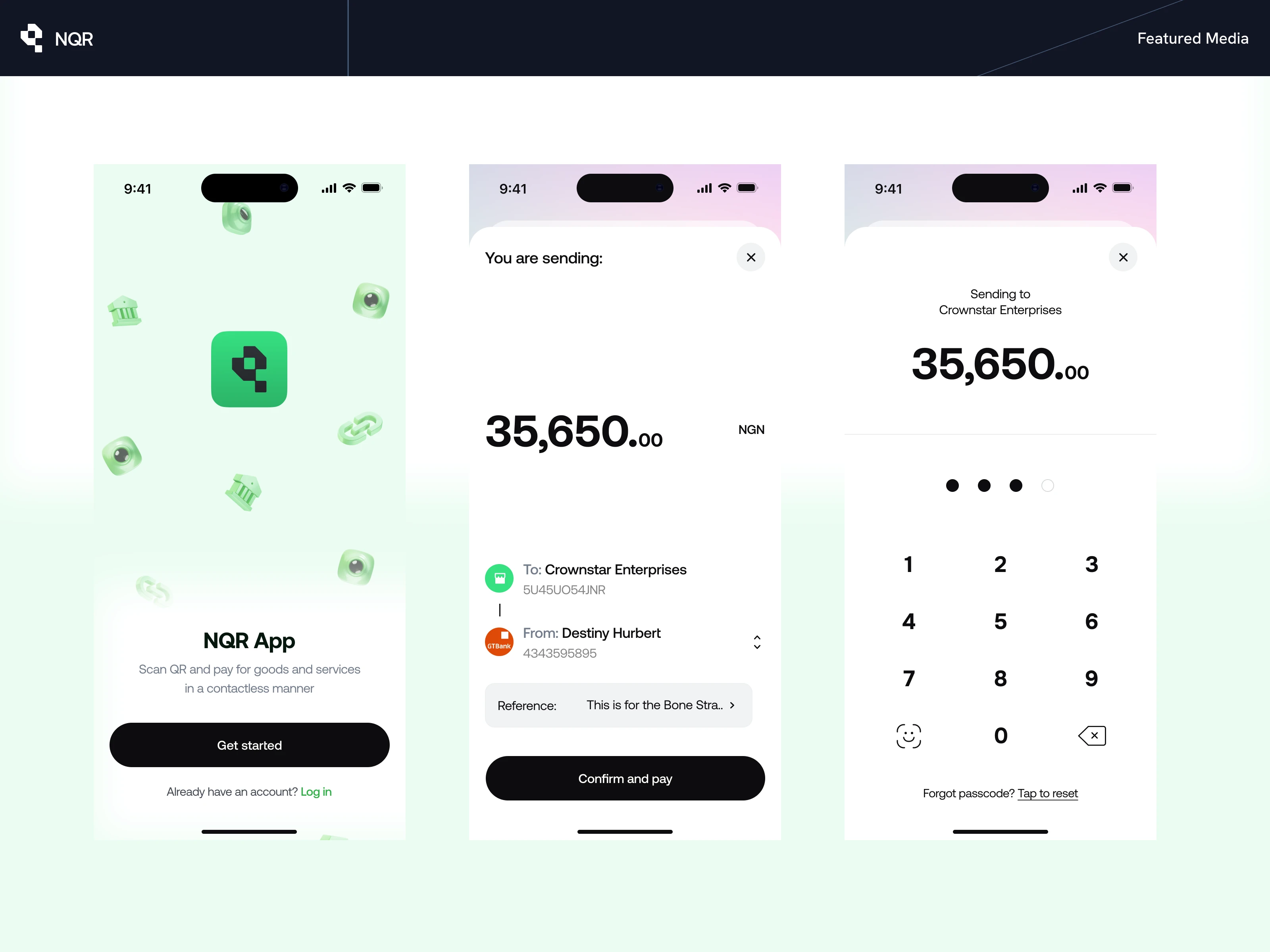
Role: Mobile Engineer
Technologies Used
Framework: React Native (Expo)
Navigation: Expo Router
Animations: React Native Reanimated, Moti, Lottie
Camera & QR Code Scanning: react-native-vision-camera
Secure Storage: react-native-mmkv
Notifications: Expo Notifications
Build & Deployment: Expo EAS
State Management: React Query + Zustand
Primary Lead Mobile Engineer responsible for building components, features and Proof of Concept for a Minimum Viable Product for the client application, NQR which is a mobile application that aims to transform QR-code-based payments and collections in Nigeria by providing a seamless and unified solution for users to make payments using NQR codes.
Key Accomplishments
QR Payment Experience
A single mobile app enabling users to link multiple bank accounts and make NQR payments without switching bank apps
Frictionless QR scanning powered by the device camera, with real-time merchant lookup via NIBSS
Smooth, animated interfaces offering a polished experience using Lottie, Moti, and Reanimated
Secure authentication across the entire payment journey through PIN, biometrics, and encrypted local storage
🔄 Real-Time Transaction Flow
Instant QR data validation and merchant retrieval
Push + in-app notifications for success, pending, failures, and reversals
Smart transaction history with filters, deep linking from notifications, and downloadable receipts
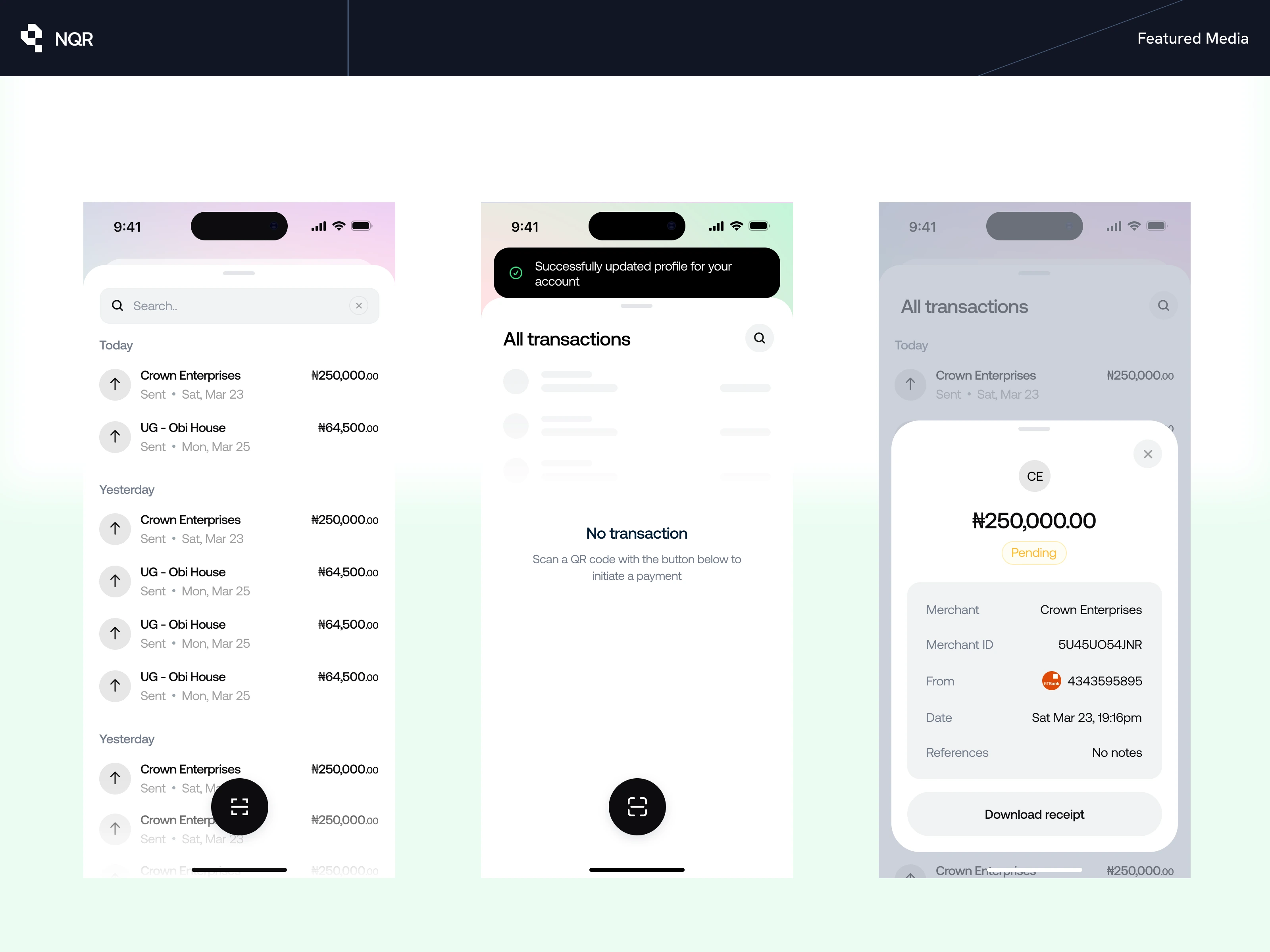
Transactions View Showing Active, Empty & Detailed Transaction Sheet
Technical Implementation
Core Architecture
1. Account & Authentication Layer
Sign-in Options: Via Phone Number (SMS / WhatsApp)
Verification: OTP or email code flow
PIN Setup: Secure 4-digit PIN
Biometrics: Integrated using Expo Local Authentication (fingerprint/Face ID)
Local Credential Storage:
Tokens, bank linkage states, session metadata stored via MMKV encrypted storage
PIN hashed + stored securely, biometric key handled by OS-level security
2. Multi-Bank Integration
Users link multiple bank accounts (via bank APIs or OAuth-like flows)
Bank selection UI built with Moti transitions and Reanimated shared element animations
3. QR Code Scanning & Merchant Validation
Real-time QR scanning powered by react-native-vision-camera
Decoding NQR payload → sending to server for validation & processing
Deep validation pipeline:
QR scanned
Parsed payload extracted (merchant ID, amount, NRN, optional metadata)
API call to NIBSS for merchant details
Display confirmation screen with animations (merchant card, logo fade-in, amount pulsing)
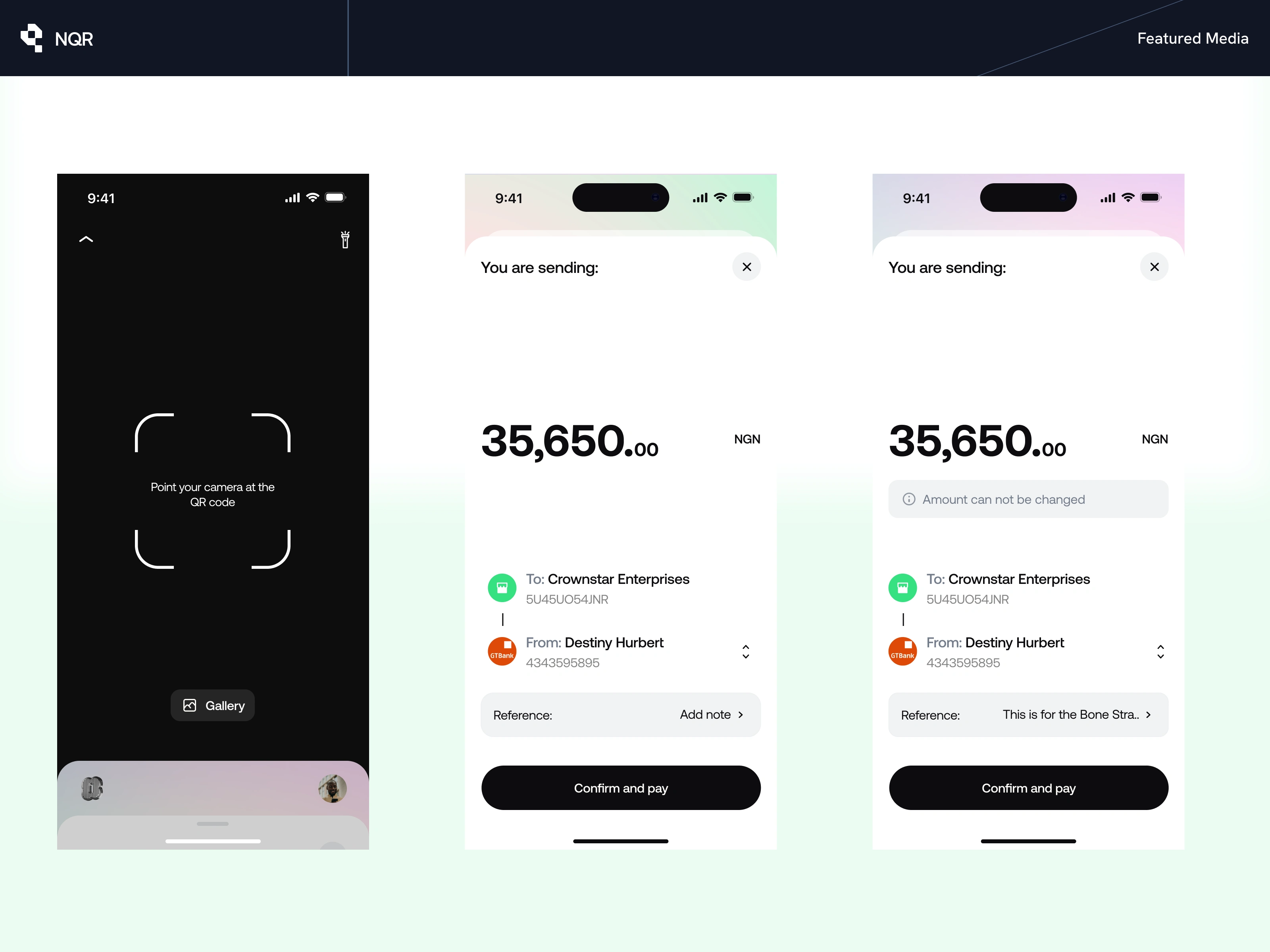
4. Payment Execution
Payments executed via Paystack Direct Debit API
Multi-step pipeline:
User selects bank
User authenticates (biometric → PIN fallback)
Transaction request sent
Pending state displayed with animated loader (Lottie)
Final confirmation updates with smooth success/failure transitions
5. Transaction History & Receipts
Local + remote transaction sync
Filters:
Merchant, date range, status, bank account
PDF generation via backend → emailed on request
Deep linking: tapping a push notification opens the exact transaction detail screen
Smooth list transitions via Reanimated Layout Animations
6. App Security Layer
PIN-protected actions: payments, account linking, profile edits
Biometric-first authentication flow
Sensitive screens auto-lock when app goes background
Encrypted storage via MMKV
QR spoof detection (invalid signatures or mismatched merchant details)
7. UI/UX Engineering
Lottie animations + Moti for onboarding screens
Expo Router ensures:
Deep linking
Clean nested navigation
Strong URL-based routing for notifications
Technical Challenges Solved
📌 QR Processing & Reliability
Ensuring fast decoding using Vision Camera with frame processors
📌 Secure Multi-Bank Linking
Managing multiple linked accounts with differing auth flows
Token encryption + controlled lifecycle
Preventing misuse of bank selection and ensuring correct account mapping during payments
📌 Nigerian Network Constraints
Lightweight API payloads
Retry logic with exponential backoff
Optimistic UI during confirmation states
Authentication & Security
Phone Number Sign up & Login (SMS & WhatsApp)
Biometric login
4-digit PIN setup for high-risk actions
Auto-lock after inactivity or backgrounding
Encrypted MMKV storage
QR Payment Module
Vision Camera live scanner
Real-time decoding + merchant lookup
Merchant details card with animated entry
Payment amount confirmation and edit (if supported)
Bank selection with Reanimated transitions
PIN/Biometric validation
Animated success/failure feedback
Multi-Bank Account Management
Add/remove bank accounts
Re-authentication when tokens expire
Default payment account settings
Transaction History
Full transaction history
Search filtering
Detailed transaction sheet
PDF receipt emailed to user
Tap-on-notification → open detailed transaction sheet
Profile & Settings
Edit personal information
Change PIN & authentication preferences
Enable/disable biometrics
Delete account (with 30-day grace period)
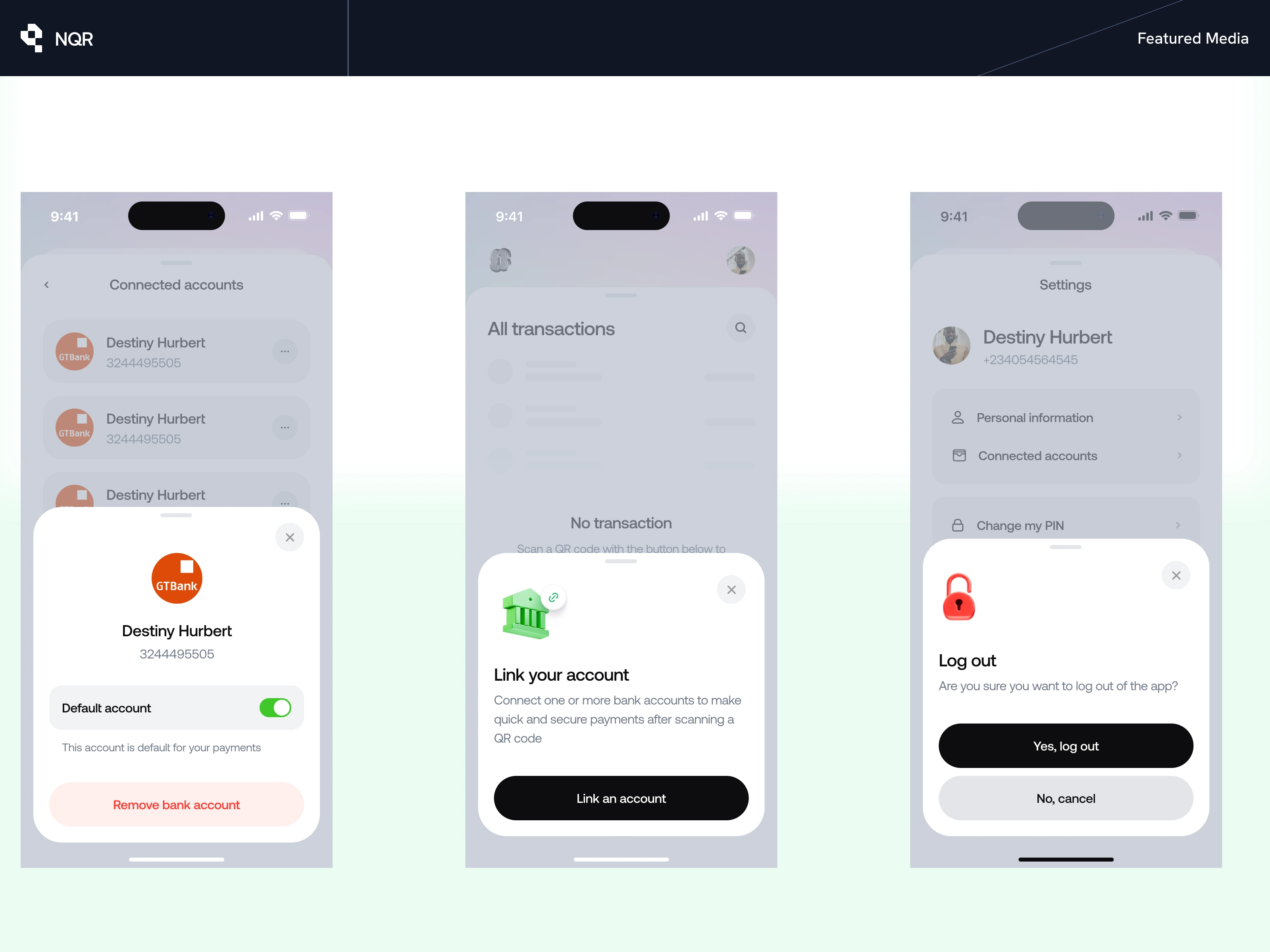
Profile & settings
Support & Help
One-tap email support (opens email client)
Pre-filled subject line + contextual logs (optional)
Logout
Confirmation modal
Immediate session clearance
Secure token revocation
5 likes · 69 views · Oct 29, 2025
QR code payment app for iOS and Android. Full scan-to-pay flow, transaction history, and secure transfer UX. Built with React Native and Expo.


