NetGet: Smart Domain & Routing Manager for Web Deployments

neurons .me



Key Features Version 2.6.x
Expose your IP securely via HTTPS
Manage multiple domains and SSL certificates
Route HTTPS requests to internal services
Serve static content via HTTPS
Port management and built-in diagnostics
Wildcard certificates and subdomain support
Flow Overview
When netget is installed on your server, it binds to your public IP and starts listening for HTTP and HTTPS traffic.
You use the netget CLI to register your domains and subdomains, specifying where each one should route — either to an internal service (via port) or to a static folder.
All incoming requests are:
Automatically redirected from HTTP to HTTPS for secure connections.
Matched against the registered domains.
Routed to the appropriate port or static content you’ve defined.
Netget also manages your SSL certificates, issuing and renewing them automatically so you don’t have to worry about HTTPS setup.

NetGet - Domain Administration
Example Use Case
Suppose you own example.com, and you want to:
Route https://example.com to a static folder serving a React web interface.
Point api.example.com to a backend service exposing your API.
With netget, you can manage this — and as many domains and subdomains as needed — from a single interface.
Simply point your domain(s) DNS A Record to your server’s IP address or CNAME to your main server name, then use the netget CLI to:
Route example.com to your React build directory.
Forward api.example.com to the port where your API is running.
Netget will automatically handle SSL certificates for all configured endpoints.
Just ensure your applications are actively running on the ports defined in netget — it will take care of the routing, HTTPS encryption, and traffic flow.
Port Management
Netget includes a built-in Port Management module to help you monitor, inspect, and free up ports directly from the CLI.
To access run:
netget
Navigate to Port Management using the arrow keys.
Available Actions:
Inspect Port: See which process is using a specific port, with PID and service info.
Kill Process on Port: Free a blocked or stuck port by terminating the process.
Gain full visibility and control over your device’s port allocation and traffic routing.

Routing through netget.
Under the Hood
Netget installs globally via
npm and sets up a CLI to manage routing and certificates easily from your terminal.Netget listens on HTTP and HTTPS ports, automatically upgrading traffic to secure HTTPS connections.
Incoming requests are resolved through a local SQLite database embedded in the netget package, mapping registered domains or subdomains to a port or static path.
It integrates with Certbot and Let’s Encrypt to automatically issue and renew certificates — including wildcard support — making HTTPS effortless and scalable across subdomains.
You can assign a main domain name to the server where netget is running — often called your main server. In your DNS provider, set a CNAME or A Record pointing to your netget server’s public IP.
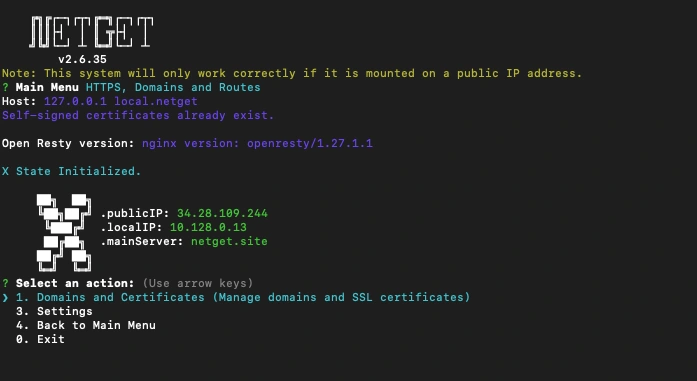
NetGet CLI
For example, using a wildcard:
*.example.com → A Record to netget's Public IP
Then, within netget:
Netget will route all traffic accordingly and handle SSL certificates for each.
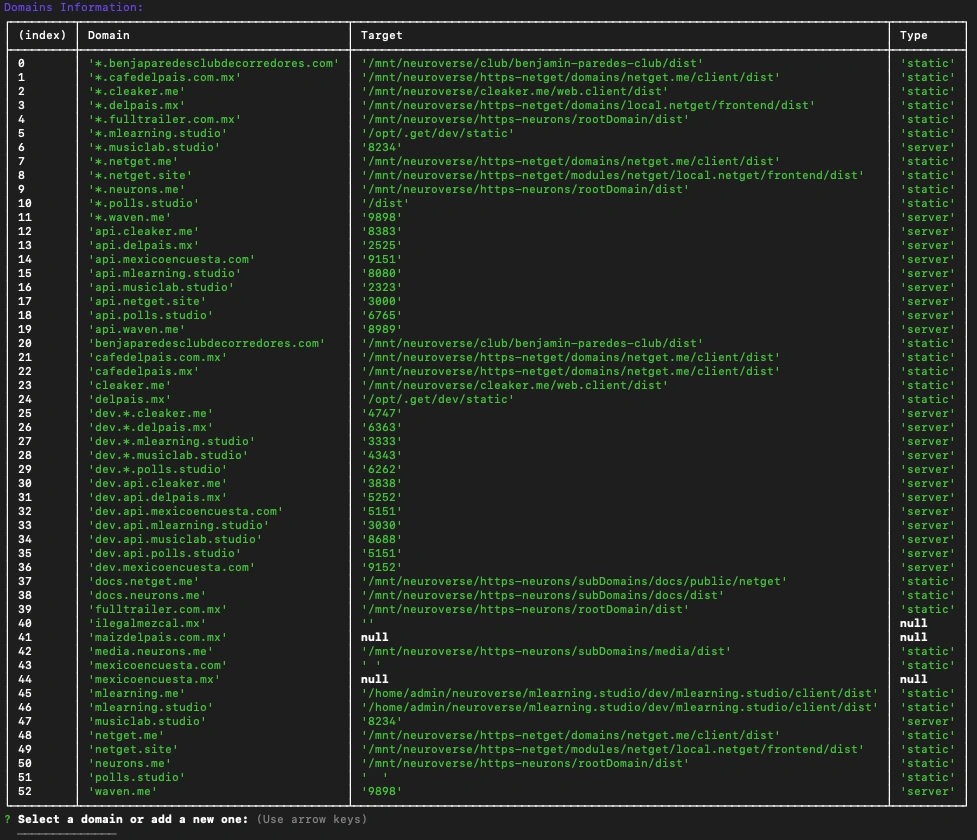
NetGet Table Example
Summary
Whether you're a solo developer or managing infrastructure at scale, netget provides a unified way to expose local services, manage traffic, and build modular, decentralized architectures — with ease, flexibility, and security.
Like this project
Posted Jul 26, 2025
Netget is a domain and routing manager that connects HTTPS domains to static content or servers, enabling fast, secure, and flexible web deployments.
Likes
1
Views
7
Timeline
Oct 1, 2024 - May 26, 2025