Repo Reader - AI-Powered Repository Learning

Isaac Onyemaechi


🎮 Repo Reader - AI-Powered Repository Learning
Transform any GitHub repository into an interactive, gamified learning experience with AI-powered analysis and intelligent code assistance.
🚀 What is Repo Reader?
Repo Reader is an innovative tool that makes understanding complex codebases fun and engaging through gamified learning walkthroughs. It analyzes any GitHub repository and creates structured learning experiences with achievements, progress tracking, and interactive quizzes. Enhanced with TiDB vector search for intelligent code assistance:
🎯 Gamified Learning: Transform repositories into interactive learning quests with achievements, levels, and progress tracking
🤖 AI-Powered Analysis: Deep code understanding using advanced language models
📚 Learning Path Generation: Creates progressive, difficulty-appropriate walkthroughs tailored to your experience level
🏆 Achievement System: Unlock badges and earn points as you master different aspects of the codebase
🎮 Interactive Quizzes: Test your understanding with dynamically generated questions
💬 RAG Chat Interface: Ask questions about any codebase using TiDB vector search (NEW!)
⚡ Smart Code Assistant: Get instant answers with relevant source code citations
✨ Features
🎯 Core Learning Experience
Repository Analysis: Clones and analyzes GitHub repositories automatically
Gamified Walkthroughs: Structured learning modules with difficulty progression
Achievement System: Unlock badges for completing learning milestones
Progress Tracking: Visual progress bars and completion statistics
Interactive Quizzes: Codebase-specific questions that test real understanding
Multi-Level Learning: Beginner, Intermediate, and Advanced learning paths
🤖 AI-Powered Intelligence
Code Structure Detection: Identifies frameworks, languages, and architectural patterns
Learning Path Generation: Creates progressive, difficulty-appropriate walkthroughs
Hybrid LLM Support: Local models with OpenAI fallback for analysis
💬 Enhanced RAG Chat (NEW!)
TiDB Vector Indexing: Automatically indexes code chunks for semantic search
Intelligent Q&A: Chat interface for asking questions about the codebase
Source Citations: Answers include relevant code snippets and file references
Hybrid Search: Combines vector similarity and full-text search
🤖 AI-Powered Intelligence
Hybrid LLM Support: Local models with OpenAI fallback
Context-Aware Analysis: Understanding of project structure and dependencies
Multi-Step RAG Workflow:
Ingest & Index: Code chunks embedded into TiDB vector store
Semantic Search: Vector + full-text hybrid search
LLM Generation: Context-enhanced responses
Chat Interface: Interactive code assistance
🎮 Gamification Elements
Achievement System: Unlock badges for learning milestones
Progress Visualization: Interactive progress bars and completion tracking
Level System: Advance through difficulty levels as you learn
Social Features: Share progress and achievements
🚀 Quick Start
Prerequisites
Node.js 18+ and npm/pnpm
Python 3.13+
Git
TiDB Serverless account (free tier available)
OpenAI API key (optional: for cloud AI features)
1. Clone and Install
2. Configure Environment
Required Environment Variables:
3. Start Development Servers
After you run npm run dev, it would take a couple of seconds to actually initialize as this project is using a local embedding model so there would be a first time initial download of this model (it is very lightweight) and after that it would be cached. Dont start using the frontend until you see this message
This starts:
Frontend: http://localhost:3000 (Next.js)
API: http://localhost:5328 (Flask)
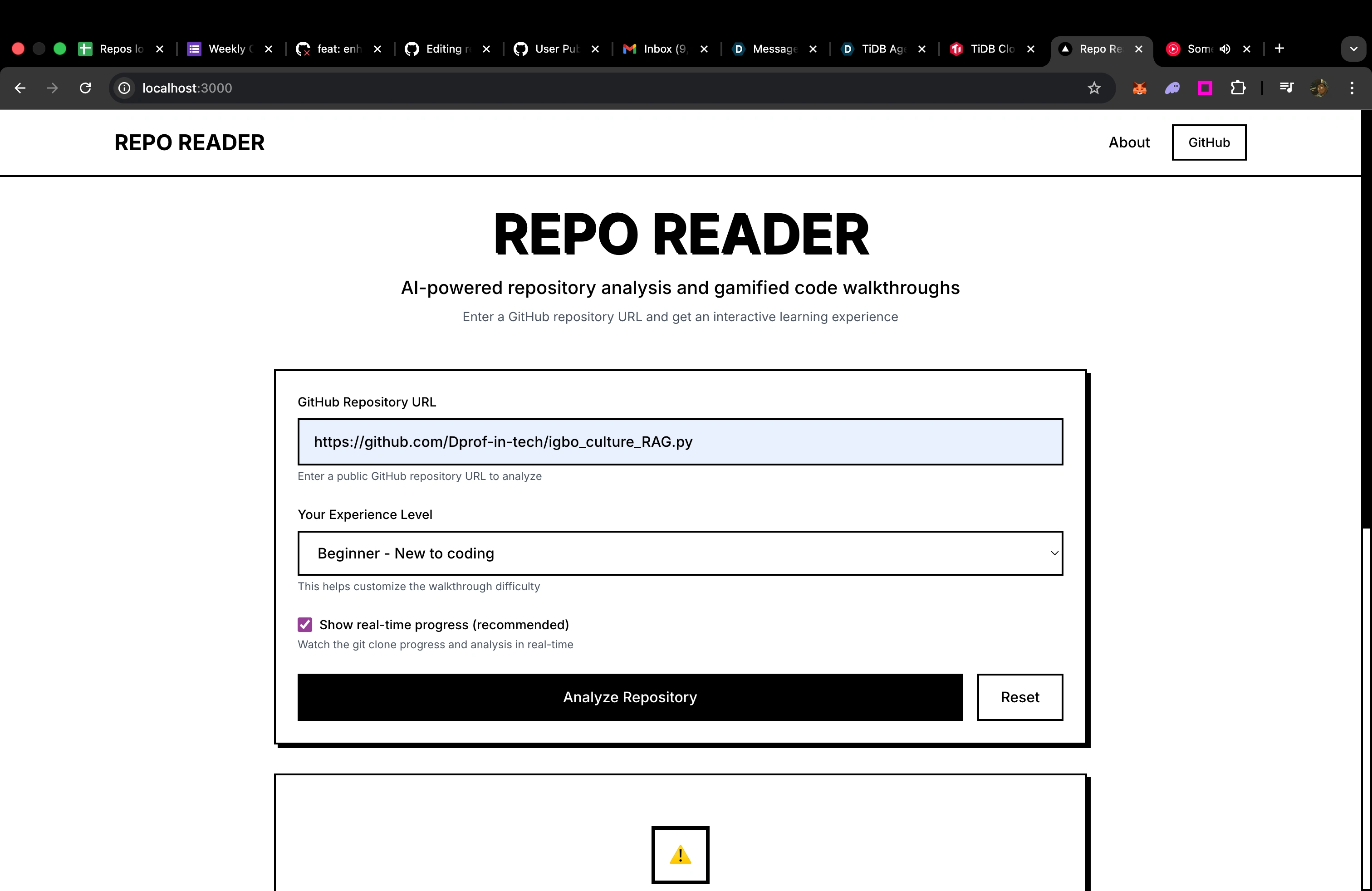
4. Try It Out!
Enter a GitHub repository URL
Select your experience level (Beginner/Intermediate/Advanced)
Watch the AI analyze the repository and create your personalized learning path
Follow the gamified walkthrough with achievements and quizzes
NEW: Use the chat widget to ask questions about the code using RAG!
💬 RAG Chat Enhancement
The latest enhancement adds intelligent code assistance using TiDB Serverless vector search:
How RAG Chat Works
Repository Indexing: Code is automatically chunked and embedded into TiDB vector store
Smart Search: When you ask questions, the system finds relevant code using hybrid search
Context-Aware Answers: AI generates responses using the most relevant code snippets
Source Citations: Every answer includes references to specific files and line numbers
TiDB Vector Features
VECTOR(384) columns for semantic embeddings using all-MiniLM-L6-v2
Hybrid search combining vector similarity and full-text search
Connection pooling and batch processing for optimal performance
Intelligent caching for faster response times
Chat Interface Features
Interactive chat widget appears after repository analysis
Real-time responses with streaming support
Source code citations with file paths and line numbers
Multi-turn conversations that remember context
Mobile-responsive design with proper text wrapping
🏗 Architecture
Tech Stack
Frontend: Next.js 14, React, TypeScript, Tailwind CSS
Backend: Flask, Python 3.13
AI/ML: LangChain, LangGraph, OpenAI, HuggingFace Transformers
Database: TiDB Serverless with vector search
Deployment: Vercel (Frontend), Vercel Functions (Backend)
System Architecture
Core Components
🤖 LangGraph Agent (
api/agent.py)Orchestrates the entire analysis workflow
Manages state between analysis steps
Handles streaming progress updates
NEW: Includes automatic TiDB indexing step
🛠 Analysis Tools (
api/tools/)RepoReaderTool: Clones and extracts repository data
CodeIndexerTool: Embeds and indexes code into TiDB
CodeAnalyzerTool: Performs static and AI-powered code analysis
RAGQueryTool: Handles question answering with context retrieval
WalkthroughGeneratorTool: Creates gamified learning experiences
🗄️ TiDB Integration (
api/tools/tidb_vector_store_fixed.py)SQLAlchemy ORM with VectorType columns
Automatic embedding generation with caching
Hybrid search (vector + full-text)
Connection pooling for performance
💬 Chat Interface (
components/CodeChatWidget.tsx)Interactive chat widget with proper text wrapping
Real-time question answering
Source code citations
Mobile-responsive design
🎯 Usage Examples
Basic Analysis
RAG Chat API
Code Search
🚀 Deployment
Vercel Deployment (Recommended)
Connect your GitHub repository
Set environment variables in Vercel dashboard (including TiDB credentials)
Deploy automatically
Environment Variables for Production
🤝 Contributing
We welcome contributions! Here's how to get started:
Development Setup
Fork the repository
Create a feature branch:
git checkout -b feature-nameSet up TiDB Serverless account
Configure environment variables
Make your changes
Add tests if applicable
Submit a pull request
Code Style
Use TypeScript for frontend code
Follow Python PEP 8 for backend code
Add JSDoc/docstring comments for public functions
Use descriptive commit messages
Testing
🐛 Troubleshooting
Common Issues
TiDB connection fails:
Check TiDB Serverless credentials in
.envEnsure database exists and is accessible
Verify network connectivity
Chat widget not working:
Ensure repository is analyzed and indexed first
Check browser console for API errors
Verify OpenAI API key is working
Performance issues:
Check TiDB connection pool settings
Monitor embedding cache performance
Consider upgrading to TiDB Cloud Dedicated
Performance Tips
Use SSD storage for better I/O performance
Enable connection pooling (already configured)
Monitor TiDB query performance
Use embedding caching for repeated queries
📊 Monitoring
Check system status:
📄 License
MIT License - see LICENSE file for details.
🎯 Project Focus
Primary Goal: Transform complex codebases into engaging, gamified learning experiences that help developers understand and master new technologies through interactive walkthroughs, achievements, and personalized learning paths.
Latest Enhancement: Added TiDB Serverless integration for intelligent code assistance, enabling users to ask questions and get contextual answers while exploring repositories.
🙏 Acknowledgments
TiDB Cloud: For serverless vector database capabilities
LangChain & LangGraph: For the AI orchestration framework
OpenAI: For GPT models and embeddings API
HuggingFace: For open-source model hosting
Vercel: For hosting and deployment platform
Made with ❤️ for developers who want to understand code better
Like this project
Posted Sep 16, 2025
Developed AI-powered tool for gamified learning of GitHub repositories.
Likes
0
Views
6