Serverless Expense Tracker Development

Roshni Havelikar


📒 Expense Book
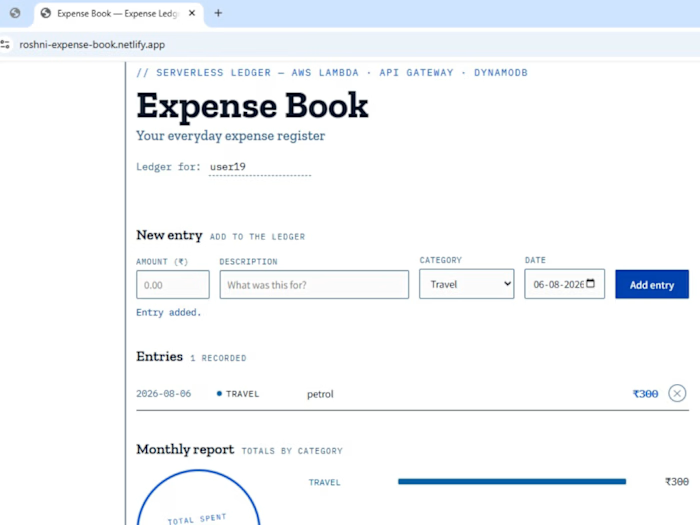
A serverless, full-stack expense tracker built entirely on AWS — no servers to manage, no infrastructure to maintain. Add expenses, track spending by category, and view monthly reports, all backed by a pay-per-use backend.
🔗 Live Demo: https://roshni-expense-book.netlify.app
💡 Why I built this
I wanted to understand serverless architecture from the ground up — not just read about Lambda and API Gateway, but actually wire them together, break things, read the CloudWatch logs, and fix them. This project is the result: a working expense tracker where every part of the stack — database, backend, API layer, and frontend — was built and debugged by hand.
⚙️ Architecture
┌─────────────┐ HTTPS ┌──────────────┐ Invoke ┌─────────────┐ Read/Write ┌──────────────┐ │ Frontend │ ─────────────▶ │ API Gateway │ ─────────────▶ │ Lambda │ ─────────────────▶ │ DynamoDB │ │ (HTML/CSS/JS)│ │ (REST API) │ │ (Python) │ │ (NoSQL) │ └─────────────┘ ◀───────────── └──────────────┘ ◀─────────────── └─────────────┘ ◀───────────────── └──────────────┘ Netlify Roshni stage 4 functions, Partition key: userId IAM execution role Sort key: expenseId
Request flow: the browser calls a REST endpoint → API Gateway (with Lambda proxy integration) forwards the raw event to the matching Lambda function → the function reads/writes DynamoDB using an IAM role scoped for that access → the response is serialized back through API Gateway to the browser, with CORS headers so the request isn't blocked cross-origin.
🧰 Tech stack
Layer Technology Frontend HTML5, CSS3, vanilla JavaScript (
fetch API) API layer Amazon API Gateway (REST API, Lambda proxy integration) Compute AWS Lambda (Python 3.x) Database Amazon DynamoDB Access control IAM roles & policies Hosting Netlify (frontend) Version control Git & GitHub🔌 API Endpoints
Method Endpoint Description
POST /expenses Add a new expense GET /expenses?userId={id} Get all expenses for a user DELETE /expenses/{expenseId}?userId={id} Delete a specific expense GET /report?userId={id} Get total spend + category-wise breakdown✨ Features
Add expenses with amount, category, description, and date
View all expenses in a clean, ledger-style list
Delete individual entries
Auto-generated monthly report with category-wise totals
Fully responsive UI, no frameworks — just HTML/CSS/JS talking directly to the API
🐛 What I actually debugged (not just followed)
Building this surfaced real, non-obvious serverless issues that I worked through one by one:
Lambda proxy integration — without it enabled in API Gateway,
event['queryStringParameters'] came back empty even though Postman showed the request going through fine.IAM least-privilege — Lambda's default execution role only allows writing logs. Every DynamoDB call needed an explicit permission grant, which surfaced as
AccessDeniedException in CloudWatch until fixed.Decimal serialization — DynamoDB returns numeric values as Python
Decimal, which json.dumps() can't serialize by default. Fixed with a custom default= handler.CORS (two-part fix) — a browser blocks cross-origin calls entirely different from how Postman behaves. Fixing it required both a
Access-Control-Allow-Origin header in every Lambda response and enabling CORS at the API Gateway resource level for the preflight OPTIONS request to succeed.Case sensitivity — a path parameter named
{Id} in API Gateway silently mismatched event['pathParameters']['id'] in Python, producing a KeyError that only made sense after reading the CloudWatch traceback.📁 Project structure
expenses-book/ ├── index.html # Frontend (self-contained) ├── backend/ │ ├── addExpense/lambda_function.py │ ├── getExpense/lambda_function.py │ ├── deleteExpense/lambda_function.py │ └── getMonthlyReport/lambda_function.py └── README.md
🚀 Running it yourself
The frontend is a single static file — no build step required.
Like this project
Posted Aug 26, 2026
Developed a serverless expense tracker using AWS services and deployed on Netlify.
Likes
1
Views
3