Backend Dev, Shipstation, Printing, Shopify
Portfolio project

Verified paid workView completed work
Graffeo Coffee sells gifts through Zest, a gifting platform for Shopify that lets shoppers send coffee to one or many recipients with a personal message. Instead of printing those messages as separate cards through a third-party service, Graffeo wanted them on its own packing slips, printed automatically for the gift orders its warehouse ships through ShipStation, before its consumer gifting launch in November.
I handled it end to end, from research to sign-off, in under two weeks.
The challenge
Get each message from the checkout, through Shopify, into ShipStation, with nothing typed by hand.
Give the gift slip only to gift orders that have a message. Every other order keeps the usual slip.
Handle multiship checkouts, which split into one order per recipient plus a parent order that must never ship.
Fit the warehouse's 4x6 thermal labels and print together with the shipping label, with no extra step for the team.
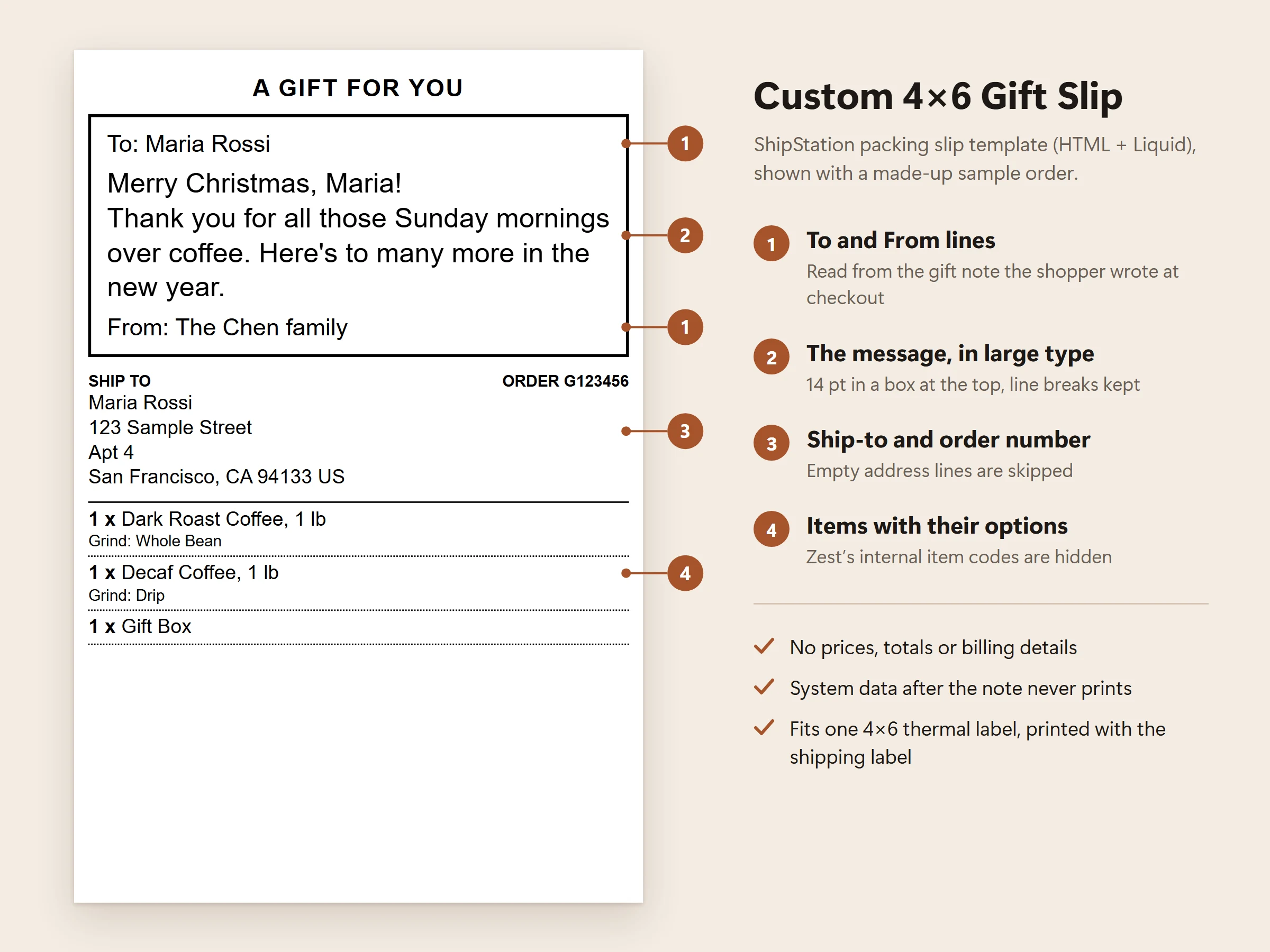
Keep prices and billing details off the slip.
What I built
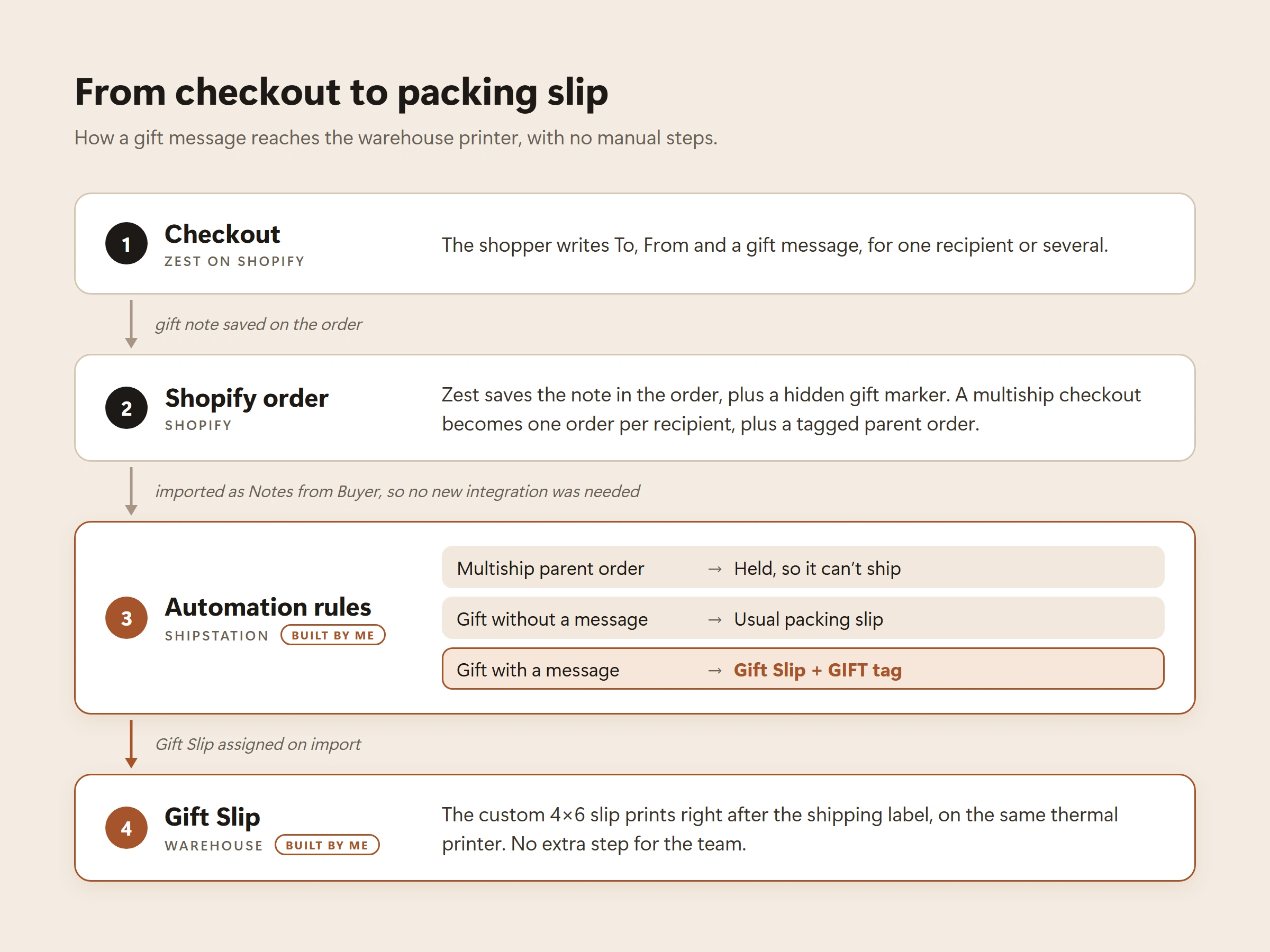
Mapped the data path. I traced where Zest stores each part of a gift order in Shopify (the order note, hidden attributes and tags) and where each part lands in ShipStation. The message already reached ShipStation's Notes from Buyer field, so no new integration or middleware was needed.
A custom 4x6 Gift Slip, built in ShipStation's HTML and Liquid template editor. The message prints in large type in a box at the top, between To and From lines, followed by the ship-to address, order number and items. The template cleans up the raw note: it strips the system data added after the message, hides Zest's internal item codes, handles gifts without a message, and works around quirks in ShipStation's Liquid engine.
Automation rules. Gift orders with a message get the Gift Slip and the GIFT tag automatically. Gifts without a message keep the usual slip, and multiship parent orders are held so they can't ship by mistake. I also checked every existing rule for conflicts.
Documentation. A launch-readiness report for the client's team (what was built, QA results, launch steps and known limits), printer-test instructions, and written steps for adding gift notes to manual orders by hand.
How I tested it
A local test harness in Python (python-liquid) rendered the template against 22 order shapes, including the way ShipStation's Liquid splits text, before each draft went into ShipStation.
Test orders through the checkout preview: a single-recipient gift, and a three-recipient multiship order with one recipient left without a message.
Worst-case slips printed on the warehouse's thermal printer: a 300-character message with 5 items, a 250-character message with 3 items, and a 12-line message. Every slip fit on one label.
Six issues found and fixed before launch; the template went through eight drafts.
The result
Gift orders with a message now get their gift slip automatically, printed right after the shipping label.
No extra steps for the warehouse and no new software to maintain. It all runs on Graffeo's existing Shopify and ShipStation setup.
The client's team confirmed everything works.
1 like · 2 views · Nov 13, 2026
Graffeo Coffee wanted the gift messages from its Zest gifting checkout printed on its own packing slips. I traced the data from Shopify into ShipStation, built
Timeline
Nov 5, 2026 - Nov 6, 2026
Tags


What the client had to say
It's always great working with Vladislav! He's very talented and hardworking!


Bethany Ren, Graffeo
Nov 6, 2026, Client