ChatTensorFlow

Lalan Kumar


ChatTensorFlow
ChatTensorFlow is an intelligent assistant that helps users with TensorFlow related queries by utilizing the power of LangGraph based Agents, vector embeddings, and a conversational interface powered by various LLM providers.
Features
Multi-provider support: Works with multiple LLM providers (Google Gemini, OpenAI, Anthropic, Cohere)
Content processing: Splits and embeds TensorFlow documentation for semantic search
Query routing: Intelligently classifies user questions and determines next steps
Assisted research: Follows a research plan to answer complex TensorFlow queries
Context-aware responses: Provides answers with citations from official TensorFlow documentation
Architecture
ChatTensorFlow is built with a modular architecture:
Document Crawler: Efficiently crawls TensorFlow documentation using sitemap.xml
Data Ingestion: Processes web content into chunks for embedding
Vector Store: Stores embeddings for semantic search using Chroma
Retriever: Retrieves relevant content when answering questions
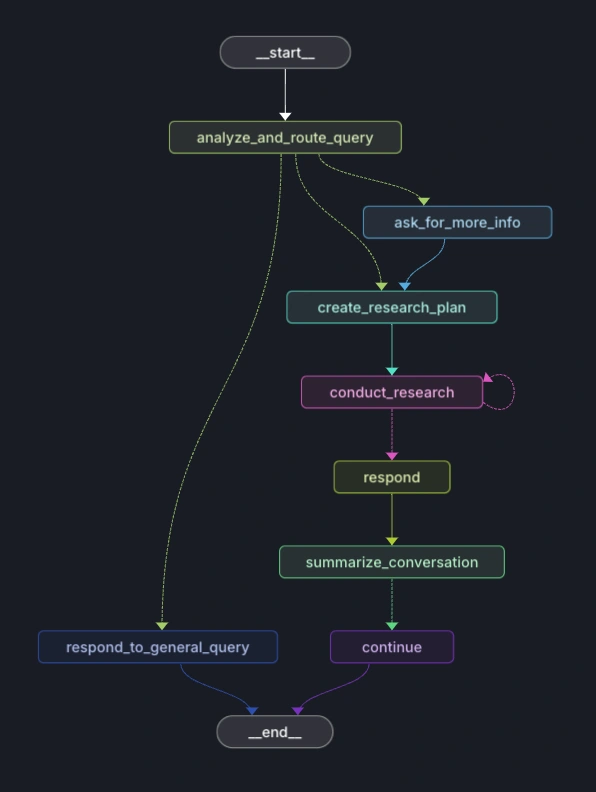
Researcher Graph: Follows a structured plan to research answers
Router Graph: Determines how to handle each user query
Response Generator: Creates coherent, accurate responses based on retrieved information
Graphs
Getting Started
Prerequisites
Python 3.9+
API keys for at least one supported LLM provider
Installation
Clone the repository:
Create a virtual environment:
Install dependencies:
Set up your environment variables:
Data Collection
To crawl and process the Scikit-learn documentation:
Run the web crawler:
Process and ingest the data:
This will create a Chroma vector database with the embedded documentation chunks.
Usage
Run the application:
The assistant can answer questions about:
TensorFlow API usage
Deep learning concepts
Model building and training
TensorFlow data pipelines
Common errors and troubleshooting
Example queries:
"How do I compile and train a Keras model?"
"How do I use tf.data.Dataset to load and preprocess large datasets?"
"What are the parameters for a Conv2D layer?"
"How do I create and use a custom loss function?"
Configuration
The application can be configured by setting the following environment variables:
Project Structure
How It Works
User Query Analysis: The system classifies the query as TensorFlow related, general, or requiring more information
Research Planning: For TensorFlow queries, a research plan is created
Document Retrieval: Relevant documentation is retrieved using semantic search
Response Generation: A detailed, accurate response is generated citing relevant documentation
Contributing
Contributions are welcome! Please feel free to submit a Pull Request.
Fork the repository
Create your feature branch (
git checkout -b feature/amazing-feature)Commit your changes (
git commit -m 'Add some amazing feature')Push to the branch (
git push origin feature/amazing-feature)Open a Pull Request
License
This project is licensed under the MIT License - see the LICENSE file for details.
Acknowledgments
Uses crawl4ai for crawling
Uses ChromaDB for vector storage
Powered by various LLM providers (Gemini, OpenAI, Anthropic, Cohere)
Documentation content from TensorFlow
Developed by Lalan Kumar
Like this project
Posted Jul 30, 2025
Developed ChatTensorFlow, an AI assistant for TensorFlow queries using LangGraph and LLMs.