Automated Lead Pipeline in HubSpot CRM

John Akhilomen
Verified


Overview
This project involved designing and implementing a fully automated lead pipeline within HubSpot CRM for a client looking to scale their outbound sales operations. The automation was built to eliminate manual data entry, ensure lead deduplication, and route qualified leads to the right sales owners — all in real time.
The Challenge
The client's sales team was spending hours each week manually creating and updating lead records in HubSpot — pulling data from multiple sources, checking for duplicates, and assigning ownership by hand. Key problems included:
Duplicate lead records causing CRM clutter and missed follow-ups. No consistent naming convention for leads across company accounts. Leads not being assigned to the correct company owner, leading to slow response times. No automated pipeline to handle inbound webhook data or HubSpot-triggered events.
The Solution
I designed and built a multi-trigger automation workflow that integrates directly with HubSpot's API. The workflow supports both webhook-based and HubSpot-native triggers, making it flexible enough to handle lead creation from any external source or internal CRM event.
How the Workflow Works
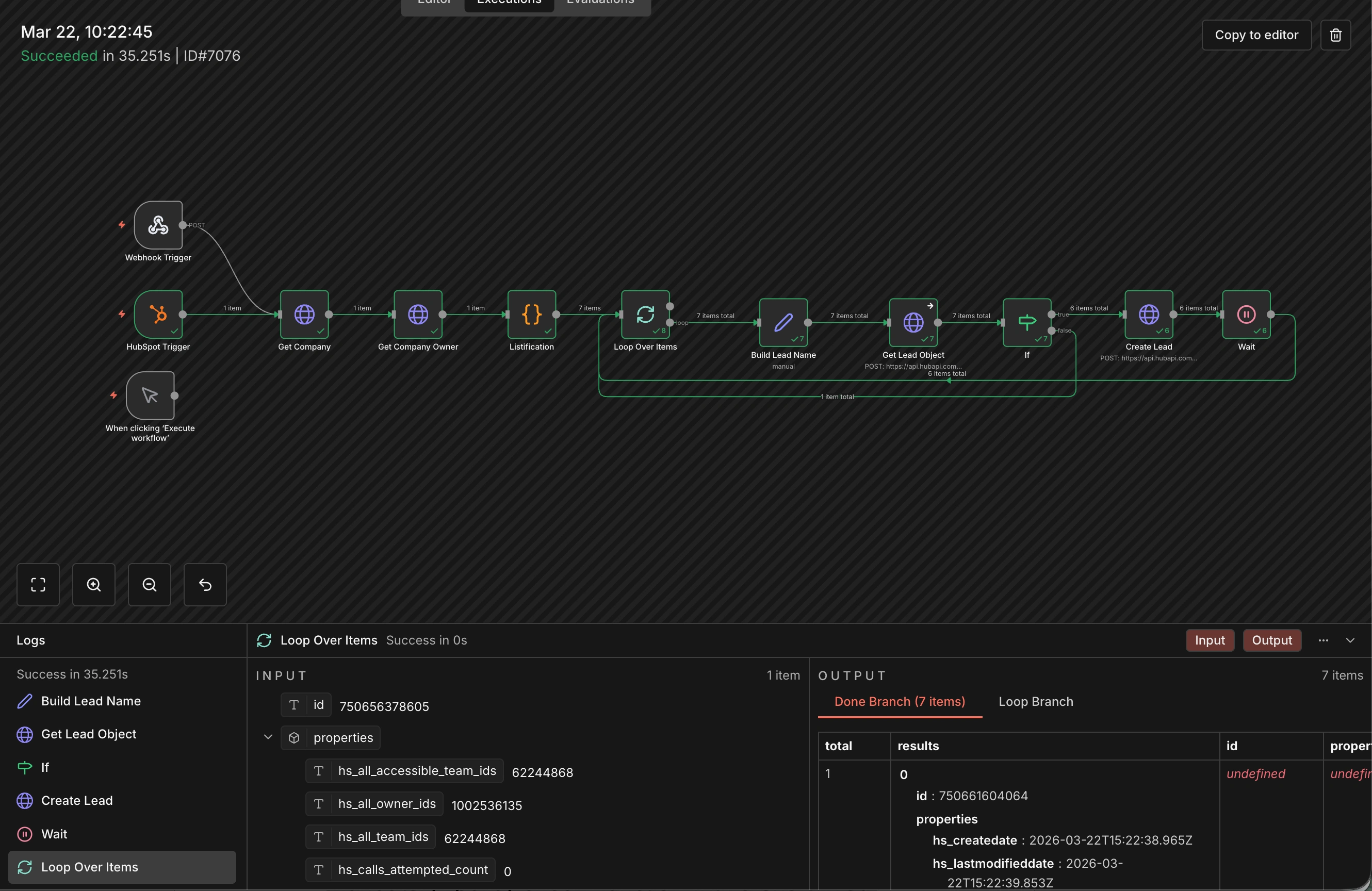
Trigger — The workflow is initiated via either a Webhook (for external form submissions or third-party tool integrations) or a HubSpot Trigger (for internal CRM events). This dual-trigger setup ensures no lead source is missed.
Company Enrichment — The workflow fetches the associated company record and retrieves the company owner from HubSpot, ensuring every lead is automatically tied to the correct account and sales rep without manual assignment.
Listification & Loop — Contact data is structured into a list and iterated through item by item. For each contact, the workflow dynamically builds a standardized lead name, creating naming consistency across all records in the CRM.
Deduplication Check — Before creating a new lead, the workflow calls HubSpot's Lead Object API to check whether the lead already exists. A conditional (If) branch evaluates the result: if the lead exists, it is skipped; if not, a new lead record is created via a POST request to HubSpot's API.
Rate Limiting — A Wait step is included after each lead creation to respect HubSpot's API rate limits, ensuring the workflow runs reliably at scale without hitting throttling errors.
Results
The Phase 1 workflow was successfully tested and executed, processing 7 lead records in 35.25 seconds with zero errors. Key outcomes from Phase 1 include:
100% automated lead creation — zero manual data entry required. Intelligent deduplication preventing duplicate lead records in HubSpot. Automatic lead-to-owner assignment based on company ownership. Standardized lead naming convention applied across all records. Scalable architecture ready for high-volume lead ingestion in Phase 2.
Tools & Technologies Used
HubSpot CRM (Lead, Contact, and Company Object APIs). Workflow automation platform (n8n / custom webhook infrastructure). JavaScript for data transformation and lead name construction. Conditional logic and loop-based batch processing for scalability.
Like this project
What the client had to say
John is by far the best agent coder I have worked with. Not only he knows n8n, he knows the connecting platforms such as hubspot intimately so he can optimize workflows and make my api token use much more efficient


Onne Ganel, OGAdvisors
Mar 23, 2026, Client
Posted Mar 24, 2026
Built a fully automated HubSpot lead pipeline with n8n — zero manual entry, real-time deduplication, and auto-routing to the right sales owner.
Likes
0
Views
14
Timeline
Mar 13, 2026 - Mar 23, 2026
Clients
OGAdvisors