
Case Study: Resurrecting a Dual-Xeon Homelab from a Kernel-Level ACPI & Sysfs Meltdown
Introduction
When configuring high-performance concurrent environments for offensive security testing, standard plug-and-play logic doesn't apply. During a routine rolling upgrade on a custom dual-processor Intel Xeon infrastructure (running Kali Linux, Kernel 7.0.12), a catastrophic firmware conflict completely isolated the system. The machine successfully initialized the desktop environment but entered a state of absolute peripheral paralysis: zero USB functionality (keyboard/mouse dead) and localized network collapse.
This case study breaks down how I bypassed automated kernel mechanisms and unbricked the hardware architecture without a complete system reinstall or hardware replacement.
The Symptom & Forensic Analysis
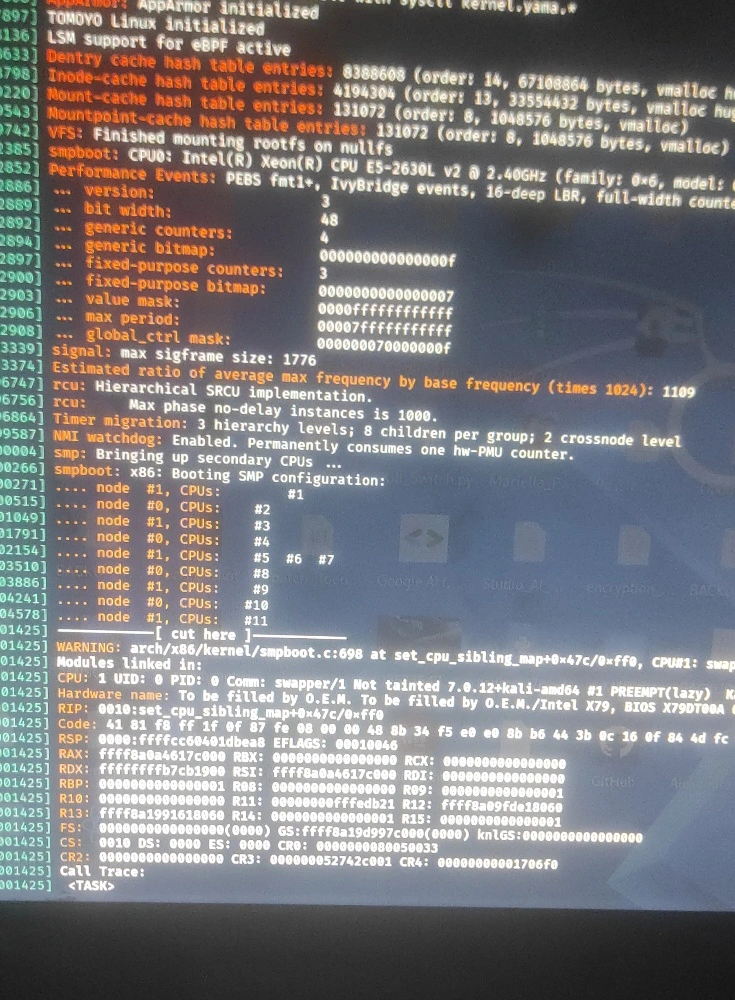
A standard cold boot allowed the display manager to render the graphical user interface, but the system's hardware enumeration halted mid-way. By capturing the early-boot kernel ring buffer (dmesg), the root cause was exposed deep within the low-level sysfs tree:
[ 75.237349] sysfs: cannot create duplicate filename '/devices/platform/coretemp.1/hwmon/...'
[ 75.237358] CPU: 18 UID: 0 PID: 125 Comm: cpuhp/18 Tainted: [S]=CPU_OUT_OF_SPEC, [W]=WARN 7.0.12
[ 75.237490] platform coretemp.1: Adding Core 18 failed
The Underlying Architecture Flaw
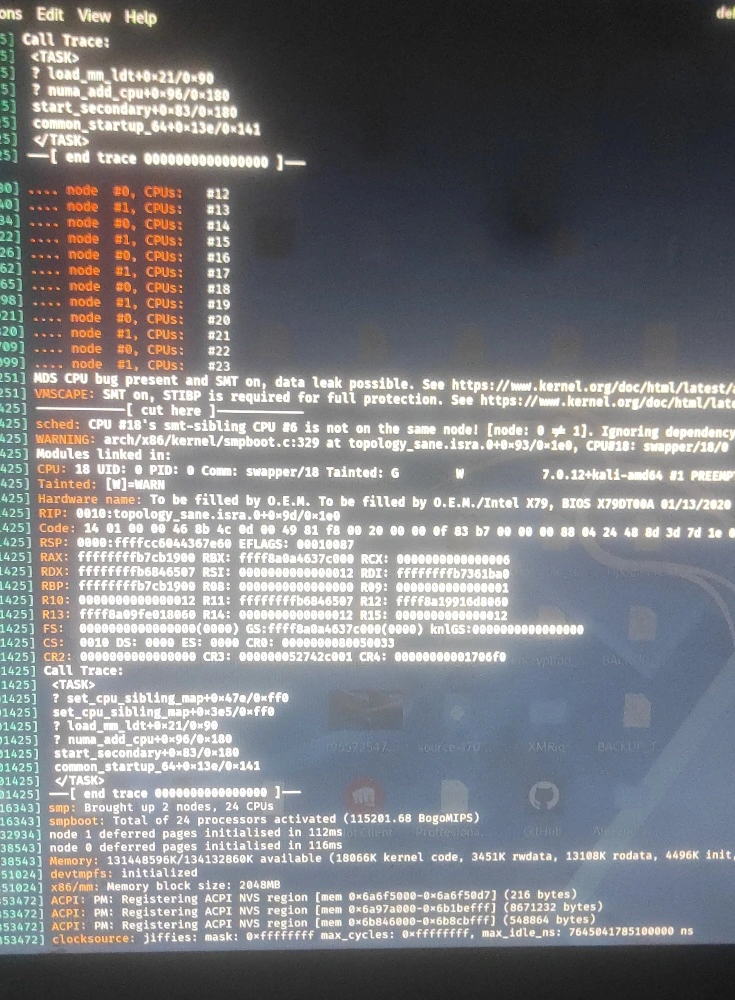
The factory ACPI tables of the dual-socket motherboard generated a chaotic, non-linear Advanced Programmable Interrupt Controller (APIC) mapping. The Linux kernel scheduler detected a massive topological anomaly:
sched: CPU #18's smt-sibling CPU #6 is not on the same node! [node: 0 != 1]. Ignoring dependency. WARNING: arch/x86/kernel/smpboot.c:329 at topology_sane.isra.0+0x93/0x1e0, CPU#18
1. Hyper-Threading Fragmentation: The logical thread CPU #18 and its physical sibling CPU #6 share the exact same silicon die, L1/L2 caches, and execution pipelines.
2. Topological Inconsistency: The broken factory BIOS assigned CPU #18 to Physical Socket 0 (node 0) and CPU #6 to Physical Socket 1 (node 1).
3. The Sysfs Crash: When the coretemp driver attempted to register temperature monitoring zones sequentially, it hit a duplicate filename collision in the virtual file system due to the mismapped core indices. The kernel panicked (Tainted: WARN), freezing the udev hardware daemon before it could initialize the PCIe/USB sub-systems and input drivers.
The Bypass Strategy:
Instead of wasting hours rebuilding static ACPI/SRAT tables from scratch in a production emergency, I opted for an aggressive kernel-level mitigation strategy. I modified the bootloader configuration (GRUB) to inject a highly targeted set of flags to silence the faulty driver and force peripheral passthrough:
modprobe.blacklist=coretemp initcall_blacklist=coretemp pci=nocrs iommu=pt
Engineering Breakdown of the Fix:
modprobe.blacklist=coretemp & initcall_blacklist=coretemp - A dual-layer blacklisting approach. It completely prevents the temperature monitoring driver from initializing, whether compiled as a dynamic module or baked directly into the Kali kernel. This eliminated the sysfs duplicate folder conflict entirely.
pci=nocrs - Forces the kernel to ignore the invalid PCIe host bridge windows reported by the corrupted BIOS firmware, allowing proper resource allocation across the 24-thread environment.
iommu=pt - Instructs the Intel VT-d engine to provide a direct memory access (DMA) bypass for local peripherals, rescuing the USB controllers and the onboard network interface from being quarantined by false-positive DMA protection errors. (a.k.a iommu passtrought)
Results & Deliverables
By overriding the automated kernel balancing and suppressing the erratic hardware sensors, the system achieved full stability:
1. Hardware Restoration: Restored 100% functionality to USB inputs and revived the network stack with no hardware changes.
2. Resource Optimization: Secured all 128GB of RAM operating in custom NUMA nodes, ready for heavy concurrent operations.
3. Zero Downtime Blueprint: Created a reproducible boot-level patching method for legacy or unverified enterprise hardware operating under modern Linux kernels.
Skills demonstrated: ACPI/NUMA Architecture, Infrastructure Hardening, Linux, Low-Level Hardware Forencics, Kernel Optimisation
0 likes · 9 views · Jul 12, 2026
Case Study: Resurrecting a Dual-Xeon Homelab from a Kernel-Level ACPI & Sysfs Meltdown Introduction When configuring high-performance concurrent environment...

