
MIZANUR RAHMAN
Digital Marketing Lead Generation & AI Automation Specialist
New to Contra
MIZANUR is ready for their next project!
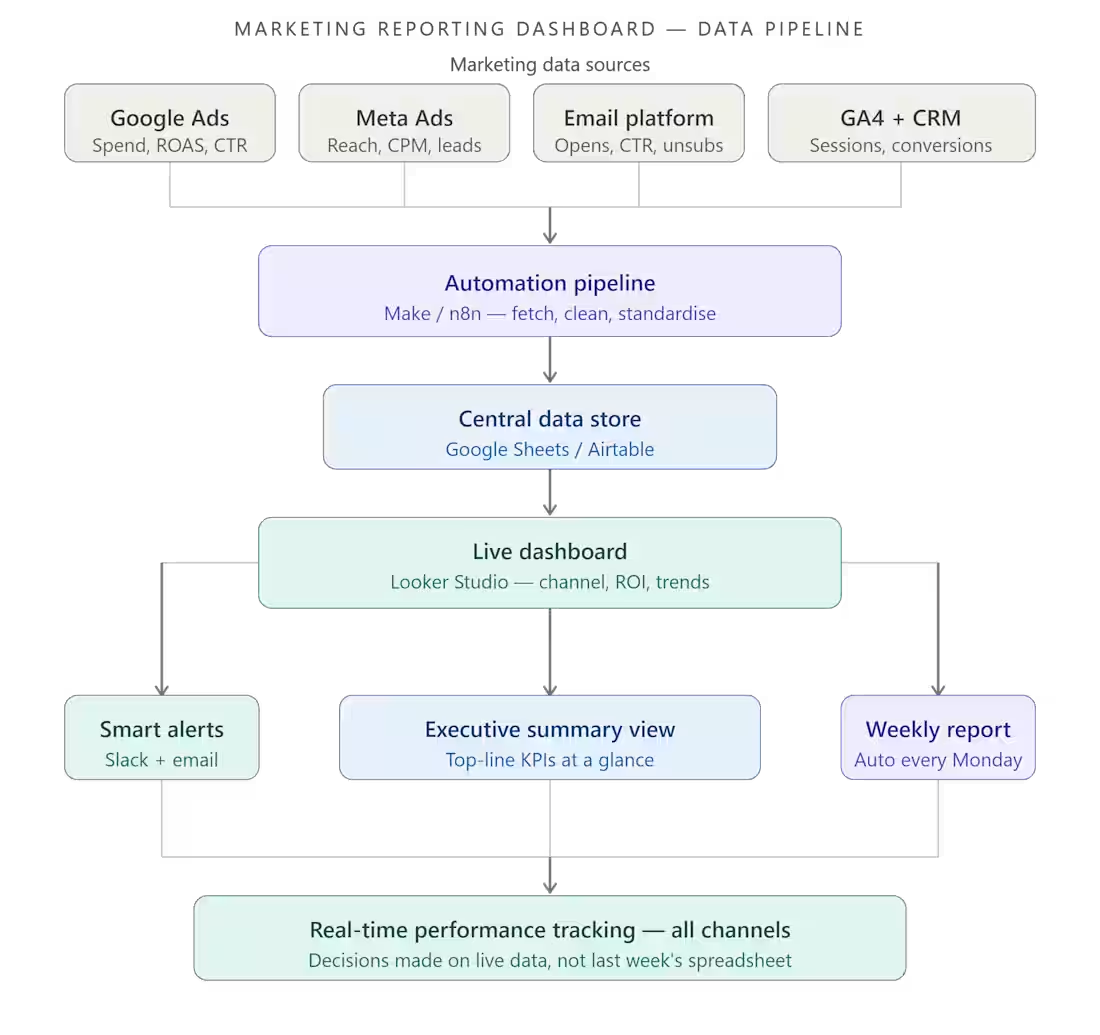
Marketing Reporting Dashboard, From Data Chaos to Real-Time Performance Clarity
Project Description:
I built a fully automated marketing reporting dashboard for a client who had no clear view of how their campaigns were actually performing. Instead of digging through spreadsheets and ad platforms every week, they now have a single live dashboard that shows every key metric, updated automatically, in real time, across all channels.
<<<<<Full Project Write-Up>>>>>
The Problem
The client was running marketing campaigns across multiple channels, paid ads, email, social media, SEO, but had zero visibility into what was actually working.
Every week, someone had to manually pull data from Google Ads, Meta, email platforms, and analytics tools, paste it into a spreadsheet, format it, and then try to make sense of it. By the time the report was ready, the data was already outdated. Decisions were being made on guesswork, not facts.
They were spending budget without knowing which campaigns were driving revenue and which were burning cash.
The Solution
I designed and built a fully automated marketing reporting dashboard that pulls data from all their channels in real time and displays everything in one clean, decision-ready view.
Here is exactly what I built:
Step 1: Data Source Integration
Connected all marketing platforms to a central data pipeline:
Google Analytics 4, website traffic, sessions, conversions
Google Ads, spend, clicks, CTR, ROAS, cost per lead
Meta Ads (Facebook + Instagram), reach, impressions, CPM, conversions
Email platform (Mailchimp / ActiveCampaign), open rates, CTR, unsubscribes
CRM, lead volume, deal value, attribution
Step 2: Automated Data Pipeline
Built an automation layer using Make / n8n that:
Pulls fresh data from every platform on a set schedule (hourly or daily)
Cleans and standardises the data into one consistent format
Pushes it to a central data store (Google Sheets or Airtable)
Triggers alerts if any metric drops below a defined threshold
Step 3: Live Dashboard Build
Built the reporting dashboard in Looker Studio (or Notion / Airtable) with:
Executive summary view, top-line numbers at a glance
Channel-by-channel performance breakdown
Campaign ROI comparison across all platforms
Weekly and monthly trend charts
Cost per lead and cost per acquisition by source
Conversion funnel from click to closed deal
Step 4: Automated Alerts
Set up automated Slack and email alerts that notify the team when:
Ad spend exceeds daily budget threshold
ROAS drops below target
Email open rate falls significantly
A campaign goes from top performer to underperformer
Step 5: Automated Weekly Report
Every Monday morning, a formatted performance summary is automatically sent to the marketing manager, no manual pulling, no formatting, no delays.
The Result
Real-time marketing performance tracking across every channel, fully automated.
The client went from spending hours each week building reports manually to having a live dashboard that updates itself. They can now see at a glance which campaigns are driving results, where budget is being wasted, and exactly where to focus next week's effort, all before their morning coffee.
Tools & Tech Stack
Looker Studio / Google Data Studio: dashboard and visualisation
Google Analytics 4: web traffic and conversion tracking
Google Ads API: paid search performance
Meta Ads Manager: paid social performance
Make / n8n / Zapier: data pipeline automation
Google Sheets / Airtable: central data store
Slack + Email — automated alerts and weekly reports
Mailchimp / ActiveCampaign: email marketing data
Key Outcomes
✅ Single dashboard replacing 5+ manual reports
✅ Data refreshes automatically, always up to date
✅ Full channel visibility: paid, organic, email, social
✅ Automated weekly summary reports, zero manual prep
✅ Real-time alerts when performance dips
✅ Faster, data-driven decisions every single week
Who This Is For
This dashboard is built for you if:
You are running marketing across multiple channels but have no unified view
Your team spends hours every week building the same report manually
You make budget decisions based on gut feel rather than real data
You want to know which campaigns are actually driving revenue — not just clicks
You are scaling marketing spend and need clarity before you increase budget
Why Work With Me
Most marketing dashboards show vanity metrics that look impressive but do not help anyone make a decision. I build dashboards around the numbers that actually matter to your business, cost per lead, ROAS, conversion rate by source, and revenue attribution. Every widget earns its place. If it does not drive a decision, it does not go on the dashboard.
Ready to see all your marketing data in one place?
Send me a message on Contra. Tell me which platforms you are currently running campaigns on, I will tell you exactly how I would connect everything and what your dashboard would look like within a week.
0
22
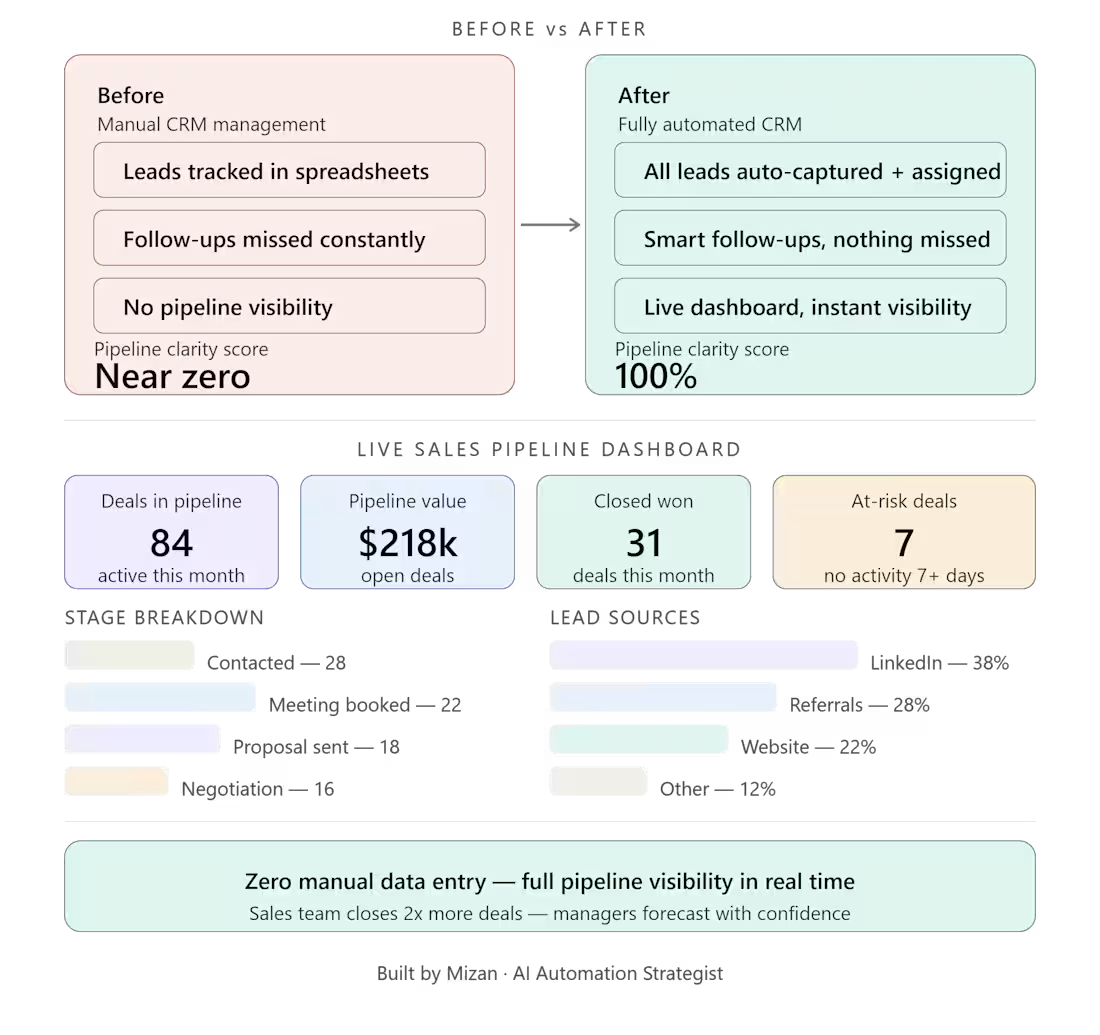
CRM & Sales Pipeline Automation, From Chaotic Lead Tracking to a Crystal-Clear Sales Machine
Project Description:
I built a fully automated CRM and sales pipeline workflow for a B2B client whose lead tracking was scattered across spreadsheets, sticky notes, and inboxes. The result: a clean, automated system that gives the entire sales team real-time visibility into every deal, at every stage, without manual data entry.
Full Project Write-Up
The Problem
The client's sales team was flying blind.
Leads were coming in from multiple sources, LinkedIn, referrals, cold outreach, website forms, but there was no single place to track them. Sales reps each kept their own spreadsheets. Follow-ups were missed. Deals slipped through the cracks. Management had no idea which stage any deal was at without physically asking someone.
The result? Lost revenue, frustrated reps, and zero accountability across the pipeline.
The Solution
I designed and implemented a fully automated CRM workflow that centralized every lead, automated every status update, and gave leadership a real-time view of the entire sales pipeline.
Here's exactly what I built:
Step 1: Unified Lead Capture
All lead sources (website forms, LinkedIn, Apollo, email) now flow automatically into one CRM. No manual entry. Every lead lands in the right place with the right data attached, name, source, company, date, contact info.
Step 2: Automated Pipeline Stages
Each lead moves through clearly defined pipeline stages automatically based on activity triggers:
New lead → Contacted → Meeting booked → Proposal sent → Negotiation → Closed Won / Closed Lost
When a rep books a meeting, the deal moves to the next stage automatically. No one has to remember to update the CRM, it updates itself.
Step 3: Smart Follow-Up Sequences
If a lead goes cold (no activity for X days), the system automatically triggers a follow-up task for the assigned rep, or sends a nurture email on their behalf. Nothing falls through the cracks.
Step 4: Deal Ownership & Accountability
Every lead is automatically assigned to the right rep based on source, territory, or round-robin logic. Ownership is clear from day one. No more "I thought you were handling that."
Step 5: Real-Time Pipeline Dashboard
Leadership gets a live dashboard showing:
Total deals in pipeline and their value
Deals by stage, rep, and source
Conversion rates at every stage
Forecasted revenue for the month/quarter
Deals at risk (no activity in 7+ days)
Step 6: Automated Reporting
Weekly pipeline summary reports are automatically generated and sent to the sales manager every Monday morning, no manual pulling of data.
The Result
Full sales process visibility, from first touch to closed deal.
The sales team went from chaotic, scattered tracking to a clean system that practically runs itself. Reps spend zero time on data entry. Managers have instant visibility. Follow-ups never get missed. And for the first time, the team could accurately forecast monthly revenue.
Tools & Tech Stack
GoHighLevel / HubSpot: CRM and pipeline management
Make / Zapier / n8n: Workflow automation and triggers
Google Sheets / Airtable: Reporting and dashboard layer
Slack: Real-time deal alerts and team notifications
LinkedIn + Apollo: Lead source integrations
Gmail / Outlook: Automated follow-up sequences
Key Outcomes
✅ Zero manual data entry across the sales team
✅ 100% lead capture from all sources, nothing missed
✅ Automatic follow-up triggers, no deals go cold silently
✅ Full pipeline visibility for leadership in real time
✅ Weekly automated sales reports, no manual prep
✅ Accurate revenue forecasting for the first time
Who This Is For
This system is built for you if:
Your sales team tracks deals in spreadsheets or their own heads
Leads are coming in from multiple sources but nobody knows where they stand
Your manager has to ask reps for updates instead of just checking a dashboard
You've lost deals simply because someone forgot to follow up
You're trying to scale your sales team without scaling the chaos
Why Work With Me
Most CRM setups collect dust because they're built for how a vendor thinks sales works, not how your team actually works. I build CRM workflows around your real process: your lead sources, your pipeline stages, your team's behavior. The result is a system your reps actually use, because it removes work rather than adding it.
Ready to see your entire sales pipeline in one place?
Send me a message on Contra. Tell me where your leads currently live and how many reps are on your team, I'll map out exactly how I'd build this for your business.
0
24
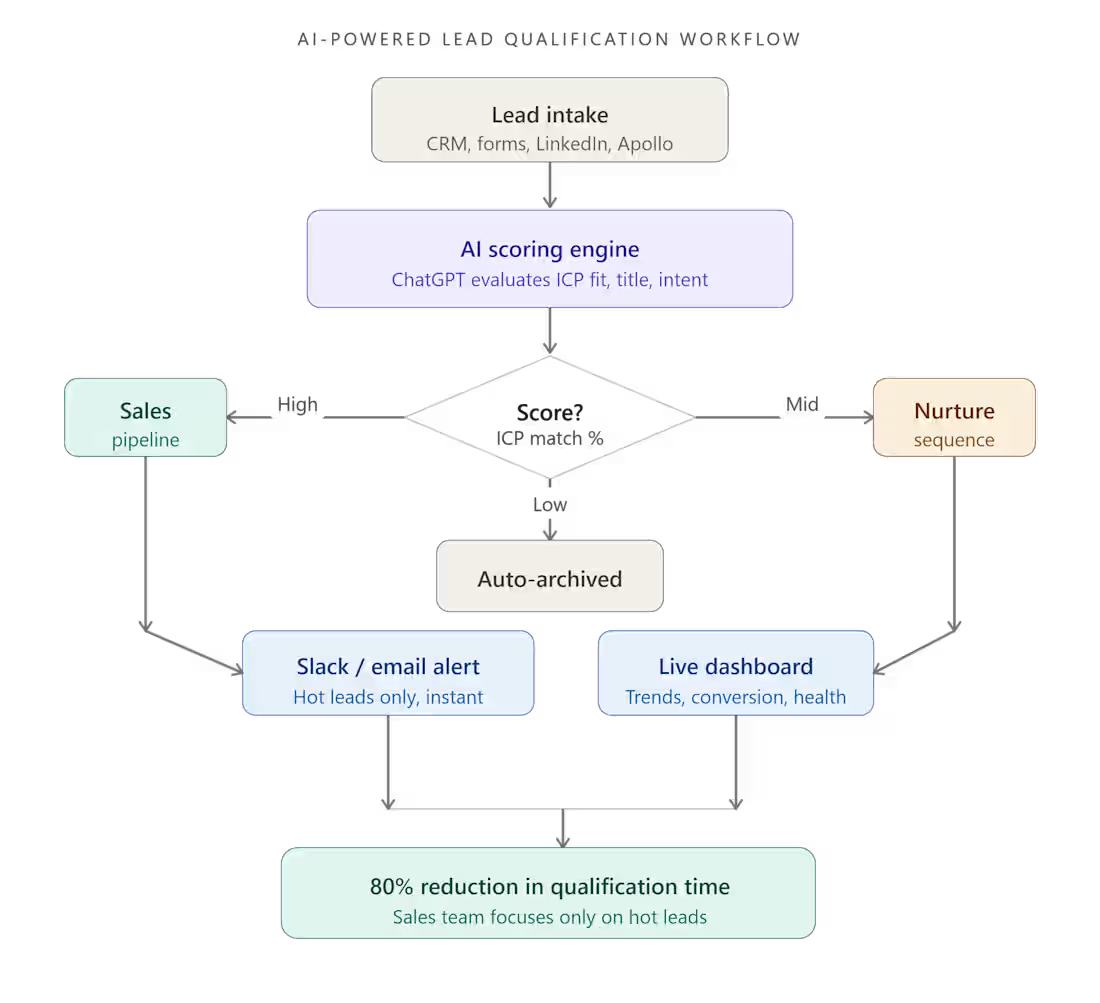
AI-Powered Lead Qualification Workflow, 80% Faster, Zero Manual Effort
I built an end-to-end AI workflow that automated manual lead qualification for a B2B client. Using ChatGPT + automation tools, I reduced qualification time by 80%, turning a slow, human-heavy process into a smart, scalable system that runs on autopilot.
The Problem
My client was drowning in unqualified leads.
Every day, their sales team spent hours manually reviewing leads. checking job titles, company sizes, industry fit, and engagement signals, just to figure out who was worth talking to. This wasn't just slow. It was expensive, inconsistent, and burning out their team.
They needed a smarter way to sort signal from noise.
The Solution
I designed and built a fully automated AI-powered lead qualification workflow using ChatGPT and a custom automation stack.
Here's how it works:
Step 1: Lead Intake
New leads flow in automatically from their CRM or lead sources (forms, LinkedIn, Apollo). No manual entry needed.
Step 2: AI Scoring with ChatGPT
Each lead is sent to a ChatGPT-powered prompt engine that evaluates:
Job title relevance
Company size and industry fit
Intent signals and keywords
ICP (Ideal Customer Profile) match score
The AI assigns a qualification score and a short reasoning note, like having a junior SDR review every lead instantly.
Step 3: Automated Routing
Based on the score, leads are automatically routed:
✅ High-fit leads → straight to the sales pipeline
🔁 Mid-fit leads → nurture sequence
❌ Low-fit leads → archived automatically
Step 4: Notification & Dashboard
The sales team gets instant Slack/email alerts for hot leads only. A live dashboard shows qualification trends, conversion rates, and pipeline health in real time.
The Result
80% reduction in lead qualification time.
What used to take a team hours now happens in seconds, automatically, consistently, and at scale. The sales team now focuses 100% of their energy on high-fit prospects instead of wasting time on manual sorting.
Tools & Tech Stack
ChatGPT (GPT-4): AI qualification engine
Make / Zapier / n8n: Workflow automation
CRM Integration: HubSpot / GoHighLevel
Slack + Email: Real-time lead alerts
Google Sheets / Airtable: Live dashboard & reporting
Who This Is For
This system is a perfect fit if you are:
A B2B founder or sales team getting more leads than you can manually process
Running outbound campaigns and wasting time on cold prospects
Paying SDRs to do work that AI can handle in milliseconds
Wanting to scale your pipeline without scaling your headcount
Why Work With Me
I don't just set up tools, I build systems that solve real business problems. Every workflow I create is designed around your specific ICP, data flow, and team's daily reality. You get a system that actually gets used, not just a pretty automation diagram.
Ready to qualify leads on autopilot?
Let's talk. Send me a message on Contra and tell me about your current lead volume and qualification process. I'll tell you exactly how I'd build this for your business.
1
41
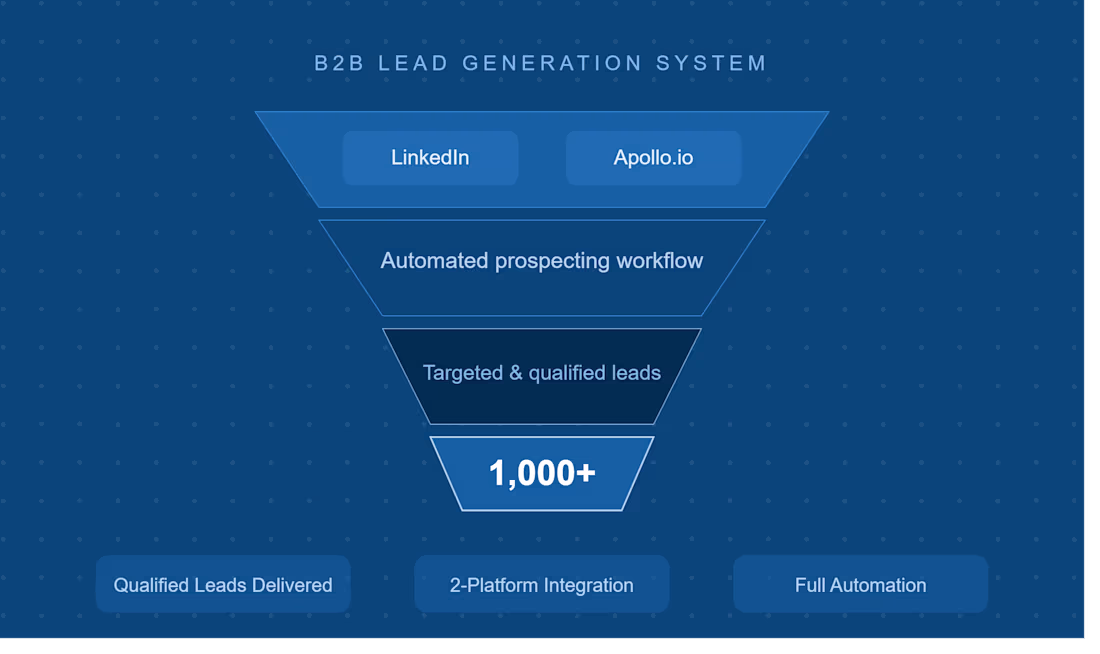
Built a Lead Generation System for B2B Prospecting
Problem:
Client needed qualified leads.
Solution:
Created prospecting workflow using LinkedIn and Apollo.
Result:
Generated 1,000+ targeted leads.
0
34