Freelancers using WonderFreelancers using WonderMeet Petlancer: The Ultimate Freelancer Sidekick 🐾
As a freelancer, staying motivated through intense deep-work blocks can be hard at times, so I wanted to marry that 90s nostalgia and fun of Tamagotchis with a practical productivity hub to create the ultimate focus companion.
Fun fact: In real life, my core motivation to work is providing the best possible life for my 9 pets (3 cats, 1 dog, and 5 goats!). So, I built an interactive app where your actual freelance output directly translates into taking care of your virtual pixel pet.
Key Features:
⭐ The "Choose Your Starter" Onboarding: a setup screen where you choose and name your companion - whether that's a cute cat, a happy dog or a silly goat
⭐ The "Productivity-Meets-Fun" Dashboard: on the left is your fun side - with your pet, along with its Hunger, Cleanliness, and Energy bars. On the right is the productivity side - with a 25-minute Pomodoro timer and your daily to-do list.
Completing pomodoros and checking off your daily tasks earns you credits that you can spend to feed, clean or play with your pixel buddy.
As a first-time user of Wonder, it's definitely one of those tools I can see myself using again in the future. I love how it works so well with my casual-style prompts, it feels like I'm just chatting with a chat-based app like Gemini. I also really like that, at the end of each implementation, it suggests next steps or asks questions along the way if needed. You really feel like it's your partner in crime rather than just an AI that's doing what you tell it to do.
And of course, you can check out my design file here: https://app.wonder.so/freelancingwithsilvia/files/019f3960-2948-7f1b-8079-f7280babb4ae Iris - turn the work you already did into case studies that get you hired.
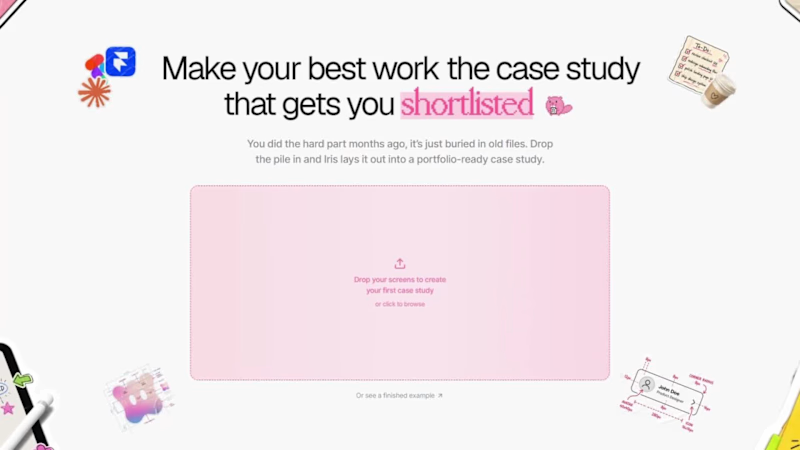
Freelance design runs on case studies, but they're the chore you never get to. You ship the project, move on, and your best work stays invisible. I had five or six projects sitting exactly like that, so I built the tool I needed.
Drop the screens you already have, answer a few quick questions, click or just talk, and Iris drafts the whole case study: a real structure, your screens placed and staged, every word yours to edit. The AI rewrites the line you select the way you want, and it never touches your pixels, it remembers your screens and helps you stage them. You stay the designer.
I designed Iris entirely in Wonder and shipped it live with Wonder's Claude MCP - canvas to code and back in minutes after pivoting 48 hours before the deadline i'm grateful for it 😂 . Every asset, down to the pixel mascot, was generated in Wonder.
👉 Try it: https://iris-six-chi.vercel.app
(https://iris-six-chi.vercel.app)Linkedin post: https://www.linkedin.com/feed/update/urn:li:activity:7480047687556472832
(https://www.linkedin.com/feed/update/urn:li:activity:7480047687556472832/)Wonder file : https://app.wonder.so/th-o/files/019f276d-deb3-717d-8940-1a86c6f0317f
Built in Wonder. ══════════════ ✦ ATLAS ✦ ══════════════
The Living Memory of Humanity
═══════════════════════════════════════
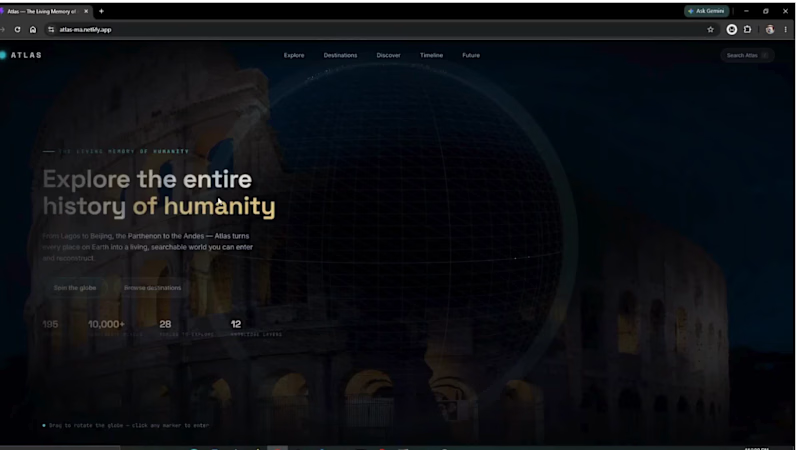
Atlas is an immersive experience that transforms the way we explore history. Instead of reading about the past, users travel through it.
Starting from a living globe, Atlas lets you select any location and begin a Memory Flight—a cinematic journey where the world rewinds around you. Cities transform across centuries, civilizations emerge, cultures evolve, and every place reveals the stories that shaped it.
Built with Wonder, I used its design capabilities to rapidly prototype the product, create a scalable design system, explore multiple historical experiences, and develop a complete storyboard that guided the final interactive experience. From the global navigation to each Memory Flight, Wonder made it possible to iterate quickly while maintaining a polished, cohesive vision.
Atlas is built around one simple belief:
Every place remembers. Every memory tells a story.
Live Demo: Click here to test the Live Demo Link (https://atlas-ma.netlify.app/)
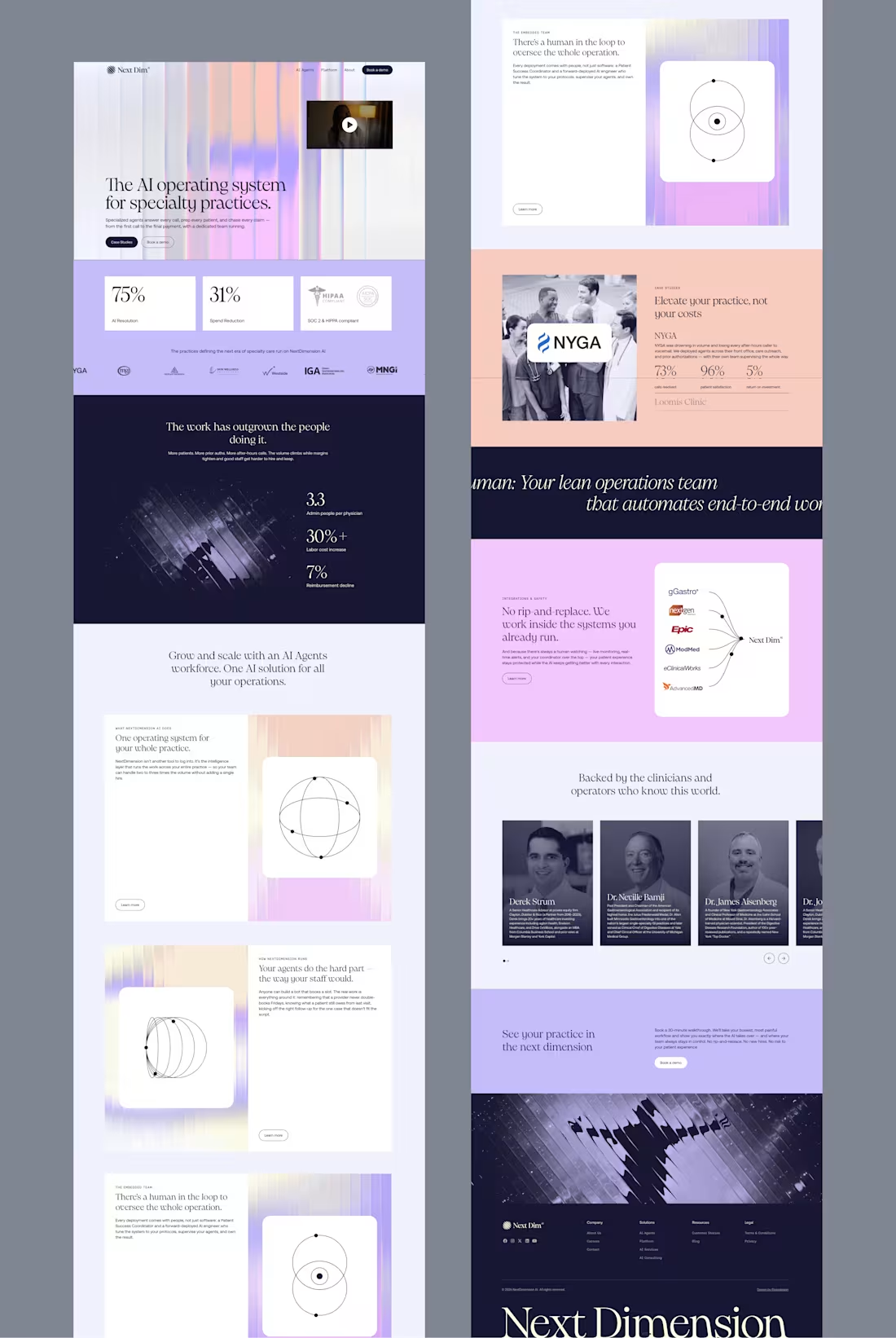
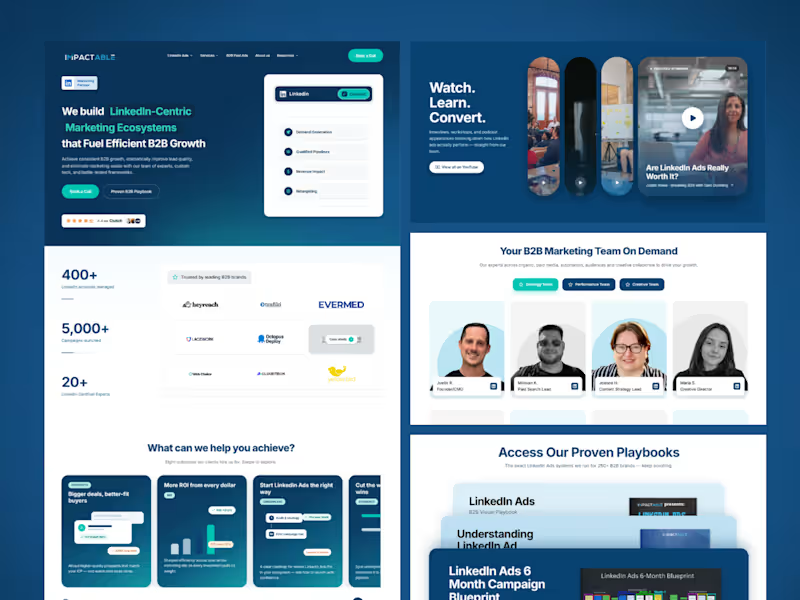
Wonder Design File: Click here to see Wonder Design source (https://app.wonder.so/user-623bcf/files/019f1e87-2457-7975-ac66-067908dd5d95) I was in the middle of auditing Impactable's homepage because I felt it could convert better.
The strategy was done, and the redesign was already mapped out. Then, right before I started the design execution... I came across Wonder's design challenge. Perfect timing.
Instead of jumping into Figma like I normally would, I thought...
"Why not put Wonder through a real B2B project?"
This wasn't a concept or a fake landing page, It was a real redesign I plan to pitch to the company.
As a Performance Designer for B2B and SaaS teams, my job isn't just making things look good. It's auditing websites and ads, finding conversion gaps, building strategy, and turning those decisions into landing pages that drive results.
The strategy is the fun part, but the execution is usually the slow part.
So I let Wonder take over that stage.
Instead of spending days designing every section from scratch, I used Wonder to bring my ideas to life, one section at a time, while I stayed focused on the creative direction. The experience felt like having a UI Designer do the execution work for me.
The result was incredible. A project that would normally take me around 10 days was ready in just 3. That's 70% of my time back.
Less time pushing pixels. More time solving real business problems.
Here's the Wonder file if you're curious to see how it came together:
🔗 https://app.wonder.so/josiah-damilare/files/019f2a19-450b-7a87-a138-86ee0a065ec0
And here's the first deployed version:
🚀 https://impactable-web-build.vercel.app/
Huge shout out to the Wonder team for building something that fits the way I already work instead of asking me to change my entire workflow. Chromatic Duel is a visual decision experience built in Wonder for the Contra x Wonder Challenge.
The project explores a simple idea:
Color palette selection should not only be about taste.
It should survive pressure.
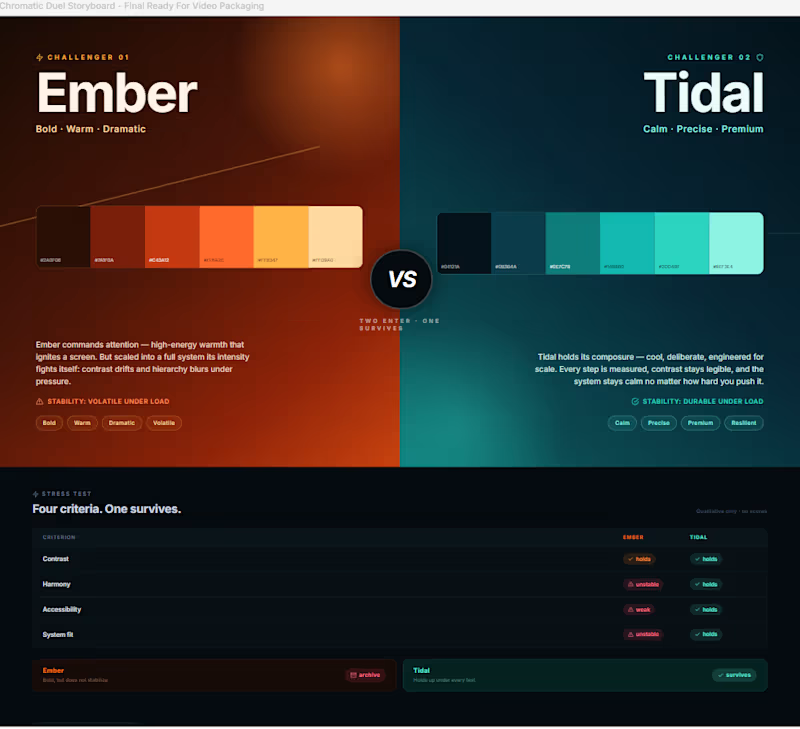
Chromatic Duel turns two competing palette directions into a visible stress test. Ember enters as the bold, warm, dramatic direction. Tidal enters as the calm, precise, premium system direction.
Instead of presenting both palettes as moodboards, the Wonder canvas frames them as a duel.
The question is not:
“Which one looks better?”
The question is:
“Which one survives?”
Inside Wonder, I used the canvas to shape the full decision journey: the initial duel, the stress-test comparison, the iteration trail, the pivot in criteria, the workflow proof layer, and the final verdict.
The palettes are compared through four qualitative lenses:
Contrast
Harmony
Accessibility
System fit
As the system became clearer, Ember felt expressive but less stable. Tidal held together better across the interface direction, making it the stronger final choice.
Final Wonder verdict:
TIDAL SURVIVES.
Ember is archived.
I also created a Framer page as a bonus interactive wrapper. It lets visitors try challenger palettes and compare them visually against the fixed Tidal benchmark. The Framer page extends the experience, but the official build, workflow, and final decision remain in Wonder.
The core memory line:
The palette that survives the stress test wins.
Wonder file:
https://app.wonder.so/faadil-boussari/files/019f35d4-04d2-7664-afd6-bb717a9100bf
Walkthrough video:
Uploaded directly with this submission.
Framer bonus page:
https://cyan-lettuce-159672.framer.app/