Projects using Wave AccountingProjects using Wave Accounting
Cover image for ๐Ÿ“Š ๐–๐ก๐ฒ ๐ญ๐ก๐ž ๐‚๐ก๐š๐ซ๐ญ ๐จ๐Ÿ
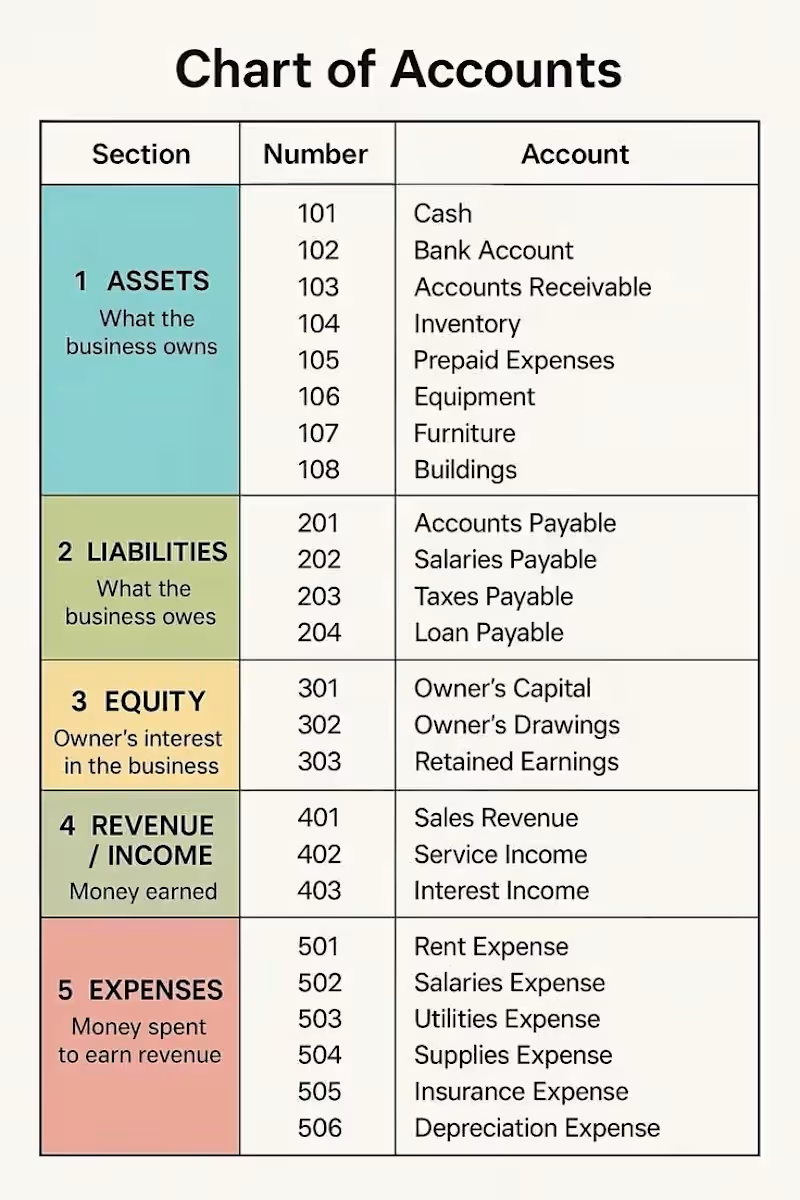
๐Ÿ“Š ๐–๐ก๐ฒ ๐ญ๐ก๐ž ๐‚๐ก๐š๐ซ๐ญ ๐จ๐Ÿ ๐€๐œ๐œ๐จ๐ฎ๐ง๐ญ๐ฌ ๐Œ๐š๐ญ๐ญ๐ž๐ซ๐ฌ Behind every clear financial report is a well-organized ๐‚๐ก๐š๐ซ๐ญ ๐จ๐Ÿ ๐€๐œ๐œ๐จ๐ฎ๐ง๐ญ๐ฌ (๐‚๐Ž๐€). Think of the COA as the financial filing system of a business. It organizes transactions into the right categories so financial information stays clear, accurate, and useful. The five main account categories are: ๐Ÿ’ฐ๐€๐ฌ๐ฌ๐ž๐ญ๐ฌโ€” What the business owns ๐Ÿ“Œ ๐‹๐ข๐š๐›๐ข๐ฅ๐ข๐ญ๐ข๐ž๐ฌโ€” What the business owes ๐Ÿ‘ค ๐„๐ช๐ฎ๐ข๐ญ๐ฒโ€” The ownerโ€™s interest in the business ๐Ÿ“ˆ๐‘๐ž๐ฏ๐ž๐ง๐ฎ๐ž โ€” What the business earns ๐Ÿ’ธ ๐„๐ฑ๐ฉ๐ž๐ง๐ฌ๐ž๐ฌโ€” What the business spends to operate and generate income A well-structured Chart of Accounts can help businesses: โœ… Keep financial records organized โœ… Generate clearer financial reports โœ… Understand where money is coming from and going โœ… Make more informed business decisions You donโ€™t need to be an accountant to start understanding your numbers. Sometimes, it begins with knowing how your financial information is organized. As a bookkeeper, I believe organized books should do more than produce reportsโ€”they should help business owners understand the story behind their numbers. ๐Ÿ’ฌ๐–๐ก๐š๐ญ ๐›๐จ๐จ๐ค๐ค๐ž๐ž๐ฉ๐ข๐ง๐  ๐ญ๐จ๐ฉ๐ข๐œ ๐ฐ๐จ๐ฎ๐ฅ๐ ๐ฒ๐จ๐ฎ ๐ฅ๐ข๐ค๐ž ๐ž๐ฑ๐ฉ๐ฅ๐š๐ข๐ง๐ž๐ ๐ข๐ง ๐š ๐ฌ๐ข๐ฆ๐ฉ๐ฅ๐ž ๐ฐ๐š๐ฒ ๐ง๐ž๐ฑ๐ญ?
1
257
Cover image for How to audit a CPA
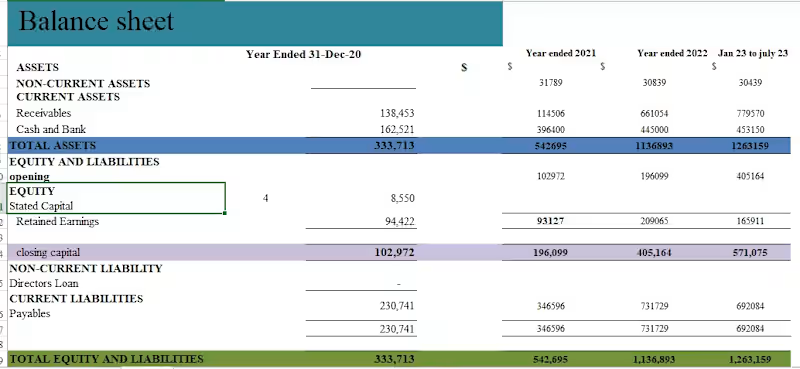
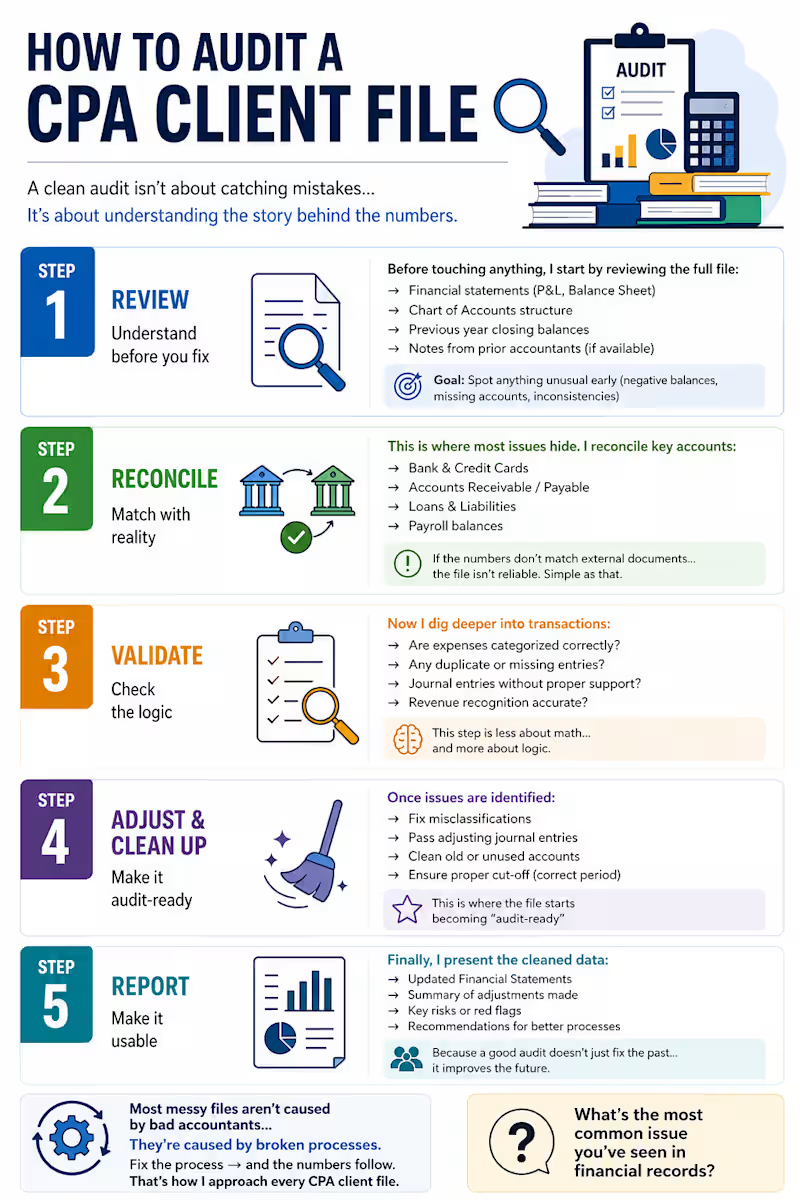
How to audit a CPA client file (step-by-step) ๐Ÿ” A clean audit isnโ€™t about catching mistakesโ€ฆ Itโ€™s about understanding the story behind the numbers. Iโ€™ve worked on 10 of client filesโ€ฆ and while every business is differentโ€ฆ this simple structure works almost every time. It all comes down to: (1) Review โ†’ (2) Reconcile โ†’ (3) Validate โ†’ (4) Report โžก๏ธ STEP 1: REVIEW (Understand before you fix) Before touching anythingโ€ฆ I start by reviewing the full file: โ†’ Financial statements (P&L, Balance Sheet) โ†’ Chart of Accounts structure โ†’ Previous year closing balances โ†’ Notes from prior accountants (if available) Goal: Spot anything unusual early (negative balances, missing accounts, inconsistencies) โžก๏ธ STEP 2: RECONCILE (Match with reality) This is where most issues hide. I reconcile key accounts: โ†’ Bank & Credit Cards โ†’ Accounts Receivable / Payable โ†’ Loans & Liabilities โ†’ Payroll balances If the numbers donโ€™t match external documentsโ€ฆ the file isnโ€™t reliable. Simple as that. โžก๏ธ STEP 3: VALIDATE (Check the logic) Now I dig deeper into transactions: โ†’ Are expenses categorized correctly? โ†’ Any duplicate or missing entries? โ†’ Journal entries without proper support? โ†’ Revenue recognition accurate? This step is less about mathโ€ฆ and more about logic. โžก๏ธ STEP 4: ADJUST & CLEAN UP Once issues are identified: โ†’ Fix misclassifications โ†’ Pass adjusting journal entries โ†’ Clean old or unused accounts โ†’ Ensure proper cut-off (correct period) This is where the file starts becoming โ€œaudit-readyโ€ โžก๏ธ STEP 5: REPORT (Make it usable) Finally, I present the cleaned data: โ†’ Updated Financial Statements โ†’ Summary of adjustments made โ†’ Key risks or red flags โ†’ Recommendations for better processes Because a good audit doesnโ€™t just fix the pastโ€ฆ it improves the future. === Most messy files arenโ€™t caused by bad accountantsโ€ฆ Theyโ€™re caused by broken processes. Fix the process โ†’ and the numbers follow. Thatโ€™s how I approach every CPA client file. Whatโ€™s the most common issue youโ€™ve seen in financial records?
0
104