NanoMech: The Real-Time Multimodal AI Trading Assistant 📈🤖
Built for the Gemini Hackathon
Traders know that in the market, seconds equal dollars. By the time you switch between your chart, your analysis tools, and your risk calculator, the candle has already moved, and your setup is gone.
I wanted to fix this. For the Gemini Hackathon, I built NanoMech—an AI that sits on top of your screen, sees exactly what you see, and gives you a complete trade plan in seconds. No API keys required, and no leaving your chart.
💡 The Solution
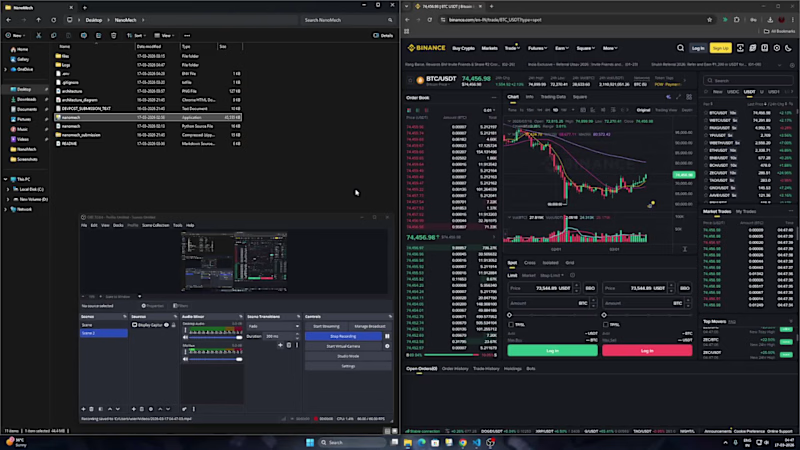
NanoMech runs as two frameless, transparent overlays on top of any trading platform. It uses Google Gemini 2.5 Flash's multimodal vision capabilities to visually read your screen and deliver instant insights.
Overlay 1: Market Analysis
Trend: Analyzes bullish/bearish market structure and moving average crossovers.
Liquidity: Evaluates order book depth, bid/ask walls, and support/resistance zones.
Momentum: Breaks down candlestick patterns, volume behavior, and price velocity.
Overlay 2: Trade Setup & Risk Management
AI-Extracted Targets: Instantly provides Entry Price, Target Price, and Stop Loss.
Live CALC Engine: Calculates Risk Amount ($), Position Size (Units), and Risk-to-Reward (R:R) Ratio. Everything updates live as you type in your desired risk percentage.
🛠️ How It Works (Under the Hood)
Vision-to-Text Processing: Captures the screen in real-time using the mss library and sends the raw screenshot to Google Gemini 2.5 Flash via the Google GenAI SDK.
Prompt Engineering: Engineered strict structured prompts using [ANALYSIS] and [TRADE] tags to force the LLM to output reliably parseable price data.
Regex Extraction: Uses regex to pull the exact Entry, Target, and Stop prices from the AI's response and wire them directly into the local risk calculator.
Custom Desktop UI: Built always-on-top transparent overlays using Python's Tkinter, utilizing threading to keep the UI fully responsive during API calls.
Hands-Free Scanning: Integrated a global hotkey (Ctrl+A+I) and an Auto Mode that scans the chart every 20 seconds.
🧗♂️ Challenges Overcome
Structured LLM Outputs: Getting an LLM to consistently return prices in a parseable numeric format is notoriously tricky. We solved this with rigorous prompt engineering and robust fallback handling.
Thread-Safe UI: Tkinter isn’t thread-safe. We engineered a solution to route all UI updates through root.after() callbacks from the active analysis thread.
UX/UI Friction: Tuning the transparency and colors so the text remains readable across both dark and light chart themes, while ensuring our global hotkeys didn't conflict with native trading platforms.
🚀 What We Learned & What's Next
This project proved just how incredibly capable Gemini 2.5 Flash is at visual reasoning. It accurately identified complex candlestick patterns, moving averages, and volume spikes from a raw image alone.
The Roadmap for NanoMech:
Voice Output: Speaking the trade setup aloud for a 100% hands-free experience.
Multi-Monitor Support: Allowing users to select which screen the AI tracks.
Cloud Hosting: Running NanoMech as a scalable web service on Google Cloud Run.
Trade Logging: Automatically tracking how the AI's setups perform over time.
💻 Built With
Python | Google Gemini 2.5 Flash | Google GenAI SDK | Google Cloud | Tkinter | mss | pillow | Regex
Ready to try it out? Check out the code and run it yourself: https://github.com/omshukla24/NanoMech
0
255
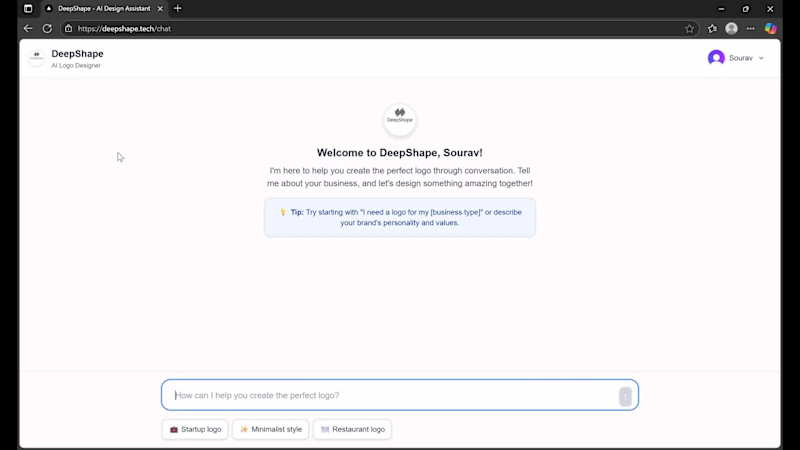
What happens when your assistant turns into your creative partner?
This is what we built few months back, a Conversational AI Design Assistant that could generate designs using natural conversation. The goal was to bypass traditional prompt engineering and replace it with natural conversation
The experience was fulfilling, with learning failure and overcoming everyday challenges. Looking forward to share more such project
If anyone is working on exciting projects, and believe I can contribute in any capacity, let's have a chat
2
1
230

How I Built My Own Telegram Lead Capture System in n8n.
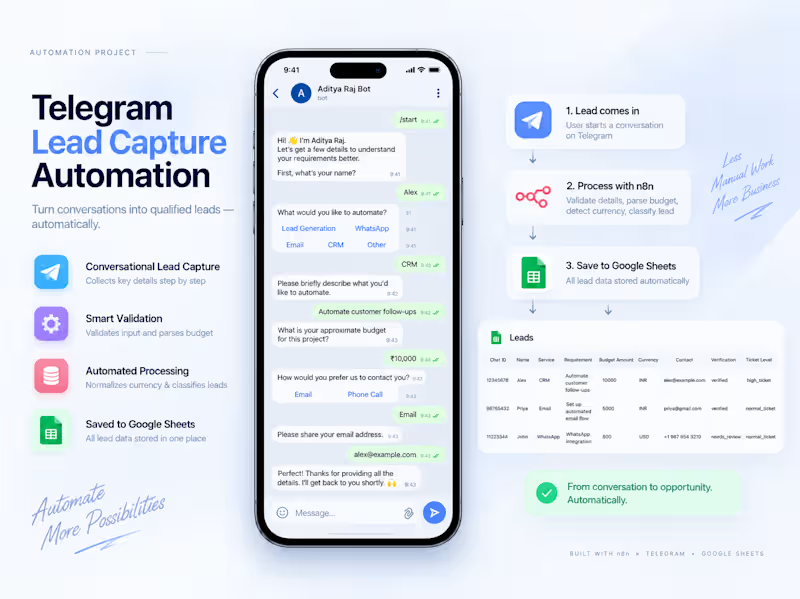
The goal was simple: create a Telegram-based lead capture system that could collect enquiries in a structured way, remember where each user was in the conversation, validate the information, normalize budgets across different currencies, classify leads, and finally store everything cleanly in Google Sheets.
I come from a Python background, so writing the chatbot logic in code would have been the easier route for me. But for this project, I deliberately chose to build the conversational flow using native n8n nodes instead of relying on a Code node. I wanted to understand how state management, branching, routing, and multi-step conversations could be handled visually inside n8n.
I only used code later where it made more sense—validating lead data, parsing budget information, detecting currencies, converting values to USD, and classifying higher-value leads.
At the moment, this system does exactly what I need it to do. If the volume of leads grows in the future, I’d extend it further—for example, automatically sending myself an email notification whenever a high-ticket lead comes in.
For now, though, I wanted to keep it practical rather than over-engineer it.
Built with: Telegram, n8n, JavaScript, Google Sheets, n8n Data Tables, and a currency conversion API.
1
173

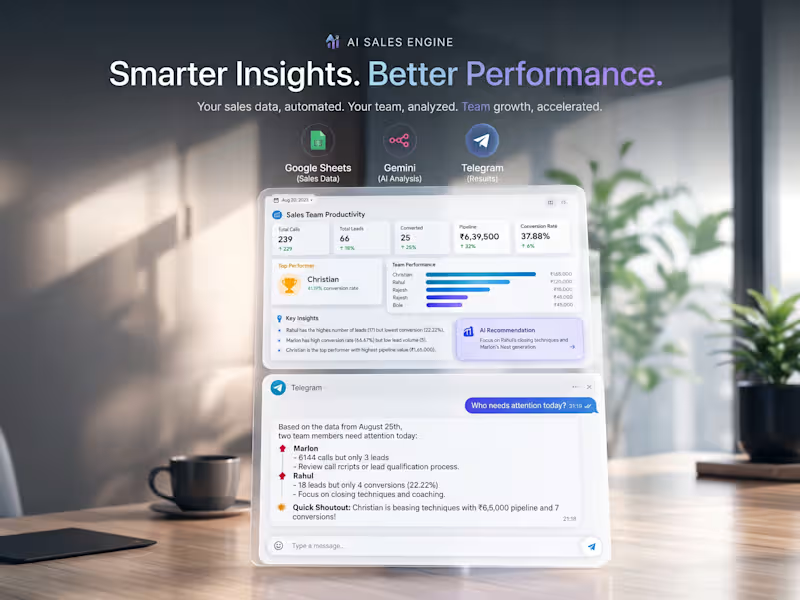
Where most Sales Manager go wrong isn't lack of data, it's getting overwhelmed with numbers and targets. What actually matters is not numbers, but "why" behind it.
So we built an Agentic AI Sales Engine that sits on your Telegram, dissects the "why" behind what's happening in your sales team. It doesn't just throws number but tells you why someone is falling short while another pulling ahead, surfaces the operational bottlenecks underneath the numbers, and suggests what can actually be done better, all in real time at 0 infrastructure cost.
Problem:
A Sales Manager needed a fast way to check teams performance, calls, leads, conversions, pipeline value, but without opening spreadsheets or chasing manual reports. But raw numbers alone don't tell you what to do. Two reps can have identical conversion rates for completely different reasons. The manager needed something that could reason about the data, not just report it but by answering questions like "who needs attention today?" or "why is Rahul underperforming?"
What We Built
A fully automated Telegram bot, powered entirely by a self-hosted n8n workflow, that reads live data from Google Sheets and combines two layers: hard KPI reporting on demand, and an AI reasoning layer that interprets those numbers into a story a manager can act on.
The "Why Layer"
This is a part that makes it more than a dashboard, instead of just telling Rahul 12% conversion, the engine reasons over calls, leads pipeline and conversion patterns together and drives an analysis thereby providing the right suggestive next steps.
Skills Demonstrated
:Workflow automation & API orchestration (n8n)
:OAuth 2.0 debugging and Google Cloud API setup
:Data processing / aggregation logic (JavaScript in Code nodes)
:LLM integration with grounded, hallucination-resistant prompting
:Conversational bot design (Telegram Bot API)
:Building production-usable tools on a strict zero-cost budget
1
223