Freelancers using Chatbase in Germany
Freelancers using Chatbase in Germany
Sign Up
Post a job
Sign Up
Log In
Filters
2
Projects
People
Aleksa Spalevic
Germany
AI Solutions Architect
5.0
Rating
29
Followers
Follow
Message
AI Solutions Architect
2
u-own GmbH | AI Website-Chatbot
2
45
15
I didn't just build a Valentine's project. I built my girlfriend's Valentine's gift. "Spoken" turns your love story into a cinematic experience! Speak your memories, upload your photos, and AI transforms it all: → Type or dictate your story with Wispr Flow → Upload the photos that mean the most → Claude AI crafts a poetic narration → ElevenLabs gives it a warm, human voice → Photos come alive with cinematic transitions → One unique link = Your Valentine's gift Speaking my ideas out loud made me think differently about what I was creating. Built with: Wispr Flow × Lovable × Claude API × ElevenLabs 🔗 Try it yourself! (https://spoken.aleksa.ai/) 🔗 LinkedIn Post (https://www.linkedin.com/feed/update/urn:li:activity:7428377582875627521/)
11
15
503
1
My new Website created with Lovable! 🔥 https://aleksa.ai/en
3
1
197
1
AI Powered Company Wiki created with Lovable.dev
1
11
Chatbase
(1)
Follow
Message
Natalie Becker
Germany
Funnel System Setup & Testing Online Events, Full User Flows
5.0
Rating
2
Followers
Follow
Message
Funnel System Setup & Testing Online Events, Full User Flows
0
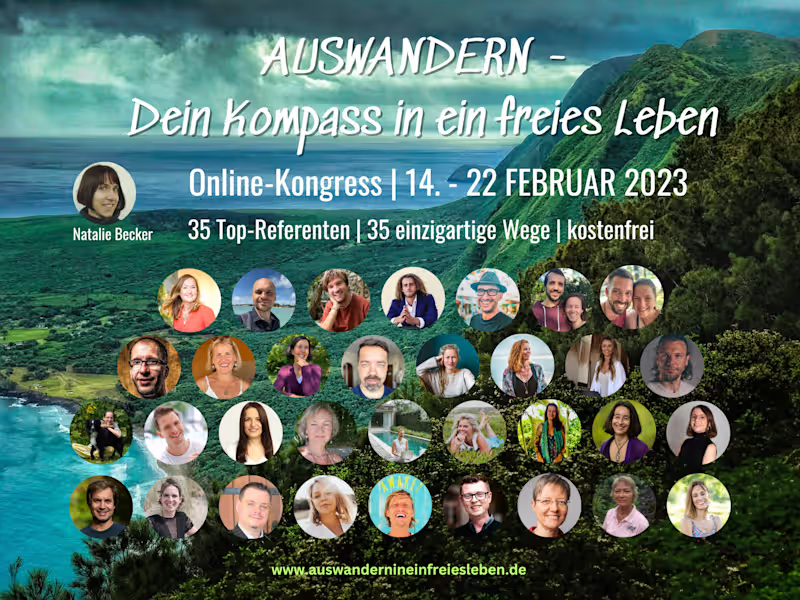
Online Summit System Setup & End-to-End Implementation This work involved the full technical setup and implementation of two multi-day online summits, built end-to-end without external support. The focus was on translating an existing concept into a functioning system — including funnel structure, access logic, content delivery, and system integrations. Key responsibilities included: - Technical setup of the summit system in WordPress - Implementation of funnel flows (registration, access, email sequences) - Setup of email automation and participant management (GetResponse) - Integration of video content and access structure - Structuring and implementing user flows across the full summit experience - End-to-end testing of the registration and access process The work required a strong understanding of how different system components interact — from entry point to content access. While the project also included conceptual and content-related elements, this work entry focuses on the technical implementation and system behavior.
0
64
0
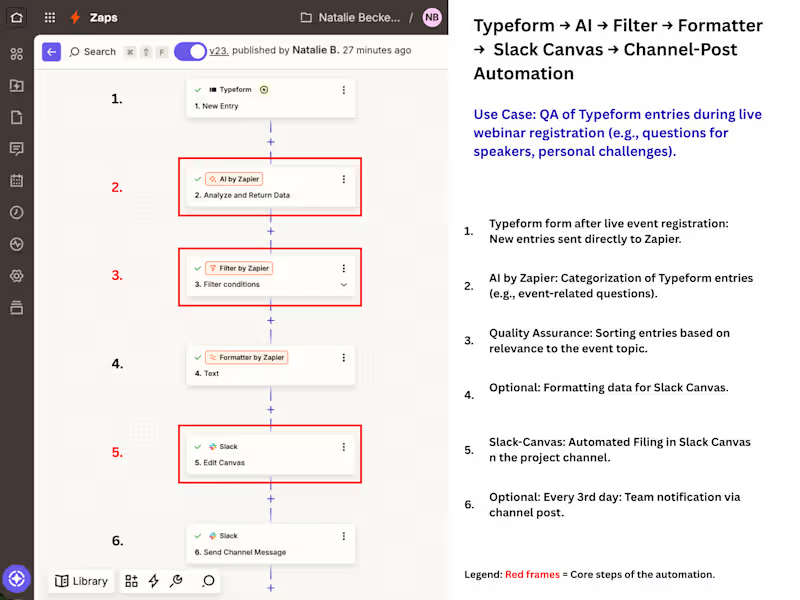
AI-Powered Event Operations: Automating Attendee Insights Overview: I designed and implemented a custom automation ecosystem for a large-scale online event to eliminate manual data handling. By connecting Typeform, OneDrive, and Slack, I transformed a chaotic manual process into a streamlined, AI-categorized workflow that recovers critical "brain capacity" for the core event team. The Challenge: The project faced a massive manual workload behind the scenes. Attendee data had to be exported, analyzed, and filed into spreadsheets by hand. This led to a significant delay in information sharing, leaving the team on Slack without real-time insights during critical event phases. The Solution: I built a multi-step automation using Zapier that does more than just move data: AI Categorization: Integrated an AI step (GPT-4 via Zapier) to analyze and categorize attendee responses in real-time. Automated Filing: Structured data is automatically filed into a Slack Canvas for immediate team access and a OneDrive Excel sheet for long-term tracking. Smart Quality Assurance: Built-in filters ensure only relevant, high-quality entries proceed to the team view. Interval Notifications: To prevent "notification fatigue," I added a digest step that sends a summary report to the Slack channel every three days, including direct links to new entries. The Results: - Time Savings: Manual operations were reduced from several hours per week to just a few minutes of monitoring. - Reduced Dependency: Shifted the process from permanent human dependency to sporadic system maintenance. The client is no longer reliant on a full-time assistant for data handling, only on occasional oversight. - Scalability: The system is built for "qualified maintenance"—it can be quickly adapted for future events, replacing repetitive copy-pasting with a scalable architecture. - Deliverables: In addition to the automation, I provided a visual process map (SOP) and a Loom walkthrough to ensure the client’s team can manage the system internally.
0
35
1
I went through a full purchase flow just recently before our webinar launch — sales page, checkout, upsell, emails, the whole flow. At first glance, nothing looked off. But going through it like an actual user, a few things started to surface. In one path, the upsell linked to the wrong offer. In another, the welcome email never arrived. Access only worked because I used the password reset option — otherwise, nothing happened. These were the kinds of issues that started to surface. What I notice quite often in funnels is this: everything works in isolation, but the transitions between systems are where things actually break. And no one really sees it, because most tests follow the expected path, and most testers are part of the bubble in which the flow was originally created. This is often where it helps to have someone outside the original setup, with an eye for UX, flow logic and the smaller details that tend to be overlooked. That’s usually where QA becomes less about checking things and more about understanding how the system actually behaves under slightly different conditions. Not perfect conditions, just ordinary ones. I’d be curious how you currently approach testing your purchase or access flows.
1
1
91
0
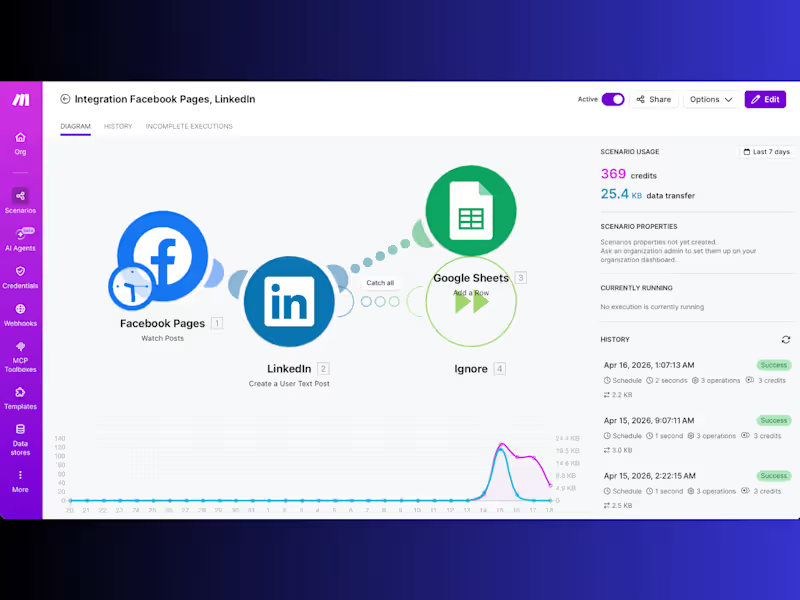
Automated Crossposting System (Facebook → LinkedIn + Google Sheets Logging) Overview: Built an automated crossposting system for a social media use-case, where new posts from a Facebook business page are automatically published as LinkedIn text posts and simultaneously logged in Google Sheets. The system ensures consistent publishing, full transparency, and reliable tracking — without manual intervention. The Challenge: Crossposting content between platforms required repetitive manual work: - Switching between Facebook and LinkedIn - Copying and adapting post content - Publishing posts individually - Tracking whether posts were successfully published This created a time-consuming workflow and introduced uncertainty around completeness and consistency. The Solution: Developed a Zapier-based automation that handles publishing and logging in one continuous workflow: - New Facebook posts are automatically detected - Content is transformed into LinkedIn-compatible text posts - Posts are published on LinkedIn without manual input - Each execution is logged in Google Sheets for transparency and tracking Zap Architecture (Technical Setup): Trigger: - Facebook Pages → New Post Step 1 – Data Extraction & Preparation: - Extract post message, links, and metadata - Clean and normalize text for cross-platform use Step 2 – Content Transformation: - Adapt structure for LinkedIn (text-only format) - Handle formatting differences between platforms - Prepare final post payload Step 3 – LinkedIn Publishing: - Action: Create text post on LinkedIn profile - Ensure correct formatting and link handling Step 4 – Logging (Google Sheets): - Create new row with: - Post content - Included link - Timestamp - Execution status (success/error) Step 5 – Error Handling & Iteration: - Debugging via JSON inspection and payload validation - Iterative improvements to stabilize the workflow - AI-assisted troubleshooting to resolve edge cases faster Key Features: - Fully automated crossposting workflow - Platform-specific content transformation - Built-in tracking and documentation - Reliable error handling and validation - Transparent execution history Results & Impact: - Saved ~1 to 2 hours of manual work per week (4–8 posts) - Eliminated platform switching and repetitive publishing tasks - Reduced uncertainty around publishing status - Improved consistency across platforms - Created a reliable, scalable system for ongoing content distribution Tools Used: Facebook Pages · LinkedIn · Zapier · Google Sheets
0
44
Chatbase
(1)
Follow
Message
Explore people