Freelancers using Looker Studio in Bangladesh
Sign Up
Post a job
Sign Up
Log In
Filters
2
Projects
People
Syeed Ponir
Dhaka, Bangladesh
Data Analyst transforming raw data into actionable dashboard
Follow
Message
Data Analyst transforming raw data into actionable dashboard
0
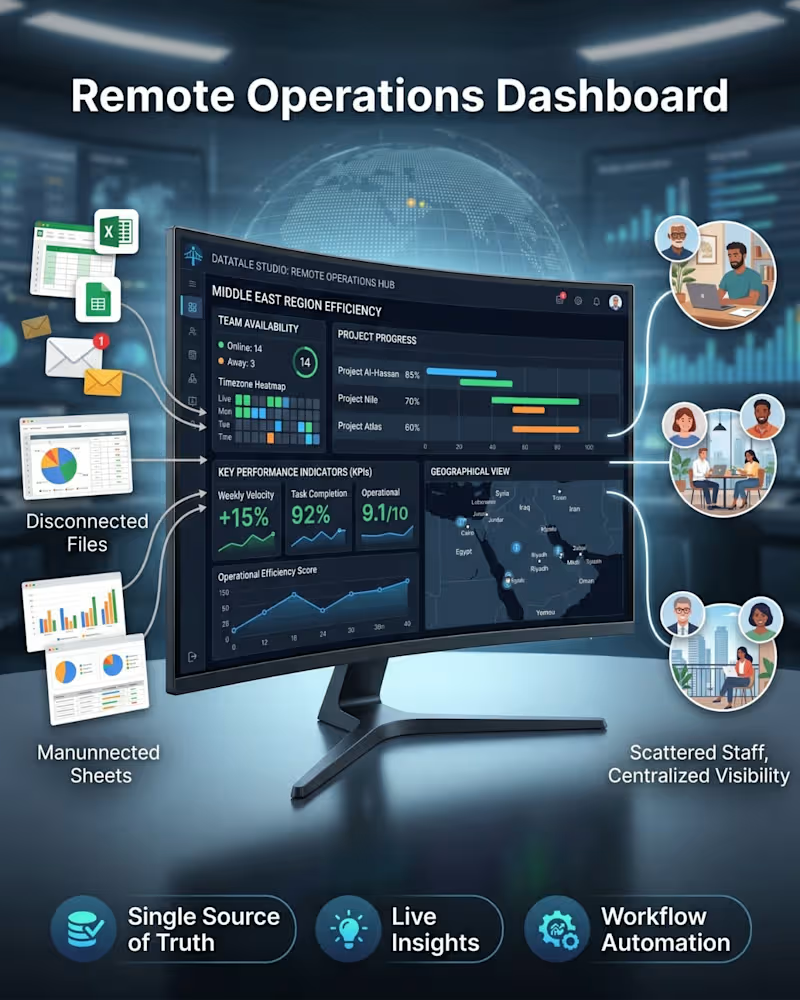
If your remote team still relies on spreadsheets for reporting β this project was made for clients exactly like you. π π₯οΈ Project: Remote Operations Dashboard for a Middle East Operations Team Here's the before and after: BEFORE working with me: β Data buried across disconnected files β No live visibility into team availability β Project updates delayed by days β Leadership flying blind on KPIs AFTER: β 14 team members tracked live with timezone heatmaps β 3 active projects visualized with real progress % β KPIs automated: velocity +15%, task rate 92%, score 9.1/10 β Full geographical view of the distributed team β One dashboard. Every answer. Instantly. This is what I do β I turn operational chaos into clarity. Whether you're a startup scaling fast or an established team going remote, I'll build you a dashboard that makes you look like you have a full data team behind you. π’ Currently available for new projects. π© Send me a message on Contra and let's scope your build. π οΈ Services: Dashboard Design Β· Business Intelligence Β· Data Visualization Β· Remote Operations Systems Β· KPI Reporting
0
70
1
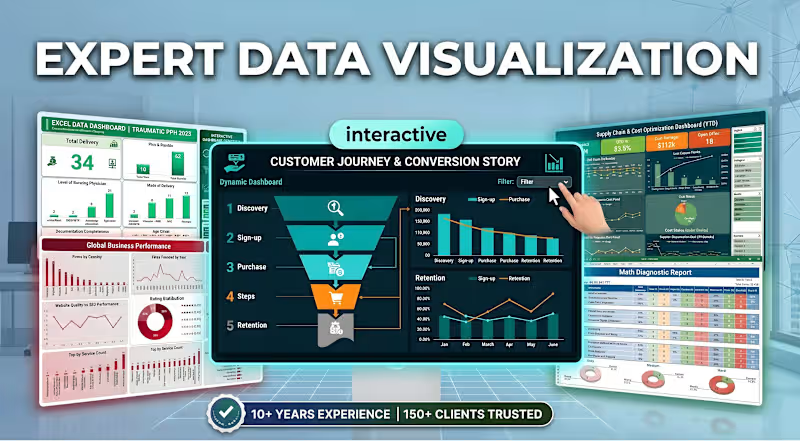
Data is only valuable if it tells a clear story. π If you are tired of digging through static, confusing spreadsheets to find your KPIs, it's time for an upgrade. Welcome to DataTale Studio. I specialize in Expert Data Visualization, engineering interactive dashboards that turn complex, messy data into actionable insights. Whether you need to map a Customer Journey funnel, track Global Business Performance, or optimize your Supply Chain, I build the exact visual systems you need to make fast, data-driven decisions. What you get when we collaborate: βοΈ Interactive Dashboards: Filter, sort, and engage directly with your metrics in real-time. βοΈ Executive-Level Clarity: Clean, elegant designs that highlight the numbers that actually matter to your business. βοΈ Proven Expertise: Backed by 10+ years of data analytics experience and trusted by 150+ clients globally. Stop guessing and start analyzing. If you are ready to transform your corporate reporting, check out my services and send an inquiry to start building your custom interactive dashboard today! π
1
127
6
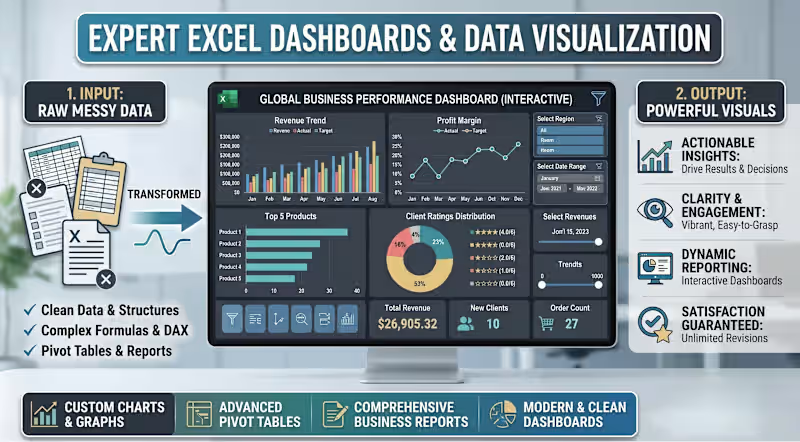
How to Turn Raw, Messy Data Into Powerful Business Insights π If you are spending hours wrestling with complex spreadsheets, itβs time for a system upgrade. How do you bridge the gap between heavy data entry and strategic decision-making? By moving from static files to interactive, automated reporting. At DataTale Studio, I specialize in transforming fragmented data into dynamic Excel dashboards that drive real business results. The Transformation Process: The Input: I take your raw data and build a robust backend using clean structures, complex formulas, and advanced DAX. The Output: You receive a modern, clean dashboard featuring custom charts, advanced pivot tables, and vibrant data visualization. Why collaborate with DataTale Studio? Actionable Insights: Replace confusing rows of numbers with clear, visual metrics. Dynamic Reporting: Interact directly with your data to spot trends instantly. Satisfaction Guaranteed: I offer unlimited revisions to ensure your custom dashboard perfectly fits your workflow. Stop guessing and start analyzing. If you are ready to streamline your business reporting, let's get to work. Send an inquiry today to discuss your custom data visualization project! βοΈ
9
6
379
2
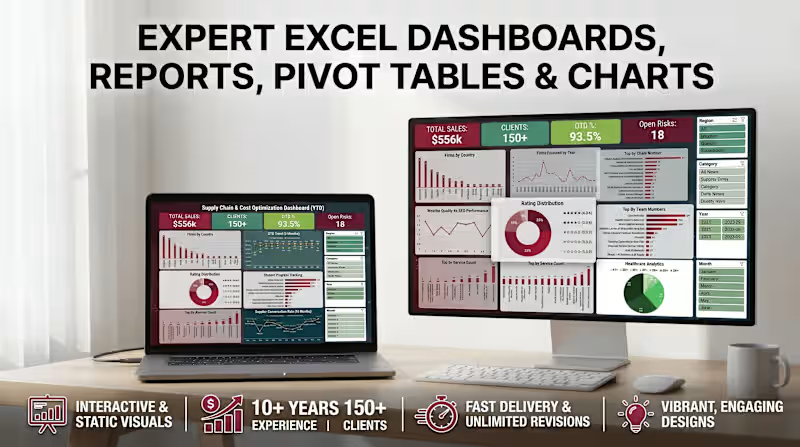
Need clear business insights fast? Letβs upgrade your reporting. π I build expert Excel dashboards designed for true operational clarity. Whether you need interactive pivot tables, dynamic charts, or comprehensive executive reports, DataTale Studio delivers premium data visualization tailored to your exact needs. What you get when we collaborate: πΉ 10+ Years of Data Experience (150+ clients and counting) πΉ Engaging, high-end visual solutions πΉ Fast delivery with unlimited revisions to ensure absolute accuracy If you're tired of digging through raw data to find your key metrics, let's get to work. Send an inquiry to start your custom dashboard project today! βοΈ
2
163
Looker Studio
(4)
Follow
Message
Murad Hossain
Dhaka, Bangladesh
UI/UX Designer crafting modern, conversion-focused digital e
New to Contra
Follow
Message
UI/UX Designer crafting modern, conversion-focused digital e
0
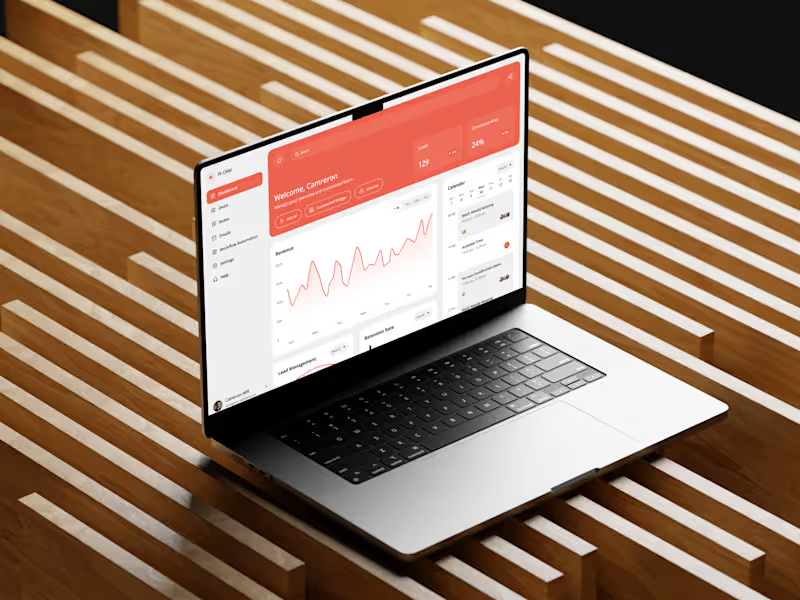
CRM Dashboard
0
0
0
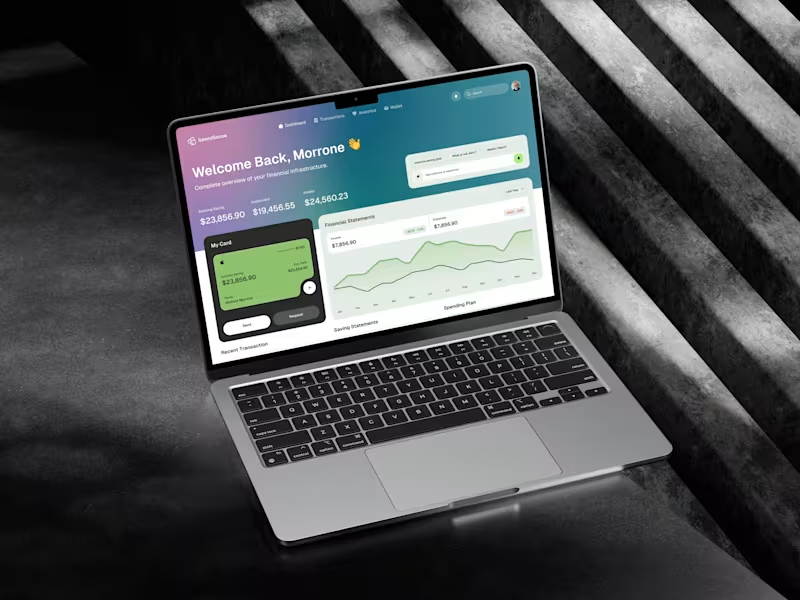
SpendSense AI β Smart Finance Dashboard
0
0
0
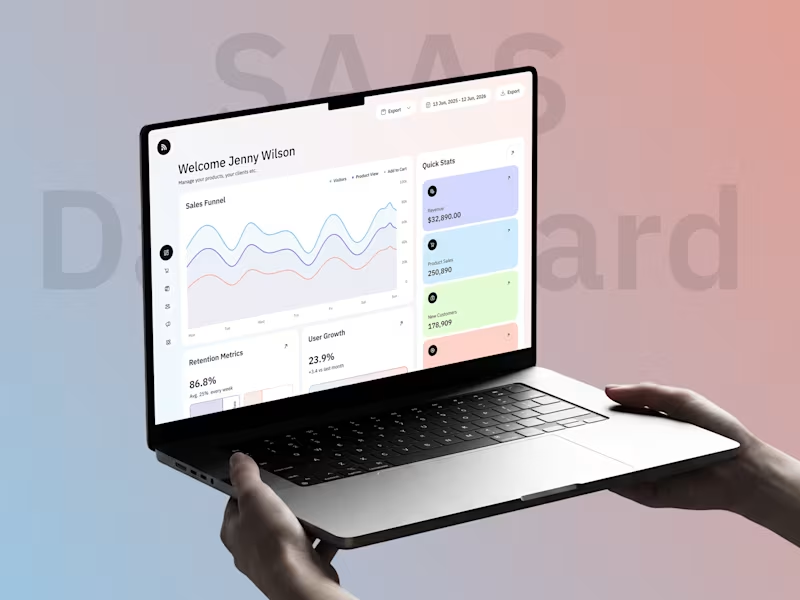
SAAS Dashboard
0
0
0
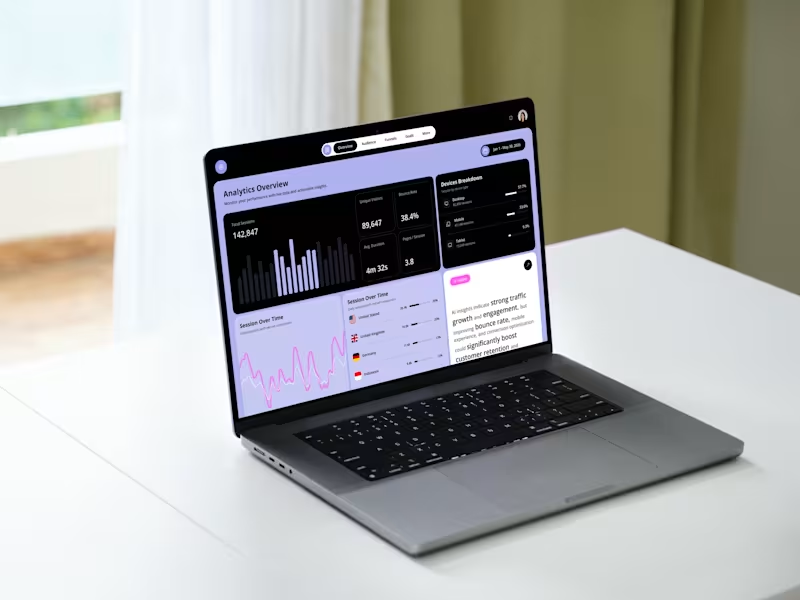
AI Powered Analytics Dashboard
0
0
Looker Studio
(27)
Follow
Message
Md Jobair Mahmud
Chattogram, Bangladesh
Google Analytics 4 | GA4 GTM Meta Pixel FB CAPI Server-Side
16
Followers
Follow
Message
Google Analytics 4 | GA4 GTM Meta Pixel FB CAPI Server-Side
0
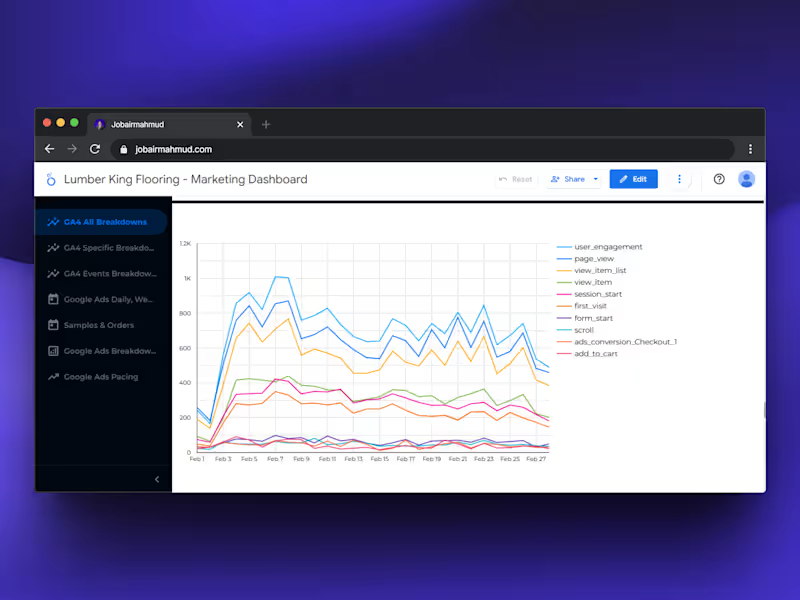
π¨ Tracking is cool but visualizing it? Thatβs where the magic happens. Looker Studio (formerly Google Data Studio) is my go-to tool for turning messy data into stories that actually make sense. Last week, I built a custom dashboard combining: Meta Ads (CAPI data) Google Ads conversions GA4 events and GoHighLevel leads Now the client can see: β Real-time ROI β Cost per lead β Purchase funnel performance β Which ad platform prints the most $$$ No more screenshots, no more confusion β just clean, automated dashboards. If youβre running paid campaigns but still relying on manual reportsβ¦ bro, itβs time to switch.
0
302
0
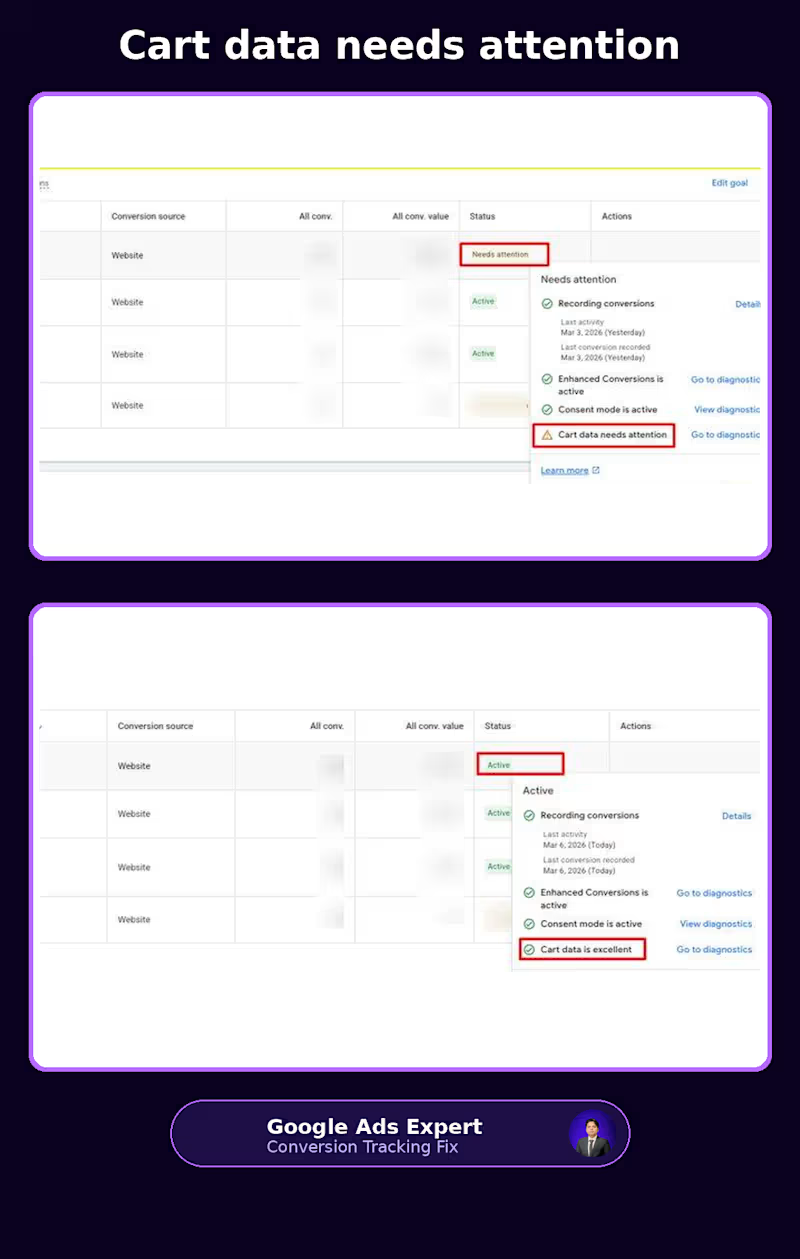
βCart data needs attentionβ is not a warning Iβd ignore on an ecommerce account. Especially if you're running Shopping or Performance Max. I recently worked on a setup where Google Ads was recording conversions, but the cart data wasn't being passed properly. The account was showing: Before: Cart data needs attention At first glance, you might think: βConversions are coming in, so what's the problem?β The problem is that a purchase conversion alone doesn't tell Google everything it needs to understand the transaction. For ecommerce, the product information matters too. Which product was added? What was its ID? How many units? What was the cart value? Without that information being passed correctly, Google has less context about what people are actually buying. During the audit, I found a few issues: Cart events weren't sending the required product data correctly The dataLayer wasn't providing complete add_to_cart information Enhanced Conversions wasn't fully configured Consent Mode was affecting the signals being sent So the fix wasn't simply βinstall another tag.β The data flow needed to be checked from the storefront all the way into Google Ads. I fixed the ecommerce dataLayer, validated the add_to_cart and purchase events, configured Enhanced Conversions, and checked that Consent Mode was behaving correctly. After the changes, the diagnostics moved to: Recording conversions: Active Enhanced Conversions: Active Consent Mode: Active Cart data: Excellent That's the part I think ecommerce advertisers often overlook. A conversion showing up in Google Ads doesn't automatically mean your ecommerce tracking is healthy. You can have purchases being recorded while product IDs, quantities, values or consent signals are incomplete. And if you're running PMax or other value-based campaigns, those details matter because your bidding decisions are built around the data you send back. This is why I spend so much time looking beyond whether a tag βfires.β I want to know whether the right data is being collected, passed and understood by the platforms that are using it. If you're seeing βCart data needs attentionβ in Google Ads, or your Shopify/WooCommerce tracking doesn't quite look right, feel free to connect or message me. Have you checked your Google Ads conversion diagnostics recently? #GoogleAds #PMax #EcommerceTracking #ConversionTracking #GoogleTagManager #EnhancedConversions
0
36
0
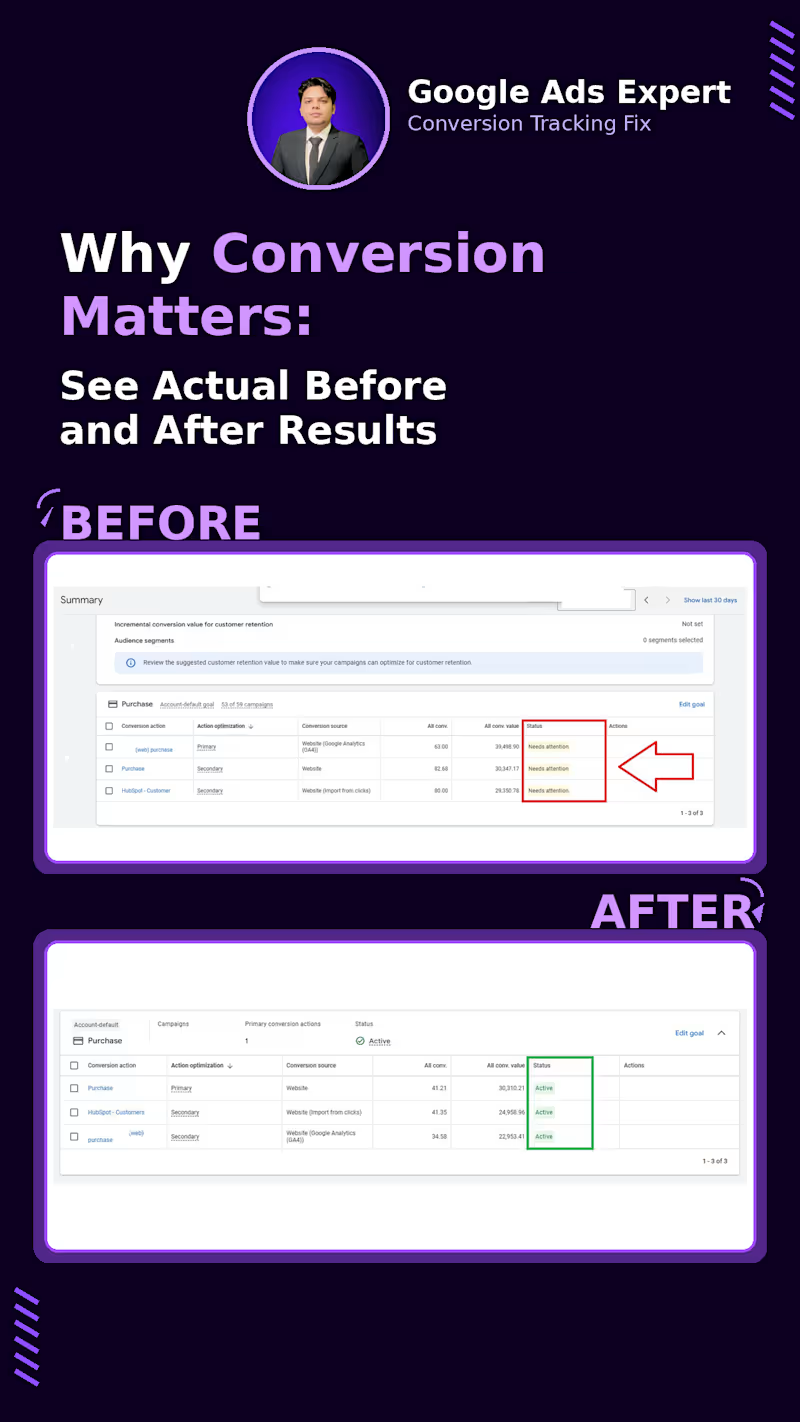
A Google Ads campaign can be perfectly structured and still optimize badly if the conversion setup is sending mixed signals. I saw this recently while auditing an account with 53 campaigns. The account had three different Purchase conversion actions: Purchase from GA4 Purchase from Website HubSpot customer import And all three were showing βNeeds attention.β The bigger issue wasn't just the warning. There was no clear conversion setup telling Google Ads which purchase signal should actually drive bidding. That matters because Smart Bidding depends on the conversion data you give it. If multiple sources are tracking the same purchase, you can end up with duplicate conversions. If the wrong action is marked as Primary, campaigns may optimize toward a signal you didn't intend to use. And if the underlying tag or import isn't working properly, the bidding system is learning from incomplete data. So the first thing I worked on wasn't campaign structure or bid strategy. It was the conversion setup. I cleaned up the duplicate Purchase actions, kept the website Purchase as the clear Primary conversion, moved the GA4 and HubSpot versions to Secondary, and re-checked the tracking and Enhanced Conversions setup. After the cleanup, the conversion actions were showing βActive.β More importantly, the account had a much clearer data flow: Website β Purchase β Google Ads β Primary conversion β Smart Bidding This is something I think gets overlooked when people talk about improving ROAS. Sometimes the problem isn't the campaign. It's the signal the campaign is being optimized against. And βconversion tracking is installedβ isn't enough. You also need to know: Is the right conversion being counted? Is it being counted once? Is it marked Primary or Secondary for the right reason? Is the value being passed correctly? And is Google Ads actually receiving the signal consistently? This is why I spend so much time auditing GA4, GTM, Google Ads and CRM conversion setups before touching the optimization side. Bad conversion data can make a good campaign look bad. If you're seeing βNeeds attentionβ, unexpected conversion numbers, duplicate purchases or strange bidding behavior in Google Ads, feel free to connect or message me. When was the last time you checked the status of your Google Ads conversion actions? #GoogleAds #ConversionTracking #PPC #GoogleTagManager #PaidSearch #PerformanceMarketing
0
38
0
I used to break my toys. Not because I wanted to destroy them. I wanted to know what was inside. How did it work? Why did it move? That curiosity never really left me. Years later, I started learning digital marketing with a borrowed laptop. I remember getting my Google Digital Garage certificate. I was so happy that day. I even thought: βMaybe one day Google will hire me.β Then I asked my father for a computer. For almost six months. Eventually, he agreed. But there was a condition: If I got the computer, I had to take responsibility for everything after that. Internet. Tools. Everything. So I started freelancing. I opened Fiverr with almost no idea how freelancing actually worked. I didnβt understand positioning. I didnβt know how to find clients. I depended almost completely on one marketplace. Then my second order got cancelled. My account went down. Money was already tight. At one point, I struggled to pay my internet bill. And the internet wasnβt just entertainment for me. It was the thing I was trying to build my future with. People around me also didnβt really understand how someone could build a career online. The traditional path was familiar: Study β degree β stable job. So when I said I wanted to build my career through the internet, not everyone believed me. I donβt blame them. They were judging the future based on what they had seen. So I decided to prove it through results. I tried. I failed. I tried different businesses. I lost clients. I made mistakes. I started again. Eventually, I realized Fiverr wasnβt the entire internet. I explored other opportunities, joined Upwork, started working with clients from different countries, and eventually earned Top Rated status. Today, I work in web analytics and conversion tracking. GA4. GTM. Google Ads tracking. Meta Pixel + CAPI. Server-side tracking. Data layers. Consent Mode. And thereβs something funny about the journey. As a kid, I took things apart to understand how they worked. Today, I do the same thing with websites and marketing systems. I take them apart. I look at the data. I find whatβs broken. Then I build it properly. Iβm still learning. Still experimenting. Still failing sometimes. But Iβm still curious. I was once a kid who wanted to know what was inside a toy. Iβm still that kid. Iβm just opening different things now.
0
63
Looker Studio
(1)
Follow
Message
Minhajul Hoque
Dhaka, Bangladesh
πMeta & Google Ads Strategist π―Backend Funnels Specialist
11
Followers
Follow
Message
πMeta & Google Ads Strategist π―Backend Funnels Specialist
0
Stop π Guessing Your Ads Data
0
14
1
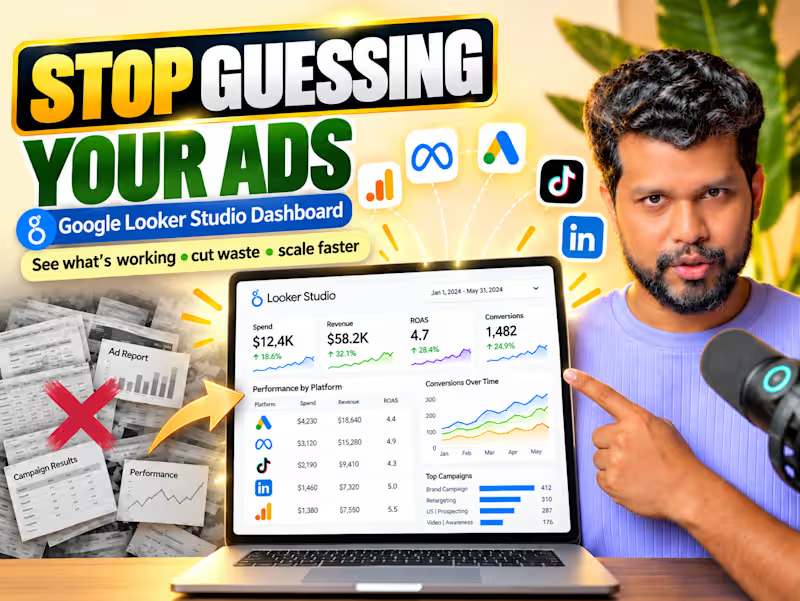
π¨ I stopped guessing my ad performance. Here's what changed: For months, I was flying blind with my ad spend. The problem? I had data everywhere but insights nowhere. Google Ads showed clicks. Meta showed impressions. Neither showed me what actually mattered. So I built a Looker Studio dashboard. Now I see: βοΈ Real-time ROAS across every platform. βοΈ Which campaigns bleed money. βοΈ Where every dollar actually goes. What it fixed: No more logging into 5 different platforms. No more "gut feeling" budget decisions.. For campaign optimization. For client reporting. For weekly reviews. For scaling what works. Nothing beats having one source of truth. Save this. Repost β»οΈ to help someone in your network. P.S. What's your biggest struggle tracking ad performance right now?
1
99
0
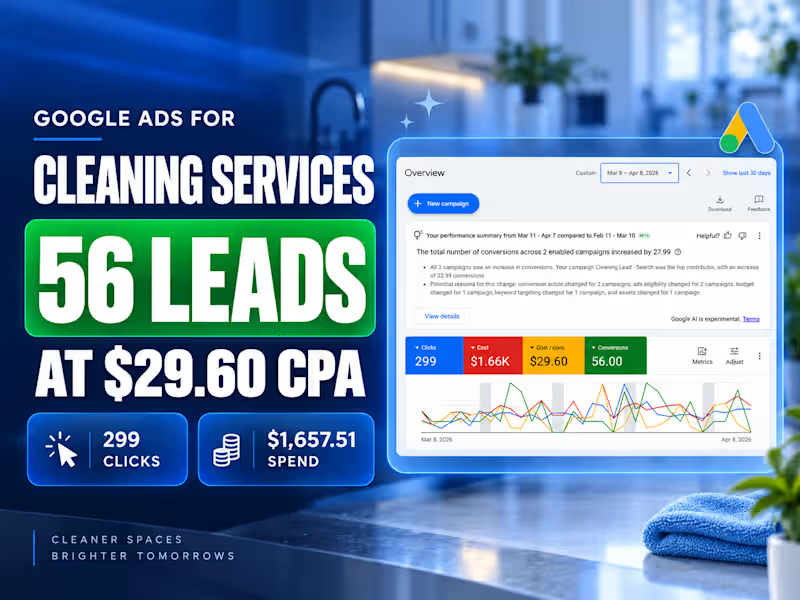
Google Ads for Cleaning Services | 56 Leads at $29.60 CPA
0
54
0
Google Ads Performance Max for Men's Clothing eCommerce
0
63
Looker Studio
(2)
Follow
Message
MIZANUR RAHMAN
Dhaka, Bangladesh
Digital Marketing Lead Generation & AI Automation Specialist
New to Contra
Follow
Message
Digital Marketing Lead Generation & AI Automation Specialist
0
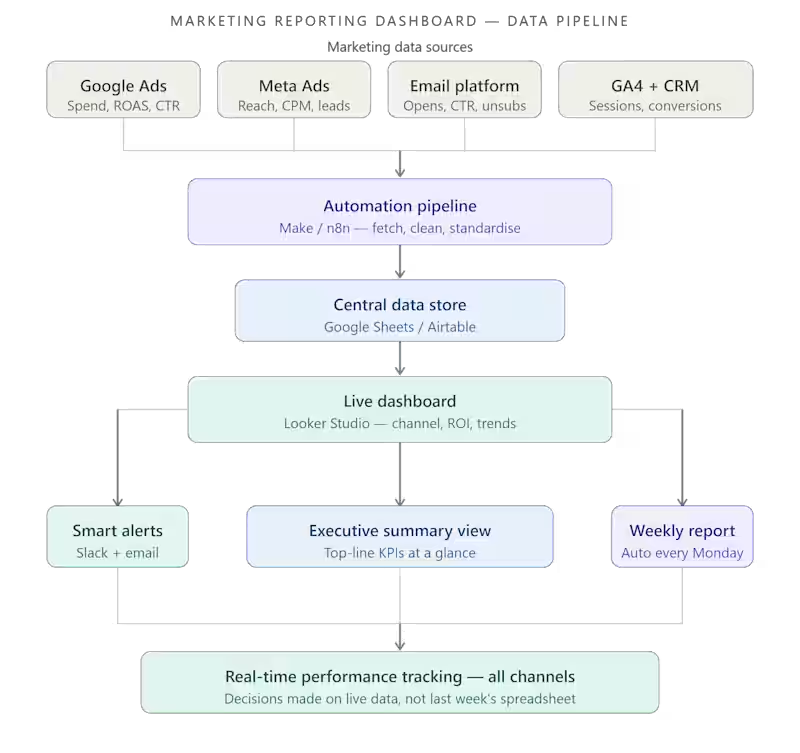
Marketing Reporting Dashboard, From Data Chaos to Real-Time Performance Clarity Project Description: I built a fully automated marketing reporting dashboard for a client who had no clear view of how their campaigns were actually performing. Instead of digging through spreadsheets and ad platforms every week, they now have a single live dashboard that shows every key metric, updated automatically, in real time, across all channels. <<<<<Full Project Write-Up>>>>> The Problem The client was running marketing campaigns across multiple channels, paid ads, email, social media, SEO, but had zero visibility into what was actually working. Every week, someone had to manually pull data from Google Ads, Meta, email platforms, and analytics tools, paste it into a spreadsheet, format it, and then try to make sense of it. By the time the report was ready, the data was already outdated. Decisions were being made on guesswork, not facts. They were spending budget without knowing which campaigns were driving revenue and which were burning cash. The Solution I designed and built a fully automated marketing reporting dashboard that pulls data from all their channels in real time and displays everything in one clean, decision-ready view. Here is exactly what I built: Step 1: Data Source Integration Connected all marketing platforms to a central data pipeline: Google Analytics 4, website traffic, sessions, conversions Google Ads, spend, clicks, CTR, ROAS, cost per lead Meta Ads (Facebook + Instagram), reach, impressions, CPM, conversions Email platform (Mailchimp / ActiveCampaign), open rates, CTR, unsubscribes CRM, lead volume, deal value, attribution Step 2: Automated Data Pipeline Built an automation layer using Make / n8n that: Pulls fresh data from every platform on a set schedule (hourly or daily) Cleans and standardises the data into one consistent format Pushes it to a central data store (Google Sheets or Airtable) Triggers alerts if any metric drops below a defined threshold Step 3: Live Dashboard Build Built the reporting dashboard in Looker Studio (or Notion / Airtable) with: Executive summary view, top-line numbers at a glance Channel-by-channel performance breakdown Campaign ROI comparison across all platforms Weekly and monthly trend charts Cost per lead and cost per acquisition by source Conversion funnel from click to closed deal Step 4: Automated Alerts Set up automated Slack and email alerts that notify the team when: Ad spend exceeds daily budget threshold ROAS drops below target Email open rate falls significantly A campaign goes from top performer to underperformer Step 5: Automated Weekly Report Every Monday morning, a formatted performance summary is automatically sent to the marketing manager, no manual pulling, no formatting, no delays. The Result Real-time marketing performance tracking across every channel, fully automated. The client went from spending hours each week building reports manually to having a live dashboard that updates itself. They can now see at a glance which campaigns are driving results, where budget is being wasted, and exactly where to focus next week's effort, all before their morning coffee. Tools & Tech Stack Looker Studio / Google Data Studio: dashboard and visualisation Google Analytics 4: web traffic and conversion tracking Google Ads API: paid search performance Meta Ads Manager: paid social performance Make / n8n / Zapier: data pipeline automation Google Sheets / Airtable: central data store Slack + Email β automated alerts and weekly reports Mailchimp / ActiveCampaign: email marketing data Key Outcomes β Single dashboard replacing 5+ manual reports β Data refreshes automatically, always up to date β Full channel visibility: paid, organic, email, social β Automated weekly summary reports, zero manual prep β Real-time alerts when performance dips β Faster, data-driven decisions every single week Who This Is For This dashboard is built for you if: You are running marketing across multiple channels but have no unified view Your team spends hours every week building the same report manually You make budget decisions based on gut feel rather than real data You want to know which campaigns are actually driving revenue β not just clicks You are scaling marketing spend and need clarity before you increase budget Why Work With Me Most marketing dashboards show vanity metrics that look impressive but do not help anyone make a decision. I build dashboards around the numbers that actually matter to your business, cost per lead, ROAS, conversion rate by source, and revenue attribution. Every widget earns its place. If it does not drive a decision, it does not go on the dashboard. Ready to see all your marketing data in one place? Send me a message on Contra. Tell me which platforms you are currently running campaigns on, I will tell you exactly how I would connect everything and what your dashboard would look like within a week.
0
23
0
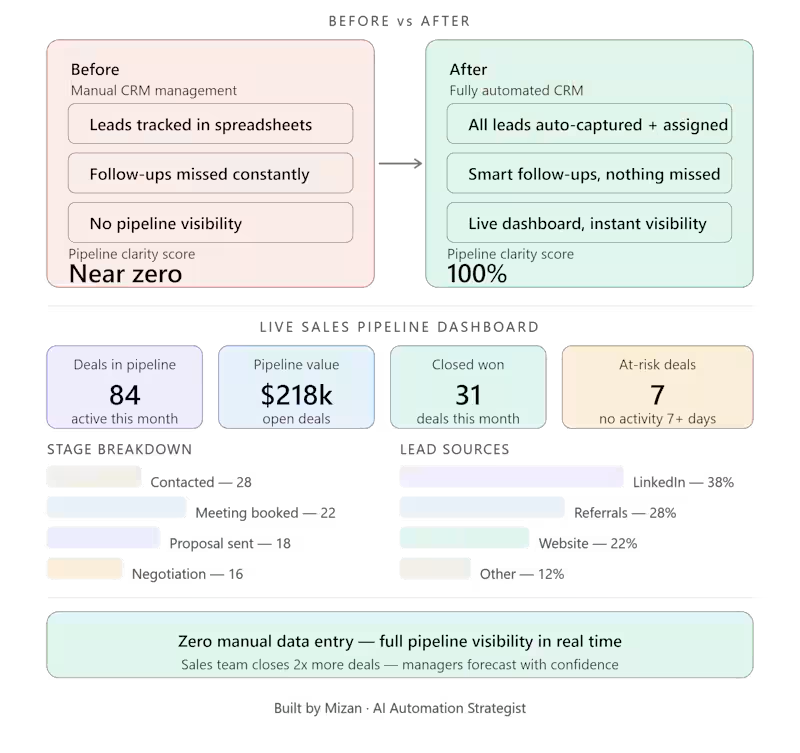
CRM & Sales Pipeline Automation, From Chaotic Lead Tracking to a Crystal-Clear Sales Machine Project Description: I built a fully automated CRM and sales pipeline workflow for a B2B client whose lead tracking was scattered across spreadsheets, sticky notes, and inboxes. The result: a clean, automated system that gives the entire sales team real-time visibility into every deal, at every stage, without manual data entry. Full Project Write-Up The Problem The client's sales team was flying blind. Leads were coming in from multiple sources, LinkedIn, referrals, cold outreach, website forms, but there was no single place to track them. Sales reps each kept their own spreadsheets. Follow-ups were missed. Deals slipped through the cracks. Management had no idea which stage any deal was at without physically asking someone. The result? Lost revenue, frustrated reps, and zero accountability across the pipeline. The Solution I designed and implemented a fully automated CRM workflow that centralized every lead, automated every status update, and gave leadership a real-time view of the entire sales pipeline. Here's exactly what I built: Step 1: Unified Lead Capture All lead sources (website forms, LinkedIn, Apollo, email) now flow automatically into one CRM. No manual entry. Every lead lands in the right place with the right data attached, name, source, company, date, contact info. Step 2: Automated Pipeline Stages Each lead moves through clearly defined pipeline stages automatically based on activity triggers: New lead β Contacted β Meeting booked β Proposal sent β Negotiation β Closed Won / Closed Lost When a rep books a meeting, the deal moves to the next stage automatically. No one has to remember to update the CRM, it updates itself. Step 3: Smart Follow-Up Sequences If a lead goes cold (no activity for X days), the system automatically triggers a follow-up task for the assigned rep, or sends a nurture email on their behalf. Nothing falls through the cracks. Step 4: Deal Ownership & Accountability Every lead is automatically assigned to the right rep based on source, territory, or round-robin logic. Ownership is clear from day one. No more "I thought you were handling that." Step 5: Real-Time Pipeline Dashboard Leadership gets a live dashboard showing: Total deals in pipeline and their value Deals by stage, rep, and source Conversion rates at every stage Forecasted revenue for the month/quarter Deals at risk (no activity in 7+ days) Step 6: Automated Reporting Weekly pipeline summary reports are automatically generated and sent to the sales manager every Monday morning, no manual pulling of data. The Result Full sales process visibility, from first touch to closed deal. The sales team went from chaotic, scattered tracking to a clean system that practically runs itself. Reps spend zero time on data entry. Managers have instant visibility. Follow-ups never get missed. And for the first time, the team could accurately forecast monthly revenue. Tools & Tech Stack GoHighLevel / HubSpot: CRM and pipeline management Make / Zapier / n8n: Workflow automation and triggers Google Sheets / Airtable: Reporting and dashboard layer Slack: Real-time deal alerts and team notifications LinkedIn + Apollo: Lead source integrations Gmail / Outlook: Automated follow-up sequences Key Outcomes β Zero manual data entry across the sales team β 100% lead capture from all sources, nothing missed β Automatic follow-up triggers, no deals go cold silently β Full pipeline visibility for leadership in real time β Weekly automated sales reports, no manual prep β Accurate revenue forecasting for the first time Who This Is For This system is built for you if: Your sales team tracks deals in spreadsheets or their own heads Leads are coming in from multiple sources but nobody knows where they stand Your manager has to ask reps for updates instead of just checking a dashboard You've lost deals simply because someone forgot to follow up You're trying to scale your sales team without scaling the chaos Why Work With Me Most CRM setups collect dust because they're built for how a vendor thinks sales works, not how your team actually works. I build CRM workflows around your real process: your lead sources, your pipeline stages, your team's behavior. The result is a system your reps actually use, because it removes work rather than adding it. Ready to see your entire sales pipeline in one place? Send me a message on Contra. Tell me where your leads currently live and how many reps are on your team, I'll map out exactly how I'd build this for your business.
0
25
1
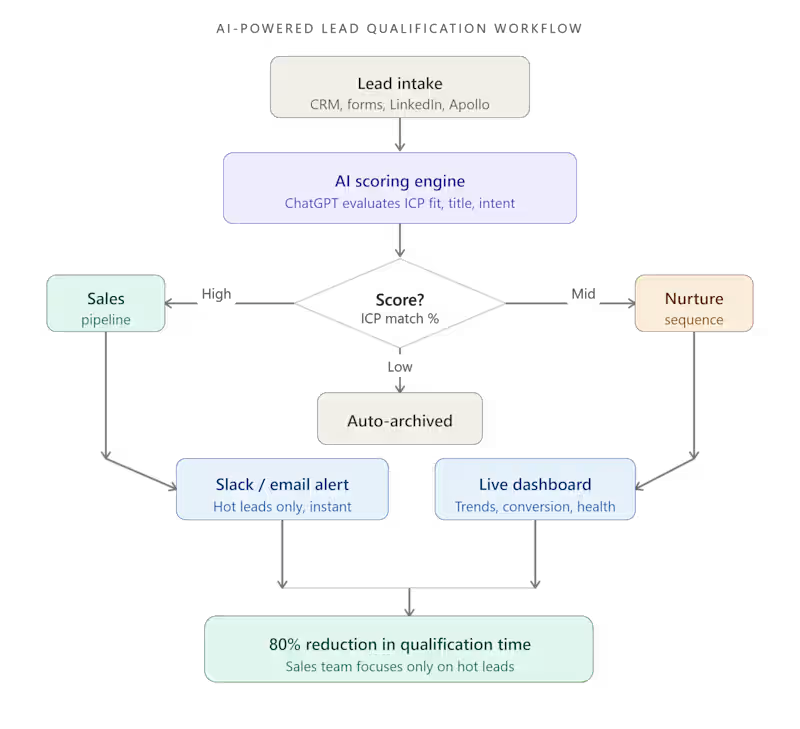
AI-Powered Lead Qualification Workflow, 80% Faster, Zero Manual Effort I built an end-to-end AI workflow that automated manual lead qualification for a B2B client. Using ChatGPT + automation tools, I reduced qualification time by 80%, turning a slow, human-heavy process into a smart, scalable system that runs on autopilot. The Problem My client was drowning in unqualified leads. Every day, their sales team spent hours manually reviewing leads. checking job titles, company sizes, industry fit, and engagement signals, just to figure out who was worth talking to. This wasn't just slow. It was expensive, inconsistent, and burning out their team. They needed a smarter way to sort signal from noise. The Solution I designed and built a fully automated AI-powered lead qualification workflow using ChatGPT and a custom automation stack. Here's how it works: Step 1: Lead Intake New leads flow in automatically from their CRM or lead sources (forms, LinkedIn, Apollo). No manual entry needed. Step 2: AI Scoring with ChatGPT Each lead is sent to a ChatGPT-powered prompt engine that evaluates: Job title relevance Company size and industry fit Intent signals and keywords ICP (Ideal Customer Profile) match score The AI assigns a qualification score and a short reasoning note, like having a junior SDR review every lead instantly. Step 3: Automated Routing Based on the score, leads are automatically routed: β High-fit leads β straight to the sales pipeline π Mid-fit leads β nurture sequence β Low-fit leads β archived automatically Step 4: Notification & Dashboard The sales team gets instant Slack/email alerts for hot leads only. A live dashboard shows qualification trends, conversion rates, and pipeline health in real time. The Result 80% reduction in lead qualification time. What used to take a team hours now happens in seconds, automatically, consistently, and at scale. The sales team now focuses 100% of their energy on high-fit prospects instead of wasting time on manual sorting. Tools & Tech Stack ChatGPT (GPT-4): AI qualification engine Make / Zapier / n8n: Workflow automation CRM Integration: HubSpot / GoHighLevel Slack + Email: Real-time lead alerts Google Sheets / Airtable: Live dashboard & reporting Who This Is For This system is a perfect fit if you are: A B2B founder or sales team getting more leads than you can manually process Running outbound campaigns and wasting time on cold prospects Paying SDRs to do work that AI can handle in milliseconds Wanting to scale your pipeline without scaling your headcount Why Work With Me I don't just set up tools, I build systems that solve real business problems. Every workflow I create is designed around your specific ICP, data flow, and team's daily reality. You get a system that actually gets used, not just a pretty automation diagram. Ready to qualify leads on autopilot? Let's talk. Send me a message on Contra and tell me about your current lead volume and qualification process. I'll tell you exactly how I'd build this for your business.
1
43
0
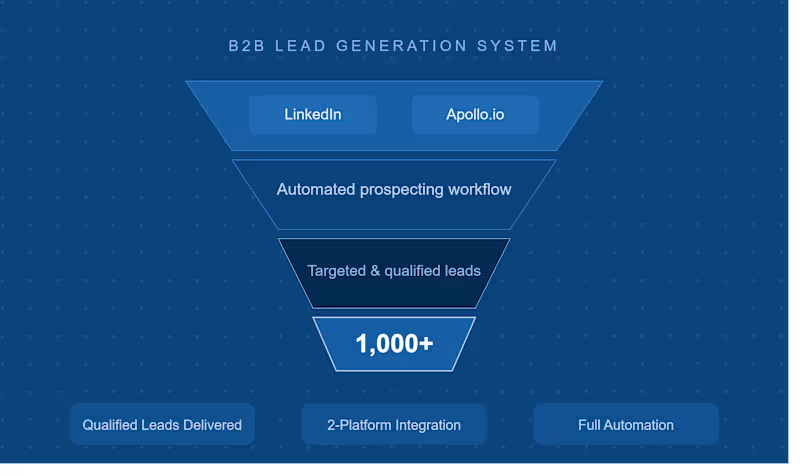
Built a Lead Generation System for B2B Prospecting Problem: Client needed qualified leads. Solution: Created prospecting workflow using LinkedIn and Apollo. Result: Generated 1,000+ targeted leads.
0
35
Looker Studio
(1)
Follow
Message
Rabbani Rasha Alvy
Bangladesh
Top notch Product Design
Follow
Message
Top notch Product Design
0
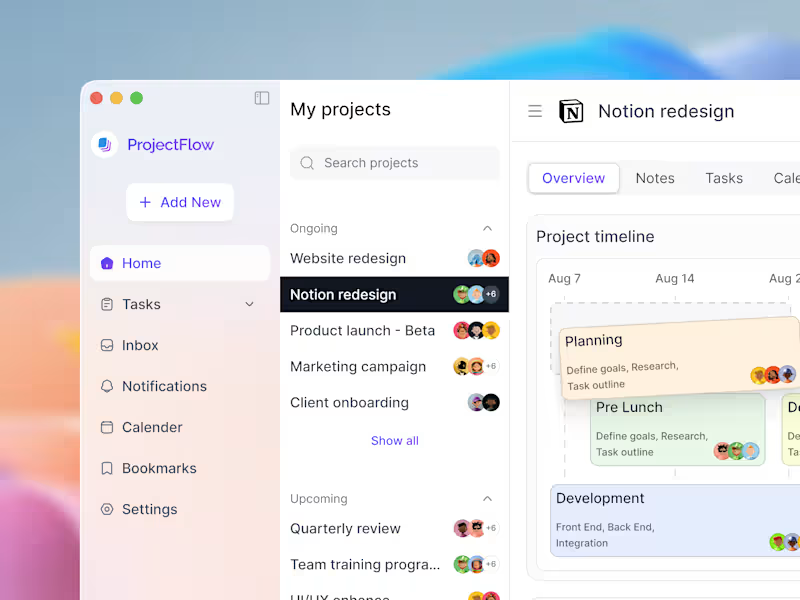
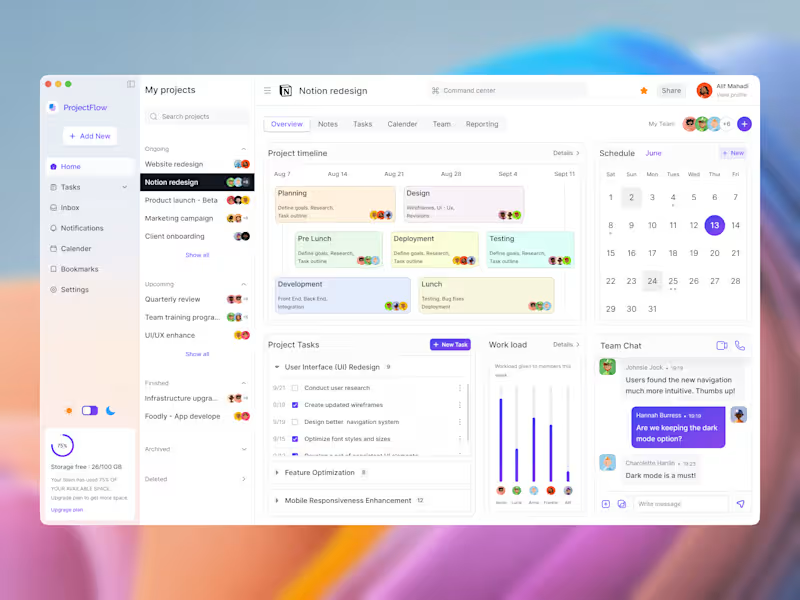
Project Management SaaS Dashboard
0
5
0
SaaS Dashboard - Project Management Software
0
6
0
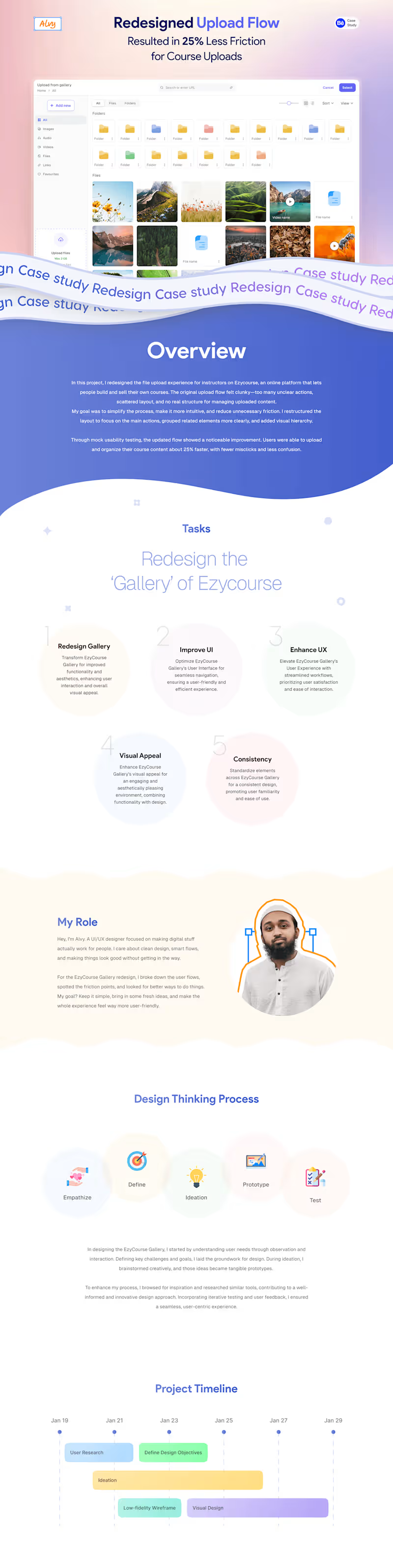
UX Case Study - Course platform upload flow redesign
0
3
0
Food Delivery App - UI Case Study
0
5
Looker Studio
(2)
Follow
Message
Pankaj Kumar Pramanik
Bhandaria Sadar Union, Bangladesh
Senior AI/ML & Data Engineer | MLOps , LLMOps
Follow
Message
Senior AI/ML & Data Engineer | MLOps , LLMOps

0
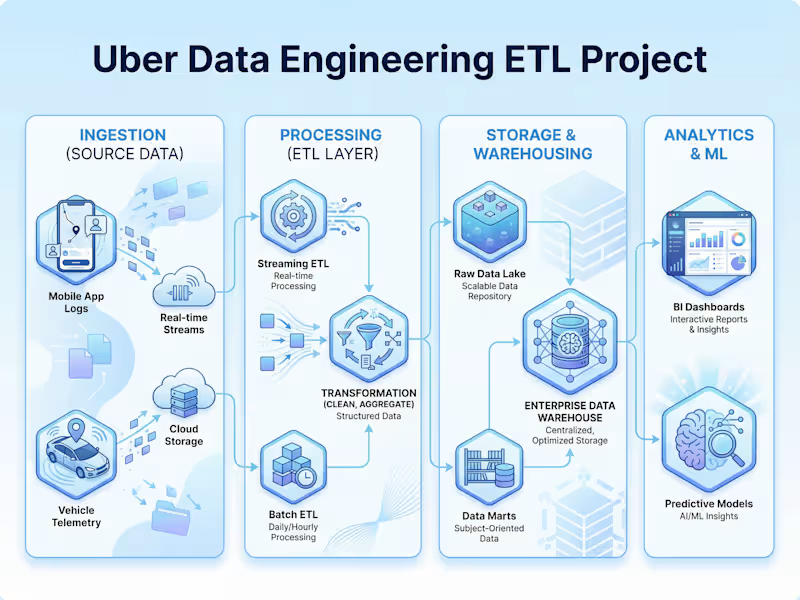
Uber Data Engineering ETL Project
0
12
0
AI Pet Travel Compliance Platform - React, FastAPI, LangGraph
0
51
0
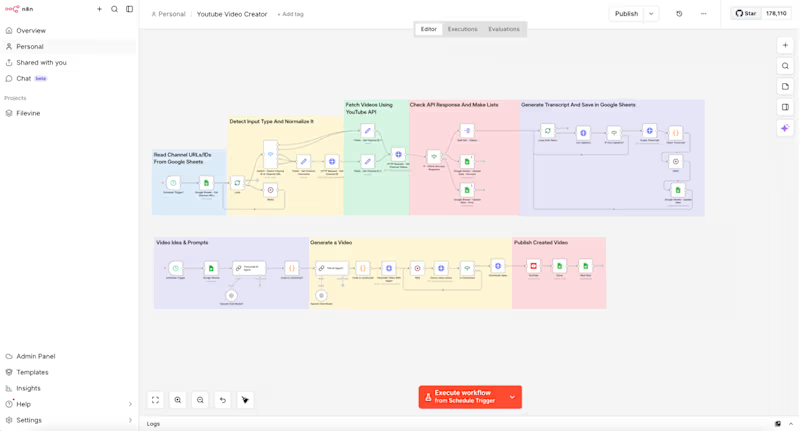
AI Automation Engineer | n8n, GoHighLevel, Make.com (http://Make.com), Retell AI, Twilio & Workflow Systems
0
141
0
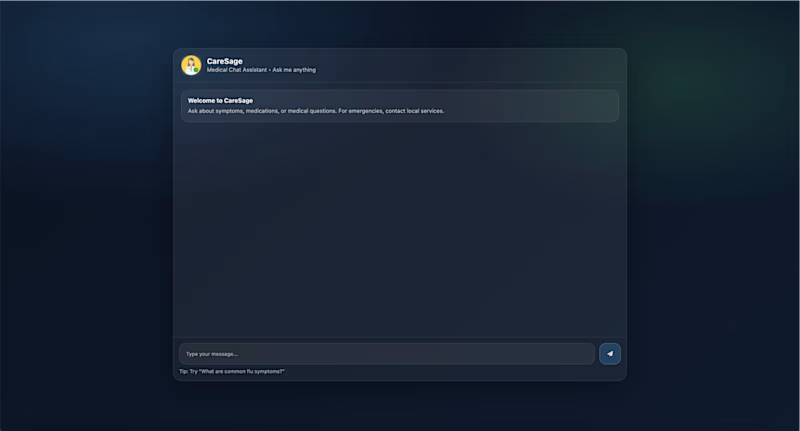
Medical RAG Chatbot (LangChain + Pinecone + Flask)
0
16
Looker Studio
(1)
Follow
Message
Nazmul Arefeen Khan
pro
Dhaka, Bangladesh
Performance Marketing & Paid Ads Conversion Tracking Xpert
5.0
Rating
3
Followers
Follow
Message
Performance Marketing & Paid Ads Conversion Tracking Xpert
0
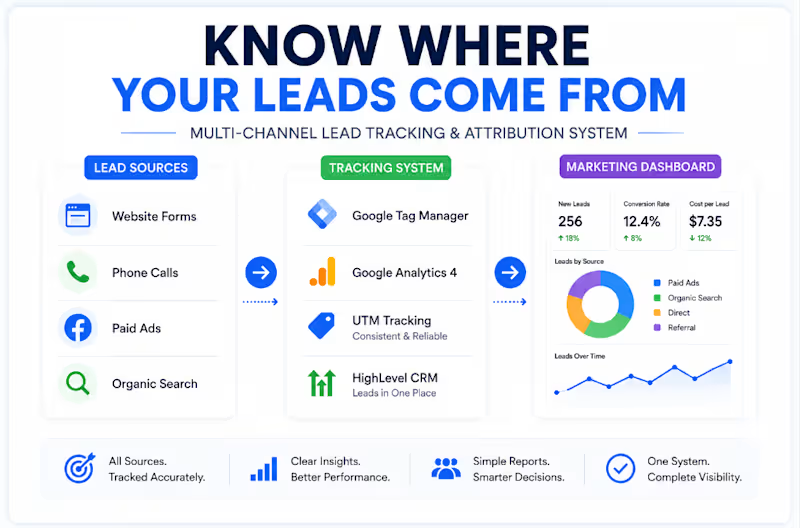
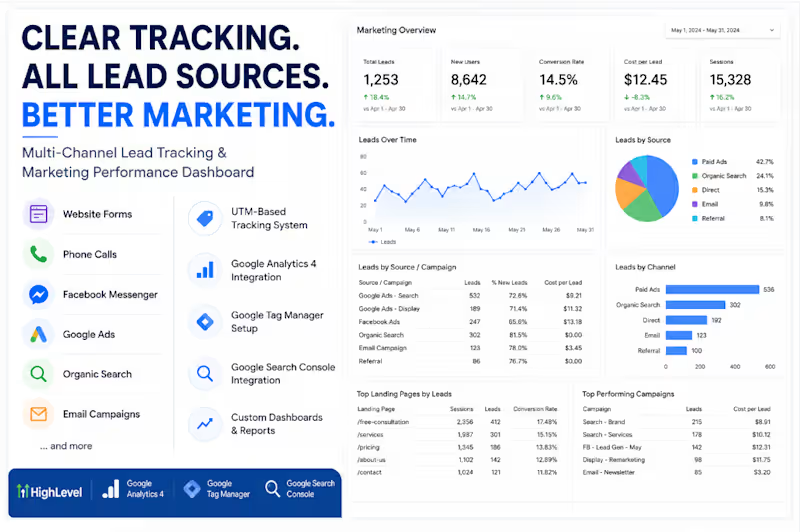
GA4 Multi-Channel Lead Tracking & Attribution
0
4
0
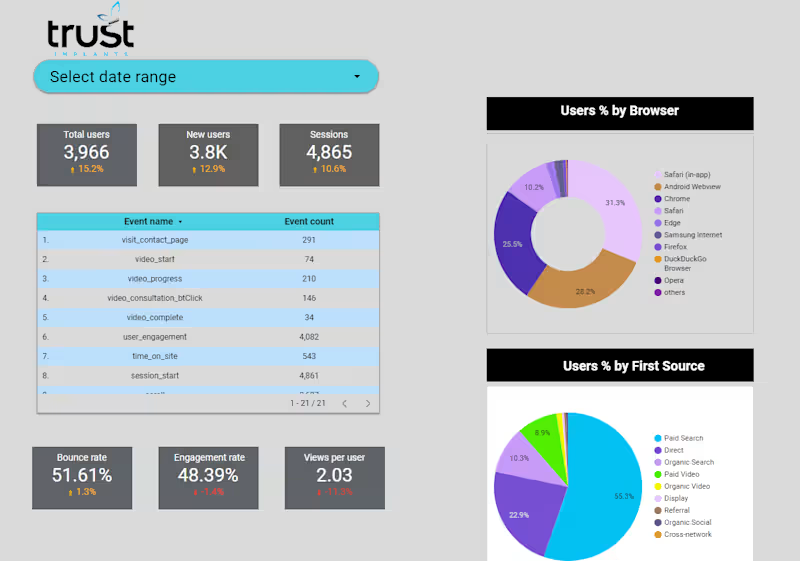
GA4 Looker Studio Dashboard Creation: Built a custom Looker Studio dashboard using GA4 data to give the business a clear view of website performance, user behavior, events, traffic sources, and audience insights, all in one easy-to-use reporting system.
0
56
0
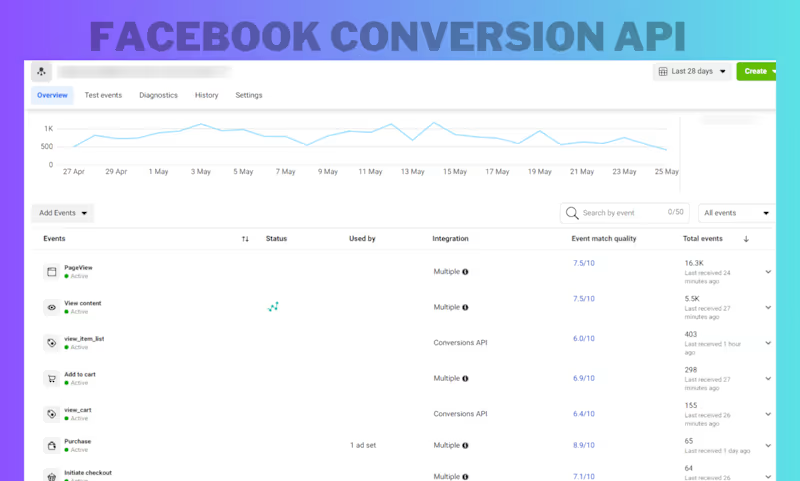
Meta Pixel & Conversion API: Ecommerce Tracking Fix β Fixed and strengthened an e-commerce Meta tracking setup by implementing Meta Pixel + Conversion API, validating key purchase-funnel events, and troubleshooting event delivery and match quality. The result was a more reliable conversion data foundation for Meta Ads optimization.
0
52
0
Multi-Channel Lead Tracking & Attribution A business was getting leads from multiple channels like website forms, phone calls, paid ads, organic search, and referrals. The problem? They couldn't clearly see where those leads were coming from. I built a simple tracking and attribution setup connecting: β Google Tag Manager β GA4 β UTM tracking β HighLevel CRM β Marketing reporting Now, lead sources can be tracked in one place and turned into clear marketing insights. The goal wasn't more data. It was better visibility. When you know where your leads come from, you can see what's working, optimize with confidence, and spend your budget smarter. Track accurately β Understand clearly β Grow smarter.
0
103
Looker Studio
(2)
Follow
Message
Explore people