
Full stack developer · Swoogo, web apps and three.js 3D
- 5.0
- Rating
- 2
- Followers
Full stack developer · Swoogo, web apps and three.js 3D
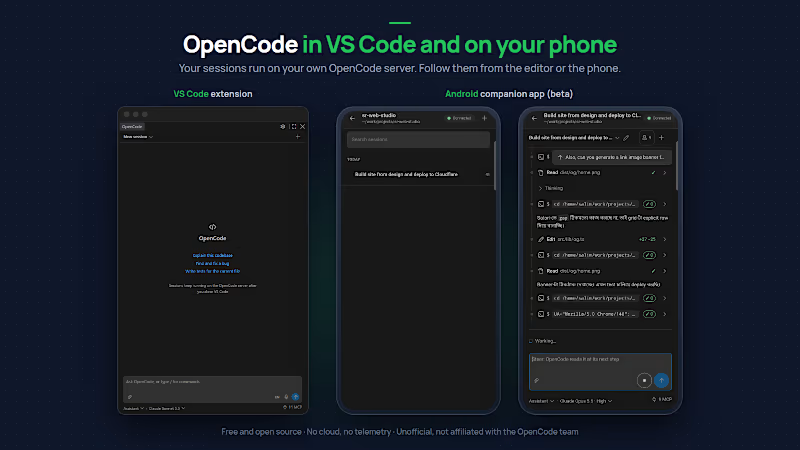
A VS Code client for the OpenCode coding agent, with an Android companion app, both talking only to your own server.
I use OpenCode, the open-source AI coding agent, every day, running as a service on an always-on machine. I built two clients around that setup for my own work and my team.
VS Code extension (Marketplace and Open VSX)
• Chat panel for OpenCode sessions in the sidebar; sessions keep running on the server when VS Code closes
• Native VS Code diffs, file links and a read-only terminal for the agent's commands
• Inline permissions and questions, agent and model picker, background workers, slash commands, MCP panel
• Voice input: free and offline on-device, or Soniox with your own key
• Pairs a phone with a one-time QR code
Android companion app (beta)
• The same sessions on the phone: chat, diffs, command output, steering a running session
• Notifications when a session needs you or finishes; a tap opens it
• A native service keeps one connection to your server: no cloud relay, no push service, no telemetry
• Works on your LAN or over Tailscale; credentials encrypted with an Android Keystore key
Engineering
• Bun monorepo: one TypeScript core and Svelte 5 UI shared by the extension and the app
• Capacitor with a native Java service on Android
• Around 1,000 unit tests, CI on GitHub Actions
• Free, MIT-licensed
Unofficial: not affiliated with or endorsed by the OpenCode team.
Links:
https://github.com/sr-web-studio/opencode-vscode
(https://github.com/sr-web-studio/opencode-vscode)https://marketplace.visualstudio.com/items?itemName=sr-web-studio.opencode-unofficial
0
41


modernlogos,branding,craftingbold,memorablevisuals,identity.
modernlogos,branding,craftingbold,memorablevisuals,identity.

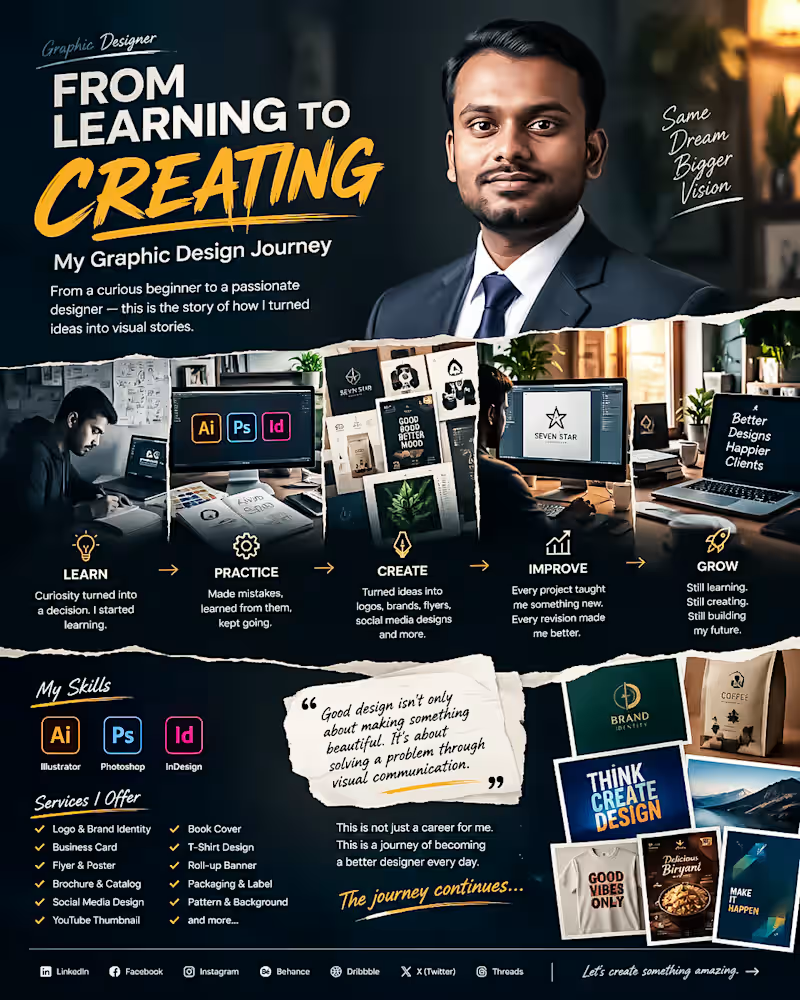
From Learning to Creating. My Graphic Design Journey 🎨
Every designer has a beginning.
Mine started with curiosity, uncertainty and a simple decision: I wanted to learn how to turn ideas into communication.
At the beginning I didn't know everything. I made mistakes struggled with typography, colors, layouts, software and countless small details that experienced designers make look easy.
I kept learning.
Step by step I improved my skills in Adobe Illustrator, Photoshop and InDesign. I started creating logos, branding materials, flyers, social media designs, packaging, thumbnails, posters and many other visual projects.
The biggest lesson I have learned is this:
Good design's n't only about making something beautiful. Good design is about solving a problem through communication.
Every project has taught me something. Every revision has made me better. Every difficult brief has pushed me to think creatively.
Today I’m still learning, still experimenting and still improving.
My journey isn't finished—. Thats what makes it exciting.
I’m building my career one design, one project and one client relationship at a time.
This is not a career, for me. This is a journey of becoming a designer every day.
If you're also building something from zero remember:
Start where you are. Learn what you don't know. Keep creating. Don't stop.
🚀 The journey continues.
#GraphicDesigner #GraphicDesign #DesignJourney #CreativeJourney #DesignerLife #AdobeIllustrator #AdobePhotoshop #AdobeInDesign #BrandIdentity #LogoDesign #FreelanceDesigner #CreativeDesigner #DesignPortfolio #VisualCommunication #Freelancing
0
53
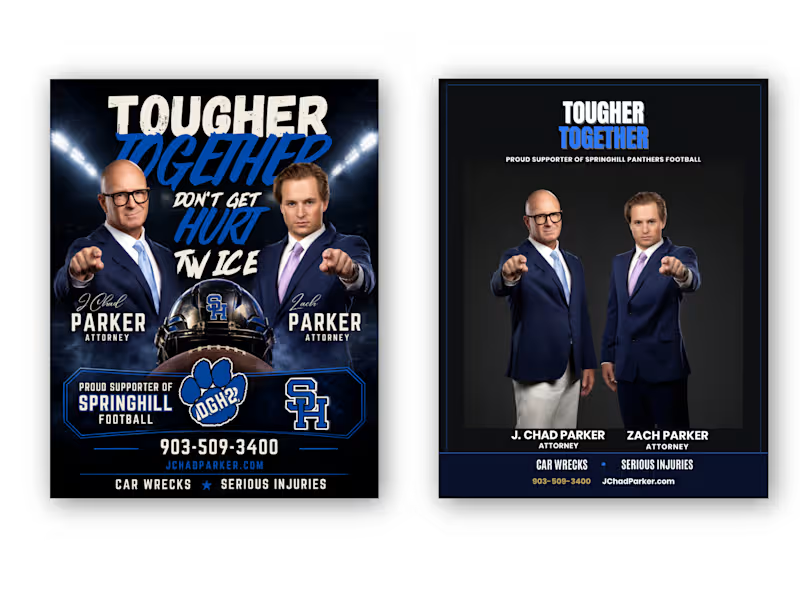
From Cluttered to Clear — Attorney Football Supporter Flyer Redesign
Client: “We have all the information we need, but the flyer doesn't communicate it clearly enough.”
My response:
“I’ll restructure the visual hierarchy, simplify the layout, strengthen the typography, and make the attorneys and contact information easier to recognize—while keeping the football-supporter identity.”
Result:
A cleaner Before → After transformation with stronger hierarchy, improved readability, better visual balance, and a more professional attorney-focused presentation.
Client Problem
The original flyer had strong content, but the overall design felt visually crowded and overly promotional. Too many elements competed for attention, making it difficult to immediately understand the attorneys, their names, services, contact information, and football sponsorship message.
BEFORE — Client's Problem:
The original concept contained all the necessary information, but the visual hierarchy was weak. Multiple headlines, images, football graphics, logos, and contact details competed for attention.
AFTER — My Solution:
I transformed the layout into a more structured and professional composition with a clear hierarchy, stronger typography, improved spacing, focused imagery, and easier-to-find contact information.
Final Result
The goal wasn't simply to make the flyer look different. The goal was to make the information easier to understand, strengthen the professional presentation, and preserve the client's football-supporter identity.
I redesigned this attorney promotional flyer by solving a common communication problem: too much information competing for attention.
The original design had strong imagery and messaging, but the hierarchy was crowded. I reorganized the content, strengthened typography, improved spacing, created a clearer information structure, and balanced the football-supporter theme with a professional legal identity.
The result: a cleaner, more focused flyer that communicates the message faster while keeping the original brand personality.
Tools: Adobe Photoshop, Adobe Illustrator
Service: Flyer Design • Graphic Design • Print Design • Layout Design • Advertising Design
Focus: Visual Hierarchy • Typography • Information Architecture • Branding • Readability
Hashtags
#GraphicDesign #FlyerDesign #FlyerRedesign #BeforeAndAfter #DesignCaseStudy #AdobeIllustrator #AdobePhotoshop #PrintDesign #AdvertisingDesign #Typography #VisualHierarchy #Branding #CreativeDesigner #AttorneyMarketing #ProfessionalDesign
0
38

Expert in B2C e-commerce dev
Expert in B2C e-commerce dev


View more →