
Dimple Panjwani
EXCEL AND DATA ENTRY


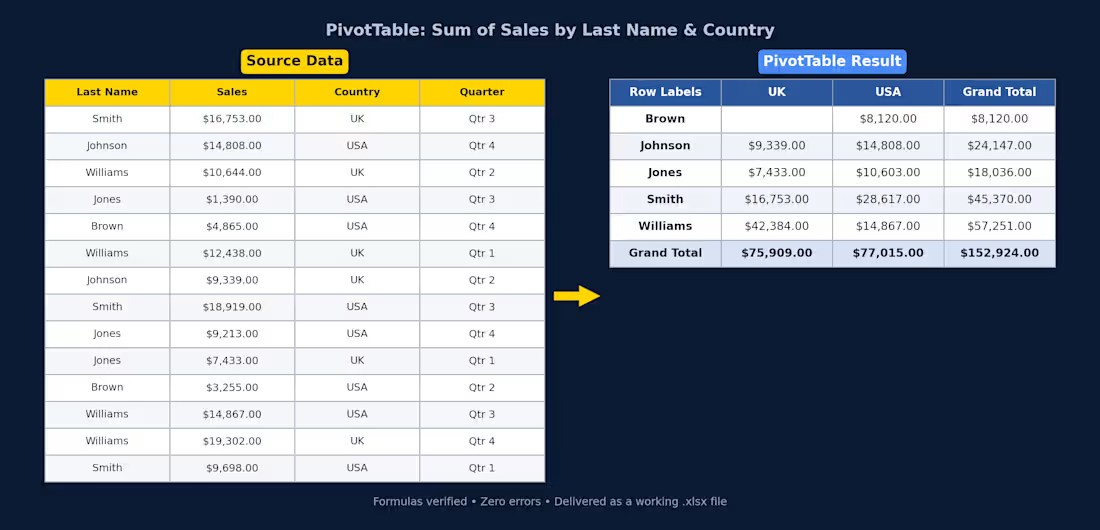
Excel PivotTable — Sales Summary
Client had raw sales data (14 rows across UK/USA, split by quarter) and needed it turned into something actually usable. I cleaned it up and built a PivotTable that breaks total sales down by rep and country, with grand totals for both.
What I did:
Structured the raw data into a proper table (consistent headers, currency formatting)
Built a PivotTable summarizing Sum of Sales by Last Name and Country
Used SUMIFS so the totals update automatically if the source data changes — nothing hardcoded
Checked every formula for errors before delivery
Delivered as a working .xlsx file, ready to plug into a bigger report or dashboard.
If you've got messy sales/ops data sitting in a spreadsheet and need it turned into something you can actually read at a glance, this is exactly the kind of thing I can help with.
3
62
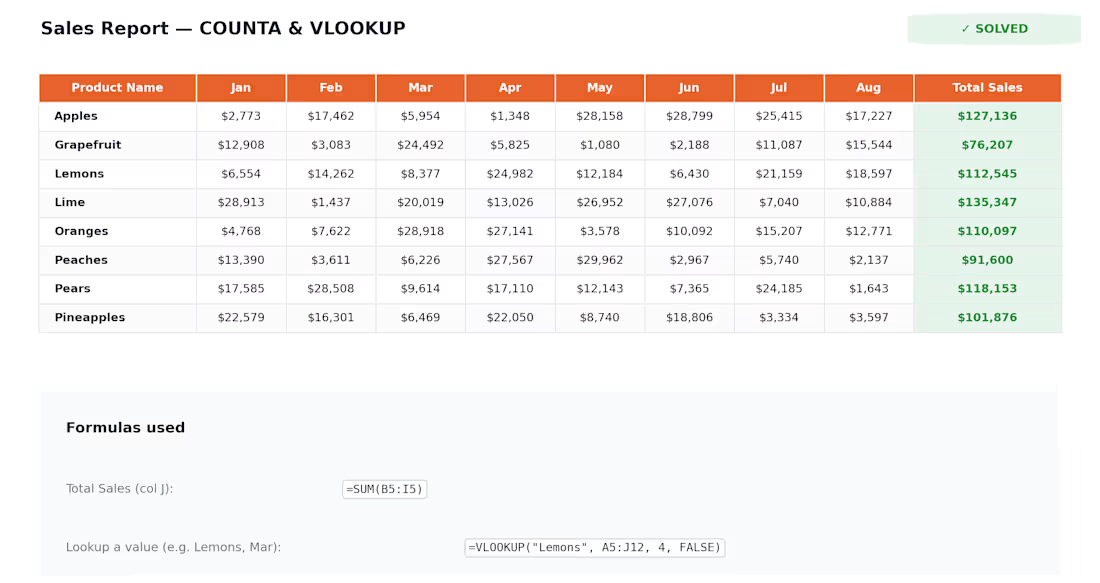
Quick one from a sales tracker I cleaned up recently — client had 8 months of product sales sitting in a spreadsheet with no totals and no way to quickly look up numbers for specific products.
I added the Total Sales column using SUM, then set up VLOOKUP so anyone on the team could pull a product's monthly numbers without scrolling through the whole sheet. Also used COUNTA to auto-count active products in the list, so the count updates itself if rows get added or removed later.
Small task, but it's the kind of thing that saves people a lot of manual work every month. If your spreadsheets need this kind of cleanup — formulas, dashboards, VLOOKUP/INDEX-MATCH, pivot tables, whatever — send me a message, happy to take a look.
0
20
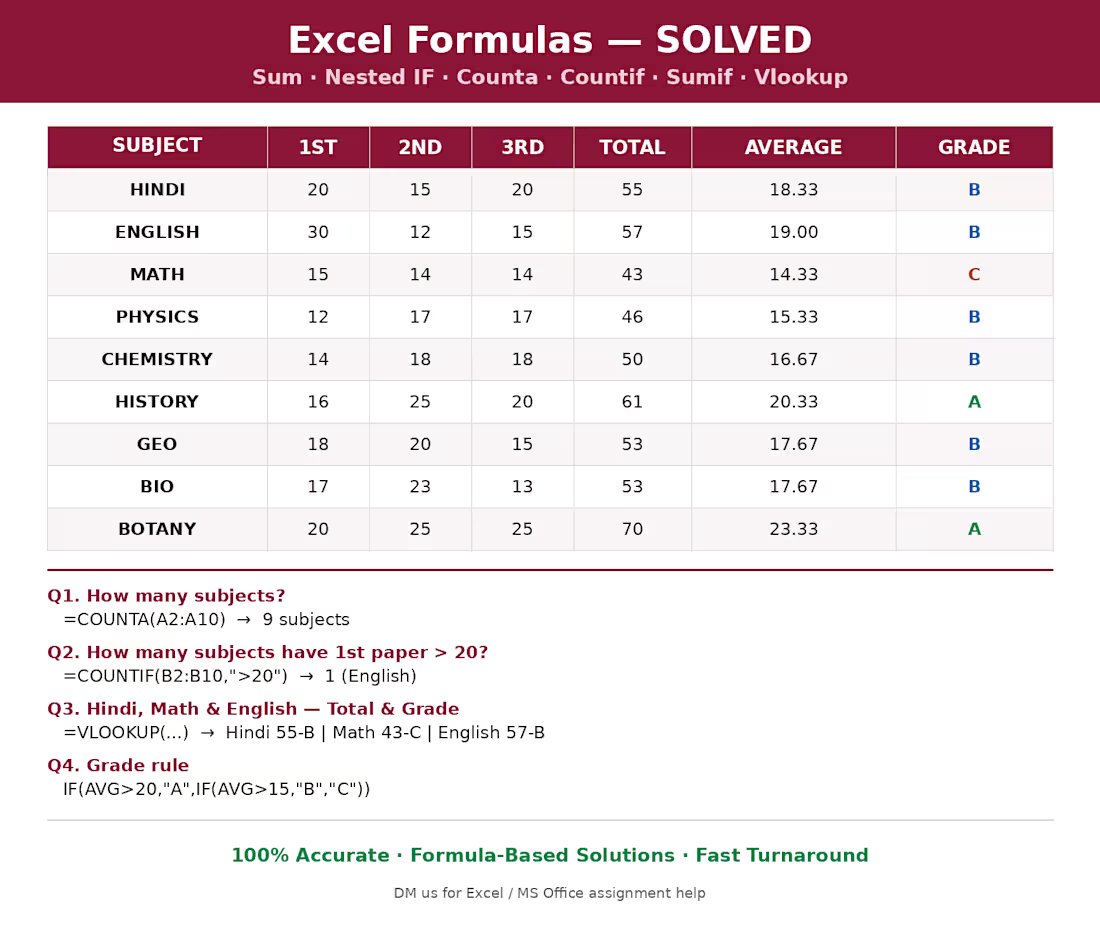
Excel Formulas & Assignment Help — Fast, Accurate, Ready to Use
Need help with Excel formulas, data tables, or MS Office assignments? I solve them quickly and accurately using proper formula logic — no shortcuts, no guesswork.
This sample shows a formula-based assignment solved using:
✅ SUM — totals across columns
✅ Nested IF — automatic grade assignment (A/B/C based on average)
✅ COUNTA — counting entries
✅ COUNTIF — conditional counting
✅ SUMIF — conditional summing
✅ VLOOKUP — pulling matched values across a table
Whether it's a college assignment, a workplace report, or a personal spreadsheet you're stuck on, I can build clean, working formulas that actually explain themselves — plus a quick breakdown of the logic so you understand exactly how it works.
📊 Turnaround: Fast
🎯 Accuracy: Formula-verified, not hardcoded
💬 DM me your sheet or assignment and I'll quote it right away
0
22
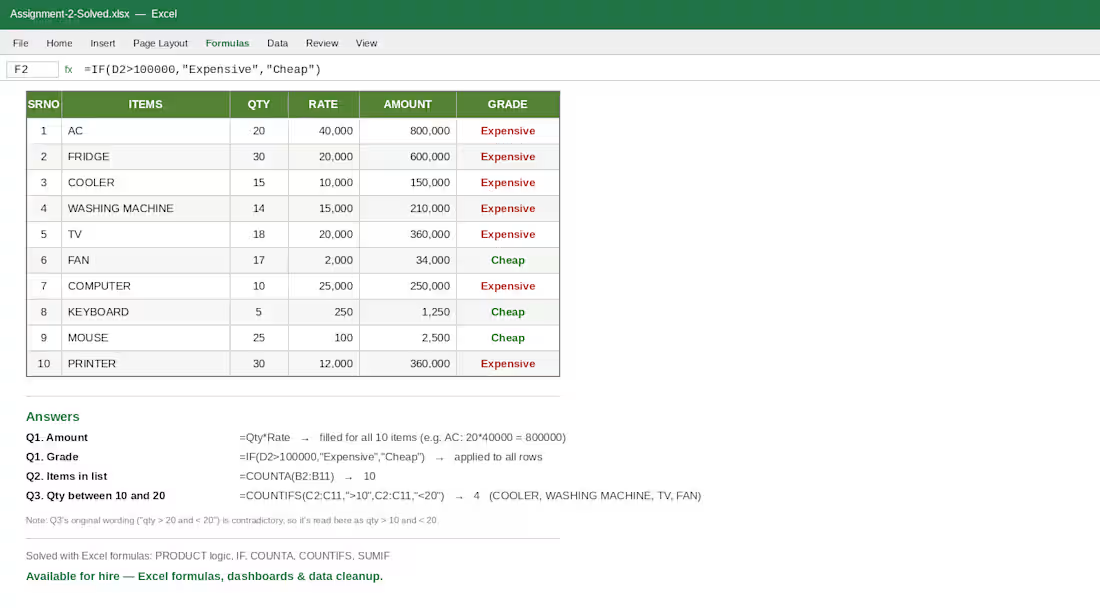
Practicing my Excel formulas today — this one covers IF, COUNTA, COUNTIFS and PRODUCT logic on a simple inventory sheet (qty × rate = amount, then flagging items as Expensive/Cheap based on amount).
Nothing fancy, just clean formula work:
=Qty*Rate for amount
=IF(Amount>100000,"Expensive","Cheap") for grading
=COUNTA() to count items in the list
=COUNTIFS() to filter qty in a range
I do this kind of stuff for actual work too — cleaning up messy spreadsheets, building formulas that don't break when someone adds a row, dashboards, the works. If you've got an Excel headache (inventory sheets, budget trackers, reports that need automating), send me a message. I'll sort it out.
0
26