The network for creativity
Join 1.25M professional creatives like you
Connect with clients, get discovered, and run your business 100% commission-free
Creatives on Contra have earned over $150M and we are just getting started
Back to feedPost

I recently learned an important Azure cost lesson while deploying an AI-powered essay review app.
The app used Python, Flask, LangGraph, the OpenAI API, and several services running on Azure Kubernetes Service.
At one point, I stopped the AKS cluster because I wanted to control costs. Later, I was surprised to see more than $170 on my Azure bill.
The lesson was that stopping an AKS cluster is not the same as assuming every related cloud cost has disappeared.
AKS depends on several underlying Azure resources, such as virtual machines, disks, load balancers, public IP addresses, networking, storage, and databases. Some costs may also come from resources outside the cluster or from usage that had already been accumulated before the cluster was stopped.
For me, the key lesson was:
Stopping a cloud service is not the same as reviewing the full cloud bill.
When deploying apps to Azure, especially with AKS, it is important to regularly check Cost Management, related resource groups, node resource groups, disks, public IPs, load balancers, storage, and databases.
This experience reminded me that cloud deployment is not only about getting an app online. It is also about understanding infrastructure, monitoring cost, and choosing a setup that fits the stage of the project.
I am now much more careful about cloud cost management, especially when building MVPs and AI-powered applications.

The network for creativity
Join 1.25M professional creatives like you
Connect with clients, get discovered, and run your business 100% commission-free
Creatives on Contra have earned over $150M and we are just getting started
Related posts

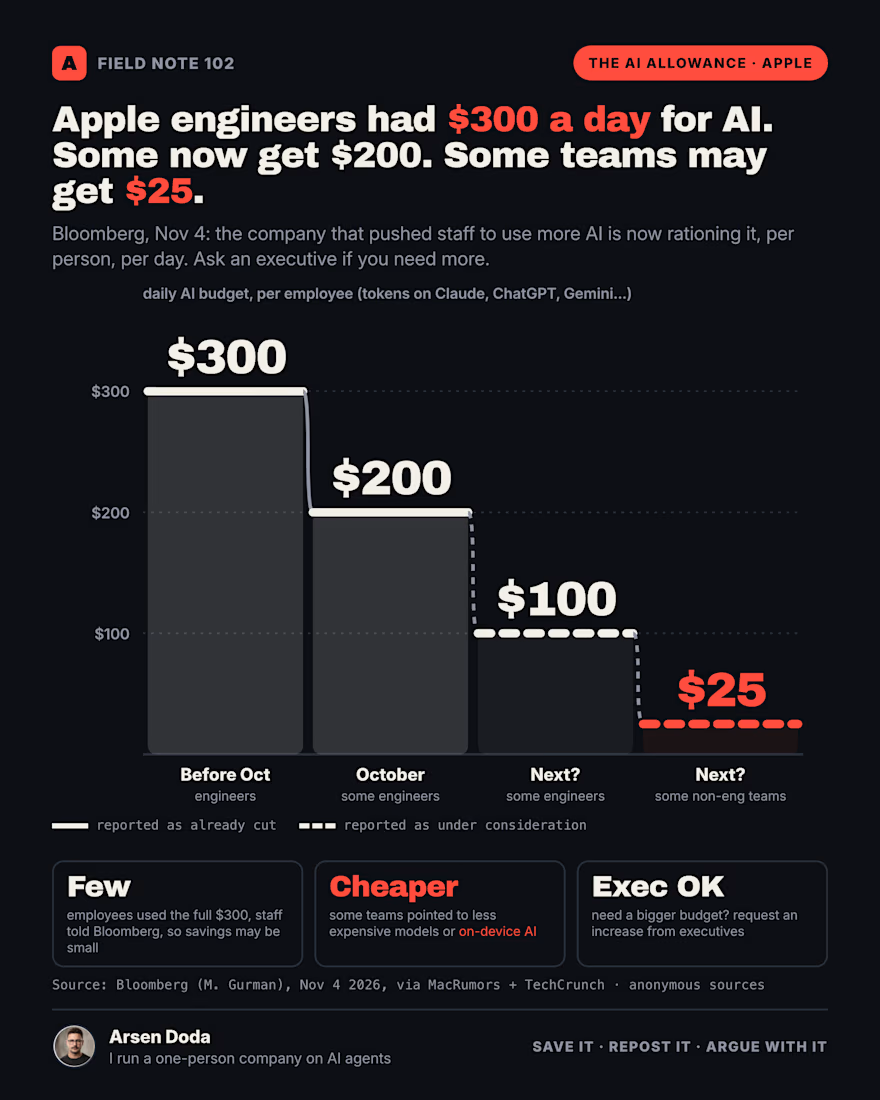
Apple engineers had $300 a day to spend on AI.
In October some of them dropped to $200.
Bloomberg says $100 is being considered next, and some non-engineering teams could go as low as $25.
This is the same company that spent this year pushing staff to use more AI.
Now it's per person, per day, and if you need more you ask an executive.
Here's what most people will miss:
The cut isn't the story.
The meter is.
What Bloomberg reported (anonymous sources, Nov 4):
→ Some engineers: $300 → $200 a day, cut in October
→ Some engineers: $100 a day under consideration
→ Many teams outside engineering: already at $100, some could get $25
→ Some teams pointed to cheaper models or on-device AI
→ Staff said few people ever used the full $300, so the savings may be small
Read that last line again.
If almost nobody hit $300, cutting to $200 doesn't save much money.
What it does is make every employee look at the meter.
That's the real change. AI stops being a free tap and becomes a budget line with your name on it.
I've lived inside that meter for months.
I run a one-person company on AI agents. Every task has a price, and this week my top model ran out of credits in the middle of my morning runs. Nothing broke. It stopped, and the work waited for me.
That's what a cap feels like from the inside. You don't get a warning that you're doing too much. You get a wall at 7:35 a.m.
So here's how I'd run a team under a daily AI budget:
Rule 1: Put the expensive model on judgment, not reading.
Bulk reads, searches and first drafts go to cheaper models. The top model writes the brief and signs off on what ships.
Rule 2: Track cost per finished task, not per seat.
"$200 a day" means nothing. "$4 per merged fix" means something you can defend in a budget review.
Rule 3: Plan for the wall before you hit it.
Decide today what happens when the budget runs out at 11 a.m.: which jobs wait, which drop to a cheaper model, and who gets told.
The companies that spent this year telling staff to "use AI more" are learning what every finance team already knew.
Usage without a unit cost is not a strategy. It's a bill.
Apple's numbers will leak into every other company's planning deck by January.
The question is whether your team finds its cost per task before finance picks a number for you.
Screenshot this for your next budget meeting.
One word: is a daily AI cap SMART or SHORTSIGHTED?

Most teams don't need more AI tools. They need fewer, used well.
This week I watched a small team pay for four AI subscriptions. They were using one of them, and only for first drafts.
We cut it down to two. We set them up to sound like the brand, and we wrote a one-page guide on what to check before anything goes out. That saved them hours a week and a few hundred dollars a month.
That's what practical AI looks like for most companies (who have not built a custom agentic system) :
→ Start with where your team actually loses time
→ Pick the one or two tools that fix that
→ Set them up in your voice
→ A person always reviews before it reaches a customer.

LongCat-2.5 costs $0.30 per million input tokens. Claude Opus 5 lists at $5.00.
I animated the numbers from Meituan's own launch table. It leads one agent test by 1.5 points and trails on two coding tests. In our worked example, the cheap model costs more once you count the human fixes.
Meituan pitches it for visual coding and design work. That's my work too: I design the site, build the agent behind it, and send each job to the model that does it well.
If you were building your next site or agent, which model would you trust with it?