The network for creativity
Join 1.25M professional creatives like you
Connect with clients, get discovered, and run your business 100% commission-free
Creatives on Contra have earned over $150M and we are just getting started
Back to feedPost
Your customers shouldn't have to wait hours for answers your business already has.
Imagine a customer asking about their subscription, account setup, billing policy, or product documentation.
The answer exists somewhere in your business. But your support team still has to search for it, copy the information, and respond manually.
Now imagine handling those repetitive questions through an AWS-powered AI chatbot that understands your business knowledge and knows when to involve a human.
The Real Business Problem
Many growing SaaS companies struggle with:
Repetitive support tickets consuming valuable team time.
Customers waiting for answers to common questions.
Knowledge scattered across PDFs, documentation, and help centers.
AI chatbots generating inaccurate or outdated responses.
Disconnected CRM, support desk, and customer databases.
Difficulty managing chatbot security, permissions, and scalability.
The Solution: AWS AI Chatbot with RAG
I can design and develop a custom AI chatbot using Amazon Web Services (AWS), Amazon Bedrock, and Retrieval-Augmented Generation (RAG).
Instead of relying only on general AI knowledge, the chatbot retrieves relevant information from your approved business documentation before generating an answer.
The system can support:
AI-powered customer support conversations.
Knowledge-base search using RAG.
Context-aware responses with source references.
Secure API integrations with existing business systems.
Human support escalation when necessary.
Conversation logging, monitoring, and access controls.
How the AWS AI Chatbot Works
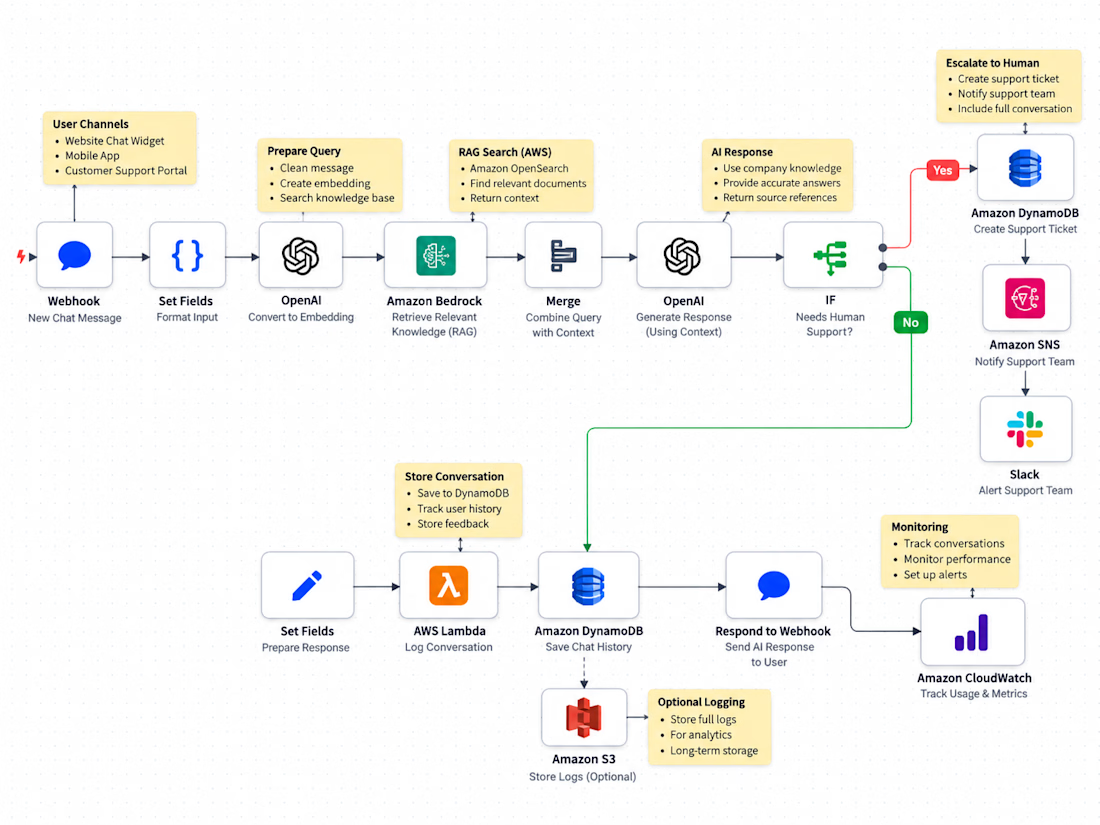
Customer Message → Amazon API Gateway → AWS Lambda → Amazon Bedrock Knowledge Bases → AI Response → Customer
Step 1 — Customer Request: A customer submits a question through your website or SaaS application.
Step 2 — Secure API: Amazon API Gateway receives the request and forwards it to AWS Lambda.
Step 3 — Knowledge Retrieval: Amazon Bedrock Knowledge Bases retrieves relevant information from indexed company documents stored in Amazon S3.
Step 4 — AI Processing: Amazon Bedrock generates a context-aware response using retrieved information.
Step 5 — Response Validation: The application applies safety checks, permission rules, and fallback logic.
Step 6 — Customer Response: The chatbot returns an answer with relevant source references when available.
Step 7 — Human Escalation: If the chatbot cannot confidently resolve the issue, the system can create a support ticket through an integrated helpdesk API.
Why Businesses Should Care
A properly designed AWS AI chatbot can help businesses:
Reduce repetitive customer support work.
Provide faster answers to common questions.
Make internal knowledge easier to access.
Maintain more consistent customer communication.
Connect AI assistance with existing SaaS infrastructure.
Build a scalable foundation for future AI features.
Let's Build the Right AI Solution
Already know what you need? → Let's discuss your AWS chatbot architecture, RAG requirements, and API integrations.
Not sure where to start? → Share your current support workflow or business documentation, and I'll help identify where an AI chatbot could provide the most value.
SEO Keywords
AWS AI Chatbot • Amazon Bedrock • AWS Development • AI Chatbot Development • RAG Chatbot • Retrieval Augmented Generation • AWS Lambda • Amazon API Gateway • Amazon S3 • AI Customer Support • SaaS Chatbot • Custom AI Chatbot • AI Agent Development • Generative AI • Knowledge Base Chatbot • Serverless Architecture • Enterprise AI Assistant • LLM Integration • Python Development • REST API Integration • AI Automation • Customer Support Automation • Cloud AI Development • Conversational AI • AWS Serverless Development
Result: A proposed AWS-powered AI support assistant designed to deliver faster knowledge-based answers, streamline repetitive customer support tasks, and connect securely with existing business applications.
#AWS #AmazonWebServices #AmazonBedrock #AWSLambda #AmazonS3 #APIGateway #AIChatbot #ChatbotDevelopment #RAG #RetrievalAugmentedGeneration #GenerativeAI #AIAgents #AIAutomation #SaaSDevelopment #CloudComputing #ServerlessArchitecture #PythonDevelopment #APIIntegration #CustomerSupportAutomation #EnterpriseAI #LLMDevelopment #KnowledgeBaseChatbot #CustomSoftwareDevelopment


The network for creativity
Join 1.25M professional creatives like you
Connect with clients, get discovered, and run your business 100% commission-free
Creatives on Contra have earned over $150M and we are just getting started



Related posts

Your technicians are fixing problems. But who's keeping your customers updated?
Imagine a customer books an emergency HVAC repair.
They receive no confirmation. The technician is dispatched, but nobody sends an arrival update. The customer calls your office twice, and your receptionist has to manually check the job status.
The repair gets completed, but the follow-up message is forgotten.
This isn't just a communication problem. It's a disconnected workflow problem.
The Hidden Problems in Field Service Operations
Missed booking confirmations and appointment reminders.
Manual SMS messages consuming administrative time.
Customers repeatedly calling for technician updates.
Disconnected booking systems and customer databases.
Delayed responses to rescheduling requests.
Forgotten service completion messages and feedback requests.
The Solution: Twilio SMS Automation Powered by n8n
I can build a custom Twilio + n8n workflow automation system that connects your booking software, customer database, and SMS communications.
Instead of manually updating every customer, the system can send timely, event-based notifications throughout the service journey.
How the Automation Works
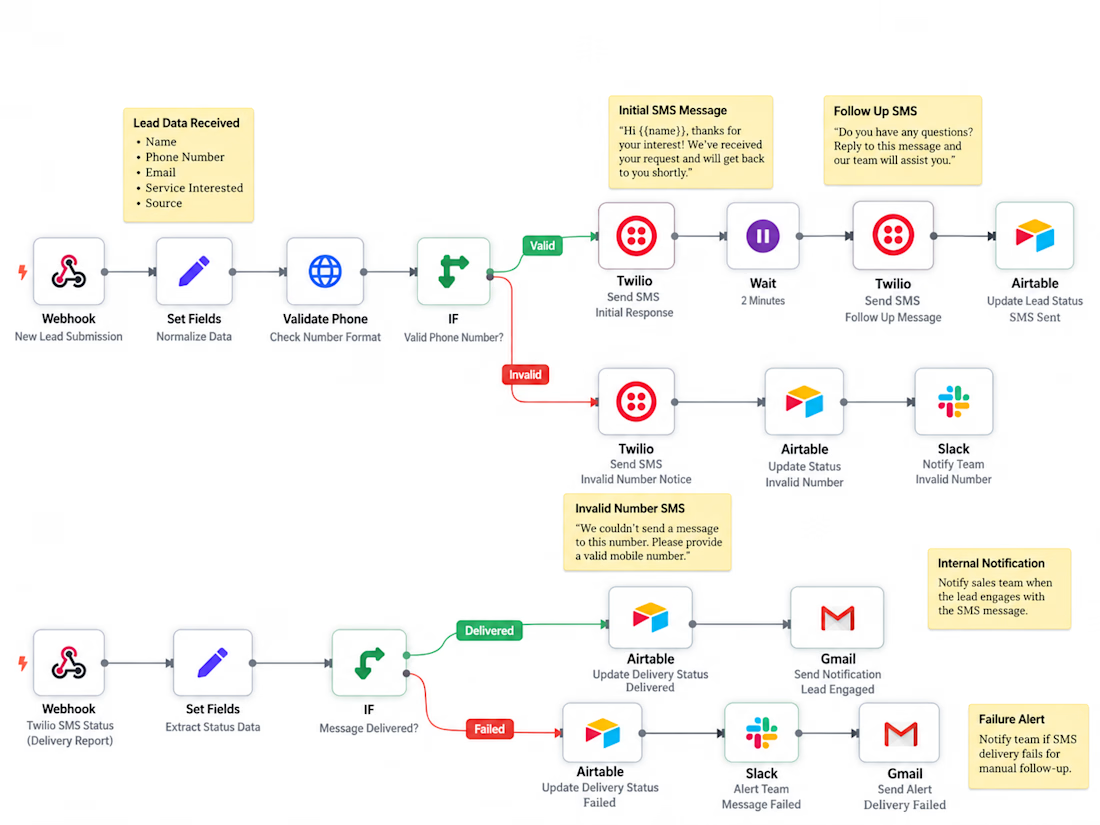
Booking System → n8n Webhook → Data Validation → CRM Lookup → Twilio SMS → Delivery Status Tracking
1. Booking Trigger: A new service appointment sends booking details to n8n through a webhook.
2. Data Validation: The workflow verifies the customer information, phone number, booking status, and messaging consent.
3. CRM Integration: The workflow retrieves customer and appointment details from HubSpot.
4. Twilio SMS: An automated confirmation is sent to the customer with relevant appointment information.
5. Conditional Logic: Invalid records are flagged for staff review instead of sending incorrect messages.
6. Delivery Tracking: Twilio status callbacks update message delivery records and flag failures for follow-up.
7. Technician Updates: Subsequent booking-status events can trigger arrival notifications, completion messages, or approved follow-ups.
What Your Business Gains
✓ Less repetitive communication work for office staff.
✓ More consistent customer appointment updates.
✓ Better visibility into messaging and delivery failures.
✓ Fewer manual steps between booking and customer notification.
✓ A scalable workflow that can integrate with existing business software.
This solution can be customized for HVAC companies, plumbing businesses, electrical contractors, appliance repair services, and other field service providers.
Let's Improve Your Customer Communication
Already know what you need? → Let's build your Twilio SMS automation and connect it to your existing booking or CRM system.
Not sure where to start? → Share how your business currently handles appointments and customer messages. I'll help identify which parts can be automated.
SEO Keywords
Twilio SMS Automation • Twilio API Integration • n8n Automation • SMS Workflow Automation • Field Service Automation • HVAC Automation • Appointment Reminder Automation • Customer Notification System • Automated SMS Notifications • CRM Integration • HubSpot Automation • Webhook Integration • Business Process Automation • Service Booking Automation • Technician Dispatch Notifications • Twilio Developer • n8n Developer • REST API Integration • Customer Communication Automation • SMS Delivery Tracking • Workflow Development • Low-Code Automation • Custom Business Automation • Field Service Management • Twilio Webhooks
Result: A proposed automated customer communication system designed to reduce manual messaging, improve appointment visibility, and keep field service customers informed throughout their service journey.
#Twilio #TwilioAPI #TwilioSMS #n8n #n8nAutomation #SMSAutomation #WorkflowAutomation #BusinessAutomation #HVACAutomation #FieldServiceAutomation #CRMIntegration #HubSpot #APIIntegration #WebhookAutomation #AppointmentAutomation #CustomerCommunication #ServiceBusiness #LowCodeAutomation #AutomationEngineer #CustomAutomation #SMSNotifications #BusinessProcessAutomation #FieldServiceManagement



flagging bad records for staff review instead of sending a wrong text is a really careful touch. how are you finding field service companies to show this to

Stop wasting time processing PDFs manually.
With n8n and AI, extract important information automatically and organize it in Google Sheets.
More than automation: a smarter solution to a real business problem.

Nice, swapping in a vision model is a smart upgrade for scanned files. Are you planning to add a fallback for when the AI node isn't confident?

Biyiniao (比翼鳥) · SHC-15/36 🦜🦜✨
Which do you prefer — Foil Card 🃏 or 3D Render?

5 voted
83%
1 voted
17%
6 votes
Closed
