The network for creativity
Join 1.25M professional creatives like you
Connect with clients, get discovered, and run your business 100% commission-free
Creatives on Contra have earned over $150M and we are just getting started
Back to feedPost

E-commerce Marketplace Management & Sales Growth – High-Volume Online Store😊

The network for creativity
Join 1.25M professional creatives like you
Connect with clients, get discovered, and run your business 100% commission-free
Creatives on Contra have earned over $150M and we are just getting started



Related posts

Shopify store for a luxury women's handbag brand: product pages, collections, and a clean storefront built to turn visitors into customers.


Great work 👏🏻

Project Title
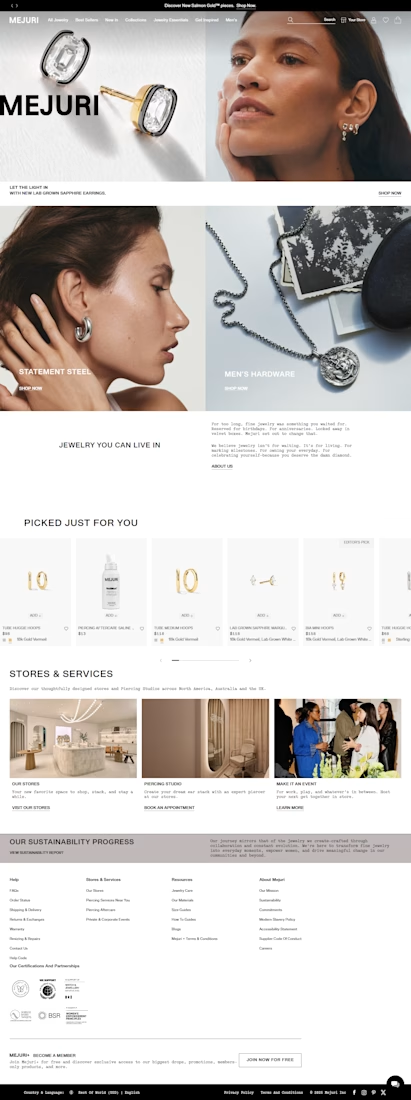
Mejuri | Premium Shopify Jewelry Store Design
Project Description
I designed a premium Shopify jewelry store experience inspired by modern luxury, minimalist aesthetics, and effortless online shopping. The goal was to create an elegant digital storefront that showcases fine jewelry beautifully while helping customers discover products and shop with confidence.
My design approach focused on combining refined visuals with a user-friendly shopping experience, making it easy for customers to explore jewelry collections, compare styles, and find pieces that complement their everyday looks.
What I Focused On
Shopify Store Design: A polished, modern storefront tailored to a premium jewelry brand.
Luxury Visual Presentation: Clean layouts, elegant typography, and product-focused imagery.
Product Organization: Structured categories for rings, earrings, necklaces, bracelets, and other jewelry collections.
User Experience: Intuitive navigation and an easy-to-follow shopping journey.
Collection Discovery: Clear pathways for exploring featured products, new arrivals, and signature collections.
Conversion-Focused Layout: Strategic shopping prompts and calls to action designed to guide customers toward product discovery and purchase.
Brand Consistency: A cohesive visual experience that communicates quality, confidence, and contemporary style.
The objective was to create a visually appealing and customer-focused ecommerce experience that presents jewelry as an everyday luxury while making online shopping simple and enjoyable.
Platform: Shopify
Service: Shopify Website Design
Industry: Fine Jewelry & Ecommerce


Most inbound bottlenecks aren't caused by low lead volume—they happen during triage.
When inquiries roll into a Google Sheet or CRM, operations teams often waste 10–15 minutes per submission reading through messy paragraphs, deciphering budget mismatch, and manually deciding who gets an immediate call vs. a standard rate sheet.
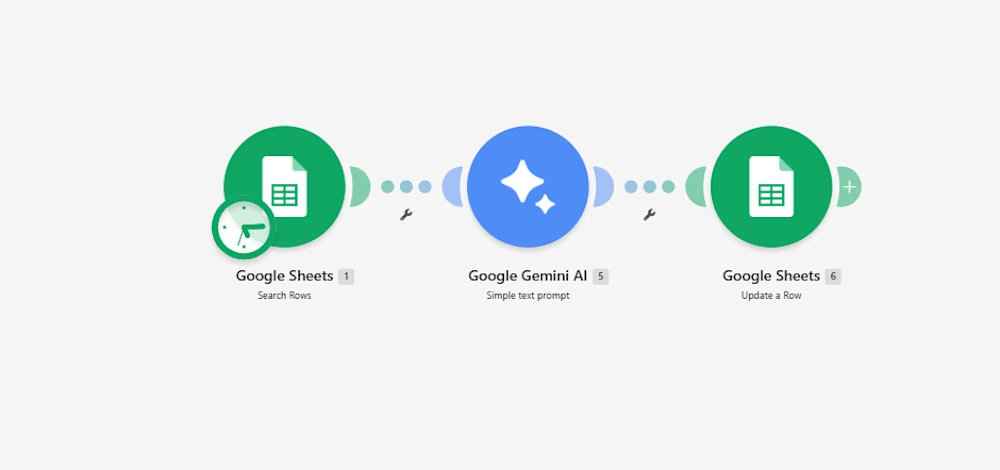
Instead of adding a bulky CRM add-on, I documented a lightweight 3-step automation pipeline built inside Make:
Intake & Extraction: An active listener triggers immediately upon a new submission, extracting core variables: client scope, target deliverables, timeline, and stated budget.
Context-Aware Evaluation (Gemini 2.5 Flash): The payload passes through an AI evaluation node with strict guardrails:
Evaluates budget against minimum agency criteria.
Assigns a triage score: Hot (immediate priority), Warm (nurture), or Cold (disqualified/template reply).
Generates a strict 15-word operational summary—no long paragraphs.
Determines an automated next step (e.g., routing to an account lead or flagging for asynchronous follow-up).
Data Return & Clean Pipeline: Appends the structured classification directly back to the master operational tracker, keeping the sheet filterable and clean.
The outcome: The sales and operations team can filter the entire board by priority status in two clicks, cutting first-touch response time to minutes without manually reading every single submission.
I’ve documented the full scenario map, execution logic, and data schemas below.
Curious how other agency operators and automation leads here handle their lead enrichment layer—are you doing AI scoring at the form level, or later in the CRM pipeline?:


For the budget gate, I'd keep an unstated budget separate from one explicitly below your minimum. Does the Make route ask for clarification when the amount or currency is missing, so a potentially suitable lead doesn't fall into Cold by default?