The network for creativity
Join 1.25M professional creatives like you
Connect with clients, get discovered, and run your business 100% commission-free
Creatives on Contra have earned over $150M and we are just getting started
Back to feedPost
Away from writing code: Diving deeper into Framer with another dark-mode landing page build ⚡
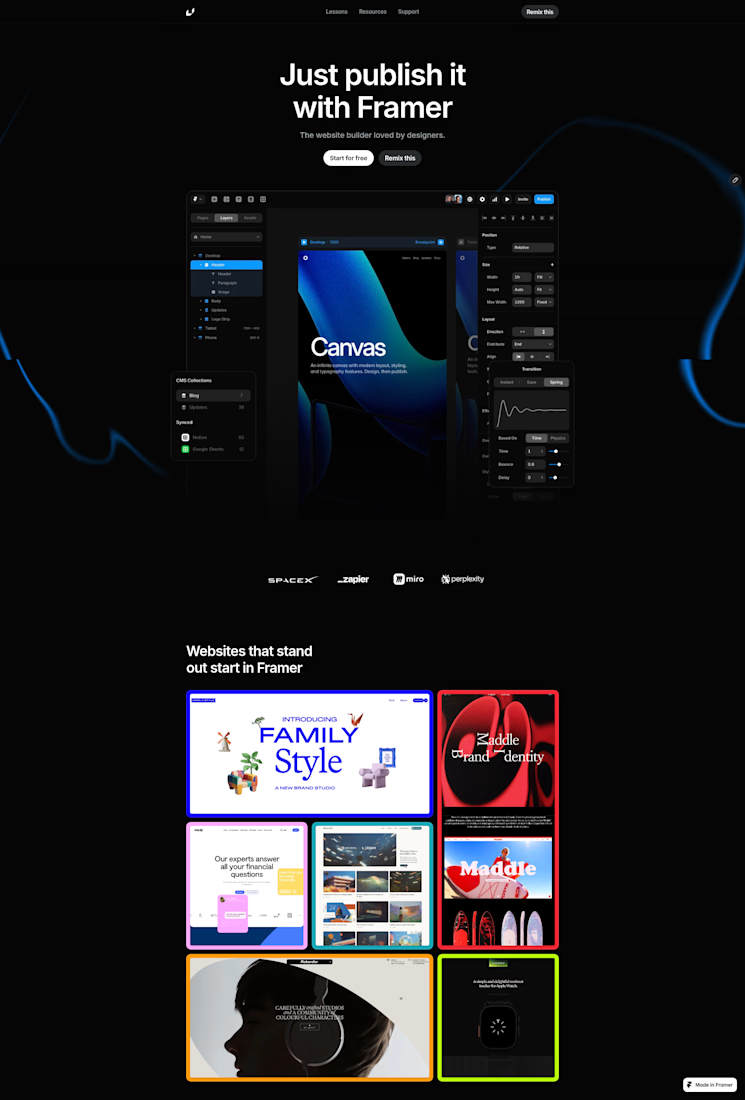
I just wrapped up another hands-on tutorial project—building a sleek, dark-mode landing page featuring the headline "Just publish it with Framer".
Here is what I focused on during this practice session:
Dark Theme Layouts: Working with high-contrast text, deep canvas backgrounds, and vibrant blue accents.
Structuring Layers: Organizing nested elements cleanly, from the Header and Body down to Updates and the Logo Strip.
Interactive Components: Setting up buttons like "Start for free" and "Remix this" right inside the builder.
It’s been a rewarding practice exercise for exploring different layout styles and tool mechanics.
Let me know what you think about the design
link: https://formal-stick-842668.framer.app


Thanks for the feedback Jaber,
Oh.. Yes, I was very careful to make sure it's responsive across devices. BTW First time my post is being goated... Thanks... I appreciate
The network for creativity
Join 1.25M professional creatives like you
Connect with clients, get discovered, and run your business 100% commission-free
Creatives on Contra have earned over $150M and we are just getting started





Related posts


Love how fluid this ticker/carousel is.
Component for Hike Medical — made in Framer.
Designed by Iverson agency.


The easing on that ticker feels really smooth. Small components like this do a lot for how premium a site feels.

i built this portfolio template in framer a few months ago, and it’s been exciting to see how much traction it’s been gaining lately!
it’s now #81 overall and #25 in the designer category on the framer marketplace, bringing in more views, reach, and commissions along the way.
sharing the case study here if you want to take a closer look at the project and see how it came together! 🙌

Huge congrats Max! #81 overall and #25 in designer category on Framer marketplace is no small feat 🚀 Framer templates that actually get traction + commissions is the dream. Well deserved!

I tested two speeds for this button in Framer.
Which one feels better to you?
A (faster) or B (slower)?
Ye le Jani Rokas wali post ke liye:
Nice test Rokas! Between A and B, I'd lean towards A (faster) — feels more snappy and responsive in Framer, especially for a CTA button. The slower B has a smooth premium feel but faster usually converts better as it feels more instant. Great attention to micro-interaction detail!