The network for creativity
Join 1.25M professional creatives like you
Connect with clients, get discovered, and run your business 100% commission-free
Creatives on Contra have earned over $150M and we are just getting started
Back to feedPost

Title
Vocapedia: a Video.js 10 skin that turns the player into an open dictionary
Live URL
https://vocapedia-skin.vercel.app
Live site using the skin (bonus)
https://vocapedia.base44.app/watch
Mux public playback ID
fNEeWPY4UUEkfCFd9617w8gvYFEsFOv72rPQj3qKG700
Description
Vocapedia turns the Video.js 10 player into an open book on a scholar's desk. The film plays on the left-hand page. The right-hand page is a live dictionary, written as the film speaks, and an A–Z thumb index runs down its edge. My aim was a player for learning a language from a film that still works as an ordinary player. Behind the book design, every control is a Video.js component with its own label, tooltip and keyboard support.
The desk: each control is an object from a lexicographer's desk.
A cobalt wax seal plays and pauses.
A brass clasp stops and returns to the first page.
Page corners skip ±10 seconds, and repeated presses add up (+20, +30).
Silk line markers jump to the previous or next spoken line.
An inkwell is the volume: its ink level shows the level, and pressing it corks the well to mute.
A magnifier shows or hides the subtitles.
A compass dial opens Settings: translation language, speed and quality.
An open book goes full page.
The timeline: the seek bar is the book's gilt page edge, with a silk ribbon and a brass clip. Each spoken line is a tab on the edge. Dragging the clip makes the edges riffle, tilts the picture, and prints the page number large ("p. 533 · 8:52"). The time also reads as page numbers: "p. 150 of 888", one page a second.
Learning from the film:
Dual subtitles: English above, the reader's language beneath, in eight languages taken from Sintel's own subtitle files.
When a word is first spoken, its A–Z tab pulls out with embers, and the word is written into the dictionary page with its pronunciation, definition and translation.
Study focus can pause after new words, repeat each line, or slow speech to 0.75×.
A review of collected words uses Again, Hard, Good and Easy.
Put to work: on vocapedia.base44.app/watch, the player is part of a real language encyclopedia. Each word you meet is saved to your own review queue on the site and earns XP towards your streak. Every word in the film's word index links back to its line in the film and to its full article.
Accessibility:
One visible gold focus ring on every control.
The focus order matches the visual order.
Keyboard shortcuts for everything (Space, ←/→, Shift+←/→ for lines, M, F, ? for a built-in guide), and Esc closes every menu.
Labels and tooltips on all controls, and a status announcer reads out each change.
Subtitle text stays readable over bright and dark scenes.
The layout adapts down to phone width: secondary controls drop out in steps, so nothing overflows.
With reduced motion on, every animation becomes a simple fade.
Forced-colours mode is supported.
Mux: the film is Sintel (© Blender Foundation, CC BY 3.0), streamed from Mux.

An open dictionary next to the film is a great idea for language learners. Love the scholar's desk framing.

Such great idea! Love it!

Turning the player into an open dictionary is a wonderful idea for language learners — the cobalt wax seal for play/pause and the inkwell whose ink level shows the volume make every control feel like an object on a scholar's desk. The A–Z tab pulling out when a new word is first...

awesome
The network for creativity
Join 1.25M professional creatives like you
Connect with clients, get discovered, and run your business 100% commission-free
Creatives on Contra have earned over $150M and we are just getting started



Related posts

Copybook is a Video.js v10 skin for lesson videos. It treats the player as a page in a school exercise book: the video is taped onto squared paper beside a red margin, the seek bar is a wooden ruler, and captions are written on a highlighter strip under the picture instead of over it.
Every control sits on the paper below the video, so text and icons keep the same contrast over any footage. The ruler is divided by the video's chapters, numbered like centimetres, and finished parts turn green, so the seek bar doubles as lesson progress; hovering it shows a polaroid of that moment. The same chapters build a checklist outline next to the player.
Small details carry the idea through: a ruled title card before the lesson starts, hand-drawn icons, sticky notes that confirm shortcuts and double-taps, and a gold star when the lesson is finished. Buttons are at least 44px, every icon has a tooltip with its shortcut, focus is a thick pen-blue outline, and all motion switches off under reduced motion. Four colour themes (Classic, Kraft, Night and Chalkboard) are switched with one attribute, and each is checked for contrast.
I built it for the video tour of my own browser extension, AI Bookmarks and Notes, where it now runs live.
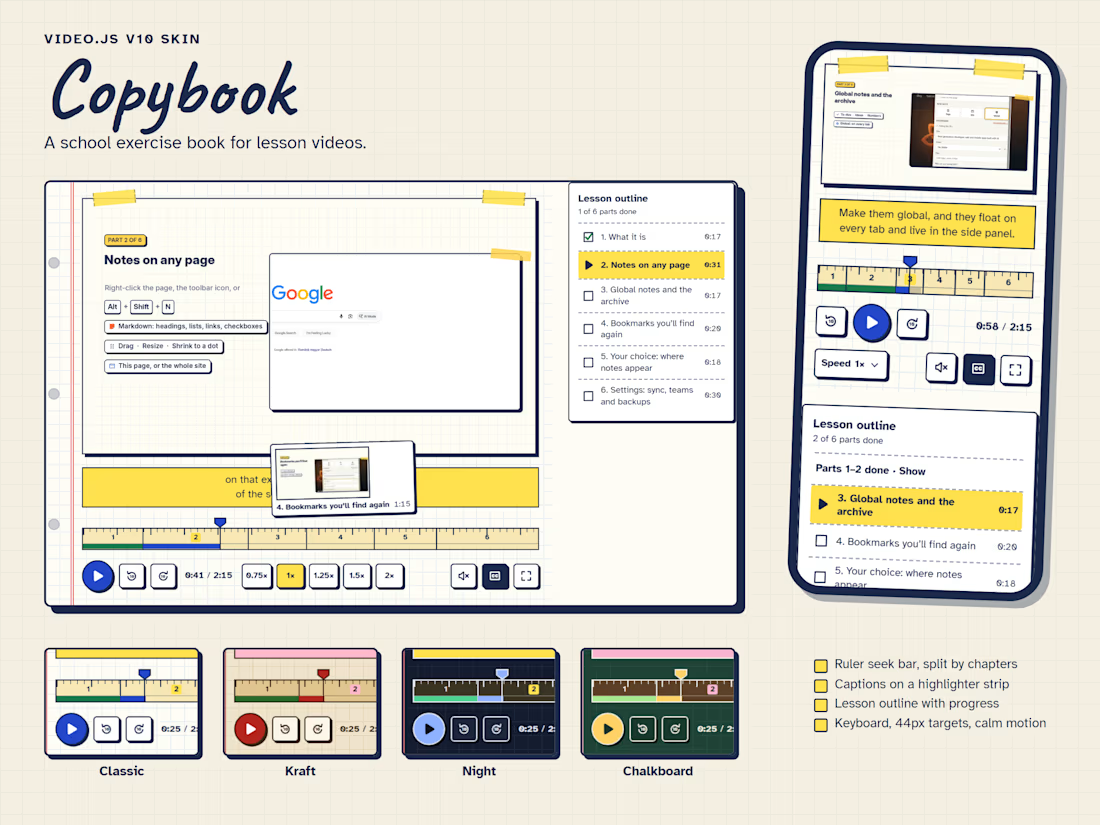

The wooden ruler and highlighter-strip captions give Copybook such a familiar school-day charm. The gold star is a lovely finishing detail.

BETWEEN TWO WORLDS — A Cinematic Video.js Experience
Between Two Worlds is a cinematic video player experience built with Video.js v10, designed to transform video playback into an immersive visual journey.
Inspired by the mystery of crossing between two worlds, the project combines a deep purple and gold aesthetic, elegant typography, atmospheric animation, and a customized Video.js interface.
Rather than presenting a conventional video player, I wanted to create an experience where the visual identity begins before playback and continues through the player controls.
Key features:
Customized Video.js controls with purple and gold styling.
A cinematic animated introduction with smooth transitions.
A coordinated video poster and visual identity.
Responsive styling and familiar playback functionality.
A live, interactive experience accessible directly in the browser.
The goal was to demonstrate how thoughtful visual design can make a video player feel like an integral part of a story, rather than simply a tool for watching it.
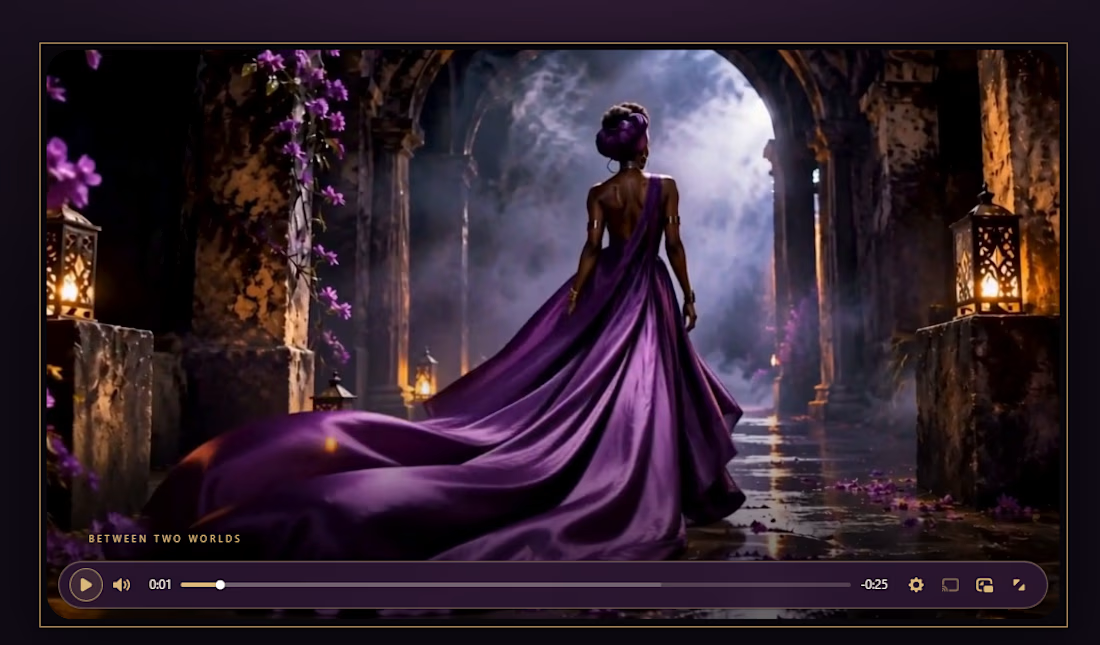
Starting the visual identity before playback even begins, with a cinematic animated introduction, is what sells the whole idea — the player doesn't just decorate the film, it opens the story. And carrying that same purple-and-gold identity through the controls keeps the two...

Pull into the drive-in and save three spots for your friends. 🚘
I built LOT 66, a custom Video.js v10 skin for the Contra challenge. Start a live watch room for up to four people and share the invite link. As each friend joins, their car lights up and their name appears above it. Everyone watches in sync.
I wanted the controls to feel like part of the car, so I built them into a vintage dashboard. The radio dial adjusts the volume, the tuning scale lets you scrub through the film, and the dashboard stays within reach in fullscreen.
Now showing the original 1960 trailer for Dinosaurus! 🦖
#VideoJSSkinsChallenge
