The network for creativity
Join 1.25M professional creatives like you
Connect with clients, get discovered, and run your business 100% commission-free
Creatives on Contra have earned over $150M and we are just getting started
Back to feedPost

POS Software Architecture: Cloud-Based vs. On-Premise vs. Hybrid Systems
A point-of-sale system is the heartbeat of a retail or hospitality business. Every sale, refund, discount, and stock movement passes through it, and when it slows down or goes offline, revenue stops. That is why the architecture behind a POS matters so much: it determines how reliable the system is on a busy Saturday, how fast new stores can be opened, how secure payment data stays, and how much the business spends on infrastructure over time.
One of the first decisions any team faces is where the system lives. Should it run in the cloud, on servers inside the store, or in a mix of both? This article compares cloud-based, on-premise, and hybrid POS architectures, explains the trade-offs, and offers guidance on choosing the right model. Whether you are building in-house or evaluating a POS software development company, understanding these options will help you ask better questions and make better decisions.
What a POS System Actually Needs to Do
Before comparing architectures, it helps to list what a modern POS must handle:
• Fast, reliable checkout, even with poor or no internet
• Payment processing with cards, wallets, UPI, and contactless methods
• Real-time inventory updates across tills, stores, and online channels
• Pricing, promotions, loyalty, and tax calculations
• Hardware integration with scanners, printers, cash drawers, scales, and customer displays
• Reporting and analytics for owners and managers
• Integrations with accounting, ERP, e-commerce, and delivery platforms
• Strong security, access control, and audit trails
Each architecture handles these needs differently.
Option 1: Cloud-Based POS Architecture
In a cloud-based POS, the core application, database, and business logic run on remote servers hosted by a cloud provider such as AWS, Azure, or Google Cloud. Store terminals are thin clients: a browser, a tablet app, or a lightweight native app that talks to the backend over the internet.
How It Works
Every transaction is sent to the cloud, processed, and stored centrally. Inventory, pricing, and customer data live in one place, and updates reach all stores instantly.
Advantages
• Centralized management. One dashboard for every outlet. Price changes, new products, and promotions go live everywhere at once.
• Faster rollout. Opening a new store can be as simple as logging in on a new device.
• Lower upfront cost. No on-site servers to buy and maintain, and subscription or usage-based pricing is common.
• Automatic updates. New features and security patches are deployed centrally without visiting each store.
• Elastic scalability. The backend can scale up for festive sales or flash promotions and scale back down afterwards.
• Easy integrations. Modern APIs make connecting to e-commerce, accounting, and marketing tools more straightforward.
• Real-time analytics. Owners can view sales across locations from anywhere.
Drawbacks
• Internet dependency. If connectivity fails and the system has no offline mode, checkout can halt. This is the biggest risk, especially in areas with unreliable networks.
• Latency. Each action that waits on a round trip to the cloud can feel slower than a local system.
• Ongoing costs. Subscription and cloud usage fees continue for as long as the system is used.
• Data residency concerns. Some regions and industries require data to stay within certain borders, which must be planned for.
• Vendor lock-in. Moving away from a specific cloud platform or provider can be difficult.
Best Suited For
Multi-outlet retailers, franchises, e-commerce-connected businesses, and fast-growing chains with reliable internet in most locations.
Option 2: On-Premise POS Architecture
In an on-premise architecture, the POS software and database run on servers or computers located inside the store or at a company data center. Terminals connect over the local network, and the business owns and manages the hardware.
How It Works
Transactions are processed locally, so the system keeps running even when the internet is down. Data may be synchronized to headquarters periodically or not at all.
Advantages
• Reliability without internet. Checkout runs on the local network, so outages elsewhere do not stop sales.
• Speed. Local processing typically gives very fast response times.
• Control. The business decides how data is stored, secured, and backed up.
• Data locality. Sensitive data stays on premises, which can simplify certain compliance requirements.
• No recurring cloud fees. Costs are mostly upfront and fixed.
Drawbacks
• High upfront investment. Servers, networking, and installation add significant cost.
• Maintenance burden. Hardware failures, backups, patches, and security all fall on the business or its IT partner.
• Hard to scale. Adding stores means installing and configuring more infrastructure.
• Fragmented data. Without careful synchronization, head office may not see accurate, real-time stock or sales.
• Slow updates. Rolling out new features or fixes to every location takes time and effort.
• Limited remote access. Managers cannot easily check performance from outside the store unless extra systems are added.
Best Suited For
Single-location businesses, environments with poor connectivity, or organizations with strict data control requirements and in-house IT capability.
Option 3: Hybrid POS Architecture
A hybrid architecture combines both worlds. The store runs a local component, often called an edge or local node, that handles checkout, hardware, and temporary data storage. A cloud backend manages master data, analytics, integrations, and synchronization across stores.
How It Works
When the internet is available, the local node and the cloud sync continuously. When the internet drops, the local node keeps processing sales and queues the data. Once connectivity returns, the queued transactions sync to the cloud and conflicts are resolved by predefined rules.
Advantages
• Resilience. Stores keep selling during outages, which protects revenue and customer experience.
• Speed at the counter. Critical operations run locally with minimal latency.
• Central control. Pricing, catalog, and reporting stay centralized in the cloud.
• Scalable growth. New stores connect to the same cloud backend with a standard local setup.
• Flexible compliance. Sensitive data can stay local while aggregated data goes to the cloud.
• Better user experience. Staff rarely notice network issues.
Drawbacks
• Higher complexity. Two layers mean more engineering effort, particularly around sync logic and conflict resolution.
• Testing challenges. Offline, reconnect, and partial-failure scenarios must all be tested thoroughly.
• Potentially higher development cost. The initial build is more involved than a pure cloud or pure on-premise design.
• Operational overhead. Local nodes must be monitored, updated, and secured remotely.
Best Suited For
Retail chains, restaurants, supermarkets, and any business where uptime at checkout is critical but central visibility and growth also matter.
Side-by-Side Comparison
Factor
Cloud-Based
On-Premise
Hybrid
Upfront cost
Low
High
Medium
Ongoing cost
Subscription and usage
Maintenance and upgrades
Mixed
Works offline
Only with offline mode built in
Yes
Yes
Speed at checkout
Depends on network
Very fast
Very fast
Multi-store visibility
Real-time
Limited or delayed
Near real-time
Scalability
Excellent
Difficult
Very good
Maintenance effort
Low for the business
High
Medium
Update rollout
Instant
Manual
Mostly automated
Engineering complexity
Medium
Medium
High
Best for
Growing chains, online-connected stores
Single stores, strict control
Mission-critical, multi-location retail
Key Architectural Considerations
Whichever model you choose, several design decisions will shape the system's quality.
Offline-First Design
Even in a cloud-centric POS, treat offline capability as a core requirement, not an extra. Use a local database on the terminal, a queue for pending transactions, and idempotent APIs so that retries never create duplicate sales. Define clearly what is allowed offline, such as cash sales and cached-price lookups, and what is restricted, such as certain card payments or gift card redemption.
Data Synchronization and Conflict Resolution
Sync is the hardest part of hybrid systems. Decide how to handle cases such as two stores selling the last unit, a price changed while a terminal was offline, or a refund processed in a different location. Common approaches include event sourcing, versioned records, and last-write-wins for low-risk data combined with business rules for critical data like inventory.
Payment Security and Compliance
Payment handling should minimize PCI DSS scope. Use certified payment terminals and tokenization so that card data never touches your application servers. Encrypt data in transit and at rest, restrict access with role-based controls, and keep detailed audit logs. Also consider local fiscal and e-invoicing regulations, which can influence where and how receipts are generated and stored.
Hardware Integration
POS software must talk to printers, scanners, cash drawers, scales, and payment terminals. Cloud-only web apps can struggle with direct hardware access, so plan for a native app, a local bridge service, or a browser extension that handles device communication.
Scalability and Performance
Design for peak days, not average days. Use horizontally scalable services, message queues for non-critical processing, caching for catalog and price data, and load testing that simulates festive and flash-sale traffic. Make sure the checkout path is lightweight and never blocked by reporting or sync tasks.
Integrations and APIs
Plan for connections to accounting and ERP software, e-commerce platforms, delivery apps, loyalty programs, and CRM tools. Exposing well-documented APIs and webhooks from the start makes the ecosystem easier to grow.
Monitoring and Remote Management
For distributed stores, you need centralized logging, health checks on every terminal and local node, remote configuration, and over-the-air updates. Make sure logs never expose card data or personal information.
How to Choose the Right Architecture
Use these questions to guide the decision:
How reliable is internet at your locations? Weak or unpredictable connectivity points to on-premise or hybrid.
How many stores do you have, and how fast are you growing? Many outlets or rapid expansion favor cloud or hybrid.
How costly is a few minutes of downtime? For high-volume stores, resilience should outweigh simplicity.
Do you need real-time, company-wide visibility? If yes, a cloud backend is essential.
What are your regulatory and data residency obligations? These may require local storage or regional cloud hosting.
What technical resources do you have? On-premise needs in-house IT, while hybrid needs strong engineering for sync.
What is your budget over three to five years? Compare total cost of ownership, not just the initial price. In practice, many growing businesses start with a cloud-based POS that includes robust offline mode, and evolve toward a hybrid design as scale and reliability demands increase. Common Mistakes to Avoid • Assuming the internet is always available. Every POS must have a plan for outages. • Ignoring hardware compatibility until late in the project. • Underestimating sync complexity in hybrid or offline-capable systems. • Letting card data touch your systems and inflating compliance scope. • Skipping load tests until a major sale event exposes bottlenecks. • Choosing architecture by trend rather than by actual business needs.
Working with a POS Software Development Company
Building a POS that is fast, resilient, and secure takes experience across payments, hardware, offline sync, and retail workflows. A specialized POS software development company can help you evaluate architectures against your real operating conditions, design a sync strategy that holds up under failure, and integrate with the payment, accounting, and e-commerce tools you rely on. When evaluating partners, look for: • Proven experience with offline-capable and multi-store systems • Knowledge of PCI DSS and local fiscal compliance • A track record integrating diverse hardware and payment providers • Clear approaches to testing, monitoring, and remote updates • Willingness to explain trade-offs honestly instead of pushing a single model
Final Thoughts
There is no universally best POS architecture. Cloud-based systems offer speed of rollout, central control, and scalability. On-premise systems offer independence and raw local reliability. Hybrid systems aim to deliver the strengths of both, at the cost of added engineering complexity. The right choice depends on your connectivity, scale, compliance needs, and tolerance for downtime. Start from how your stores actually operate, design for failure rather than perfect conditions, and choose the architecture that keeps the checkout line moving no matter what.
With careful planning, or the guidance of an experienced POS software development company, you can build a system that supports your business today and scales with it tomorrow.
The network for creativity
Join 1.25M professional creatives like you
Connect with clients, get discovered, and run your business 100% commission-free
Creatives on Contra have earned over $150M and we are just getting started



Related posts

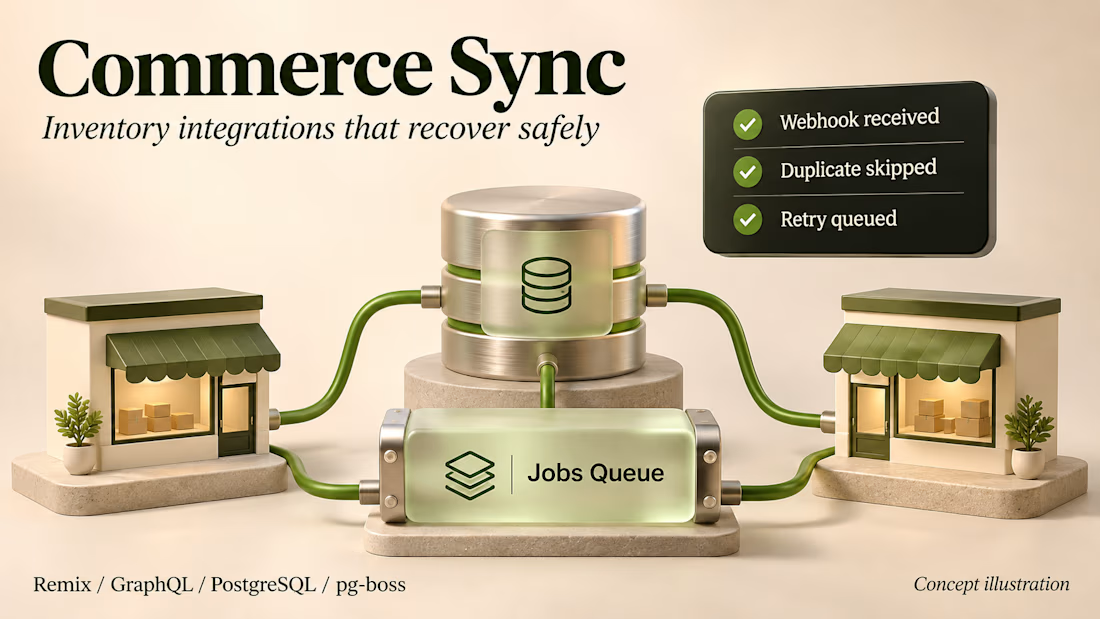
A duplicate webhook should not change inventory twice.
Commerce Sync is my multi-store Shopify integration example. Product changes move between storefronts, and inventory updates make their way back to the parent store.
The part I care about is what happens when something fails. PostgreSQL catches duplicate deliveries, pg-boss keeps jobs durable, and separate workers handle throttling and retries. Partial syncs have a rollback path.
I put the architecture and implementation decisions in the case study below. Client details are removed, and the render is a concept illustration.
I am taking on Shopify app integrations and backend maintenance, remotely from India, up to 20 hours a week.


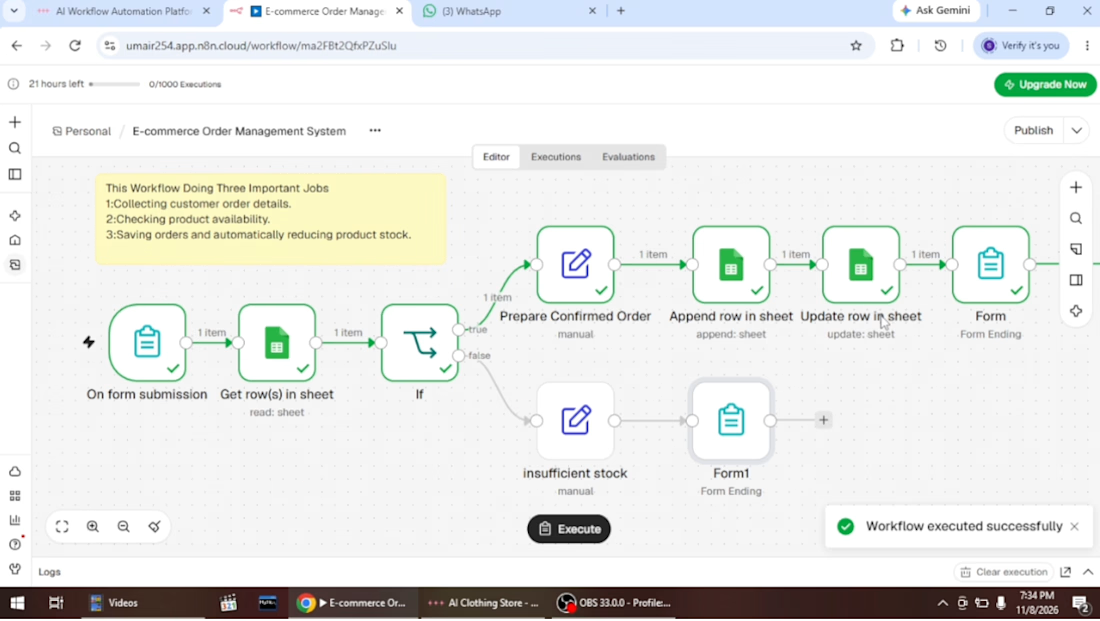
E-commerce Order Management Automation | n8n + Google Sheets
Project Overview
I developed an automated E-commerce Order Management System using n8n and Google Sheets to simplify order processing, inventory management, and customer notifications.
The goal was to reduce repetitive manual tasks, minimize order processing errors, and create a more organized workflow for e-commerce businesses.
Key Features
Automated Order Collection: Captures customer orders through an online form.
Inventory Verification: Checks product availability using Google Sheets.
Stock Validation: Uses conditional logic (IF Node) to determine whether an order can be fulfilled.
Automatic Price Calculation: Calculates the total order amount.
Order Management: Stores confirmed orders in Google Sheets.
Inventory Updates: Automatically adjusts stock quantities after successful orders.
Customer Notifications: Sends order confirmations or insufficient-stock messages.
Tools & Technologies
n8n | Google Sheets | IF Node | Workflow Automation | Data Processing
Business Benefits
Reduces manual order processing.
Improves inventory accuracy.
Helps prevent orders for unavailable products.
Streamlines communication with customers.
Keeps order and inventory records organized.
Project Objective
Build a practical automation solution that helps e-commerce businesses manage orders and inventory more efficiently.
Interested in automating your e-commerce operations? Let's connect.
#n8n #EcommerceAutomation #WorkflowAutomation #GoogleSheets #BusinessAutomation #OrderManagement