The network for creativity
Join 1.25M professional creatives like you
Connect with clients, get discovered, and run your business 100% commission-free
Creatives on Contra have earned over $150M and we are just getting started
Back to feedPost

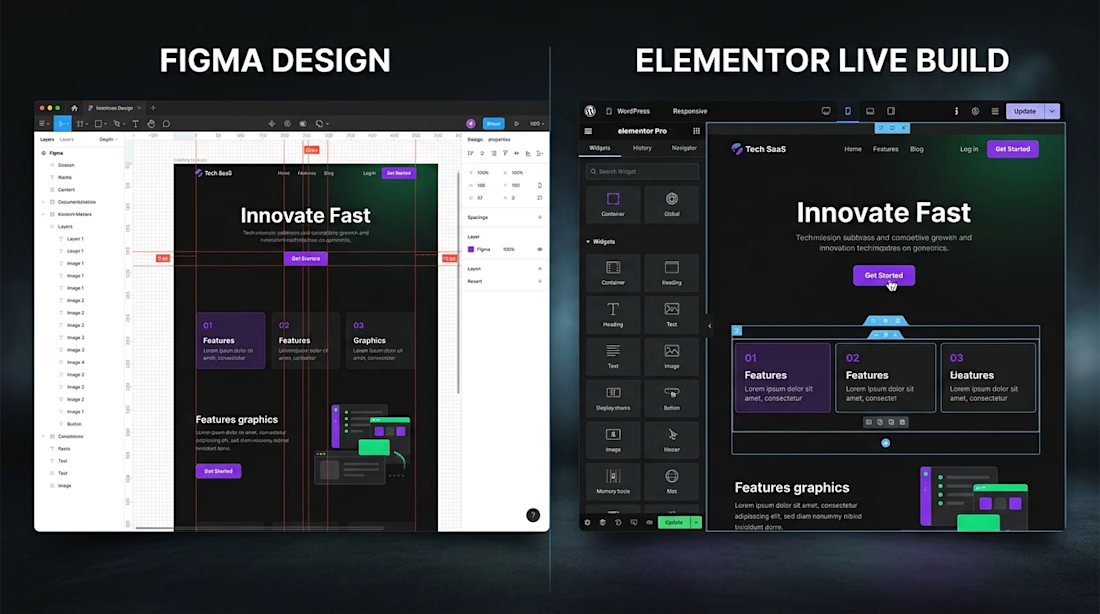
Figma to Elementor Pro conversions shouldn't sacrifice site speed for pixel-perfection.
One of the biggest mistakes I see when building custom Elementor sites is neglecting the underlying container architecture. Heavy, nested sections and unoptimized asset loading will destroy your Google PageSpeed scores before the site even launches.
Here is my standard 4-step workflow for keeping Elementor Pro builds lightweight, responsive, and ultra-fast:
Flexbox Containers over Legacy Sections: Keeps DOM depth minimal and renders layouts drastically faster.
SVG & WebP Asset Pipeline: Converting vector graphics and compressing images before they ever touch the WordPress media library.
Custom CSS for Micro-Interactions: Using lean CSS for hover states and animations instead of stacking heavy third-party plugins.
Selective Dynamic Content Loading: Setting up Elementor Theme Builder templates to pull dynamic data efficiently without bloat.
What's your go-to method for keeping page load times under 1 second on client builds? Drop your performance tips below! 👇
bugfixwordpresswebsitedesignwordpresselementorElementorResponsive DesignUX DesignWeb DevelopmentFigmaWordPress


The network for creativity
Join 1.25M professional creatives like you
Connect with clients, get discovered, and run your business 100% commission-free
Creatives on Contra have earned over $150M and we are just getting started








Related posts



Your web sections always have such strong art direction. Great to see the brand carried right into the layout.

I’ve spent the last three months building this.
Deframer is finally here.
It started with the same conversation with clients: they wanted to leave Framer but felt stuck, since moving meant rebuilding their sites.
I felt it too. Pricing kept getting harder to justify, and the product experience felt worse.
Our template sales also took a hit after the marketplace and community changes.
Other template creators have been seeing their revenue dip too.
So I built Deframer.
Some exporters just package what the browser loads from your published URL.
Deframer writes a clean Next.js + TypeScript project, following Next.js best practices. Code you can read, maintain and run yourself.
It also optimizes for SEO, AEO and speed.
Paste your Framer URL, verify it’s yours, and convert. Your pages, components, layouts and motion come along.
Three months later, it’s ready for you to try.
https://deframer.co
If you’ve been wanting to move off Framer, I’d love to hear how it works for you.


Nobody wakes up excited to measure a room 😂. At least we tried to make it look good while you do it. Did we succeed?


