The network for creativity
Join 1.25M professional creatives like you
Connect with clients, get discovered, and run your business 100% commission-free
Creatives on Contra have earned over $150M and we are just getting started
Back to feedPost

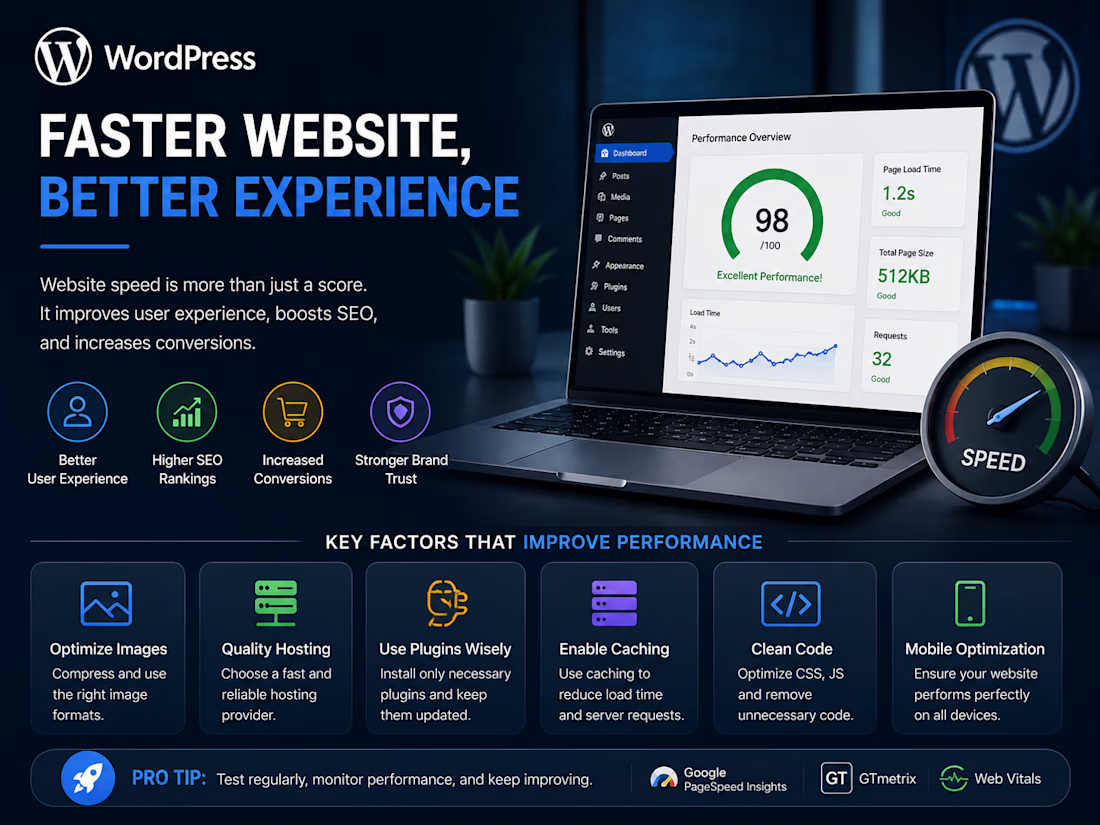
Why Website Speed Matters in WordPress
A website does not have to look bad to perform badly.
In fact, some of the most visually impressive websites can still be frustrating to use if they take too long to load. A visitor might be greeted by a beautiful layout, high-quality images, animations, and interactive features, but if the page sits loading for several seconds, there is a good chance that visitor will leave before seeing any of it.
That is why speed matters.
People have become used to getting information almost instantly. When they search for something, shop online, read an article, or visit a business website, they generally expect the page to respond without making them wait. If it does not, they have plenty of alternatives.
For WordPress websites, performance should therefore be considered during the development process, not as a problem to deal with after everything else is finished.
Good Design Is Not Enough
It is easy to focus on appearance when building a website. After all, the design is the first thing people notice.
A modern layout, large images, animations, sliders, videos, and interactive elements can make a website feel more polished. The problem is that every additional element can also add something for the browser to load or process.
For example, a full-size image uploaded directly from a camera may look great, but it may be far larger than necessary for the space where it appears. The same is true for animations and scripts. A small visual improvement may not always justify the extra load it places on the page.
This does not mean websites should be plain or stripped of useful features. It simply means that design choices need to be made with performance in mind.
A successful website should look good, work properly, and feel smooth to use.
Why Speed Has Such a Big Impact
Website speed affects the experience of using a site from the very first moment.
If a page opens quickly, visitors can start reading, browsing, or interacting almost immediately. When it is slow, they may become impatient before they even reach the content they came for.
This can influence several areas:
User Experience → Engagement → Conversions → SEO → Brand Perception
Consider an online store. A customer may be interested in buying a product, but delays during browsing or checkout can interrupt the process. Some customers may wait. Others may simply leave.
For a business website, a slow experience can also affect how the business is perceived. Even if the products or services are good, an outdated or sluggish website can create a poor first impression.
So, performance is not just something for developers to think about.
It can affect the results the website is supposed to achieve.
1. Speed Is Part of the User Experience
A website feels better to use when it responds quickly.
Visitors should be able to move from one page to another, open menus, click buttons, and access information without noticeable delays. Ideally, they should be focused on what they are doing rather than thinking about how slow the website feels.
Poor performance can show up in different ways. Sometimes the page takes a long time to load. In other cases, the content appears but buttons do not respond immediately. A page may also shift unexpectedly as images or other elements load.
These issues can make a website feel unreliable, even when the design itself is good.
This is why performance and user experience are closely connected. A visually attractive interface is only part of the experience. The way that interface behaves is just as important.
2. Speed and SEO Are Connected
Performance is also relevant when thinking about search engine optimization.
Search engines use many different signals when evaluating websites, and technical quality is one part of the overall picture. Google's Core Web Vitals, for example, focus on areas related to loading, responsiveness, and visual stability.
Of course, improving website speed alone will not guarantee high search rankings.
SEO also depends on factors such as content quality, relevance, site structure, and many others. A fast website with poor content is not automatically going to outperform a slower website with excellent content.
However, technical problems can make it harder to provide a good experience for both users and search engines.
For that reason, performance should be treated as one part of a broader SEO strategy rather than something completely separate from it.
3. Mobile Users Cannot Be Ignored
A website can perform well on a powerful desktop computer and still struggle on a mobile device.
This happens because mobile users do not all have the same conditions. They may be using slower internet connections, older devices, or browsers with different capabilities.
They also have smaller screens, which can change the way they interact with the website.
For this reason, testing only on a desktop computer is not enough.
A WordPress website should be checked across different screen sizes and devices. Responsive design is important, but responsiveness is not just about making everything smaller.
The mobile version should still be easy to navigate, quick to load, and comfortable to use.
A website that technically fits on a phone screen is not necessarily a good mobile website.
4. Large Images Can Slow Everything Down
Images are often necessary, especially for portfolios, online stores, blogs, and business websites.
At the same time, they are frequently one of the main reasons a page becomes unnecessarily large.
A common mistake is uploading an image that is much larger than the website actually needs. If a small image is displayed in a content section, there is usually little benefit in forcing every visitor to download a huge file.
Some practical ways to manage images include:
Resizing them before uploading
Compressing large files
Using suitable modern formats
Avoiding oversized images
Providing different image sizes for different devices
The purpose is not to reduce image quality as much as possible.
The better approach is to use an image that looks good while keeping the file size reasonable.
That balance can make a noticeable difference to page performance.
5. More Plugins Do Not Always Mean a Better Website
One of WordPress's biggest strengths is the availability of plugins.
A plugin can add useful functionality quickly and save developers from having to build every feature from scratch. However, it is also easy to install plugins for features that are rarely used or not needed at all.
The problem is not simply the number of plugins.
A website with several well-built and lightweight plugins may perform perfectly well, while a single poorly developed plugin could create serious performance issues.
Before adding another plugin, it is worth considering:
Is this feature actually necessary?
Is the plugin actively maintained?
Does it add unnecessary scripts or requests?
Could it affect the database or server?
Is there already another plugin providing the same functionality?
Is there a simpler way to achieve the same result?
Every plugin adds something to the website, so each one should have a clear purpose.
6. Hosting Also Plays a Major Role
Even a carefully optimized WordPress website can perform poorly if the hosting environment is not suitable.
The server is responsible for handling requests, processing data, and delivering website content to visitors. If the available resources are limited or the server is struggling, the website may become slow regardless of how well the front end has been optimized.
Hosting can influence:
Server response time
Resource availability
Reliability
Database performance
The ability to handle increased traffic
A small website may work perfectly well on a basic hosting plan. As traffic grows, however, the requirements may change.
More visitors, more database requests, additional plugins, and new features can all increase the workload.
Performance should therefore be viewed as a combination of several factors. WordPress itself is only one part of the overall system.
7. Caching Can Reduce Unnecessary Work
Caching is commonly used to help websites deliver content more efficiently.
Instead of repeating the same processing every time a visitor requests a page, certain resources or versions of content can be stored and reused.
Depending on the setup, WordPress websites may use:
Page caching
Browser caching
Object caching
Server-side caching
When configured correctly, caching can reduce unnecessary work and improve loading times.
However, caching is not always as simple as switching on a plugin and forgetting about it.
Websites with dynamic content need more careful configuration. For example, an online store may display information that changes depending on the user or the contents of their cart. In such cases, the wrong caching setup can cause outdated or incorrect information to appear.
The important thing is to use caching in a way that suits the type of website.
8. Performance Starts During Development
Trying to fix every performance issue after a website has been completed can be much harder than preventing those issues in the first place.
Performance should be considered while the website is being developed.
This can involve keeping the code clean, avoiding unnecessary scripts, limiting excessive animations, and paying attention to database queries and external resources.
Not every visual effect or third-party script provides enough value to justify its impact on the website.
A well-organized website is usually easier to maintain as well. When developers understand what each part of the website is doing, it becomes easier to identify and fix performance problems later.
Good development decisions can save a significant amount of work in the future.
9. Optimization Does Not End After Launch
A website can be fast when it is launched and slower several months later.
That is normal because websites change.
New pages may be created. More images may be uploaded. Plugins may be added. Traffic can increase, and external services may be connected to the website.
Each change can affect performance.
For this reason, website speed should be checked regularly instead of only during the development stage.
Performance monitoring makes it easier to notice problems before they begin affecting a large number of visitors.
Optimization is better viewed as part of regular website maintenance rather than a task that is completed once and never revisited.
10. The Goal Is Not a Perfect Score
Performance testing tools can be useful, but it is easy to become too focused on the numbers they produce.
A high score is helpful, but it does not automatically mean that the website provides an excellent experience.
A website could perform well in a speed test while still being confusing or difficult to navigate. On the other hand, removing every useful feature just to achieve a perfect score would not necessarily improve the website either.
The goal should be to find the right balance between:
Performance + Design + Functionality + Accessibility + User Experience
A website should be fast enough to feel smooth, but it should also remain useful and easy to understand.
The people using the website matter more than the number shown by a testing tool.
A Simple WordPress Performance Checklist
Before launching a WordPress website, it is useful to check a few key areas:
✓ Are the images optimized?
✓ Is the hosting suitable for the website's needs?
✓ Are all installed plugins necessary?
✓ Are WordPress, themes, and plugins up to date?
✓ Has caching been configured properly?
✓ Are unnecessary CSS and JavaScript files being loaded?
✓ Are third-party scripts really needed?
✓ Does the website work properly on different screen sizes?
✓ Have Core Web Vitals been checked?
✓ Has the site been tested on real mobile devices?
✓ Are regular backups available?
✓ Is performance monitored after the website goes live?
Going through these areas will not guarantee a perfect website, but it can help prevent many common performance problems.
Final Thoughts
A fast website is not just a technical achievement.
It affects how people experience the website from the moment they arrive. It can influence whether they stay, how easily they find information, and whether they complete the action the website was designed to encourage.
For WordPress developers, this means performance should be part of the project from the beginning.
There is little value in building a website with impressive features if those same features make the experience frustrating.
The best websites find a balance. They are visually appealing without being unnecessarily heavy. They include useful functionality without loading features nobody needs. They work well across different devices and remain manageable as they grow.
At the end of the day, visitors do not care how many optimizations were performed behind the scenes.
They simply notice whether the website feels good to use.
And that is what website performance is really about.


The network for creativity
Join 1.25M professional creatives like you
Connect with clients, get discovered, and run your business 100% commission-free
Creatives on Contra have earned over $150M and we are just getting started
Trending
retrofuturism
Share your favorite designs from the past exploring the distant future. Or your own take on the aesthetic 🚀
halftone
Dots. Texture. Grain. Let's see your designs using the halftone technique.

Midjourney
Creatives are showing off what they're making with Midjourney.
colorgrade
Video editors sound off: How do you enhance the mood of your video in color grading?





Related posts


Migrating the problem from WordPress to Webflow to Framer hoping the platform solves it isn't it.
If you dont change the content and how your brand reflects it, you'll get the same results.


Bidding wars!! 🧳 🤺 ⚔️ 💥
In case you didn't see it already... Today, some Upwork developers paid $200+ to auction their proposal for the top position at the client's end. It's very quickly becoming a hot topic 😅 🤣
The job post is here if you want to confirm it for yourself
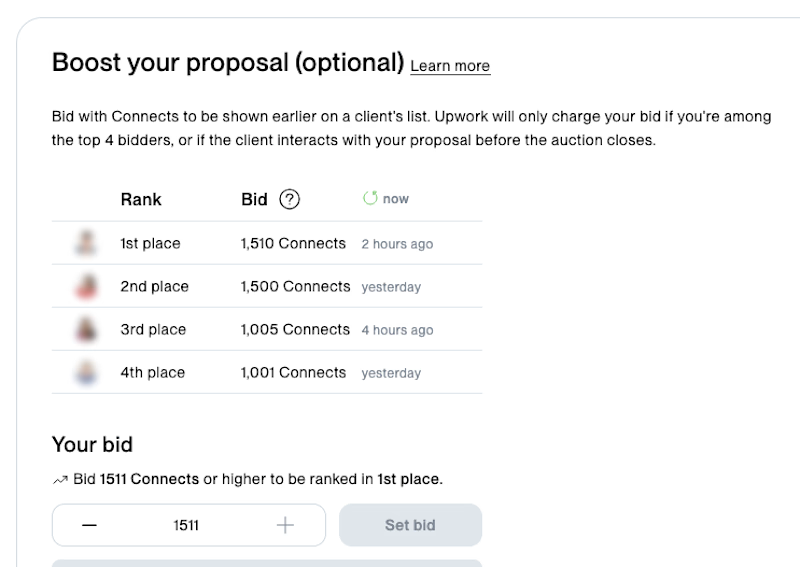

A $200 boost buys the first slot, but the useful number is how often those proposals get opened. Without that, developers are bidding on visibility with no way to price the odds.

Macaron Queen is a premium confectionery brand specializing in handcrafted French macarons and luxury gifting experiences.
I redesigned and restructured their Shopify storefront to create a more refined, conversion-focused shopping experience that better reflects the brand’s premium positioning. The project focused on elevating the visual identity, improving product storytelling, simplifying navigation, and optimizing the customer journey across desktop and mobile.
The result is a polished, luxury-driven e-commerce experience designed to make the products feel as premium online as they are in real life.

