The network for creativity
Join 1.25M professional creatives like you
Connect with clients, get discovered, and run your business 100% commission-free
Creatives on Contra have earned over $150M and we are just getting started
Back to feedPost
It’s a common misconception that automation is a "set it and forget it" kind of thing. Over the past few days, I’ve been deep in the setup for a large-scale online event where the data flow between Typeform, OneDrive (Excel), and Slack felt more like an obstacle course at first.
What I often see in these projects is a massive manual workload happening behind the scenes: attendee data being exported, analyzed, and shoved into spreadsheets by hand, while the team on Slack doesn't have the info they need when they need it.
This doesn't just eat up time; it drains the mental capacity needed for MMAs (Money Making Activities). You really just want a system that handles the logic while you focus on managing the exceptions.
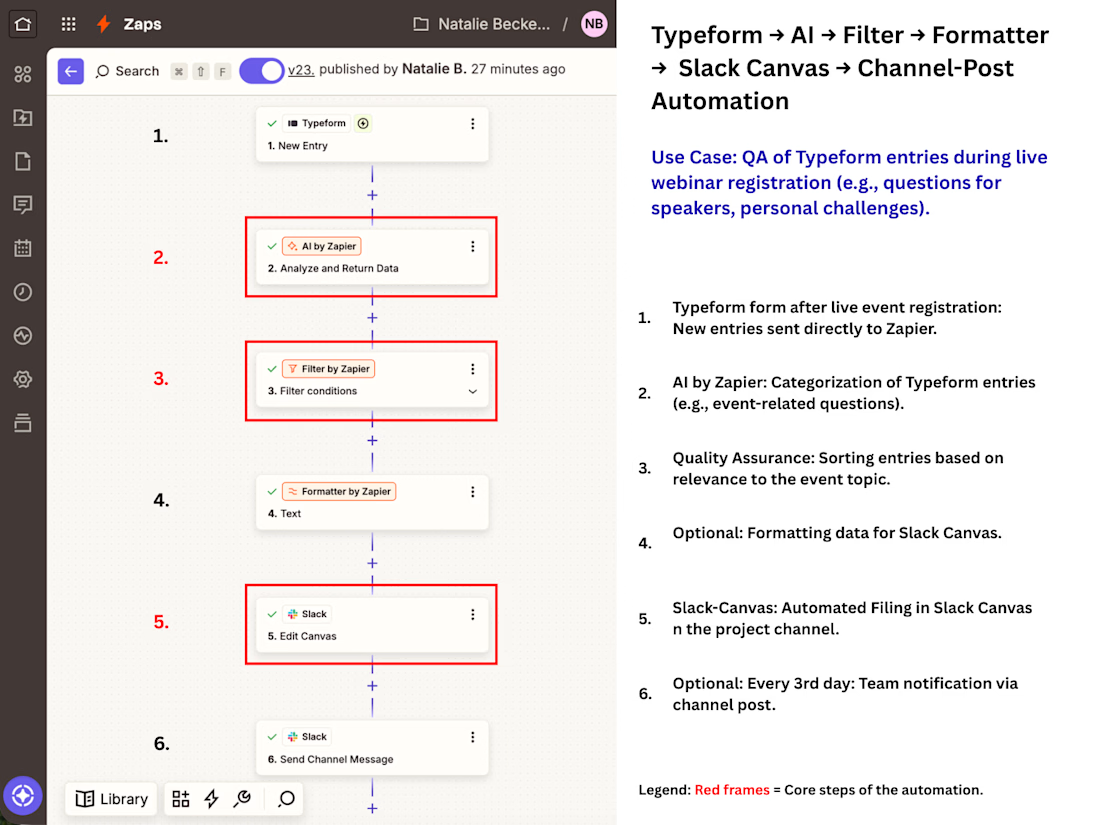
My solution: The data flows automatically now, but I’ve integrated an AI step that categorizes responses before they even hit the Slack Canvas.
Building this took several hours and a few feedback loops with Grok and ChatGPT, but the result is that manual operations were cut down to just a few minutes, replaced by occasional maintenance.
Of course, it’s not "set and forget." If the form changes or a new event comes up, I need to update the Zaps and maybe tweak the AI’s categorization. But that’s qualified maintenance instead of repetitive copy-pasting.
One side effect that clients value most: This shifts the process from constant human dependency to sporadic system maintenance. The workflow no longer stalls if someone is away—the system just keeps running.
Watching the logic chain verify and file real data correctly makes you realize just how much brain capacity was tied up in the old process.
If you’re building an event setup right now and feel like your tools are clashing instead of flowing: Let me know in the comments what your biggest workflow time-sink is.


A detail that really helps the team:
I added a specific step for interval notifications. Every three days, a message is sent to the Slack channel with a direct link to the Canvas. This way, no one has to go searching for new relevant entries, and the focus stays on the tasks that matter.

Exactly. The goal isn't just to move data, but to ensure it’s actionable once it arrives and the AI filter is set up properly. The AI filtering acts as a gatekeeper, so the team can focus on high-value tasks instead of noise. Glad you caught that nuance!
The network for creativity
Join 1.25M professional creatives like you
Connect with clients, get discovered, and run your business 100% commission-free
Creatives on Contra have earned over $150M and we are just getting started
Related posts

The hardest part of creative work isn't creating.
It's deciding what to create next.
As creatives, we make hundreds of decisions every day:
• What should I work on next?
• Which idea is worth pursuing?
• Where did I leave off?
• What's the next step?
That mental load adds up.
So for the Config Makeathon, I built Ezzi; an AI-powered creative operating system designed to reduce decision fatigue and help creators spend less time figuring out what to do and more time actually creating.
The feature I'm most excited about is the Memory Engine.
Ezzi remembers context, projects, priorities, and how you work, so you don't have to start from scratch every day.
🚀 Try the demo:
https://object-baggy-85537497.figma.site/
What causes the most decision fatigue in your creative process?
Full video walk through coming soon!


Cant wait for the walk through video

I built City Chemistry for the #ConfigMakeathon 💌🌍
Try it here: https://citychemistry.figma.site/
It’s a compatibility test for the city you can’t stop romanticizing.
City Chemistry asks the less delusional follow-up:
Is that city actually compatible with the life you’re trying to build?
You enter your current city, your dream city, and your lifestyle priorities: budget, weather, social life, career, safety, and future roots.
It gives you a compatibility score, calls out the red flags, finds better matches, and sends you a postcard from future you.
Built with Figma Make, Supabase, Gemini, and Pexels.


This is awesome! Never travelling without consulting “city chemistry” again!

🚨 EVERY RINGING PHONE IS EITHER REVENUE... OR A LOST CUSTOMER.
Most business owners think they need more leads.
Wrong.
They need to stop losing the leads already trying to buy.
Every unanswered call is a customer who moves on to your competitor.
So I built an AI Voice Agent that answers instantly, understands exactly what the customer wants, recommends the right option, books appointments automatically, and captures every lead, even when your team is unavailable.
No missed calls.
No missed opportunities.
Just faster responses and more conversations that turn into customers.
🎥 Watch the demo below.
If your business relies on phone calls, how much revenue are missed calls costing you?
Check out and follow my LinkedIn Profile Portfolio: https://www.linkedin.com/in/daniel-oluwafikayomi-famuyiwa-268a2a3a6

I expected your tagged message on this post for me. Tho I still happen to find my way here. This is good job











Trending

Claude
Claude has entered the design space. How are you using Claude Design?

Contra University
Learn from expert creatives how to earn more using next-gen AI tools.

MagicPath
The canvas is infinite, and exploration is becoming the workflow. How are you using MagicPath?
creativeaiflow
Creative AI workflows are evolving. What tools do you use, and what are their strengths and weaknesses?
freelancerlife
Freelancer life is wins, pivots, and everything in between. What’s yours right now?