The network for creativity
Join 1.25M professional creatives like you
Connect with clients, get discovered, and run your business 100% commission-free
Creatives on Contra have earned over $150M and we are just getting started
Back to feedPost

Figma to Production Website: Automated UI-to-Code Pipeline Using Figma MCP Server & AI Coding Agents
Overview
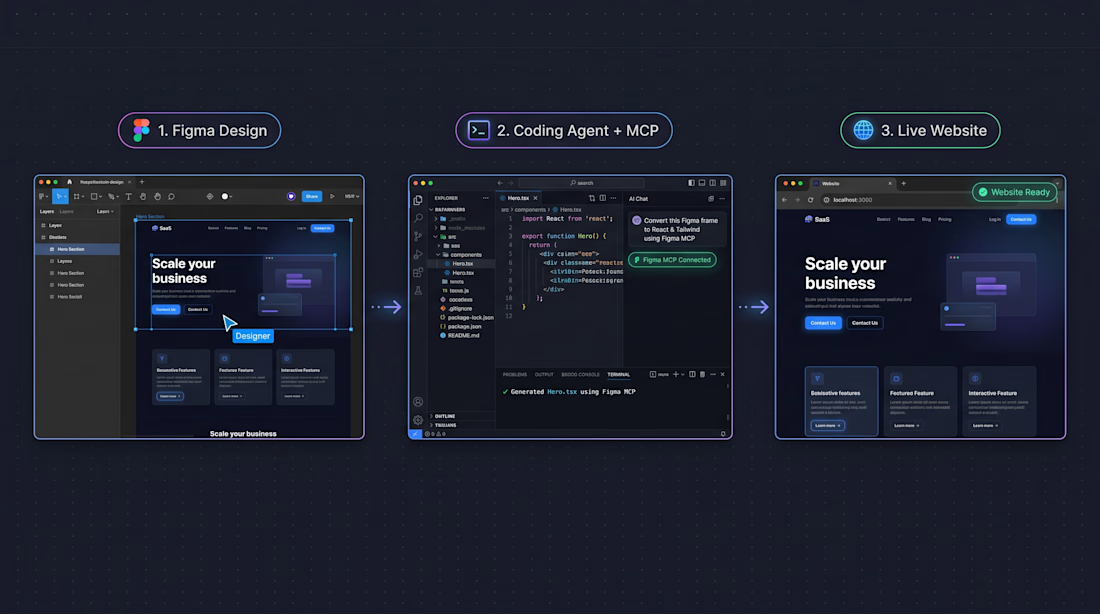
Translating Figma designs into pixel-accurate frontend code usually takes hours of manual spacing, typography, and token matching. In this project, I connected Figma directly to an AI coding agent using the Model Context Protocol (MCP) to turn a complete website design into a live, production-ready web app.
The Workflow (3 Steps)
Figma Design (Source of Truth)
Created a clean, component-based website layout in Figma using Auto Layout, consistent spacing tokens, and named layers. Switched to Dev Mode and enabled the Figma MCP Server so the design structure is exposed directly to the coding environment.
Coding Agent + Figma MCP Connection
Connected the Figma MCP Server to the AI coding agent inside the IDE. Instead of pasting screenshots, the agent reads live layout data, variables, and component hierarchy directly from the selected Figma frame via the MCP server, then generates clean TypeScript, React, and Tailwind CSS code from a single structured prompt.
Live, Production-Ready Website
Within minutes, the generated components were wired up, tested locally, and rendered in the browser, matching the original Figma spacing, typography, and hierarchy cleanly.
Why This Matters for Clients
Faster turnaround from design approval to live staging link
Consistent design tokens (colors, fonts, spacing) with fewer visual bugs
Clean, maintainable React / Next.js + Tailwind CSS codebase ready to scale
Want to automate your design-to-code pipeline or ship your next web app faster? Let's connect on Contra.

The network for creativity
Join 1.25M professional creatives like you
Connect with clients, get discovered, and run your business 100% commission-free
Creatives on Contra have earned over $150M and we are just getting started






Related posts


Great job! Looks very clean 😮💨


would you let people record a little voice intro before each track?


Very juicy. Didn't you feel like having some berries while working?