The network for creativity
Join 1.25M professional creatives like you
Connect with clients, get discovered, and run your business 100% commission-free
Creatives on Contra have earned over $150M and we are just getting started
Back to feedPost

Hello everyone, My name is Prasun and this is AURA.
A BRIEF DESCRIPTION OF THE PROJECT " AURA " WE BUILT-
AURA is an interactive, luxury sensory-cognitive wellness workspace designed to reduce stress and foster deep flow states. Moving away from traditional, static software grids, AURA implements an HTML5 canvas vector flow field running at a locked 60 FPS. This interactive backdrop translates user mouse trajectories dynamically into fluid particle paths while feeding spatial data into a multi-voice synthesizer built directly on the native Web Audio API. The result is a living user interface where touch vectors create real-time, resonance-filtered ambient chords and evolving visual physics.
1. Link to project :- https://38425a77-aura-cognitive-flow-space.netlify.app/
2. Optional backup link to the editable Stitch workspace: https://stitch.withgoogle.com/projects/8647869648563302522
3. Brief explanation of how we used Stitch:
Google Stitch was the main control center for the whole project. We started by writing down all our styling rules—like our specific dark blue colors, see-through panels, and smooth 24-pixel corners—in a file named DESIGN.md. Because Stitch reads this file as a strict visual guide, its AI engine automatically placed all our volume sliders and screen controls perfectly without breaking our theme. For the advanced setup, we used a terminal tool called an MCP server to link our online design directly to our computer. This let our offline coding tools inside Google Antigravity 2.0 scan our project files, check our work, and make sure our music audio settings were perfectly synced.
4. Feedback -
The Good Parts: The DESIGN.md file system is amazing. It completely stops the AI from changing your colors or fonts randomly on later edits, keeping the design looking clean and consistent. Also, the one-click Netlify export button makes publishing incredibly fast, letting you launch a live website in seconds without setting up complicated servers.
The Bottlenecks: Right now, if you manually tweak a design element directly on the canvas, those changes do not automatically update inside the text of your DESIGN.md file.
My Suggestions:
Make it a two-way street: if we change a color visually on the screen, have Stitch rewrite that color token in the DESIGN.md file automatically.
Add a "lock" button to elements on the canvas so that when the AI edits a specific box, it doesn't accidentally shift the positions of neighboring elements.
Build a simple visual menu for the local MCP server link so designers can connect their computer code without needing to type lines in a terminal.
5. A FULL WALKTHROUGH OF THE PROCESS : -



This is pretty fascinating, especially the way visuals and audio are tied together through user movement. Feels more like an experience than a traditional app.
My Project:
https://on.contra.com/pnfJBQ
Curious what you think about it?

on.contra.com
Introducing Voya: Revolutionize Your Travel Planning Experience
Connect with next-gen talent and tools to get work underway. Hire more independents. Start more projects. Get more creative.

Couldn’t believe my eyes when I first saw this.
The network for creativity
Join 1.25M professional creatives like you
Connect with clients, get discovered, and run your business 100% commission-free
Creatives on Contra have earned over $150M and we are just getting started
Related posts

Amazing sites for UX/UI designers, part 11
1. Grainient Supply for static and animated color gradients
2. Supahero for hero section inspiration at one place
3. Freefaces Gallery for free fonts that stand out


Title:
I built a design system generator inside Figma Make. Here's the workflow.
The problem I kept running into: every new client project meant re-explaining the brand to every AI tool from scratch. Figma Make didn't know the colors. Cursor didn't know the tokens. Claude didn't know the rules. I was the shared memory — and I kept losing things.
So I built Design System Gen. Entirely inside Figma Make. Powered by Claude API.
The workflow:
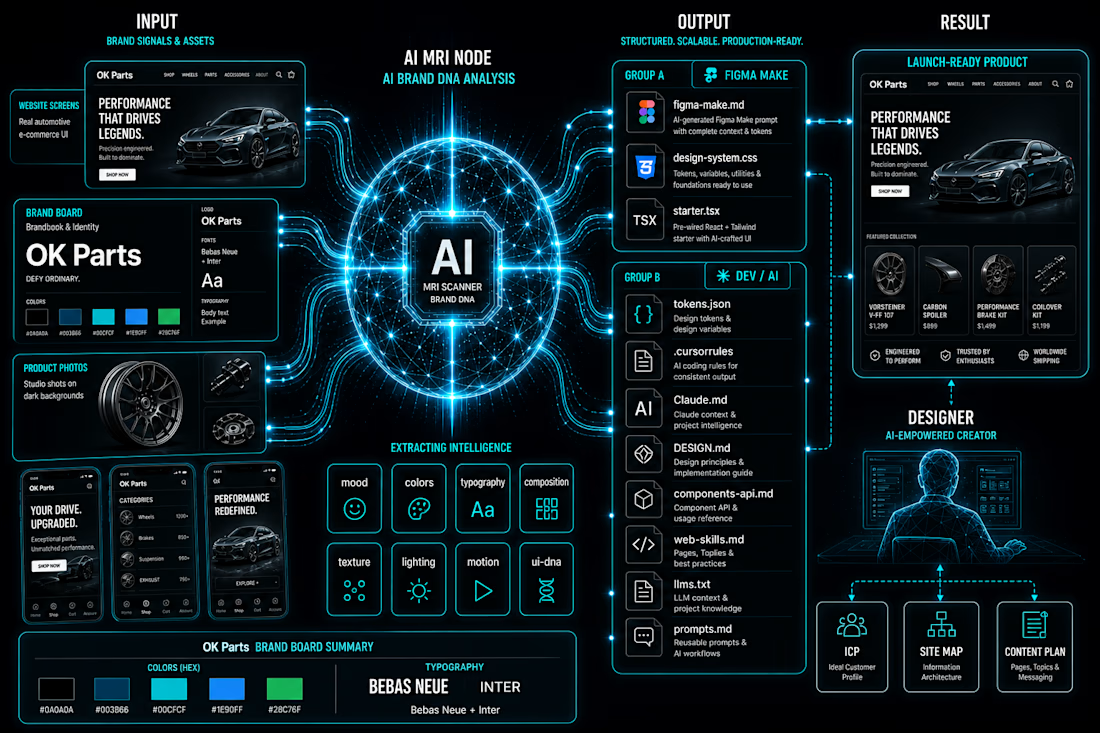
Upload brand references → Claude API analyzes them across 8 dimensions (palette, mood, typography, composition, lighting, texture, motion, UI DNA) → structured data, not vibes → generates 11 files, each formatted for a specific tool in your stack.
figma-make.md → paste once, Figma Make knows your entire design system
design-system.css → all tokens as CSS custom properties
tokens.json → W3C format, imports directly into Figma Variables
starter.tsx → React starter with tokens already bound
.cursorrules → Cursor knows your system from root
Claude.md → Claude reads it automatically every session
+ 5 more for docs, LLMs, prompts, components
Every tool gets its own context file. All consistent with each other.
The part I'm most proud of: I'm a designer. I don't write code. The entire tool — UI, API integration, file generation logic — was built and shipped inside Figma Make. No external hosting. No separate codebase.
Live at: vibecodingdsgen.figma.site
Add your Claude API key and try it with your own moodboard.
#FigmaMake #DesignSystem #VibeCoding #AI #Claude #UXUI #DesignSystems #ConfigMakeathon
As someone who constantly jumps between Figma, Claude, ChatGPT, Cursor, Lovable, and other AI tools, this problem feels very familiar 😅
The tools are getting smarter, but keeping context consistent is still surprisingly manual. Love seeing people tackle that gap.

I've never really understood how people decide on a new hairstyle.
Most of the time, we save photos from Instagram, Pinterest, or a celebrity we admire and hope it looks good on us too.
But what if it doesn't suit our face shape?
That thought led me down a rabbit hole and eventually became a design concept I'm currently exploring: StyleScan.
The idea is simple.
You scan your face, get a breakdown of your facial features, and receive hairstyle recommendations that actually suit you. You can even try them on virtually, save your favorites, and share them with friends before making a decision.
One thing I kept asking myself while designing was:
"How can I help people feel more confident before they sit in a barber's or salon chair?"
Instead of making users guess, StyleScan is designed to guide them toward styles that fit their unique features.
Would you trust an app to help choose your next hairstyle? 👇
#UIUX #ProductDesign #MobileAppDesign #UXDesign #Figma #DesignThinking #AppDesign #StartupIdea
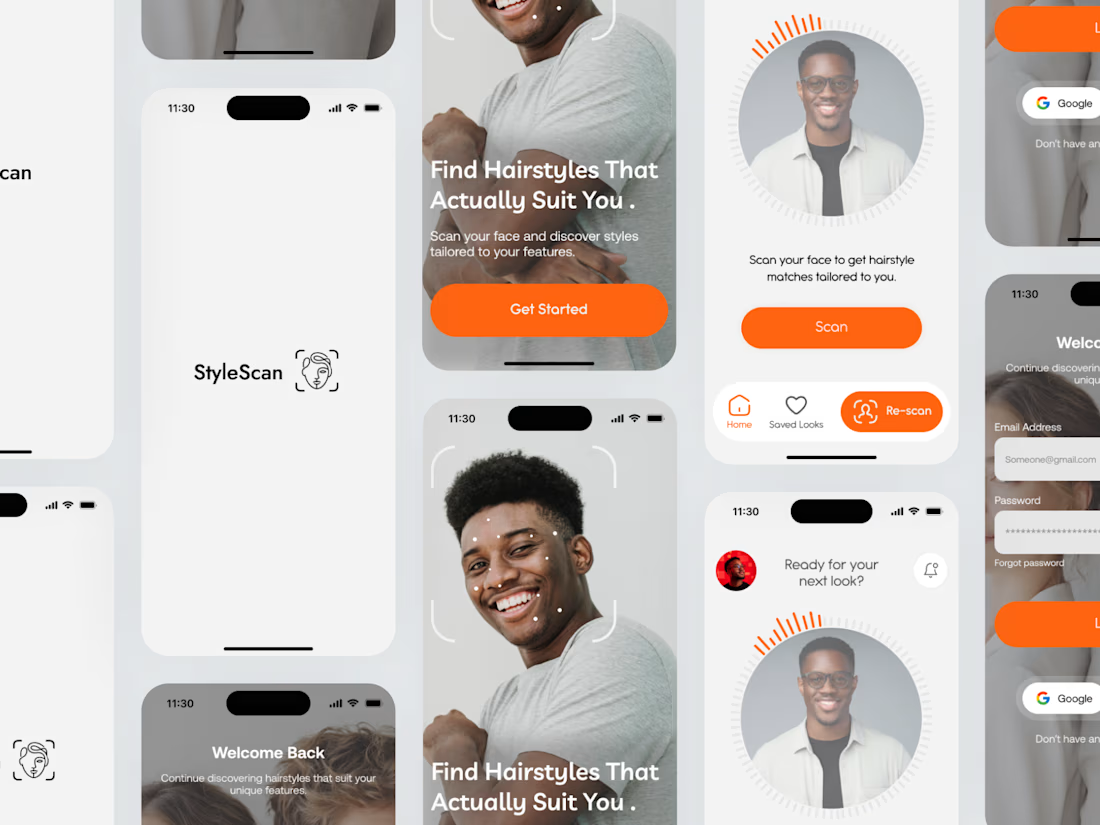

I loke those radial effect around the photo! Smart move!

















Trending

Claude
Claude has entered the design space. How are you using Claude Design?

Contra University
Learn from expert creatives how to earn more using next-gen AI tools.

MagicPath
The canvas is infinite, and exploration is becoming the workflow. How are you using MagicPath?
creativeaiflow
Creative AI workflows are evolving. What tools do you use, and what are their strengths and weaknesses?
freelancerlife
Freelancer life is wins, pivots, and everything in between. What’s yours right now?