The network for creativity
Join 1.25M professional creatives like you
Connect with clients, get discovered, and run your business 100% commission-free
Creatives on Contra have earned over $150M and we are just getting started
Back to feedPost

Ever shipped an Android app where the first tap on Login does nothing, then works on the second tap? 🤔
It's not random. It's a race condition in Room.
If you seed default data inside RoomDatabase.Callback.onCreate() by launching a coroutine, onCreate() returns before the insert finishes. The query that triggered database creation then runs too early and finds nothing. That's why it only happens on the very first launch.
Two fixes I cover in the article:
✅ Call the insert directly with runBlocking inside onCreate(). Room already runs it on a background thread.
✅ For complex or async seeding, warm up the database at startup and gate the UI until it's ready.
Have you hit this one before? #Android #Kotlin #Room #JetpackCompose

medium.com
Room’s “Lazy Initialization” Trap: Why the First Action Always Fails on a Fresh Install
If you’ve ever shipped an Android app that seeds a predefined user (or any default data) into Room on first launch, you may have run into…
The network for creativity
Join 1.25M professional creatives like you
Connect with clients, get discovered, and run your business 100% commission-free
Creatives on Contra have earned over $150M and we are just getting started

Challenges
View all


Related posts

This is why I storyboard before animation.
At that stage, we can still move scenes around, change the story, and try a different composition without rebuilding the animation.
Once the timing, transitions, and voiceover are connected, the same change can become a much bigger job.
I prefer agreeing on what each scene needs to communicate first. Then I can focus on how it moves.
Storyboard first. Animation second. Fewer “small changes” that turn out to be very large ones :)
A finished UI moment from my Mesa project.
#MotionDesign #Storyboard #SaaS #UIAnimation


🍳 Darakai Live Kitchen — Reimagining Food Delivery
What if customers didn't have to simply wait for their food?
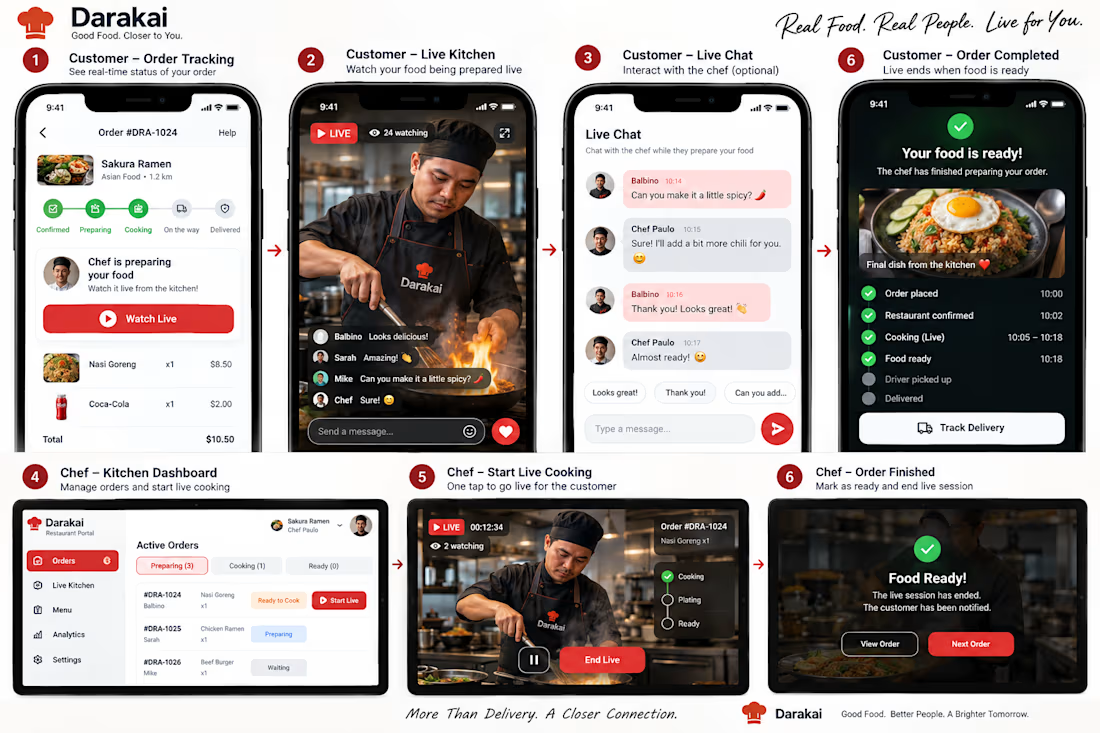
I designed Darakai Live Kitchen, a new concept for the Darakai Food Delivery app that lets customers watch their food being prepared live by the chef.
Instead of a simple “Preparing your order” status, customers can:
🔴 Watch the kitchen live
💬 Interact with the chef
❤️ Send reactions
🍽️ Follow the cooking → plating → ready journey
🚴 Track the transition from kitchen to delivery
On the restaurant side, chefs get a dedicated Kitchen Dashboard to manage orders, start a live cooking session, communicate with customers, and end the stream when the order is ready.
The experience
Order → Confirmed → Cooking Live → Plating → Ready → Pickup → Delivered
The idea is to transform food delivery from a simple transaction into a more transparent, engaging, and human experience.
Technical direction
The concept is designed around a Flutter customer app + restaurant interface + .NET API, with real-time video handled by dedicated streaming infrastructure while the backend manages orders, live sessions, permissions, chat, notifications, and session status.
More than delivery. A closer connection.
#Flutter #DotNet #FoodDelivery #UXDesign #ProductDesign #LiveStreaming #MobileApp #Darakai



If the kitchen stream drops, will the order timeline stay visible? Customers could still follow their order while the video is unavailable.

CREATOR STUDIO ACCESS UPDATE
Once you’ve created your Cantina account on mobile, you can log in to Cantina on desktop web and start using Creator Studio right away!
To get started, first create your Character in Cantina. Once your Character is ready, head to Creator Studio to bring them to life and create your pilot episode for the challenge.
We’re continuing to grant Creator Studio access on mobile, but there may be a slight delay before it appears. You don’t need to wait for mobile access to start creating - you can use Creator Studio on web in the meantime. Once your Creator Studio access is granted on mobile, you’ll receive a push notification from the Cantina app and an email confirmation.
As you create your pilot, we recommend submitting your video in English when possible so our judges can fully understand your character, dialogue, story, and overall concept. This is a recommendation, not a requirement for participation.
Need help along the way? Reach out to the Cantina Ambassadors in the challenge feed or message them directly in Cantina.
Happy creating!


As Liam mentioned us ambassadors are always a dm away if you have any questions, no matter how small it might be!