The network for creativity
Join 1.25M professional creatives like you
Connect with clients, get discovered, and run your business 100% commission-free
Creatives on Contra have earned over $150M and we are just getting started
Back to feedPost

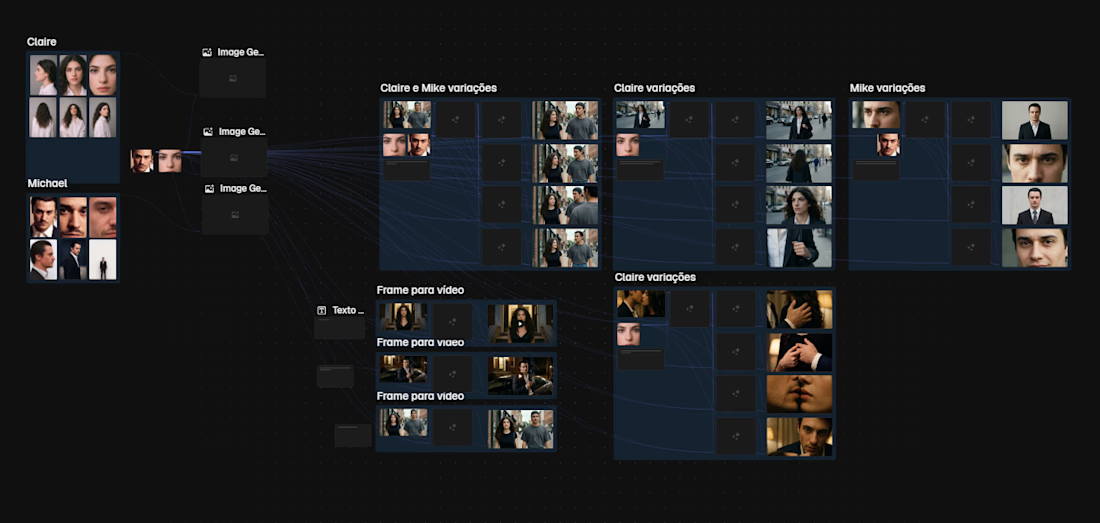
A little look at my workflow inside Magnific for AI teaser production.
I really like building my own process instead of relying on a one-click workflow.
Usually, I start with the characters first.
Then I shape a loose storyboard inspired by the book/story, selecting the scenes that would actually make sense in a teaser.
From there, I generate base images and use those as the foundation for multiple variations — mostly to explore different framings, compositions, and emotional tones.
If you look closely, you can also see a lot of wrong generations in this board — and that’s exactly why having access to tools with generous or unlimited generation options matters so much.
For this phase, tools like Nano Banana 2.0 and Kling 2.5 inside Magnific are incredibly useful, because they let me generate a large volume of images, compare, curate, discard, and refine without being overly precious too early in the process.
My workflow usually looks like this:
— build the characters
— generate base stills
— create variations for framing and continuity
— select the strongest images
— make light fixes / upscale where needed
— test prompts and reactions in motion
Once I find something that really works, I usually replicate or polish it in Kling 3.0, or sometimes re-run it in Kling 2.5 at 1080p.
I mostly save Seedance for moments where I specifically want to work with audio, but honestly… it gets expensive fast 😅
If I were using Seedance more heavily, I’d probably consider a separate Dreamina plan just for that part of the workflow.
What I like about working this way is that it feels much closer to an actual creative process:
not just generating random beautiful shots, but developing visual consistency, testing scene logic, and building a teaser with intention.
AI helps a lot — but curation, taste, and structure are still doing most of the heavy lifting.

The network for creativity
Join 1.25M professional creatives like you
Connect with clients, get discovered, and run your business 100% commission-free
Creatives on Contra have earned over $150M and we are just getting started
Related posts

Every villain has a moment where the old version of them dies.
Created with Seedance 2.5


Smooth transition

A launch film for a health product has to earn trust before it can impress.
For this AI health assistant, I created the motion design that brings the product into everyday life: calm pacing, soft glass surfaces, and an interface that lives inside real scenes.
Check it out. Would love to hear what you think.


Love the calm, thoughtful approach. It feels natural and helps build trust in the product.

Rocket Roadster: Escaping Traffic to the Main Stage
Getting to CapCut World LA shouldn’t require a boring Uber ride. Trapped in iconic bumper-to-bumper Los Angeles freeway traffic with the live keynote starting, our protagonist discovers his Tesla Roadster has an undocumented feature: “CCW Mode.” All four wheels mechanically split open to deploy high-output plasma rocket thrusters, launching the car vertically over gridlock. After a supersonic flight over the Downtown LA skyline—snatching a VIP badge dropped by an automated CapCut drone mid-air—the Roadster banks through the arena roof and pulls off an epic 180° tire-smoking drift directly onto the keynote stage.
1. Character & Asset Consistency:
Established a locked protagonist reference image (24-year-old creator in charcoal hoodie, matte-black watch) and vehicle asset (metallic cherry-red Tesla Roadster) to maintain 100% visual fidelity across generations.
2. AI Video Generation (Seedance 2.5):
Structured a 30-second multi-scene prompt divided into 5 distinct sequential beats (Traffic Jam $\rightarrow$ Wheel Thruster Deployment $\rightarrow$ Vertical Takeoff $\rightarrow$ LA Skyline Drone Badge Catch $\rightarrow$ Main Stage Drift Landing).
Prompted with explicit camera movements (interior Dutch angle, macro mechanical close-ups, FPV aerial chase, and low-angle hero tilt-up).
3. Post-Production & Sound Design in CapCut Video Studio:
Visuals: Speed-ramped the liftoff and stage drift for cinematic impact; enhanced the plasma thruster glow and stage pyrotechnics.
Audio Engineering: Built a custom multi-track soundscape featuring realistic LA traffic Foley, titanium mechanical clicks, 808 sub-bass rocket ignition, high-speed wind shear, and synchronized the tire-screech landing with a heavy EDM festival bass drop and cheering crowd reverb.
workflow


