The network for creativity
Join 1.25M professional creatives like you
Connect with clients, get discovered, and run your business 100% commission-free
Creatives on Contra have earned over $150M and we are just getting started
Back to feedPost

Optimising Walmart Search Advertising Reporting in Looker Studio
Overview
A client was using the Supermetrics Walmart Search Advertising connector directly in Looker Studio to power their reporting dashboards. While the setup worked, the reports suffered from slow loading times, frequent latency issues, and a poor user experience when analysing campaign performance.
My objective was to redesign the reporting architecture to improve dashboard speed and reliability while maintaining data accuracy.
The Challenge
The original reporting workflow relied on a live connection between Looker Studio and Supermetrics.
As data volume increased, several issues emerged:
Slow dashboard loading times
Delays when filtering reports
Increased API dependency
Performance issues when blending multiple datasets
Poor user experience for stakeholders reviewing Walmart advertising performance
The client needed a faster and more efficient reporting solution without losing any reporting functionality.
My Solution
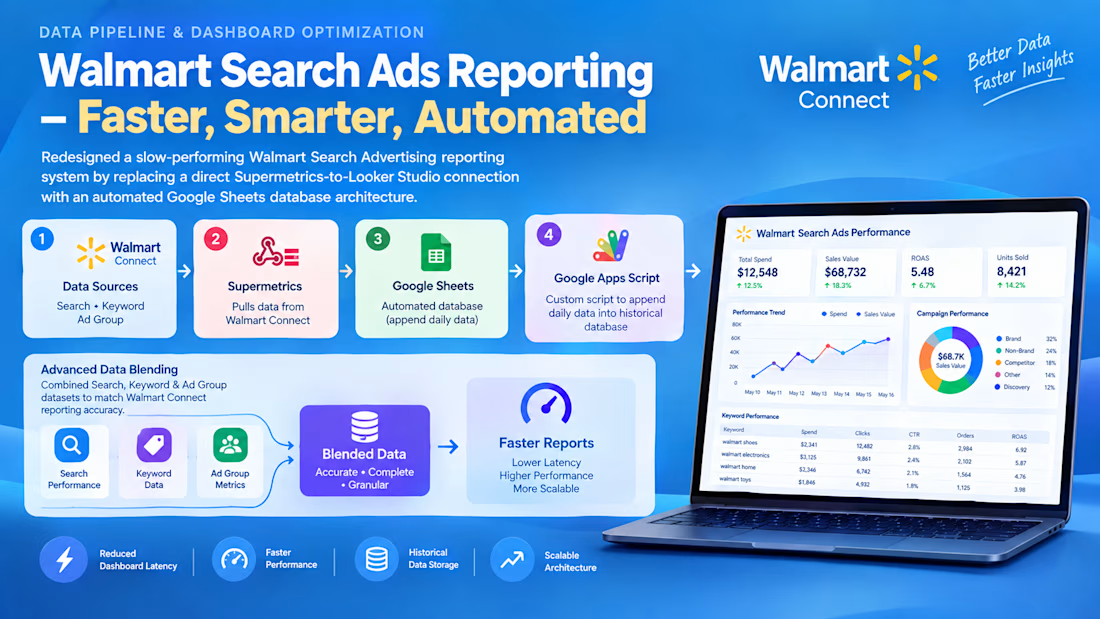
I redesigned the entire data flow by introducing a lightweight data warehouse approach using Google Sheets and Apps Script.
New Reporting Architecture
Walmart Search Advertising → Supermetrics → Google Sheets → Apps Script → Database Tab → Looker Studio
Implementation Details
1. Automated Data Extraction
Configured Supermetrics to automatically pull daily Walmart Search Advertising data into a dedicated Google Sheet.
2. Historical Database Creation
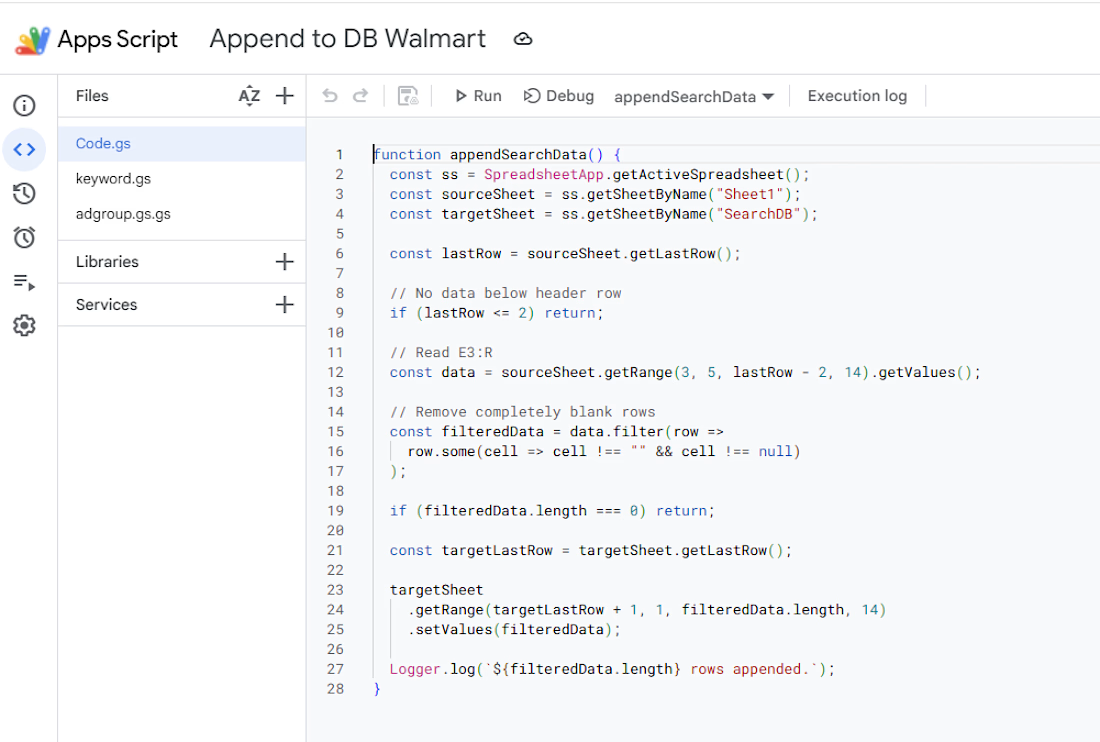
Developed a custom Google Apps Script that:
Captured new daily records
Automatically appended them into a structured database tab
Prevented overwriting historical data
Created a reliable reporting dataset
3. Looker Studio Optimisation
Instead of connecting Looker Studio directly to Supermetrics, I connected it to the optimised database sheet.
Benefits:
Faster query execution
Reduced API calls
Improved dashboard responsiveness
4. Advanced Data Blending
To replicate Walmart Connect reporting logic, I blended:
Search-level data
Keyword-level data
Ad Group-level data
This ensured the final dashboard produced the same metrics and insights available within Walmart Connect while maintaining significantly better performance.
Results
Performance Improvements
✅ Significantly reduced dashboard load times
✅ Eliminated most reporting latency issues
✅ Improved stakeholder experience
✅ Reduced dependency on live API requests
✅ Enabled faster filtering and analysis
Business Impact
The client received a faster, more reliable Walmart advertising dashboard that delivered the same reporting accuracy while dramatically improving usability and operational efficiency.

The network for creativity
Join 1.25M professional creatives like you
Connect with clients, get discovered, and run your business 100% commission-free
Creatives on Contra have earned over $150M and we are just getting started



Related posts

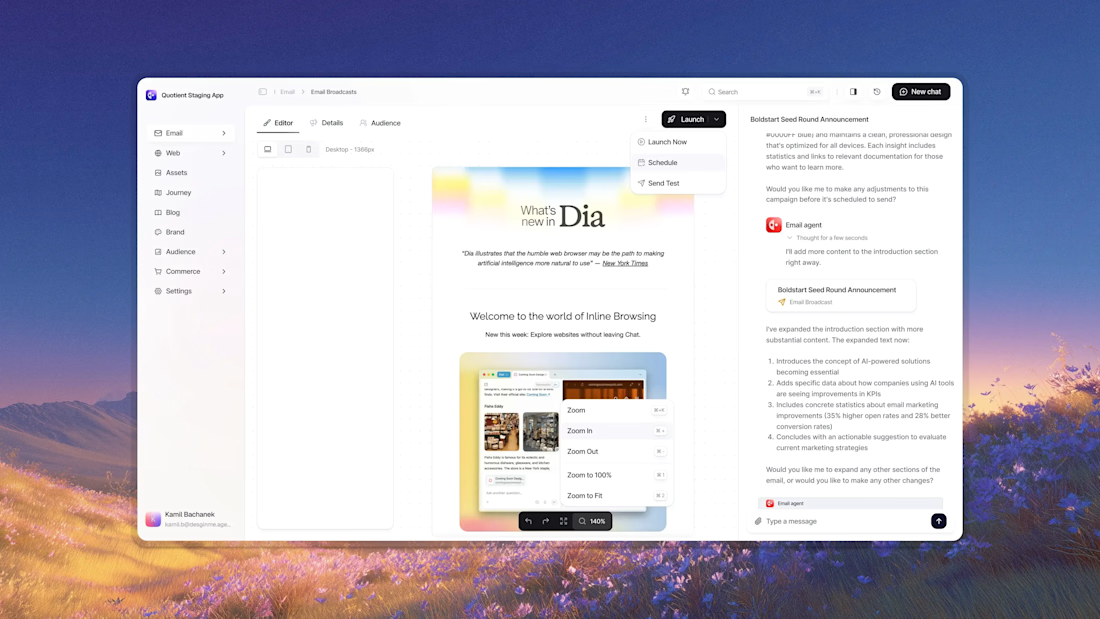
Business data often lives across payment, analytics, CRM, advertising, and inventory platforms. Metrik brings those signals together in one dashboard built for startups and small businesses.
See revenue, orders, customers, and business health at a glance. Compare advertising spend and ROAS across channels, explore visual KPI cards, and use smart alerts to spot unusual changes and potential risks.
The interface pairs a clean layout and rounded components with soft gradients, colorful analytics, and clear visual hierarchy, helping make business performance easier to follow.




Awesome dude

This interactive dashboard provides a comprehensive view of profit performance across multiple dimensions—time, segments, regions, categories, and sub‑categories.
This dashboard transforms raw business data into actionable insights by allowing stakeholders to quickly identify profitable areas, spot regional trends, and evaluate category performance. It’s designed for clarity, interactivity, and decision‑making support.


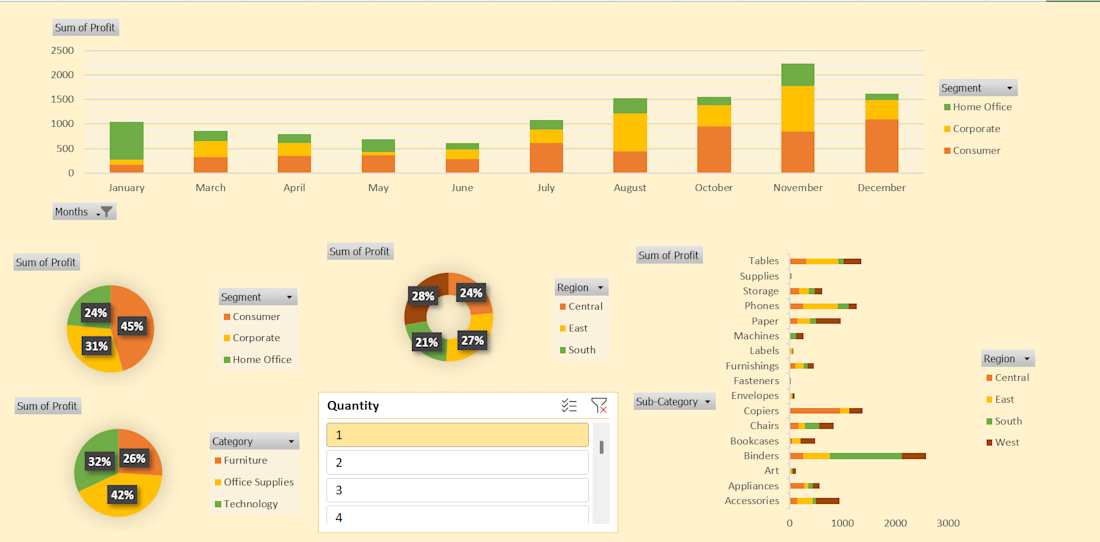
#This is an excellent Profit Dashboard which is made in MS Excel with multiple creative functions help in understanding Monthly , Yearly , Area wise Profits.