The network for creativity
Join 1.25M professional creatives like you
Connect with clients, get discovered, and run your business 100% commission-free
Creatives on Contra have earned over $150M and we are just getting started
Back to feedPost

I've been heavy into building Notion Dashboards lately.
I needed an alternative to paying for an expensive CRM and this is what I've come up with so far, a custom Multi-Client Dashboard requiring no paid plan (though I did begin paying to add automations from different client dashboards into my master task list for example).
I've built a CRM that allows my clients to have access to individual dashboards for asset sharing, tracking project status, links to pay invoices, and more!
There are also many different smaller dashboards connected to the main one so I can manage everything at a glance individually and together. For example, a content planner that allows me to track every idea from ideation to scheduling; a brain dump database which allows me to drop all my ideas in once place and categorize them digitally. I've been building based on what I find myself needing, I plan to work out some tweaks and sell it as a digital resource for business owners along with some other already created resources. https://vamtyree.gumroad.com/
Pretty proud of it:)

The network for creativity
Join 1.25M professional creatives like you
Connect with clients, get discovered, and run your business 100% commission-free
Creatives on Contra have earned over $150M and we are just getting started



Related posts

Built myself a little command center for my freelance work this week. It’s called Bench.
Contra handles the contracts and payments, but my day-to-day was scattered across Contra chats, Gmail, my calendar, Notion, and a notes app. So I pulled it all into one place:
• A dashboard showing what needs me today: unread messages, overdue tasks, past-due invoices, leads that have gone quiet
• Each project gets its own page with scope, deliveries, tasks, links, and the full message thread from Contra and email
• A pipeline for leads, including a “Ghosted” column, because we’ve all been there
• A time tracker for the hourly stuff
• It syncs with my Contra projects and invoices every morning
Curious how other freelancers here keep track of everything. Spreadsheets? Notion? Pure chaos?

Hey, Mr. @Chris Luniewicz This is honestly impressive! I'm also curious to know what tech stack you used to build 👍

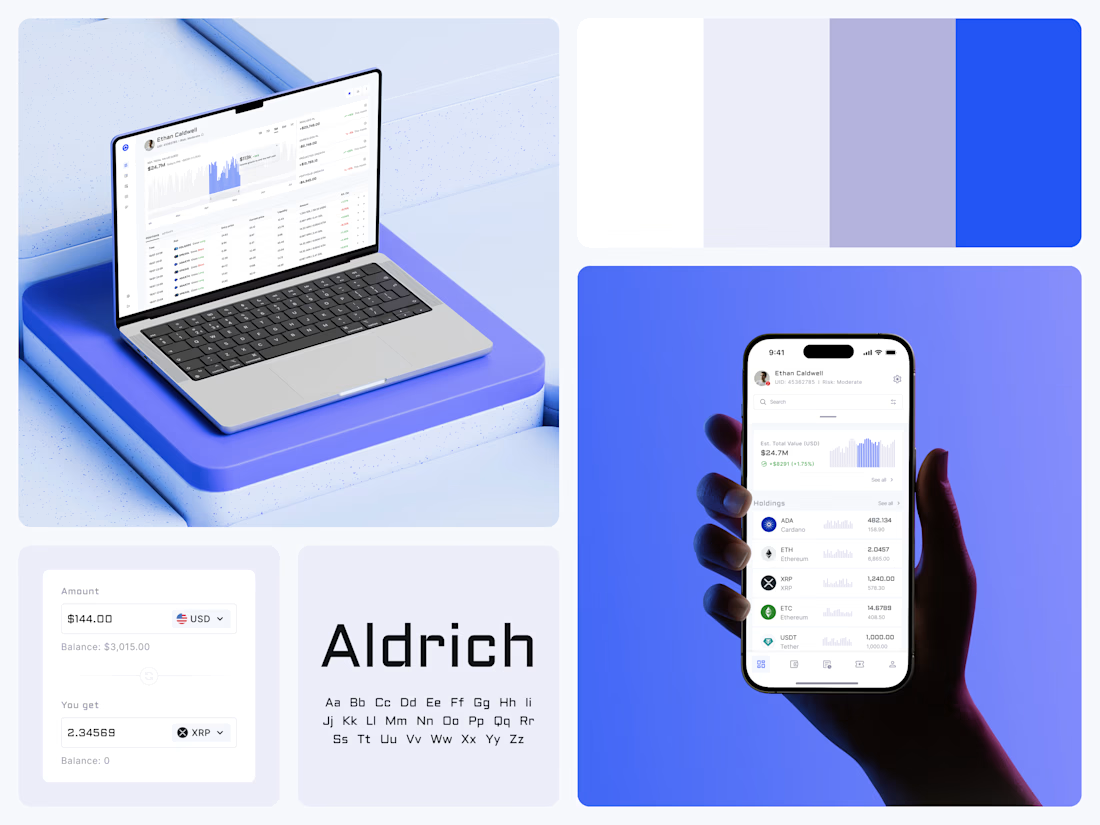
Crypto Portfolio Dashboard
Blue means one thing here: the range you are looking at.
The value chart is a row of thin gray bars, and only the selected date range fills in blue. You read the period that matters and keep the months around it as context.
The phone carries the same chart above the holdings list. Each coin gets its own small bar chart between the name and the amount, so you can scan the whole portfolio for movement without opening a single coin.
Trading screens get busy fast. This one stays light and calm, so the numbers lead: total value, realized and unrealized P&L and open positions, all on one screen.
Designed by the Hue & Machine team.
#Crypto #Fintech #DashboardDesign #TradingPlatform #DataVisualization #UIDesign #ProductDesign #WebApp #MobileDesign #FigmaDesign



Nice Ui Dmytro

Productivity Content Streamlined & Efficient
Tired of jumping between a dozen different apps for your notes, tasks, and projects? I help build clean, centralized workspaces and streamlined workflows using Notion that keep your life organized in one place. Check out my portfolio and let's optimize your productivity system
#Contra #ContraCreator #ContraIndependent #VideoEditor #Notion #Productivity #WorkflowDesign #ContentCreation #NotionWorkspace #FreelanceVideoEditor

