The network for creativity
Join 1.25M professional creatives like you
Connect with clients, get discovered, and run your business 100% commission-free
Creatives on Contra have earned over $150M and we are just getting started
Back to feedPost

A modern, editorial-style landing page template for real estate and residential developments. Built for boutique properties that want to showcase their location, amenities, and available units with a premium, gallery-like feel.
Key features:
Interactive apartment selection — visitors choose a building and floor, then browse a live floor plan showing available (highlighted) and sold units at a glance
Built-in gallery/slideshow for lifestyle and amenity photography
Fully responsive across desktop, tablet, and mobile, with a dedicated mobile navigation menu
Sections included: Hero, About, Amenities (Fitness Zone, Kids Zone, Security System), Gallery, Interactive Floor Plan, Map/Location, Contact
Ideal for real estate agencies, boutique developers, and architecture studios that need a conversion-focused site to present a single premium property or residential complex.


Amazing work!

It's a very good job
The network for creativity
Join 1.25M professional creatives like you
Connect with clients, get discovered, and run your business 100% commission-free
Creatives on Contra have earned over $150M and we are just getting started
Related posts

An infrastructure intelligence platform built on 8,600 verified Bangladeshi network cell towers to locate emergency callers without GPS, identify shared tower opportunities, analyze highway connectivity, and run in-browser diagnostics.
Project Overview:
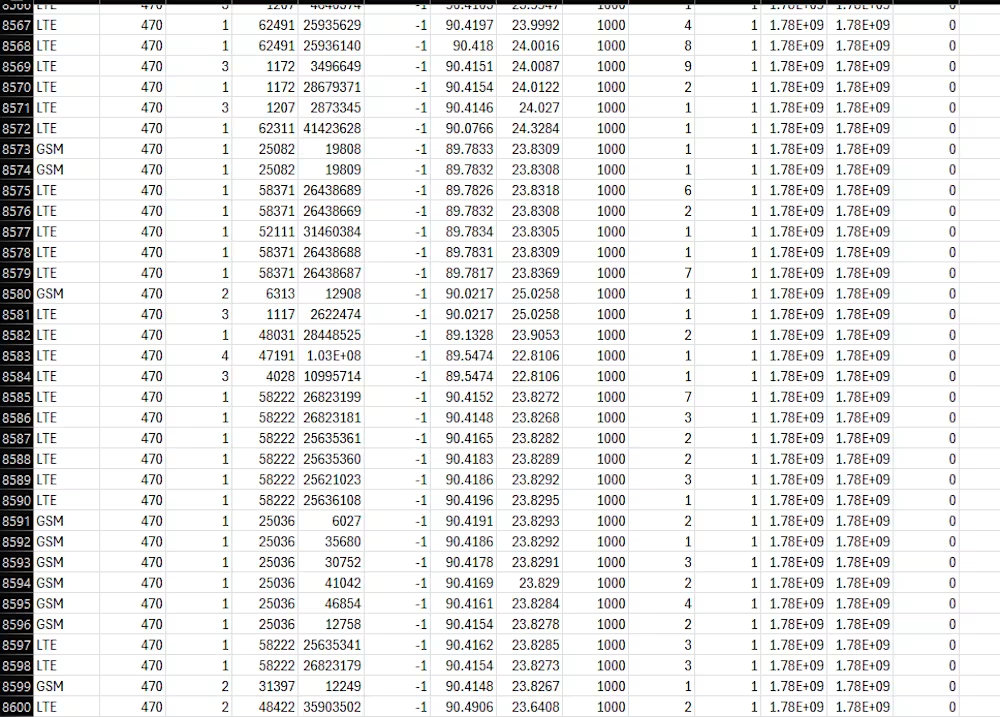
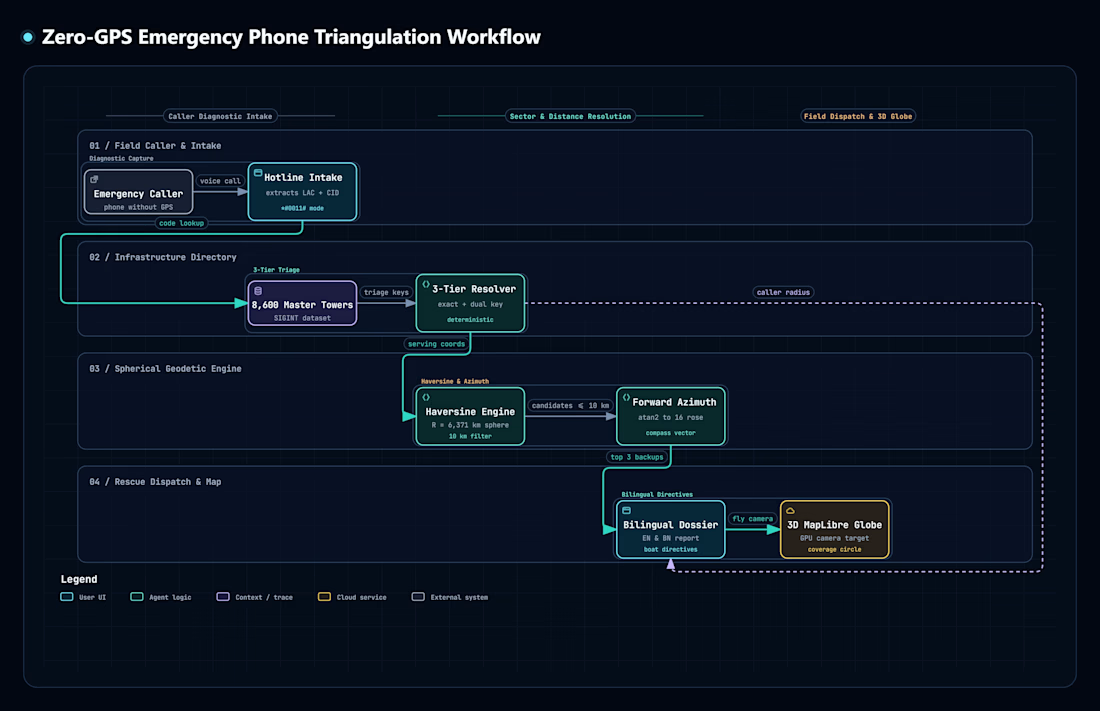
The most precious thing we own is our life. While many developed countries have put their name in the absolute pinnacle of tech industry. Developing and under Developing countries suffer a massive issue due to lack in advancements in tech. People, women, kids suffer from natural disasters and Monsoon floods regularly isolate families in districts in Bangladesh such as Sylhet, Sunamganj, and Feni. Most residents in affected rural areas rely on basic feature phones rather than smartphones with active GPS or mobile data. When calling emergency lines, they cannot share a digital map pin. However, their phone diagnostic screen displays their serving base station codes: the Location Area Code and Cell Identifier.
At the same time, mobile network operators frequently duplicate infrastructure by erecting towers within walking distance of each other, incurring redundant land leases and diesel generator costs. Freight and cold-chain logistics fleets also face coverage dropouts along major trade routes because dispatchers lack route-specific carrier performance data.
KUTNI MCC470 addresses these operational problems using a verified dataset of 8,600 physical cell towers across Bangladesh (MCC 470). It does not use simulated points, mock coordinates, or placeholder records. Every calculation runs on confirmed base stations belonging to Grameenphone, Robi, Banglalink, and TeleTalk.
It's not just a sci-fi concept, this platform not only helps in saving someone's life, but also plays a crucial role in Startups. (From a person getting saved from a life threatening disaster to a Real Estate company using this feature to give their customer's a bit of unique service by telling them which SIM cards to avoid or use for that specific home, ultimately earn some money-money in their wallets).
Core Platform Capabilities:
1. Interactive 3D Globe Network Map
It renders all 8,600 verified network cell towers present in Bangladesh on a 3D spherical Earth using MapLibre GL. Includes three conjoined map controls:
1. Real-life Satellite: Toggle photorealistic ArcGIS world imagery tiles.
2. 2D to 3D Globe: Toggle spherical Earth projection.
3. Reload and Reset: Recenter camera directly over Bangladesh.
It provides real-time filtering by operator (Grameenphone, Robi, Banglalink, TeleTalk) and radio generation (4G LTE, 3G UMTS, 2G GSM).
2. Emergency Phone Triangulation
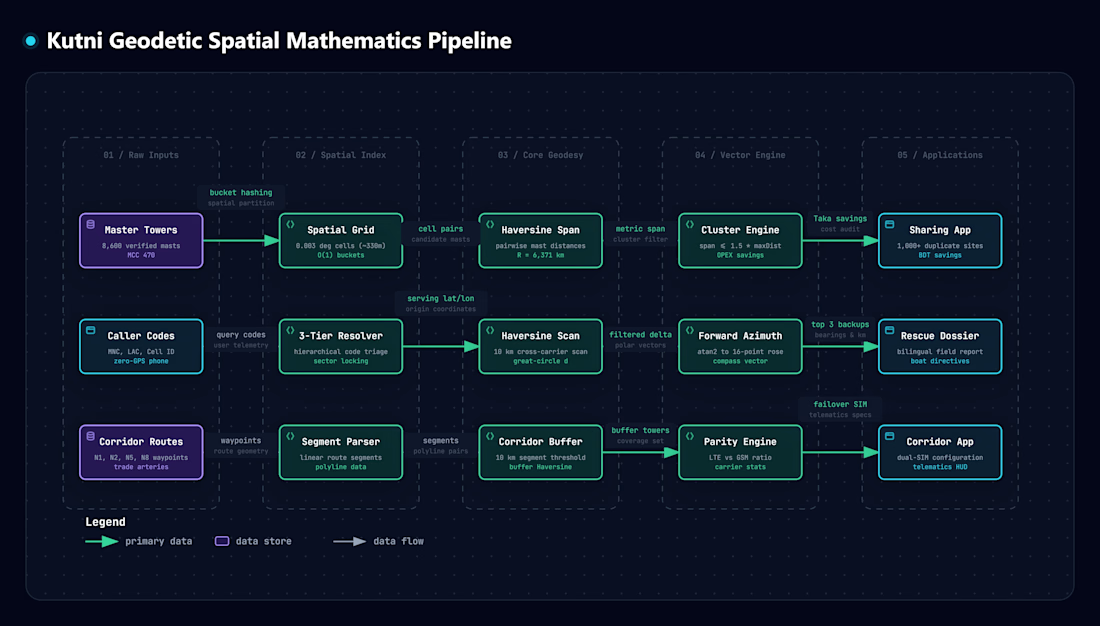
If an emergency caller uses a basic phone during a flood, a rescue volunteer can ask for the tower numbers displayed on their screen (Location Area Code and Cell ID). It matches those codes to the physical mast location and renders an approximate search perimeter and then calculates the three nearest backup towers from alternative carriers within 10 kilometers using the Haversine formula. Ultimately generating a bilingual field dispatch sheet in English and Bengali with compass bearings for boat crews.
3. Tower Sharing and Co-Location Optimizer
By constructing a cell mast requires significant capital, recurring land rent, and diesel generator fuel. It evaluates distances across all 8,600 towers in real time. Later identifies over 1,000 locations where competing carriers built standalone towers within 250 meters of one another and finally computes annual operational savings in Bangladeshi Taka achieved by consolidating onto a shared structure.
4. Highway Transport Corridors
Freight trucks, delivery vans, and emergency vehicles require continuous network reception along trade routes. Kutni inspects a whole bunch of cell tower distribution along primary national arteries: N1 (Dhaka to Chittagong), N2 (Dhaka to Sylhet), N5 (Dhaka to Bogra), and N8 (Dhaka to Khulna via the Padma Bridge). Furthermore it compares 4G LTE high-speed coverage against 2G GSM voice fallback. Finishing off by formulating primary and failover Dual-SIM hardware configurations for vehicle telematics units.
5. Genuine x86 Virtual Machine Sandbox
Kutni integrates a client-side WebAssembly x86 PC emulator running directly in the browser (meaning real life Operating Systems). It boots graphical KolibriOS or lightweight Linux BusyBox for offline diagnostic calculations and field scripts without server dependence.
6. Systems Architecture Dossier and Plain English Guide
Kutni outlines technical specifications, dataset schemas, and architectural credentials. It furthermore provides a step-by-step interactive walkthrough that explains every operational tool clearly.
Design System and Interface:
1. Color Scheme: Deep obsidian foundation (#070c0e), mint phosphor accents (#00d2be), imperial gold highlights (#d4af37), and telecom cyan (#00A8E8).
2. Tactile Surfaces: Glass-morphic panels with metallic borders, high-contrast status readouts, and responsive mobile and desktop viewports.
3. Audio Feedback: Mechanical clicks and tones synthesized using the Web Audio API for tactile operational confirmation.

For those interested in reviewing the project documentation and underlying calculations, the complete repository is available by clicking here.
This folder includes the verified 8600 network tower lists (CSV), the project pipelines/flowcharts, and a detailed PDF containing all mathematical formulas and equations used.

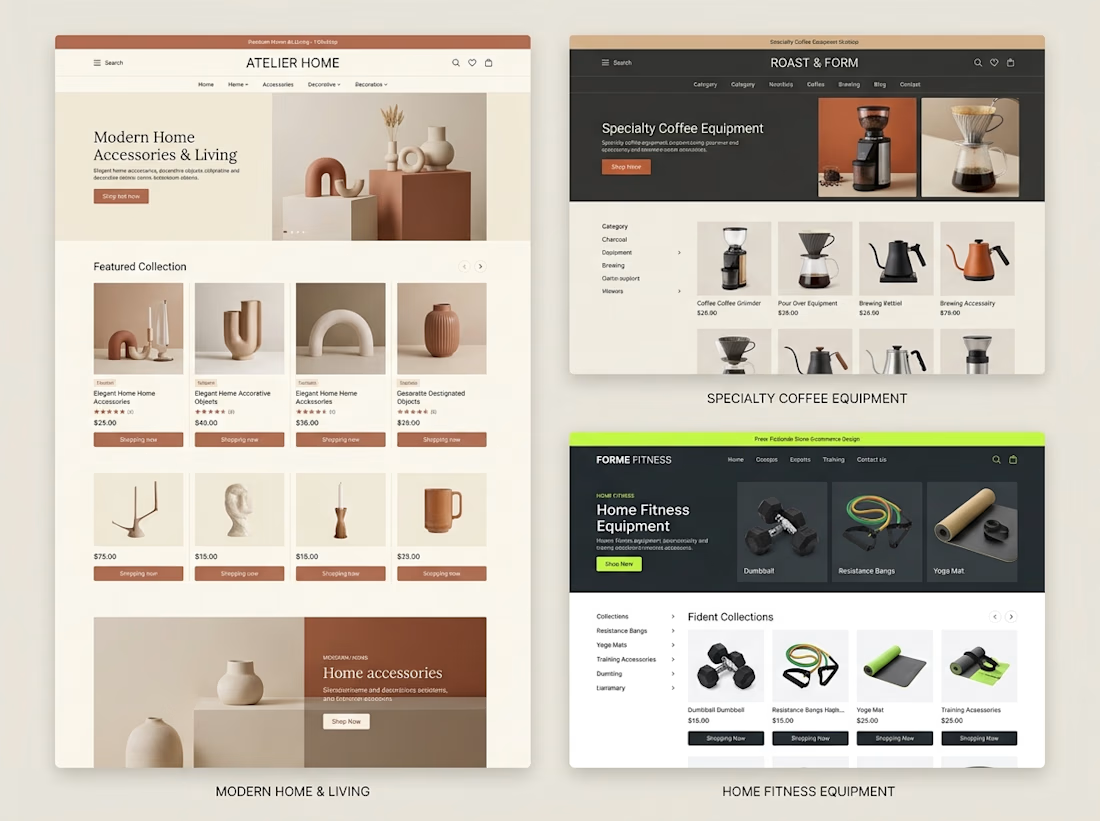
Different products need different shopping experiences.
When exploring Shopify store design, I like thinking about how the brand, product category, and customer journey should influence the final layout.
For example:
→ A home decor store needs strong visual presentation and an editorial feel.
→ A coffee equipment store needs clear categories and product information that helps customers compare options.
→ A fitness store needs organized collections and a straightforward path to the right equipment.
The goal isn't to use the same design for every business.
It's to understand what each store needs and build an experience around it.
These concepts explore three different directions, but they share one principle:
Good e-commerce design should make products easier to understand and easier to shop.
Which of these three store styles would you be most interested in exploring?


Great point. I’d pick the home decor one, editorial layouts really sell the vibe. 🔥


I bet you’ve NEVER seen button hover effects quite like these. And honestly, this time, I COOKED!
I went into this wanting to build a portfolio website. Somewhere along the way, it became so good that I’m genuinely considering making it my MAIN portfolio.
The scroll. The transitions. The interactions. But especially the button hover effects. Every little detail makes the experience feel alive, and I’ve probably spent more time hovering over these buttons than I’d like to admit.
But this wasn't just about making something that looks good. I wanted to build something that actually works for me.
THE BRANDING: I built the entire experience around my existing Sup* identity, keeping the personality intact while giving it a website that feels distinctly mine. From the visual language to the interactions, I wanted every part of the experience to feel intentional rather than like another template with a name slapped on it.
THE EXPERIENCE: As a designer, I obsess over the little things. The way an element responds when you hover over it. How scrolling feels. How one section transitions into the next. And how all of it comes together into an experience that feels cohesive.
The button interactions were easily one of my favourite parts to work on. But don't just take my word for it. Go try them yourself.
And yes, I designed a mobile-specific menu experience too. Please don't skip that part!
THE AUTOMATION: A portfolio shouldn't just display your work. It should help you get work.
One of my biggest goals was to turn this website into a funnel that brings potential clients directly to my Contra profile. I wanted to make it easier for people to discover my work, get in touch, and take the next step.
So, I built in form automation that delivers incoming submissions straight to my email and the website's admin side. No manually checking submissions across different places. The enquiries come to me, giving me a more direct way to keep track of potential opportunities.
It's a small but meaningful workflow that makes the website more than just a pretty front end.
THE STORY BEHIND THE BUILD - I've always wanted a portfolio website that properly showcases my work, personality, and approach to design. And once I found Contra, I realised I had the perfect opportunity to do more than just build a portfolio.
I could create a funnel that showcases my work and helps bring potential clients directly to my Contra profile.
When the @Base44 x @Contra HQ contest came along, it felt like the perfect excuse to bring that idea to life finally.
And the best part? This was my FIRST time trying @Base44. (Process video in the comments)
I've never had to type so little to get something this good. The recommendations were surprisingly on point, and instead of constantly fighting the tool to get what I had in mind, I could focus on what matters most to me: the experience, the details, and making the final product feel right.
As someone who genuinely enjoys pushing interfaces beyond the expected, that was a pretty exciting experience.
Because building something that looks good is one thing. Building something that looks good, feels good, works behind the scenes, and has an actual purpose? That's where the fun begins.
And Base44 made getting there ridiculously enjoyable.
This one's for the Base44 x Contra contest, and I might've accidentally built my new favourite portfolio in the process.
A couple of things I want you to try:
1. Hover over the buttons. Like Seriously.
2. Experience the mobile-specific menu.
3. Check out the custom favicon. Yes, that's me. 😉
Live website: https://supreet.base44.app/
Built around my Sup* identity. Designed to showcase my work. Automated to capture enquiries. Created to turn visitors into potential clients.
Now, please go hover over those buttons. You'll understand.
Base 44 Usage Proof: