The network for creativity
Join 1.25M professional creatives like you
Connect with clients, get discovered, and run your business 100% commission-free
Creatives on Contra have earned over $150M and we are just getting started
Back to feedPost
PLAYBOOTH: a booth made for play 🎟️
My entry for the Video.js v10 Skins Design Challenge
▶ Live site: https://playbooth.vercel.app
▶ The player on its own (Project URL): https://playbooth.vercel.app/player/
▶ The player on an ordinary page: https://playbooth.vercel.app/embed/
▶ Open source (Apache 2.0): https://github.com/ruffasakay/playbooth
🎮 THE IDEA: “PLAY” MEANS TWO THINGS
A photobooth is a little room you step into. PLAYBOOTH is one made for play, both kinds.
Play the game. The site is close to a little game: walk down a quiet street at night, step into the booth, pick a tape off the shelf and slide it into an old VCR.
Play the film. Watching is played too. You pick the frame your film plays in, snap the moments you love, and print them as a photostrip. A film isn’t something you only sit through here; you collect it.
The player at the heart of it is a complete Video.js 10 skin. It works inside the booth, on its own page, and on any React page.
👍 CONTROLS FOR THUMBS (MOBILE-FIRST)
When you hold a phone sideways, your thumbs rest on its short edges, not along the bottom. So in PLAYBOOTH the controls stand up beside the picture, in sidebars:
• Right thumb: a vertical progress bar and one column of buttons for play, ±10 s, sound, captions, settings, lock, snap and full screen.
• Left thumb: the booth’s own buttons (back, snaps, album, eject). On the showcase page it’s frames, a surprise frame and the next film.
• Nothing ever sits on the film. The picture takes every pixel in between.
• Upright: hold the phone upright and the same controls lie down under the picture, with frames and films gathered in one button below.
• Full screen: it turns the film sideways on phones. On iPhone, which has no real full screen for websites, the player fills the screen and turns itself.
• Touch like a phone player: double-tap the left or right side to skip 10 s. Slide up or down on the left for brightness and on the right for volume, even while the screen is locked.
🖥️ A NEW WAY TO WATCH ON DESKTOP
Almost every player puts its controls in a horizontal strip along the bottom, over the film. PLAYBOOTH turns that on its side, and it changes how watching feels: the picture stays whole and uncovered, and the controls stand beside it.
• The timeline is a column: you run your mouse down it, like scrolling a feed.
• A reel of frames: hover it and real frames from the film move alongside your pointer. The moment you point at is the largest, outlined with its time, and the moments around it shrink and fade. Drag, and the picture scrubs too. The reel is loaded once, so it never waits on the network.
• Feedback: every shortcut flashes a large copy of its button in the middle of the picture, and volume and brightness show a level at the picture’s edge.
• Getting out of the way: while a film plays, the controls step aside and the picture grows.
• Lock: one click locks, one click unlocks. Locked, volume and brightness still answer, by key or by slide.
🖼️ THE FRAME IS THE THEME
Every film sits in a photo frame, and the frame sets the player’s colours: each one tints its own dock, buttons and progress bar. There are 34:
• Fourteen patterns: cocoa dots, a gingham ribbon, a pink 2003 word processor whose white page is the film, pool mosaic, leopard, lily vines, star denim, halftone stars, star glow and more.
• Twenty drawn in code: star confetti, comic panels, lace, red film, airmail, velvet and more.
The windows are always straight-edged rectangles with slim margins, so the film keeps most of the space. The chooser is a scrolling list with a clear preview of each frame. Anywhere the player is (the booth, the showcase or your own site), you can turn any landscape picture into your own frame, right from the chooser.
📸 SNAP: THE FEATURE I ALWAYS WANTED
As a film lover, my most-wanted feature (requested by me, hehe) is a screenshot button, so here it’s one of the player’s own buttons. Press S or the camera button on any frame, playing or paused. It downloads straight away, framed, and waits in the booth’s tray. From there you print it in any frame or stack a few into a photostrip, like a real photobooth.
🎶 A COZY BOOTH
The booth has a soft lo-fi loop, played live in the browser with no music files. It fades out the moment your film starts and comes back when you eject the tape or go to print your snaps. One switch mutes every sound.
🧩 USE IT ON YOUR SITE
The player is one React component. Copy the src folder, install its packages, and render PlayboothPlayer with a Mux playback ID or any HLS or MP4 link. On phones it picks its own shape: tall when held upright, screen-high when held sideways, so it never shrinks into a postage stamp. The code is in the README and in the showcase’s “Use it” card.
✅ HOW IT MEETS THE BRIEF
✓ Works: Video.js v10 (@videojs/react). The films are hosted on Mux and play through Video.js’s MuxVideo.
✓ Essential controls: play/pause, seek, time, volume/mute and full screen, plus captions, quality, speed, caption styles, brightness, picture-in-picture, lock and snap.
✓ Responsive: the layout follows the player’s own size, from an upright phone to a TV. Test any size live on /player/, against a light or a dark page.
✓ Keyboard: real buttons in Tab order, a slider for seeking, and Esc closes menus. Shortcuts: Space/K, J/L and ←/→ for 10 s, ↑/↓ volume, Shift+↑/↓ brightness, M, C, F, S, 0–9.
✓ Readable over any video: the controls never cover the picture. Captions can have an outline or a box, in your size and colour.
✓ Easy to tap: buttons are 38–58 px.
✓ Visible focus: a double ring inside every button.
✓ Calm on request: reduced motion turns off the gliding, menu motion, reel fades and camera moves.
Films and posters: Blender Studio open movies under Creative Commons. Built with Video.js v10 (@Video.js), React and three.js. Videos hosted on @Mux.

this is where it all started, sharing my paint draft, hehe🥰
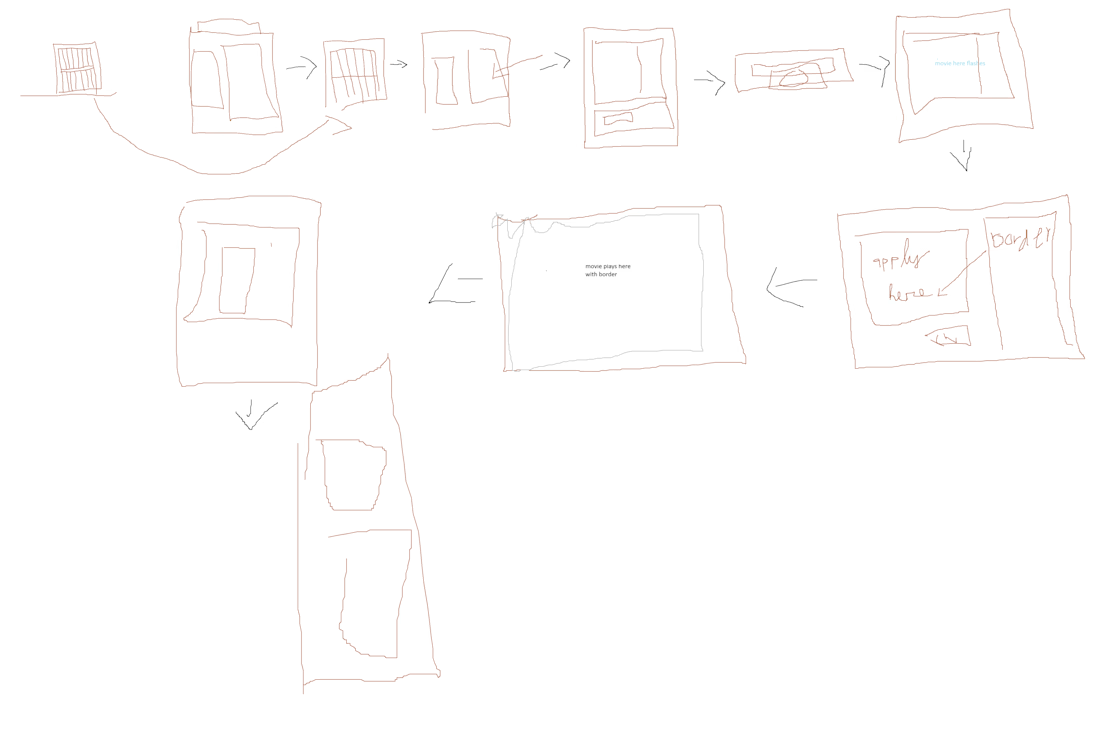

PLAYBOOTH where play means two things, love the double meaning. Open source too, nice.
The network for creativity
Join 1.25M professional creatives like you
Connect with clients, get discovered, and run your business 100% commission-free
Creatives on Contra have earned over $150M and we are just getting started



Related posts

Who wants to come to a picnic with an outdoor movie? I'll bring the video player 🧺🎬
Picnic Cinema is my new Video.js skin: a 3D garden cinema where the controls hang as tags from festoon bulbs. The lights glow when you pause and dim when the film starts.
Too comfy to reach the bulbs? Grab the remote on the picnic table.
You can still use the keyboard like a normal player: Space to play, arrows to seek and change the volume, F for fullscreen.


this is such a fun concept!

Storytime, the Pop-Up Edition: a picture book you can play
My first entry dressed the player as a picture book. This one makes the book do the work, so every part of the metaphor is a real control or real player state.
Chapters are pages. Each chapter becomes a numbered tab on the crayon trail, the scrub preview names the page you are pointing at, and the folded corner of the picture is a button: tap it to turn to the next page (N and P on a keyboard). No chapters in your video? No tabs and no corner.
The star is the player's state. She walks the trail while the story plays, walks faster or slower with the reading speed, and falls asleep when you pause. Reading speed itself is a snail, a pair of footsteps or a rabbit. In bedtime mode the paper turns midnight blue, the picture dims and the star becomes a moon. The last page is "The End".
The book folds to fit. On small players the two-row strip closes into a one-row bookmark that still carries play, time, the trail, mute and fullscreen, and takes about 30% of the picture instead of 45%. Speed, captions and bedtime tuck into a pop-up page that closes with Esc.
It works on any video (try the "Any plain video" switch on the demo), recolours with --media-accent-color, and keeps every control at 44px or more with visible two-tone focus rings, captions lifted above the controls, and a calm mode under reduced motion.
The demo film, The Little Star Walks Home, is my own paper-cut animation that runs from bright day to dark night to test contrast. It streams from Mux, and the same player is live on my own site. Plain HTML and CSS on Video.js v10 components, no build step.

This is such a magical concept! A picture book you can actually play is such a beautiful idea. I love how every part of the metaphor is a real control, chapters as pages, the corner turns them, and a star walks the story home. So playful, so clever, and so thoughtfully designed. Good luck with the challenge!

Title
Arcade: a Video.js 10 skin that turns the player into an arcade cabinet
Live URL
https://arcade-skin.vercel.app/
Mux public playback ID
fNEeWPY4UUEkfCFd9617w8gvYFEsFOv72rPQj3qKG700
Description
Arcade turns the Video.js 10 player into a photoreal arcade cabinet. A neon VJS × MUX marquee sits above a glowing CRT tube, with a control deck and front panel of real arcade buttons below it. My aim was a player that's fun to play with but still works as a player. Behind the art, every control is a Video.js component with its own role, translated label and keyboard support.
Joysticks: both are real ARIA sliders. The left stick scrubs the film, going faster the further you push it. The right stick sets the volume and shows it on a 10-LED meter. They work with mouse, touch and keyboard, and spring back when released.
Screen and status: the time is shown on a 7-segment readout and the chapters on an LED seek strip. When the film ends, the CRT collapses to a dot.
Arcade options card: opens on the screen itself. It turns on a WebGL curved-CRT shader, a typewriter dialogue box for captions, sound effects and vibration.
Arcade extras:
Level select shows the film's chapters as game levels.
TURBO speeds playback up.
A how-to-play card lists the controls.
Typing ↑↑↓↓←→←→BA turns on a secret 8-bit mode.
Four "cartridges" recolour the whole cabinet from one public token.
Accessibility:
One visible focus ring covers every control.
Touch targets are 44px or larger.
A compact layout is built for phones.
All animation stops when reduced motion is on.
High-contrast and forced-colours modes are supported.
Mux: the film is Sintel, streamed from Mux, with Mux Data enabled.