The network for creativity
Join 1.25M professional creatives like you
Connect with clients, get discovered, and run your business 100% commission-free
Creatives on Contra have earned over $150M and we are just getting started
Back to feedPost

How I Use Vibe Coding for Ultra-Fast Layouts ⚡
Sometimes a client needs a website launched literally today, but only the design is ready. This is where AI comes to the rescue—solving the problem almost instantly if you know how to use it right.
I always start with a manual design in Figma. Leaving the UI to AI is a huge mistake; users have learned to spot AI-generated layouts, which instantly kills credibility. But if you already have a solid design, you can code it rapidly without paying for expensive subscriptions like Claude Code or Figma Make:
1. 🔍 Find an export plugin: Use a Figma plugin to convert your layout into code. I use Anima (not sponsored!).
2. ✂️ Decompose by blocks: Convert the first screen or functional block into code and feed it into Gemini with a precise prompt.
3. 🏗️ Build iteratively: Develop the site block by block with the AI, reviewing the quality at every step.
4. 🎉 Done! You have a production-ready site built in under an hour.
The Takeaway: AI is a powerful accelerator for routine layouts, but serious, complex projects still require human engineers for architecture and strategy. AI won't replace developers, but developers using AI will deliver 10x faster.
How do you use vibe-coding for your layouts?

The network for creativity
Join 1.25M professional creatives like you
Connect with clients, get discovered, and run your business 100% commission-free
Creatives on Contra have earned over $150M and we are just getting started











Related posts

Behind the scenes of the Treal Studio brand film.
Built in one week, from creative direction to sound design.


Love the overall feel, looks amazing 👌🏼


Brilliant work

tiiny.host Landing Page
Description:
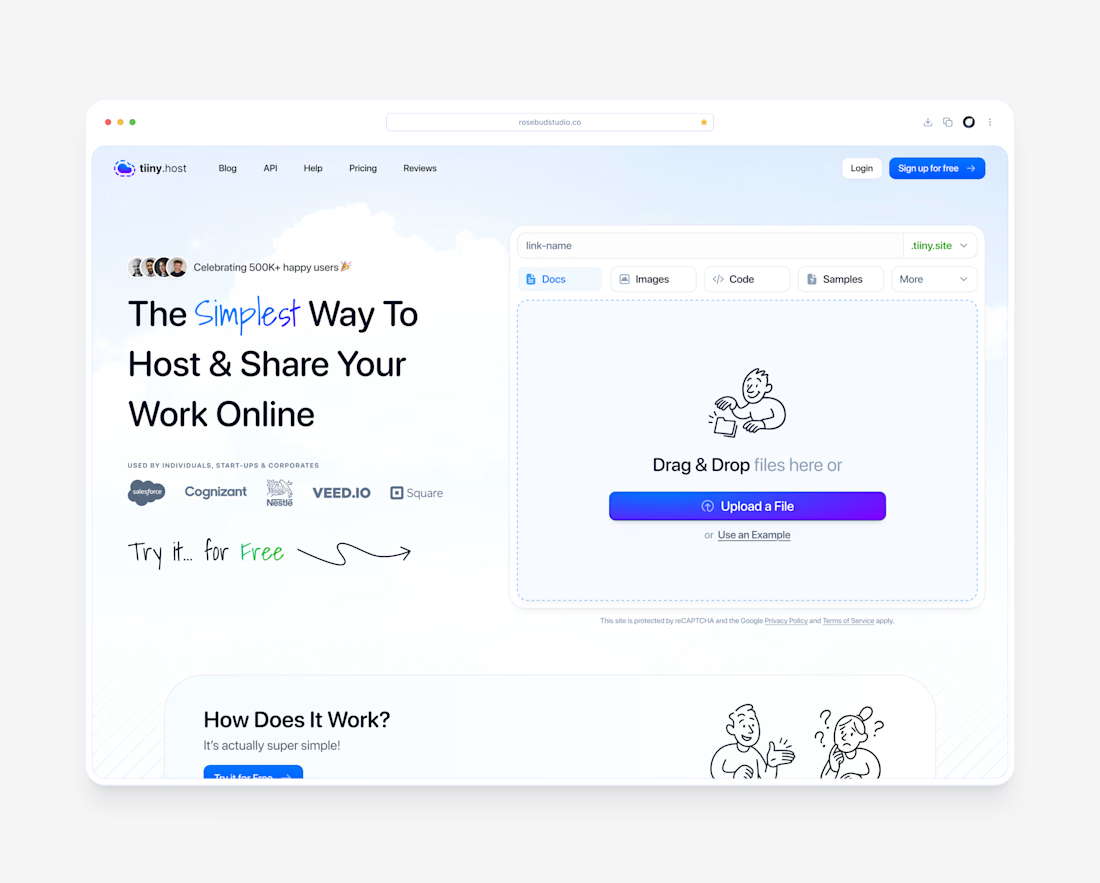
A clean, friendly landing page for tiiny.host, the easiest way to put a file online and share it with a link.
The goal was to make the product feel as simple as it actually is. The upload box sits right in the hero, so visitors can drag in a file and get a live link without scrolling or signing up first.
What I focused on:
1. Upload-first hero with a clear “Upload a File” action and file type tabs (Docs, Images, Code, Samples)
2. Hand-drawn illustrations and script accents to keep the tone light and approachable
3. Social proof up top: 500K+ users and logos like Salesforce, Nestlé, and Square
4. Soft sky gradient and plenty of breathing room so nothing feels technical or intimidating


The hand-drawn illustrations with the script accents are what make this landing page special, Dante. They keep a file-hosting tool feeling light and approachable instead of technical, which is exactly the tone the upload-first hero needed.