The network for creativity
Join 1.25M professional creatives like you
Connect with clients, get discovered, and run your business 100% commission-free
Creatives on Contra have earned over $150M and we are just getting started
Back to feedPost
The StrictHostKeyChecking blindspot: Why disabling SSH host key verification in automation invites trivial man-in-the-middle attacks across your fleet.
When automating infrastructure deployments using Ansible, CI/CD pipelines, or bastion jump hosts, engineers frequently encounter the dreaded OpenSSH prompt: ``The authenticity of host '10.0.1.5' can't be established. Are you sure you want to continue connecting (yes/no)?``
Because interactive prompts break unattended automation, developers routinely disable host key checking in their Ansible configs, CI runner scripts, or user profiles: ``StrictHostKeyChecking=no`` and ``UserKnownHostsFile=/dev/null``.
This single operational shortcut completely dismantles SSH security:
1. Elimination of Mutual Authentication: SSH provides end-to-end encryption only if the client cryptographically verifies that the server is genuinely who it claims to be. Setting ``StrictHostKeyChecking=no`` blinds the client: any attacker capable of performing ARP poisoning, DNS spoofing, or BGP route hijacking can position themselves as an active man-in-the-middle (MITM). 2. Transparent Credential Interception: The attacker's rogue SSH server terminates the connection, intercepts user passwords or forwards private SSH agent requests, and transparently logs all interactive keystrokes before forwarding traffic to the real target. 3. The "accept-new" Half-Measure: Setting ``StrictHostKeyChecking=accept-new`` blindly trusts the server on first connection (TOFU). If the attacker intercepts the initial provisioning run of a newly created node, that fraudulent key is permanently trusted.
Hardening enterprise SSH requires eliminating manual host key prompts through cryptographic infrastructure: • Publish Cryptographic SSHFP Records in DNSSEC: Use OpenSSH ``ssh-keygen -r <hostname>`` to generate SSHFP records containing SHA-256 fingerprints of your host public keys. Publish these records in your DNSSEC-validated zone and configure clients with ``VerifyHostKeyDNS=yes``. Clients automatically verify the server's public key against DNSSEC with zero interactive prompts. • Deploy an Enterprise OpenSSH Certificate Authority (CA): Create a dedicated offline SSH Host CA in FreeIPA. Sign all newly provisioned server host public keys during cloud-init/kickstart deployment (``HostCertificate /etc/ssh/ssh_host_rsa_key-cert.pub``). • Single Fleet-Wide Trust Anchor: In client ``/etc/ssh/ssh_known_hosts``, add a single entry declaring the CA public key: ``@cert-authority *.example.com ssh-ed25519 AAAAC3...``. Clients now trust every present and future server signed by the CA automatically, with zero prompts and zero MITM risk. • Automated Host Key Rotation: Centralized CAs enable automated expiration dates and effortless host key rotation across thousands of bare-metal and cloud nodes.
Eliminate manual prompts, stop blind SSH bypasses, and secure remote administrative access.
Deploy enterprise identity and PKI infrastructure with our 2-week Enterprise FreeIPA HA & Centralized PKI/CA Sprint on Contra: https://contra.com/s/ALrNLqlg-enterprise-free-ipa-ha-and-centralized-pkica-infrastructure
#Security #CyberSecurity #Linux #DevOps #Infrastructure #IdentityManagement #SRE


The network for creativity
Join 1.25M professional creatives like you
Connect with clients, get discovered, and run your business 100% commission-free
Creatives on Contra have earned over $150M and we are just getting started





Related posts

Kerberos ticket failures: Why establishing cross-realm trust between FreeIPA and Active Directory fails when DNS SRV records are omitted.
In hybrid enterprise environments, establishing a bidirectional or one-way cross-realm trust between an enterprise Linux identity domain (FreeIPA/Red Hat IdM) and Microsoft Active Directory (AD) is the industry standard for centralized single sign-on (SSO) and RBAC governance. It allows enterprise Active Directory users to log into Linux compute clusters seamlessly without duplicating user accounts.
Yet initial trust deployments routinely stall on cryptic Kerberos errors: ``KRB5KDC_ERR_S_PRINCIPAL_UNKNOWN`` or ``Cannot find KDC for realm``.
The failure mode almost always traces back to **DNS SRV service discovery omission**:
1. Kerberos Locality via DNS: Unlike legacy LDAP where client configs hardcode server IP addresses, Kerberos authentication is dynamically discovered. When a Linux client attempts to obtain a Ticket Granting Ticket (TGT) for a cross-realm user, the Kerberos library queries DNS for specific SRV records to locate the Key Distribution Center (KDC). 2. The Missing Service Records: If the Windows AD DNS zone or the FreeIPA BIND9 zone fails to publish authoritative SRV records (``_kerberos._udp``, ``_kerberos._tcp``, ``_kpasswd._udp``, and ``_ldap._tcp.dc._msdcs``), domain controllers cannot discover each other during trust establishment. 3. Kerberos Realm Referral Failures: Without explicit realm referrals configured in SSSD and Kerberos (``/etc/krb5.conf``), Linux clients query their local KDC for external AD realms. The local KDC has no routing path to issue referral tickets, and cross-realm authentication fails completely.
Building rock-solid, enterprise cross-realm trust requires synchronized DNS automation: • Automate DNS Zone Forwarding & Delegation: Configure FreeIPA integrated BIND9 DNS with conditional forwarders pointing directly to the Active Directory DNS servers for the corporate AD domain, and configure reciprocal conditional forwarders in Windows DNS. • Validate Authoritative SRV Records: Verify that both realms publish complete SRV record sets with correct priority and weight parameters for UDP and TCP ports 88 (Kerberos) and 464 (kpasswd). • Enforce Cross-Forest Trust Validation via SSSD: Deploy SSSD with ``subdomain_inherit`` and ``krb5_use_enterprise_principal = True``, allowing users to authenticate seamlessly using User Principal Names (UPNs) across both Linux and Windows fleets. • Centralize Host-Based Access Control (HBAC): Use FreeIPA HBAC rules to dictate exactly which Active Directory security groups have permission to access specific Linux hosts, enforcing least-privilege access without touching local host configurations.
Unify your corporate identity, eliminate scattered credentials, and streamline enterprise access.
Deploy enterprise identity infrastructure with our 2-week Enterprise FreeIPA HA & Centralized PKI/CA Sprint on Contra: https://contra.com/s/ALrNLqlg-enterprise-free-ipa-ha-and-centralized-pkica-infrastructure
#IdentityManagement #Security #DNS #Linux #Infrastructure #DevOps #SRE

Mounting docker.sock in CI/CD: Why providing build jobs access to the host Docker daemon gives any pull request total root control over your cloud account.
To build container images inside continuous integration pipelines (GitLab CI, GitHub Actions, Forgejo/Gitea Act Runners), developers need a container runtime. The most common shortcut recommended across internet tutorials is simple: mount the host Docker UNIX socket into the runner container: ``volumes: ["/var/run/docker.sock:/var/run/docker.sock"]``.
In any environment where developers, contractors, or public contributors can submit pull requests, **mounting the host Docker socket is equivalent to granting unauthenticated root access to the entire host**:
1. Trivial Container Breakout: Access to ``docker.sock`` allows any process inside the container to communicate with the host Docker daemon. An attacker submitting a malicious pull request or tainted dependency simply executes: ``docker run -v /:/host -it alpine chroot /host`` In under 2 seconds, the attacker escapes the container, obtaining full root access on the host operating system. 2. Cloud IAM Instance Metadata Theft: Once on the host, the attacker queries the cloud instance metadata service (IMDS at ``169.254.169.254``). They extract temporary IAM session tokens associated with the runner's cloud instance role. If the runner instance has permissions to manage S3, push to ECR, or touch Kubernetes clusters, your entire cloud organization is compromised. 3. Persistent Pipeline Backdoors: Attackers can silently install rootkits, modify adjacent container volumes, or poison production build artifacts before they are deployed.
Hardening production CI/CD runner platforms requires eliminating privileged daemon sockets: • Adopt Rootless Podman & Quadlets: Deploy sovereign CI/CD runners (like Forgejo Act Runner) using rootless Podman supervised by systemd Quadlets. Containers run entirely inside user namespaces without root privileges on the underlying host. • Use Daemonless Image Builders: Replace Docker build commands with daemonless build tools like ``kaniko``, ``buildah``, or ``podman build``. These tools assemble OCI images completely in user space without requiring access to a host daemon socket. • Enforce IMDSv2 and Hop Limits: Configure your cloud provider to mandate IMDSv2 (requiring token-based HTTP PUT handshakes) and enforce an HTTP hop limit of 1 (``http-put-response-hop-limit=1``). This prevents containers running inside the VM from reaching the metadata endpoint entirely. • Ephemeral Disposable VMs: For untrusted public pipelines, run jobs inside single-use, ephemeral KVM virtual machines that are destroyed immediately upon job completion.
Stop insecure pipeline breakouts and protect your production cloud credentials.
Deploy a secure, air-gapped developer platform with our 1-to-2 week Sovereign Git Forge & CI/CD Runner Platform Sprint on Contra: https://contra.com/s/7vW66W2v-sovereign-git-forge-and-cicd-runner-platform-deployment
#Security #DevOps #Docker #CyberSecurity #Cloud #Infrastructure #SRE



Local developer tool that executes atomic commit plans through a dual-agent AI pipeline (Generator & Reviewer) with real-time SSE streaming, quality gates, and automated rollbacks.


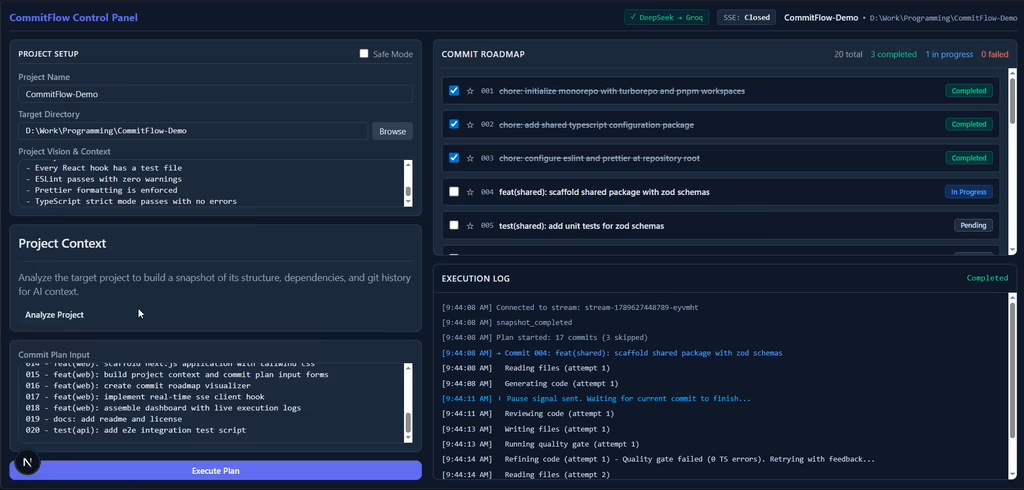

The dual agent pipeline creating atomic commit plans and the live SSE stream makes the review loop feel almost instant.