The network for creativity
Join 1.25M professional creatives like you
Connect with clients, get discovered, and run your business 100% commission-free
Creatives on Contra have earned over $150M and we are just getting started
Back to feedPost
GreenHouse: An Apple Home Greenhouse Controller
I want to share my hobby project: a greenhouse controller that connects to the Apple Home ecosystem. It is a pilot version that currently supports temperature sensors, but it is already fully capable of standalone operation.
What is working now
Hardware core: The device is built on the LilyGO T-A7608E-H board (ESP32) with a GSM modem.
Sensor support: It collects data from DS18B20 temperature sensors and can handle up to 10 of them.
Data delivery: It sends all data via MQTT to a home server.
Power saving: It uses an 18650 battery and enters a deep sleep mode to save energy.
Smart intervals: The sleep timer adapts automatically, waiting 2 minutes if a send fails and 15 minutes if it succeeds.
Server side: A Python-based logger tracks temperatures, while a web interface built with Flask and Chart.js displays live charts.
Apple Home integration: HomeBridge and the MQTTThing plugin bring everything into your Apple Home app automatically.
Future plans
This project was built from the ground up to be an expandable platform. In the future, I plan to add automated watering, lighting controls, and ventilation management. Right now, it is a fully functional, DIY temperature monitoring tool that you can build yourself.
Links
Web Demo: https://greenhouse.dronetales.net
I would love to hear your feedback, ideas, and suggestions for future updates!

github.com
GitHub - DroneTales/GreenHouse: Контроллер теплицы для Apple Home
Контроллер теплицы для Apple Home. Contribute to DroneTales/GreenHouse development by creating an account on GitHub.

The adaptive sleep intervals are a lovely detail—small power-aware decisions like that make the hardware feel genuinely considered, not just functional. Curious how you’re thinking about presenting the sensor history in the home-server UI.

I use Apple Home, so unfortunately, viewing the history directly from the Home app is not available. However, for this exact purpose (viewing the history), I created a Python web app that allows you to check the history for any period via a web interface. (The link is in the...
The network for creativity
Join 1.25M professional creatives like you
Connect with clients, get discovered, and run your business 100% commission-free
Creatives on Contra have earned over $150M and we are just getting started





Related posts
I finally finished developing the application I wrote about recently. It now fully satisfies me and is ready to use. The app is free and available on GitHub.
Home Network Inventory is a self-hosted web application for documenting and managing home or small-office networks. It supports multiple isolated homes, each with its own devices, locations, subnets, and connections.
It tracks devices, network interfaces, IP addresses (static, DHCP, reserved, external), Wi-Fi networks, physical ports, connections, DHCP pools, credentials, services, and port-forwarding rules. A visual topology page shows the network graph with drag-and-drop layout saving.
Access requires authentication, with admin and user roles. All data is stored in a database on a Raspberry Pi. The app is aimed at network administrators and programmers who need an accurate, structured inventory of their infrastructure.
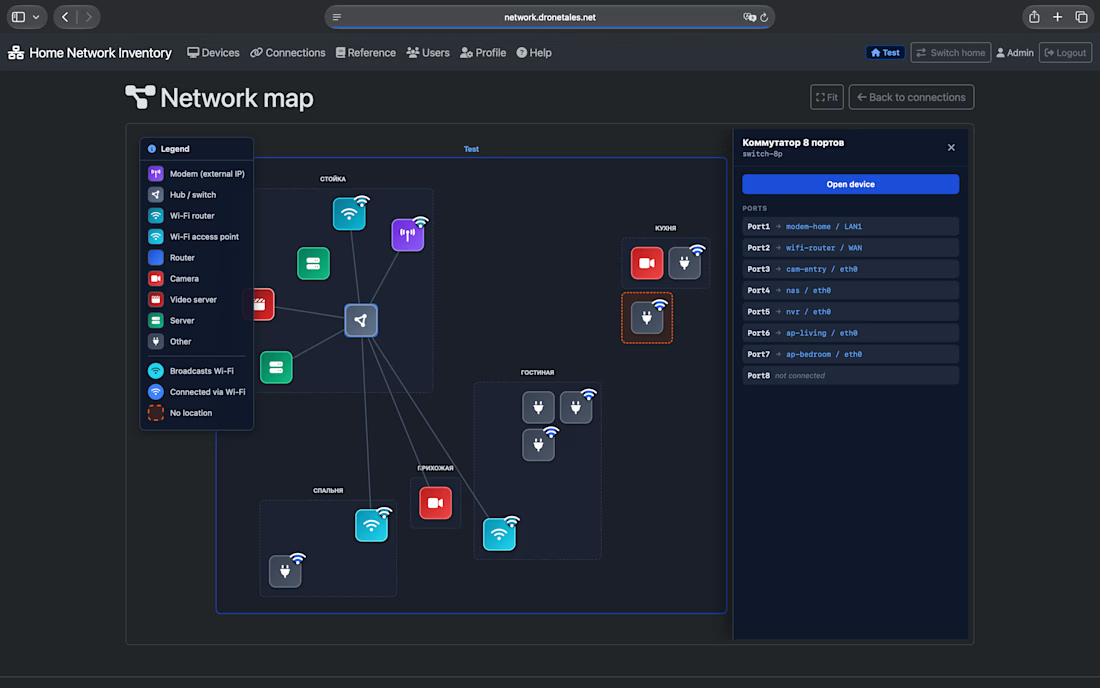

Nice that it runs on a Raspberry Pi. The drag and drop network map is the best part of the screenshot.

This year, I worked on a mental health app where I explored using water to represent brainwaves and quality sleep.
I think it communicates the idea much better than the typical green energy orb. 🌊
What do you think?
46 votes
Ends in 20h

Love the energy orb. which one is your pick here?

I will program and simulate your 8051, stm32, esp32 or arduino project
MY SERVICES
Microcontroller programming (Embedded C/C++)
Proteus circuit simulation
Sensor and module interfacing
Motor and relay control
Debugging and code fixing
Modification of existing code
Circuit/wiring diagrams and pin configuration
Commented source code with explanation
Simulation files and project documentation
I work on both new and existing projects.
