The network for creativity
Join 1.25M professional creatives like you
Connect with clients, get discovered, and run your business 100% commission-free
Creatives on Contra have earned over $150M and we are just getting started


The network for creativity
Join 1.25M professional creatives like you
Connect with clients, get discovered, and run your business 100% commission-free
Creatives on Contra have earned over $150M and we are just getting started







Related posts


I built an open-source skill that stops AI from making every design look the same
Every AI-generated website looks the same. Centered hero. Purple gradient. Three feature cards.
The reason isn't bad taste. AI agents fill gaps in a brief with the average of their training data. If you don't define what "not average" means for your project, you get the mean.
So I built Intent Interrogator, a free skill that works across Claude Code, Codex, Cursor, Copilot, and any agent that reads the Agent Skills standard.
It does three things:
Interrogates - asks 4 questions before writing any code:
→ What should someone feel in the first 3 seconds?
→ Who specifically is this for?
→ What's the one constraint I must respect?
→ What should this definitely not look like?
Persists - saves the brief to a .intent/ file inside your project. New chat, new week, new agent, the intent is still there.
Verifies - before declaring the work done, it compares what it built against what you asked for, and produces an Intent Receipt showing where it matched and where it drifted.
That last part is the piece I haven't seen anywhere else.
You don't need to code to use it. You just answer four questions.
Free forever. Feedback welcome.
#design #ai #opensource #productdesign
github.com
GitHub - yutivora/intent-interrogator
Contribute to yutivora/intent-interrogator development by creating an account on GitHub.

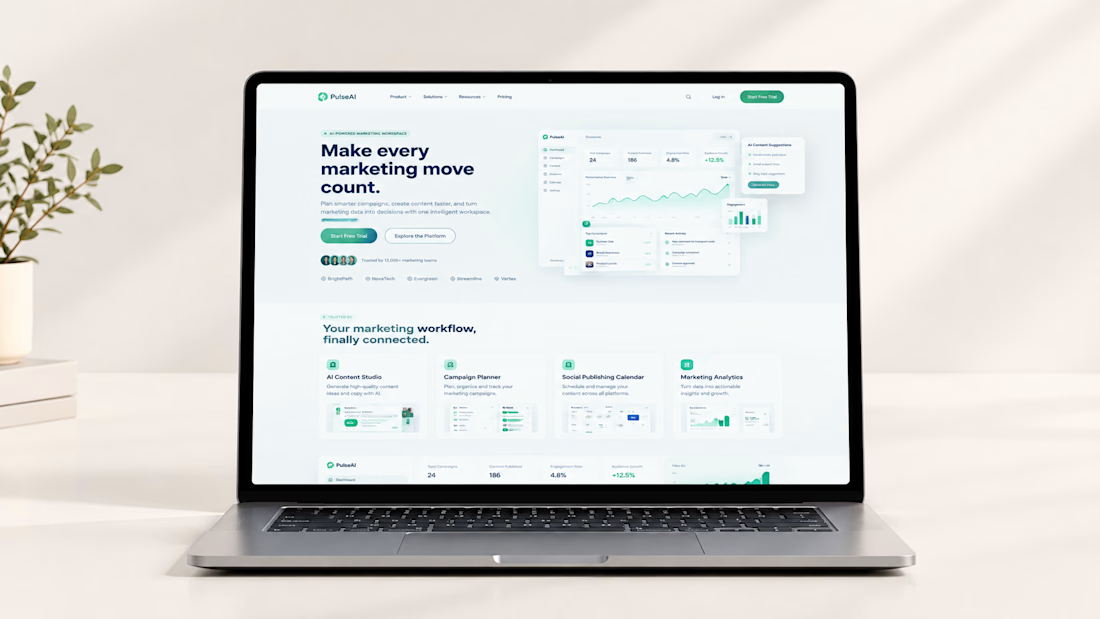
PulseAI — Modern AI Marketing SaaS Website Design in Framer
PulseAI is a modern SaaS website concept for an AI-powered marketing workspace designed to help businesses organize campaigns, streamline content planning, manage publishing schedules, and understand marketing performance from one connected platform.
Designed in Framer, the website combines a clean interface, strategic content structure, and polished dashboard visuals to communicate a complex software product in a simple, engaging, and professional way.
The goal was to create a conversion-focused SaaS marketing website that builds trust, communicates product value, and encourages visitors to explore the platform or start a free trial.