The network for creativity
Join 1.25M professional creatives like you
Connect with clients, get discovered, and run your business 100% commission-free
Creatives on Contra have earned over $150M and we are just getting started
Back to feedPost

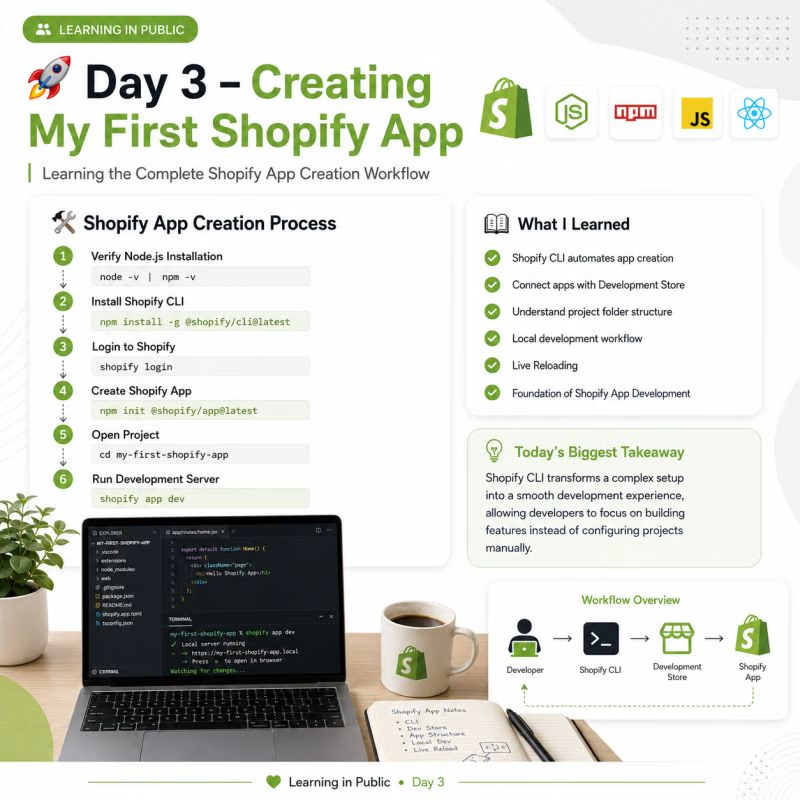
🚀 Day 3 of My Shopify App Development Journey | Creating My First Shopify App
After understanding the Shopify ecosystem and setting up my development environment, today I finally created my first Shopify app using Shopify CLI.
At first, I thought creating a Shopify app would require a lot of manual configuration. But I was surprised to see how Shopify CLI automates most of the setup process, allowing developers to focus on building features instead of spending hours configuring a project.
🛠️ Complete Process I Followed
✅ Step 1: Verify Node.js & npm Installation
Before creating the app, I made sure Node.js and npm were installed correctly.
node -v
npm -v
✅ Step 2: Install Shopify CLI
npm install -g @shopify/cli@latest
Shopify CLI is the official command-line tool that simplifies creating, running, testing, and deploying Shopify apps.
✅ Step 3: Authenticate with Shopify
shopify login
This command connects the CLI with my Shopify Partner account, allowing me to create and manage apps.
✅ Step 4: Create My First Shopify App
npm init @shopify/app@latest
During the setup, Shopify CLI asked me to:
• Enter the app name
• Select the preferred app template
• Choose my Shopify Partner organization
• Connect the app to a development store
Within a few minutes, the complete project structure was generated automatically.
✅ Step 5: Open the Project
cd my-first-shopify-app
✅ Step 6: Run the Development Server
shopify app dev
This command starts the local server, opens a secure tunnel, installs the app on my development store, and enables live reloading whenever I make changes.
📂 What I Explored
✅ Project folder structure
✅ Configuration files
✅ Development workflow
✅ Local development server
✅ Development store integration
💡 Today's Biggest Takeaway
The biggest lesson I learned today is that Shopify CLI isn't just a tool for creating apps—it's the foundation of the entire Shopify app development workflow.
It automates repetitive tasks, creates a production-ready project structure, and provides a smooth development experience from the very beginning.
Small steps like these build the foundation for creating real-world Shopify applications.
Tomorrow, I'm excited to explore Polaris, App Bridge, and the Admin API to understand how Shopify apps interact with stores.
💬 Question for experienced Shopify developers: Which part of the Shopify app development journey challenged you the most when you were getting started?
I'd love to learn from your experience. 👇

The network for creativity
Join 1.25M professional creatives like you
Connect with clients, get discovered, and run your business 100% commission-free
Creatives on Contra have earned over $150M and we are just getting started





Trending
retrofuturism
Share your favorite designs from the past exploring the distant future. Or your own take on the aesthetic 🚀
halftone
Dots. Texture. Grain. Let's see your designs using the halftone technique.

Midjourney
Creatives are showing off what they're making with Midjourney.
colorgrade
Video editors sound off: How do you enhance the mood of your video in color grading?
Related posts

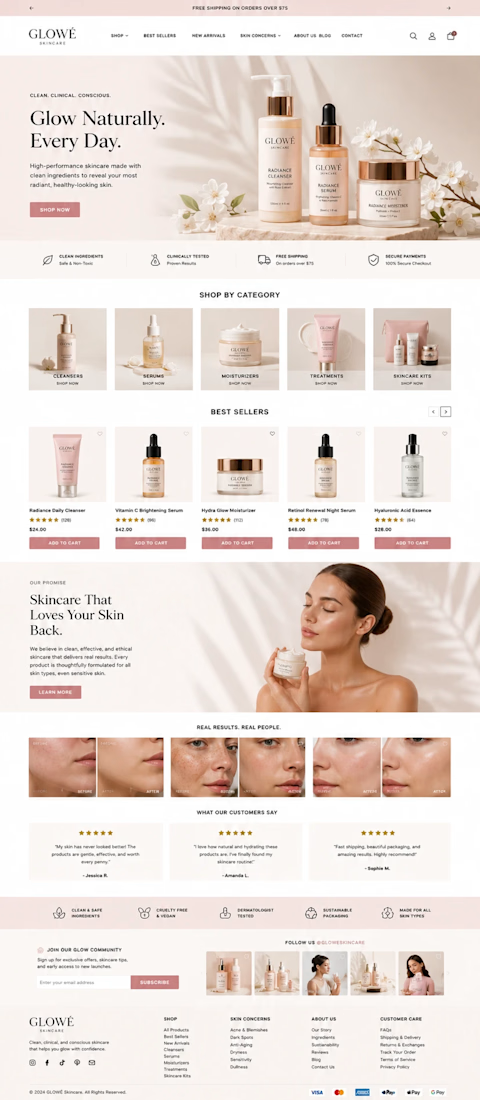
Elegant Skincare Shopify Store Design
Built and optimized a polished Shopify store for a growing skincare brand, with a focus on creating a premium shopping experience and supporting long-term e-commerce growth.
The project included store planning, theme customization, product page optimization, app integrations, and performance improvements. Every part of the storefront was designed to make browsing easier, strengthen the brand presentation, and improve conversion opportunities across desktop and mobile.
- Custom Shopify store design and theme customization
- Conversion-focused product page optimization
- Mobile-friendly, responsive storefront
- App and third-party integration
- Store speed and performance improvements
- Clean, premium visual direction for a skincare brand
- Scalable setup built to support future products and growth



Fashion E-commerce Shopify Store
A modern Shopify e-commerce store designed for a women's fashion brand.
I focused on creating a clean and visually appealing storefront that highlights products, promotions, collections, and key customer benefits while maintaining a simple shopping experience.
My work included:
Shopify store design
Homepage layout
Collection sections
Promotional/discount sections
Customer benefit sections
Contact form
Responsive design
Conversion-focused CTAs
Objective: Create a professional fashion storefront that combines strong visual presentation with a straightforward customer journey.
Role: Shopify Designer / E-commerce Web Designer

Really clean execution. The visual hierarchy works beautifully.


Creative work