The network for creativity
Join 1.25M professional creatives like you
Connect with clients, get discovered, and run your business 100% commission-free
Creatives on Contra have earned over $150M and we are just getting started
Back to feedPost

Malware in a WordPress backup, disguised as a photo
A client wanted me to restore a WordPress site from a zip backup and asked for one thing before paying: a screenshot of the site running on my own computer, with localhost in the address bar.
Loading a WordPress site runs its PHP on whatever machine serves it. So I read the zip with a script first and didn't extract it.
WordPress core matched the official checksums. In wp-content/mu-plugins, though, there was a file that looked for a 4.6 MB "JPEG" in uploads, renamed it to .exe and tried nine ways to launch it. The first two bytes of that "JPEG" were MZ, which is how a Windows executable starts. Opening localhost for the screenshot would have been enough to run it.
My first script missed it because it trusted file extensions. Now it reads the first bytes of every file.
The write-up has the loader code and the checks I now run before importing a backup I didn't make. If the same file reached you, the SHA-256 hashes are at the end.
https://helban.dev/en/case-studies/fake-wordpress-backup-malware/


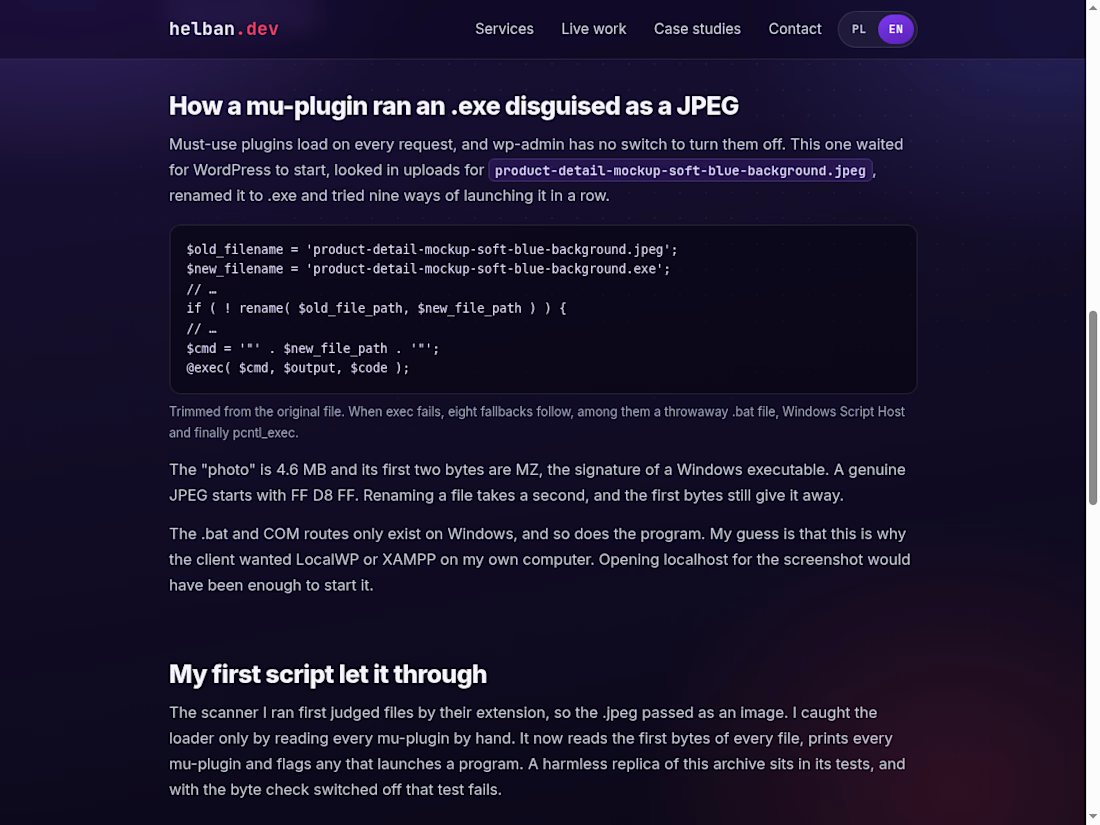

The MZ check is such a good catch. Worth adding for anyone restoring sites: mu-plugins run on every request and can't be switched off from the dashboard, so they're a favourite hiding spot. Did the client ever reply after you flagged it?
Good on you for pushing past the template reply. That probably saved the next person who picked up that job. And that's a great point about the plugin list: nothing changes in the database, so the Plugins screen looks clean. A quick look inside mu-plugins is going on my restore checklist.
The network for creativity
Join 1.25M professional creatives like you
Connect with clients, get discovered, and run your business 100% commission-free
Creatives on Contra have earned over $150M and we are just getting started



Related posts

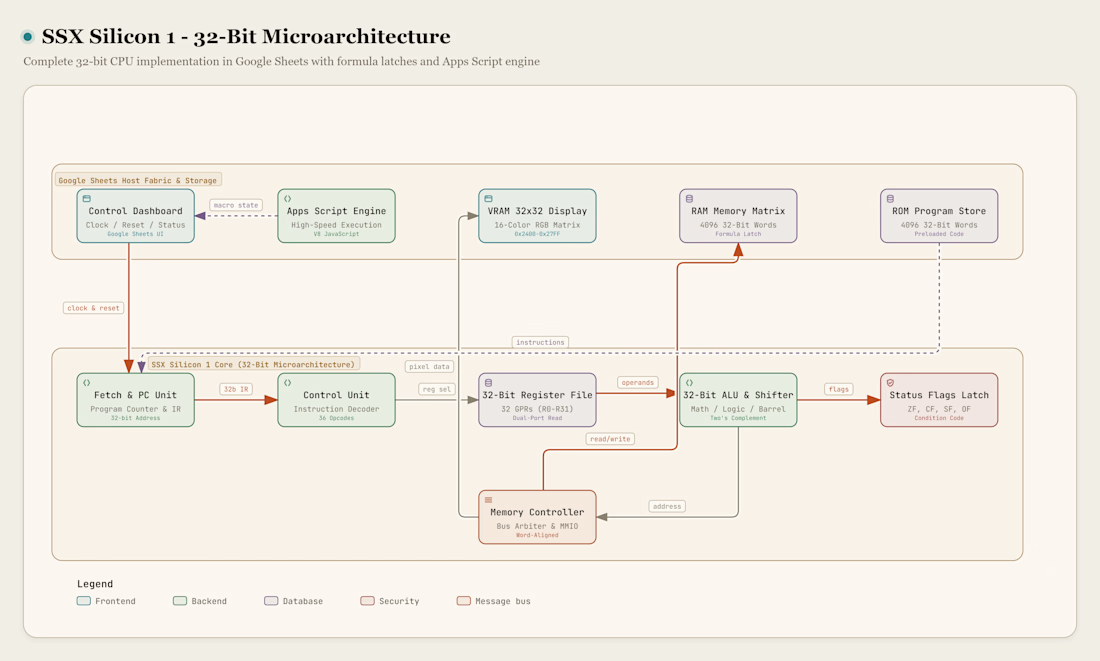
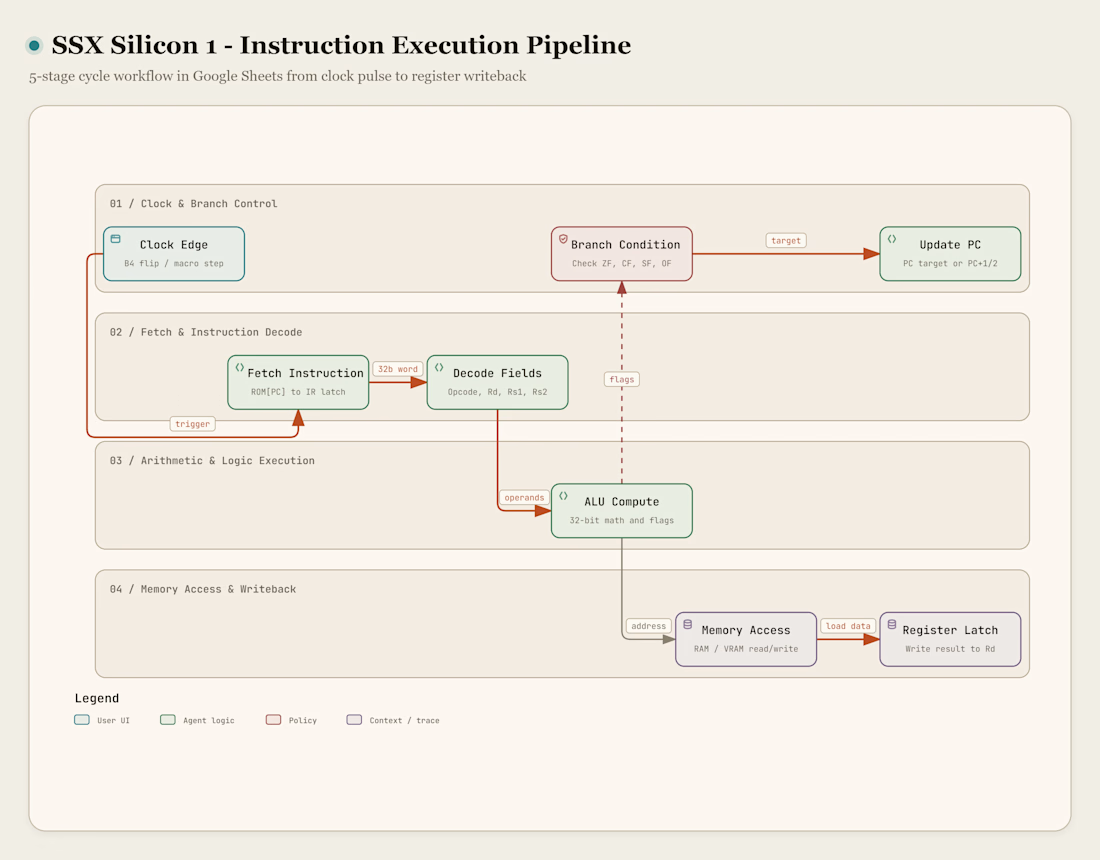
Most people open Google Sheets to handle monthly budgets, invoices, or attendance logs. I wanted to see if spreadsheet cells could work as an actual computer chip. That led to SSX Silicon 1, a working 32-bit computer processor built inside a single Google Sheets workbook. It runs with 32 registers, a 16-kilobyte memory space, 36 instructions, and a 32 by 32 pixel color display. The sheet does not use pre-recorded animations, placeholder numbers, or external file links. Every calculation runs through a five-stage pipeline: fetch, decode, execute, memory access, and writeback.
You can run the processor in two ways. With Google Sheets iterative calculation turned on, toggling a manual clock cell advances the machine cycle by cycle using native circular formulas. For continuous execution, an embedded Google Apps Script V8 engine powers interactive buttons and a custom top menu, running programs at hundreds of instructions per second. The 32-bit arithmetic logic unit handles numbers up to 4.29 billion across 36 instructions, covering arithmetic, division, bit shifting, logic gates, and subroutine branching. It also tracks four hardware status flags on every cycle: Zero, Carry, Sign, and Overflow.
The memory layout organizes a self-contained 16-kilobyte address space across dedicated sheets. This includes 4,096 words of program ROM, 4,096 words of read-and-write data RAM, system I/O registers, and a stack region starting at address 0x3FFF. Thirty-two registers handle active computation: R0 stays fixed at zero, R1 through R27 store math and variables, and R28 through R31 serve as pointers for the frame, stack, return address, and program counter. A dedicated video RAM block at 0x2400 maps directly to a 32 by 32 grid of 1,024 cells, using conditional formatting and a 16-color RGB palette to draw borders, crosshairs, and pixel graphics. I also wrote a Python two-pass assembler that turns human-readable .ssx assembly code into spreadsheet-ready CSV tables, along with interactive HTML architecture diagrams built with Archify.
To make sure the CPU calculates accurately, I tested every instruction against a Python reference emulator across five benchmark programs. The hardware self-test verifies all 32 arithmetic operations, memory reads, and stack frames in 77 cycles, leaving the golden signature 0xCAFEBABE in register R1. A 32-bit Fibonacci program generates 47 terms in RAM up to 1,836,311,903 without rounding or overflow. A prime number sieve finds all 25 primes under 100 using memory arrays, an integer matrix program calculates a 3x3 matrix product, and a graphics routine draws a multicolored geometric crest across 232 lit pixels. The project includes five PDF documents: an academic research paper, an instruction set manual, a microarchitecture specification, a verification report, and a beginner guide. Everything runs in a standard web browser.
For anyone who wants to open the processor in Google Sheets, check out the Python compiler, or read the manuals (including the step-by-step Beginner Guidebook and Research Paper), the full open-source release is available on my GitHub!
Inside the repo, you will find:
The ready-to-import Google Sheets CPU workbook (.xlsx)
The Python assembler & bit-exact reference emulator
Interactive HTML architecture & pipeline diagrams
All 5 PDF manuals and the 5 sample assembly programs





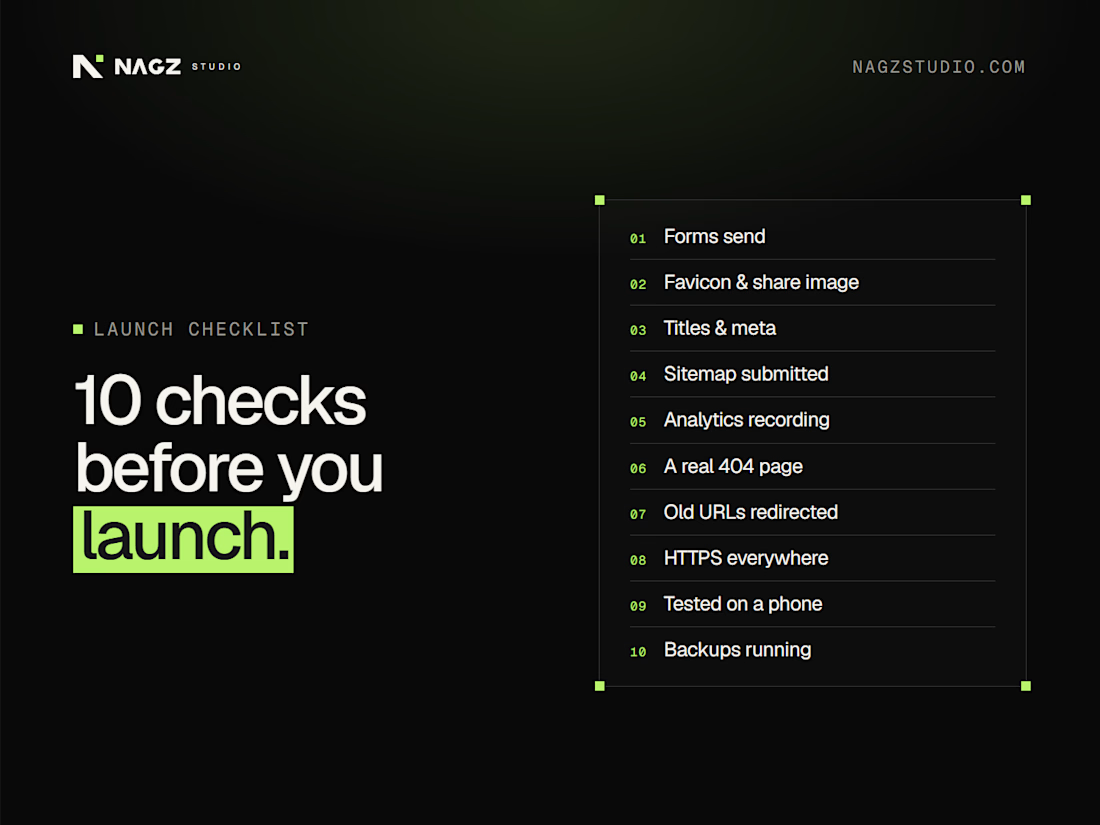
10 checks before you launch
Launching a site this week? Run through these first:
Every form sends, and you receive the email
Favicon and social share image are set
Page titles and meta descriptions are written
The sitemap is submitted in Google Search Console
Analytics is recording visits
A 404 page exists and links back home
Old URLs redirect to their new pages
HTTPS everywhere, with no mixed-content warnings
Tested on a real phone, not just a narrow browser window
Backups are running
Save this for your next launch. Which one gets forgotten most? My vote: number 7.
#WebsiteLaunch #LaunchChecklist #WebDevelopment #Startup #WebsiteTips

Such a handy launch checklist.

I just deployed an ecommerce web app with marketplace. Where you can display your goods and service and get buyers easier.






Great work 👏🏻