The network for creativity
Join 1.25M professional creatives like you
Connect with clients, get discovered, and run your business 100% commission-free
Creatives on Contra have earned over $150M and we are just getting started
Back to feedPost

A client's hero video was taking 10.8 seconds to paint. The fix was one HTML attribute.
Hebron Market is a halal butcher in Boston. The homepage opens on a full bleed video of the counter. It looked great, and the largest contentful paint was 10.8s on a phone. Google wants that under 2.5s.
The obvious move is to compress the video. I did, and it barely helped. The real problem was that the browser had nothing at all to paint until enough video had arrived.
So I gave it something to paint immediately. A poster attribute on the video tag, pointing at one compressed still from the first frame.
That is the whole fix. The browser paints that still instantly, LCP measures against the image instead of the video, and the video swaps in when it is ready. Nobody watching can tell the difference.
10.8s to 2.3s.
Two things I learned the hard way on the same job.
The file was actually 71 MB, not the 42.9 MB the export dialog reported. Check the file on disk, not the estimate your editor gives you.
Use preload="metadata" rather than auto, or you are still pulling the entire video down on someone's phone plan before they have scrolled anywhere.
If your hero is a video and your LCP is bad, look for a missing poster attribute before you change anything else.
The network for creativity
Join 1.25M professional creatives like you
Connect with clients, get discovered, and run your business 100% commission-free
Creatives on Contra have earned over $150M and we are just getting started
Related posts


Officially @Spline - certified. Unofficially, we’ve been 3D-obsessed for years 😉🥇
Feels like the perfect excuse to bring back our interview with the Spline team - 🔗 Link
🎙️ We talked about how we use 3D to make complex B2B products easier to understand, with Elecctro as a real case.
Thank you, Spline, for the badge and for having us 💜
Curious to hear what you think 👇



great work deserves great badges 🏆 congratulations, Lynksen!


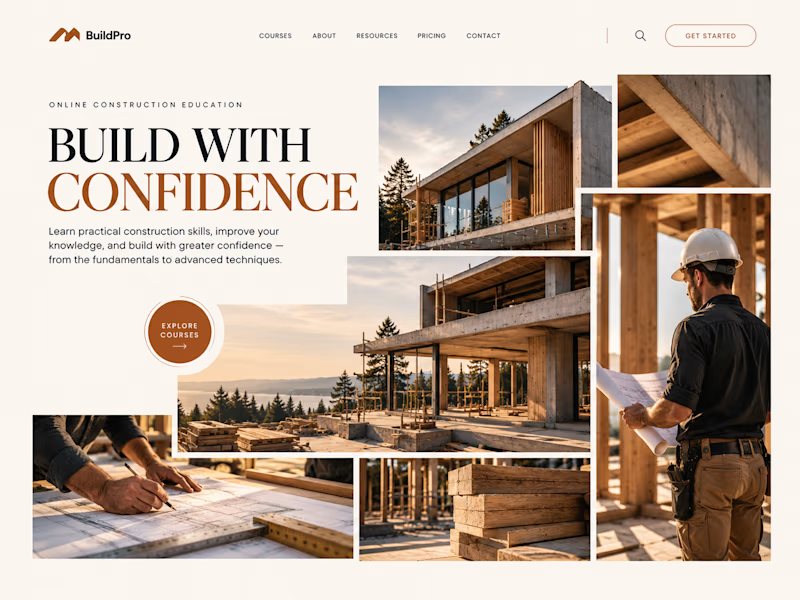
Same course. Same content.
But two completely different feelings ✨
Which version would you choose?

18 voted
31%
40 voted
69%

58 votes
Closed

option 2 feels a bit more cinematic, the confident feeling is embedded into the layout!