The network for creativity
Join 1.25M professional creatives like you
Connect with clients, get discovered, and run your business 100% commission-free
Creatives on Contra have earned over $150M and we are just getting started
Back to feedPost

Marey is a Video.js 10 skin built on one idea from film history. In 1882 Étienne-Jules Marey photographed motion as many exposures on a single plate, so you could see a movement, not just a moment. A scrub preview usually shows one frame: where you are. Marey shows what moves.
How it works
• Point at the timeline and the preview becomes a chronophotograph: the frame under the pointer, sharp, with the next four seconds of the same shot stacked over it as fading exposures. Light frames stack their darks and dark frames their lights, so whatever moves leaves a trail while the background stays put. A cut or the end of a chapter stops the stack, so a plate never mixes two shots.
• Drag, and every frame you pass lands on the plate and fades under the next, like a long exposure.
• Pause, and the centre turns into a frame-stepper: one frame at a time with a turn of a disc shutter (Marey's photographic gun shot twelve frames a second on a turning disc). Shift + arrows or , and . do the same, and the clock reads hundredths.
• The timeline is a chronograph scale: a tick every second, a long one at every chapter, and the chapters numbered as plates (Pl. I to Pl. IX). What has played takes the toning colour. When idle, the band develops away into a hairline with a notch at every plate.
• One skin property, --marey-tone, tones the plate and the played line: sepia, selenium, cyanotype, platinum, gold.
Usability
• The stock Video.js time slider stays underneath as the real control; the six custom elements only act through the player store (seek, pause).
• Full keyboard map: Space/K, ←/→ 5 s, J/L 10 s, Shift + ←/→ or , . one frame, [ and ] for chapters, M, F, C, I, 0–9, < and >. On the slider itself Shift + arrow keeps its usual big step.
• The plate reads a finer storyboard (a frame every half second) from a metadata track, and falls back to the media's own storyboard (Mux's) when there is none. On a phone the plate rides above your thumb while you drag; paused, the centre steps frames with 44 px buttons.
Accessibility
• The slider names the chapter and the time for screen readers ("Plate 3 of 9: Lunetta"); frame steps and chapter jumps are announced.
• Opaque smoked glass, never blurred: silver type at 15:1, and at least 13:1 even over a white frame. No text ever sits on the picture.
• Reduced motion: no trail, no shutter sweep, no drawing in. Forced colours: system colours throughout. A silver focus ring you can always see, 44 px targets on touch, and captions with sound descriptions.
Real site: running live on AIVCJ's portfolio domain with our studio reel, nine live templates, one chapter each, streamed from Mux. Built on @videojs/html 10.4, started from the Scaffold skin. Type: Big Shoulders Display, IBM Plex Mono, Inter Tight. Licensed under Apache-2.0. Music: "Another August" in the reel and "Vaporware" in the demo film, both by The Cynic Project (CC0).

A scrub preview that shows the movement, not just the moment. Brilliant use of Marey.

Pausing and having the centre turn into a frame-stepper — one frame at a time with a turn of a disc shutter — is the detail I love most: the pause state becomes a tool for studying motion, not just stopping it. Numbering the chapters as plates (Pl. I to Pl. IX) on a chronograph...

This is the one I keep thinking about. Every scrub preview shows a frame, and you made it show motion. It's a small change that makes complete sense once you see it. Does it hold up on fast cuts, or does it work best on single continuous shots?
The network for creativity
Join 1.25M professional creatives like you
Connect with clients, get discovered, and run your business 100% commission-free
Creatives on Contra have earned over $150M and we are just getting started


Related posts

Pull into the drive-in and save three spots for your friends. 🚘
I built LOT 66, a custom Video.js v10 skin for the Contra challenge. Start a live watch room for up to four people and share the invite link. As each friend joins, their car lights up and their name appears above it. Everyone watches in sync.
I wanted the controls to feel like part of the car, so I built them into a vintage dashboard. The radio dial adjusts the volume, the tuning scale lets you scrub through the film, and the dashboard stays within reach in fullscreen.
Now showing the original 1960 trailer for Dinosaurus! 🦖
#VideoJSSkinsChallenge

The vintage dashboard controls are pure genius.

Verbatim: the subtitle became the player.
The sentence you're hearing is the control bar. Words light up as they're spoken. Drag along them to scrub, or click a word to jump to it.
Three things to try:
• Press / and type a word. Every place it's said gets a tick on the seek bar.
• Hit the link button to copy a link to the exact sentence on screen.
• Stop moving, and the bar folds into an ordinary subtitle.
Built on Video.js v10 as an HTML skin, streamed from Mux, and driven by a plain captions file with no word-level timestamps. Every control works from the keyboard, and it respects reduced motion, high contrast and forced colours.


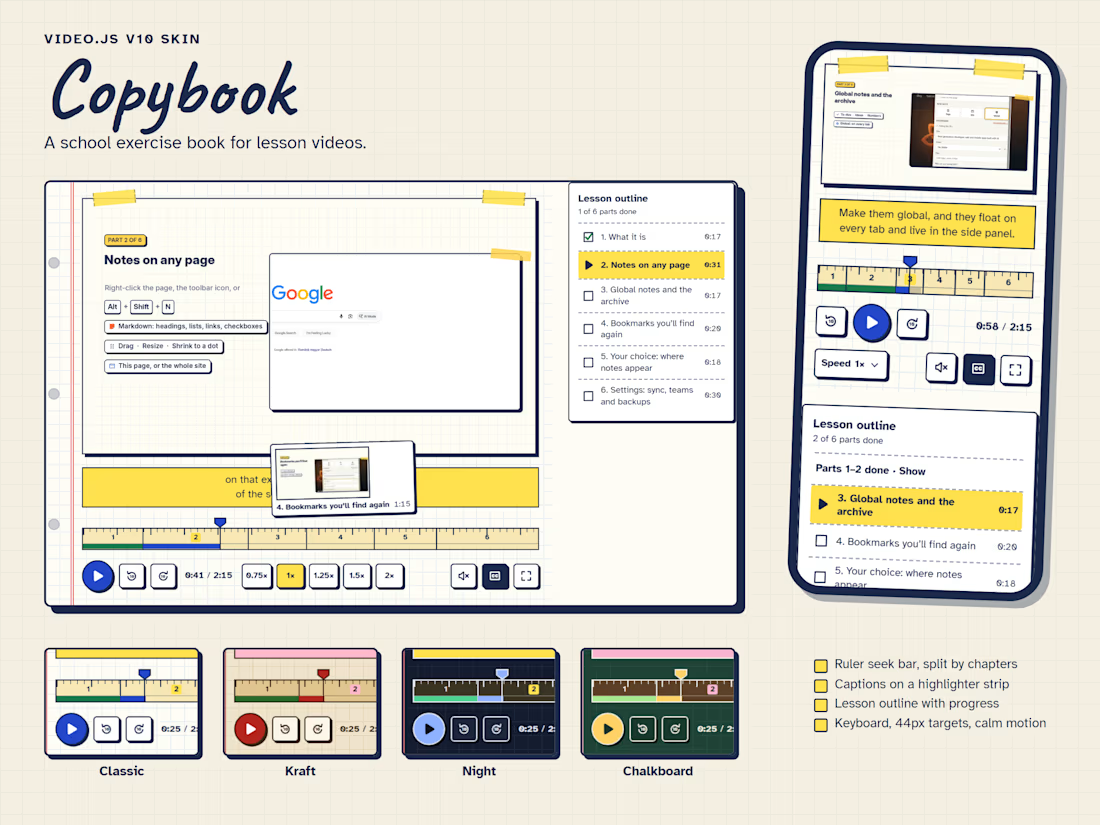
Copybook is a Video.js v10 skin for lesson videos. It treats the player as a page in a school exercise book: the video is taped onto squared paper beside a red margin, the seek bar is a wooden ruler, and captions are written on a highlighter strip under the picture instead of over it.
Every control sits on the paper below the video, so text and icons keep the same contrast over any footage. The ruler is divided by the video's chapters, numbered like centimetres, and finished parts turn green, so the seek bar doubles as lesson progress; hovering it shows a polaroid of that moment. The same chapters build a checklist outline next to the player.
Small details carry the idea through: a ruled title card before the lesson starts, hand-drawn icons, sticky notes that confirm shortcuts and double-taps, and a gold star when the lesson is finished. Buttons are at least 44px, every icon has a tooltip with its shortcut, focus is a thick pen-blue outline, and all motion switches off under reduced motion. Four colour themes (Classic, Kraft, Night and Chalkboard) are switched with one attribute, and each is checked for contrast.
I built it for the video tour of my own browser extension, AI Bookmarks and Notes, where it now runs live.

The wooden ruler and highlighter-strip captions give Copybook such a familiar school-day charm. The gold star is a lovely finishing detail.