The network for creativity
Join 1.25M professional creatives like you
Connect with clients, get discovered, and run your business 100% commission-free
Creatives on Contra have earned over $150M and we are just getting started
Back to feedPost

Stop Building AI Demos. Build Store-Ready Products. 🚀
Most AI photo projects end up as simple wrappers or half-baked demos. I wanted to build something real, production-ready, and fully monetized.
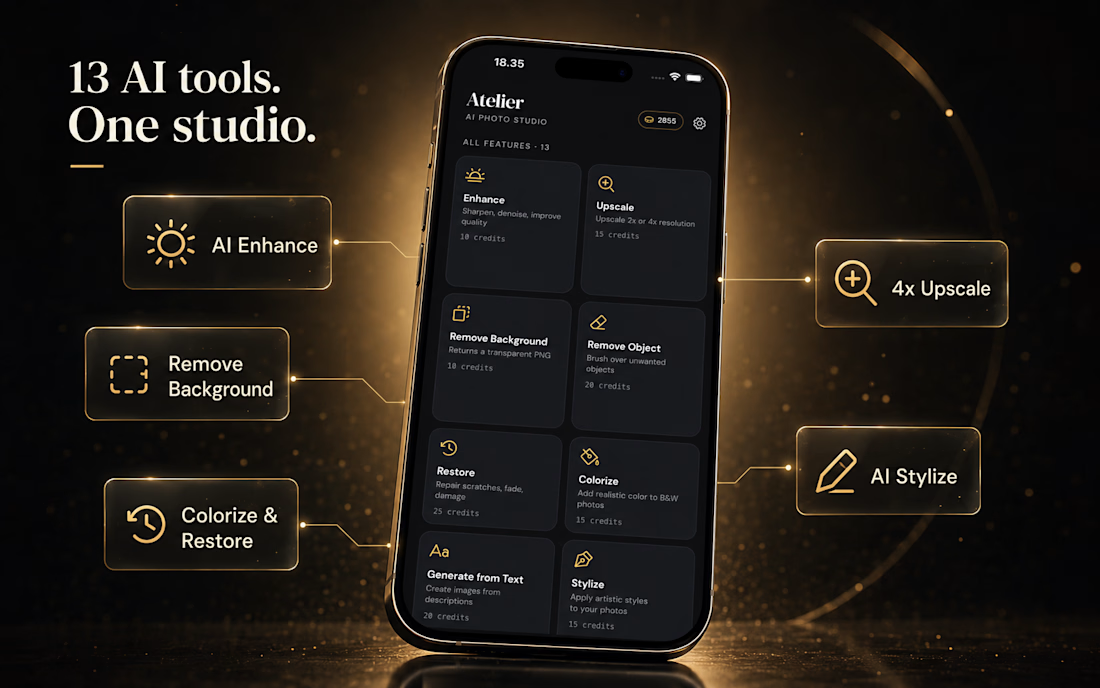
🙌 Meet Atelier — a production grade AI Photo Studio built for the App Store and Google Play.
Packed with 13 heavy-duty AI tools—including AI Enhance, 4x Upscale, and precise Background Removal (as showcased in ai-photo-1.png) - Atelier processes images fast and securely.
⚡ Engineering the Experience:
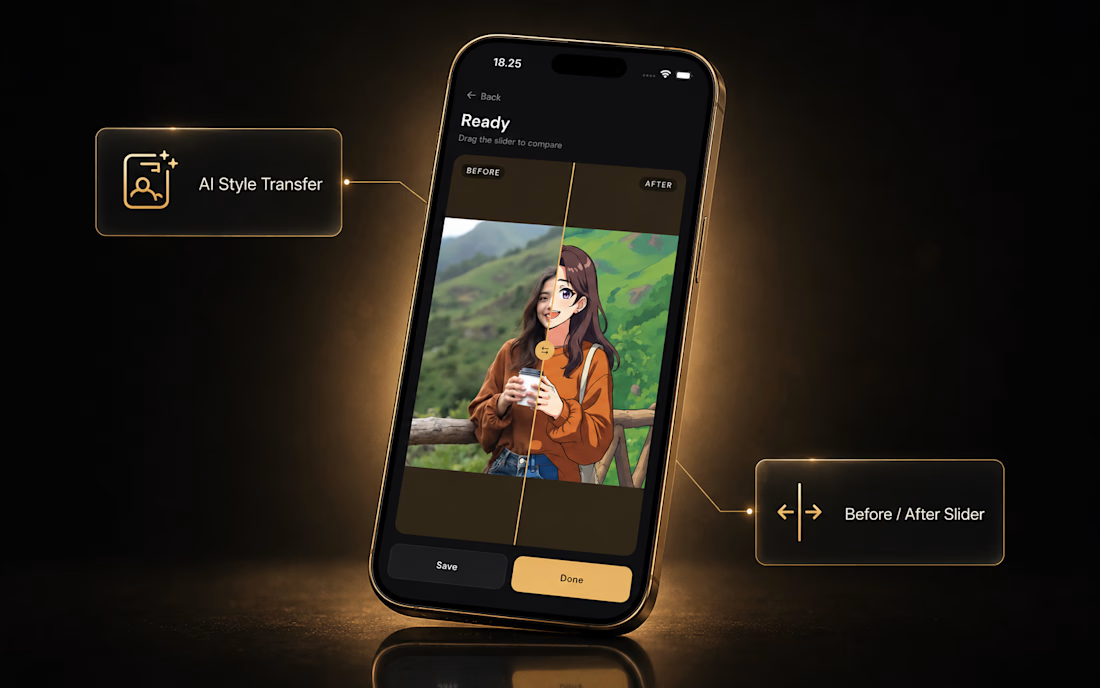
- The Frontend: Built an ultra-smooth cross-platform UI with Flutter, featuring an interactive Before/After comparison slider (ai-photo-2.png).
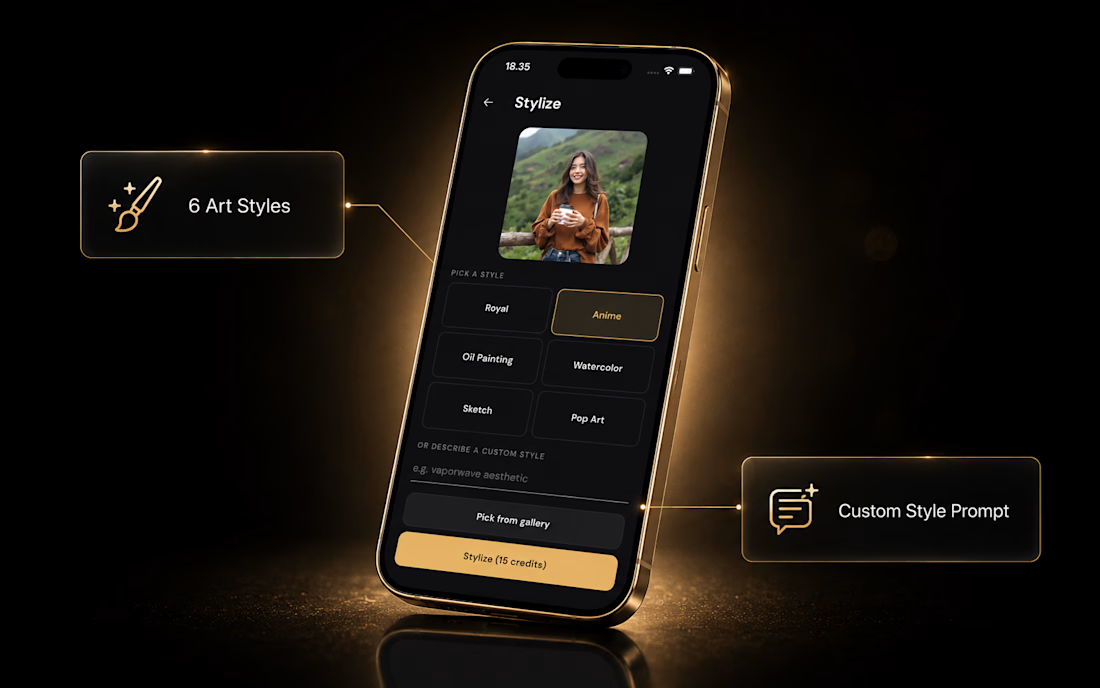
- The Creative Engine: Integrated 6 distinct art styles and a custom style prompt engine for infinite generation flexibility (ai-photo-3.png).
- The Backbone: Engineered a secure Go backend that interfaces with AI image models, handles fast data delivery, and manages strict receipt-verified In-App Purchases (IAP).
No generic templates, no lagging interfaces—just a complete, commercially viable mobile ecosystem.
Need an engineer who builds real, revenue-generating AI products instead of just placeholders? Let’s Discuss!🔥
#ProductDesign #MobileDevelopment #B2BSoftware #AIAutomation



Perfect
🙌 big thanks ethan, 😊 very appreciate
The network for creativity
Join 1.25M professional creatives like you
Connect with clients, get discovered, and run your business 100% commission-free
Creatives on Contra have earned over $150M and we are just getting started











Related posts

Poster Club turns a simple event template into your own print. I built two working Flutter versions and recorded the same editing flow in each.
Print Room: calm, editorial, with a mounted canvas and bottom tools.
Cutout Playground: bold, playful, with loose prints and tools at the edge.
Which one would you rather use?
What made the difference?
Grab it for free:
https://contra.com/products/cUHBysMu-poster-club-free-flutter-ab-ui-kit

37 voted
60%
25 voted
40%
62 votes
Closed

Print Room looks great!!

AI video is not about pressing generate.
It’s about controlling the direction before anything moves.
This short beauty concept was built from:
• one veeeeeeeery detailed prompt
• 8 reference frames
• basic editing and polish in Photoshop and After Effects
The interesting part for me is not that AI can make a video.
It’s that you can start directing it with a clear visual system:
• same color language,
• same model mood,
• same product world,
• same campaign feeling across stills and motion.
That’s where AI gets useful for brands.
Not as a random generator, but as a way to prototype campaign ideas faster, test visual directions earlier and turn static concepts into motion without a full production setup.
Tools:
• Magnific (Nano Banana 2 + Seedance 2.0)
• Adobe (Photoshop + After Effect)
Full case study here: https://designmorphic.com/impossible-species
#AICreative #CreativeDirection #ProductMarketing

Greattt✨

Building a Modern Restaurant Management Dashboard with Lovable (Light ☀️ vs. Dark 🌙)
I’ve been working on the dashboard interface for ReserveTable (Eat Pro Japan), focusing on giving restaurant managers and users a clean, modern, and intuitive interface to manage bookings, tables, and analytics.
Using Lovable, I was able to rapidly prototype and construct a modern UI system complete with smooth component transitions and native theme switching.
✨ Key Design & Tech Highlights:
⚡ Built with Lovable: Leveraged AI-powered design-to-code workflows to assemble clean component hierarchies, responsive search/filter bars, and sleek cards rapidly.
🌗 Seamless Light & Dark Mode: Designed a flexible color system using modern CSS variables / Tailwind tokens so the entire interface gracefully shifts between an elegant light aesthetic and a moody, dark dining ambience.
🎯 Contextual UI Elements: Styled input controls, select menus, and primary CTA buttons to maintain legibility and contrast across both light and dark themes.


For reservation and table states, the same semantic color tokens need to stay clear in light and dark mode. Did you define status tokens once and map both themes to them, or tune those colors per component?