The network for creativity
Join 1.25M professional creatives like you
Connect with clients, get discovered, and run your business 100% commission-free
Creatives on Contra have earned over $150M and we are just getting started
Back to feedPost


Title:
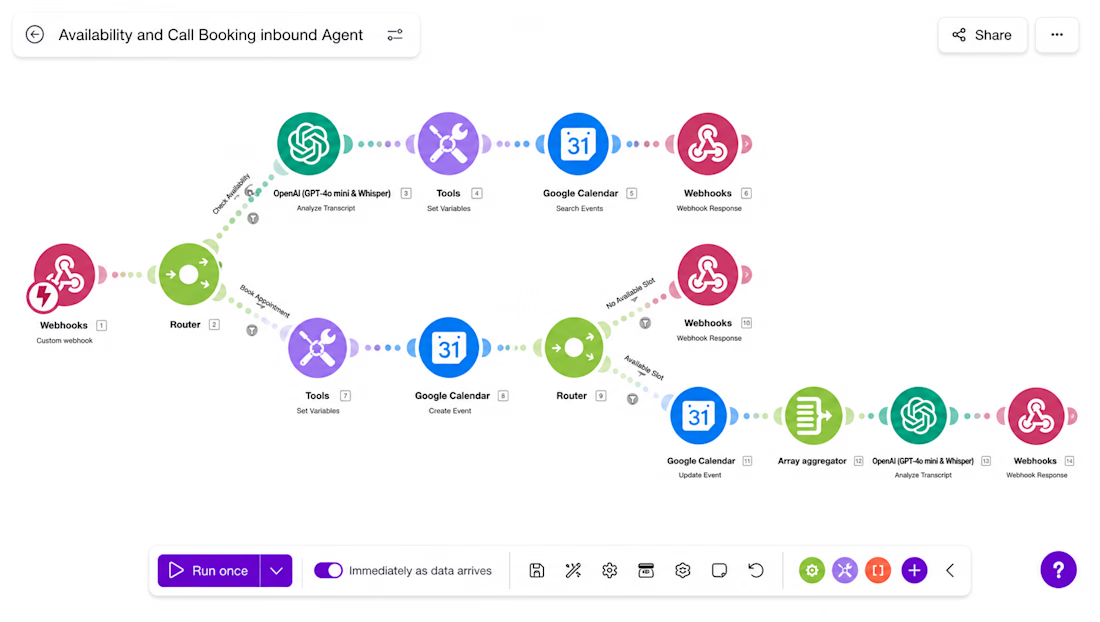
AI-Powered Appointment Booking Agent with Make.com, OpenAI & Google Calendar
Description:
I Built an intelligent AI appointment booking automation using Make.com, OpenAI, Google Calendar, and Webhooks to automate availability checks, appointment scheduling, and customer responses in real time.
This workflow acts as a virtual booking assistant that understands user requests, checks calendar availability, books appointments automatically, and returns instant responses without human intervention.
Key Features
✅ AI-powered appointment scheduling
✅ Real-time availability checking with Google Calendar
✅ Automatic event creation and calendar updates
✅ Smart booking logic with multiple routing paths
✅ Instant webhook responses for seamless user experience
✅ OpenAI integration for natural language processing
✅ Handles unavailable time slots automatically
✅ Reduces manual scheduling and administrative work
Workflow Process
Receives booking requests through a webhook
Uses OpenAI to analyze user intent
Checks calendar availability
Creates appointments automatically
Updates calendar events when needed
Responds with booking confirmations or alternative availability
Processes scheduling data efficiently using array aggregation
Tech Stack
Make.com (Integromat)
OpenAI GPT-4o
Google Calendar
Webhooks
AI Automation
Appointment Scheduling Automation
Workflow Integration
Results
This automation helps businesses eliminate scheduling bottlenecks, reduce no-shows, improve response times, and provide a smooth booking experience for customers 24/7.
Skills: AI Automation, Make.com, OpenAI Integration, Google Calendar Integration, Appointment Booking System, Workflow Automation, Business Process Automation, API Integration, Webhook Development.

The network for creativity
Join 1.25M professional creatives like you
Connect with clients, get discovered, and run your business 100% commission-free
Creatives on Contra have earned over $150M and we are just getting started








Related posts

Picture a consultant who takes 8 sales calls a week.
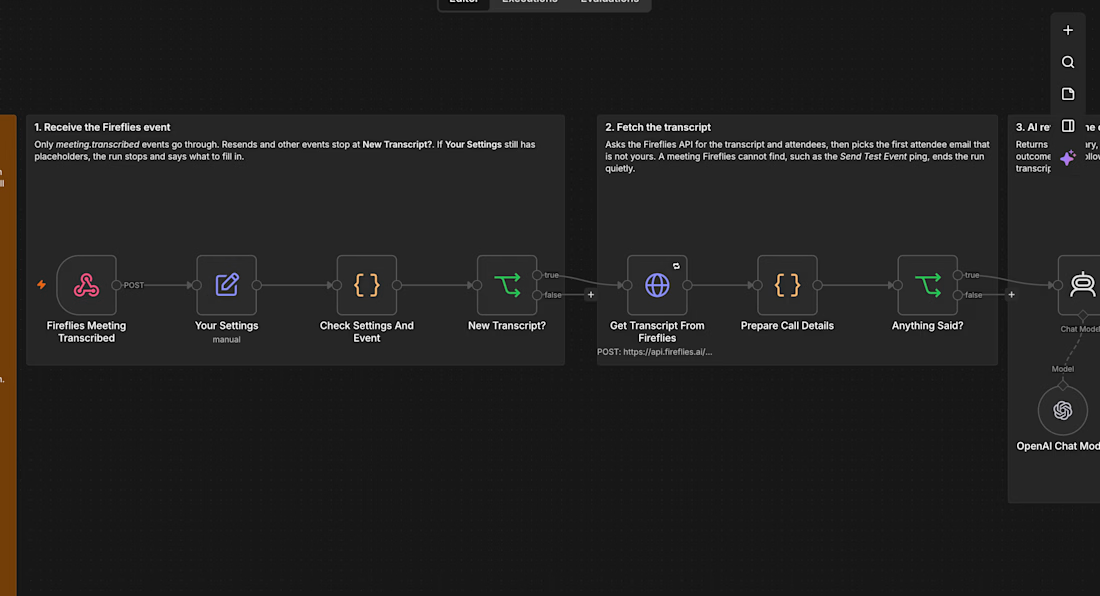
After each one comes the same routine: replay the recording, write notes, update the pipeline sheet, write the follow-up email. Call it 30 minutes a call. That is 4 hours a week, and on busy days the follow-up slips to tomorrow.
I built an n8n workflow that takes that routine away:
→ Fireflies records and transcribes the call
→ As soon as the transcript is ready, AI writes a summary, the open questions, the next step and whether the prospect is ready to go ahead
→ A follow-up email that fits that outcome is saved in Gmail drafts, addressed to the person on the call
→ The call is logged in Google Sheets and the notes land in your inbox
Nothing is sent automatically. You read the draft, change a line if you want, and press send.
For that consultant, 4 hours of admin a week turns into a few minutes of reading, and every prospect hears back the same day.
I tested it on a real recorded client call and have submitted it to the n8n template library as a free template. If you want it set up for your business, send me a message.



AI voice receptionists that answer every incoming call, resolve customer queries, and book, update, or cancel appointments. They replaced a receptionist service that cost thousands of dollars a month


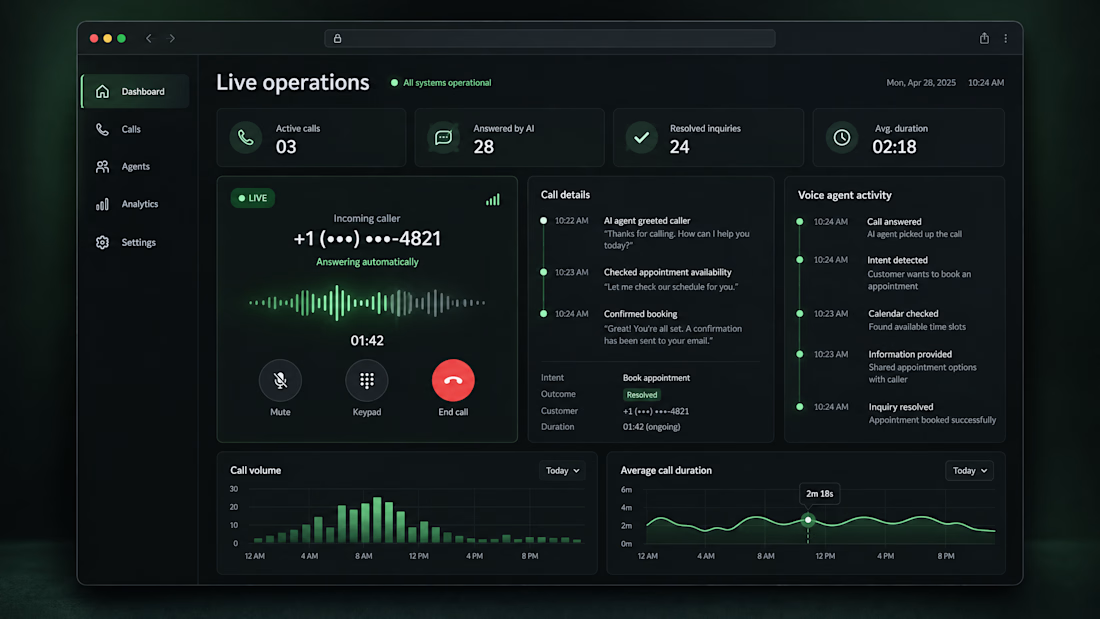

Replacing a receptionist service is where the ROI is easiest to show. How do you handle calls the agent can't resolve: live transfer to staff, or a callback?

🚀 Built a Gmail AI-Tagging + Slack Alerts System — Because Important Emails Should Never Get Missed
The problem every B2B team faces:
❌ Client emails sit unanswered for days
❌ Bank or government emails get buried in the inbox
❌ Deadlines are missed because no one flags them
❌ No daily view of what's pending vs overdue
I built a system that fixes all of this:
🎯 WHAT IT DOES:
✅ Watches Gmail inbox every 5 minutes
✅ Uses AI to classify every email into 5 categories:
• URGENT (deadlines, overdue, time-sensitive)
• BANK_GOV (banks, .gov domains, tax authorities)
• CLIENT_ACTION (awaiting response)
• FOLLOW_UP (needs follow-up)
• FYI (informational)
✅ Pushes real-time Slack alerts to the right channel:
• #urgent — for time-sensitive items
• #finance-legal — for bank/gov emails
• Assignee DM — for client action items
✅ Sends a daily 8 AM digest with:
• Overdue items
• Awaiting client action
• Pending tasks
✅ Auto-applies Gmail labels (AI/Urgent, AI/Bank-Gov, etc.)
✅ Hourly overdue scanner with automatic escalation
⚙️ TECH STACK:
n8n | Gmail API | OpenAI GPT-4o-mini | Slack API | Google Sheets
📊 RESULT:
→ Zero missed urgent emails
→ 15+ minutes saved per team member per day
→ Complete audit trail in Google Sheets
→ Full visibility into what's stuck and where
Gmail stays the primary interface. Slack becomes the reminder layer that ensures nothing slips.
Want this deployed for your team? Let's talk.
#AIAutomation #GmailAutomation #SlackIntegration #n8n #B2BSaaS #Productivity #WorkflowAutomation


Splitting BANK_GOV out on its own is smart. Those are the emails that hurt most when they get buried. When GPT-4o-mini tags one wrong, does the corrected label feed back into the prompt, or is it fixed by hand?