The network for creativity
Join 1.25M professional creatives like you
Connect with clients, get discovered, and run your business 100% commission-free
Creatives on Contra have earned over $150M and we are just getting started
Back to feedPost
I Built Quvelis Chatbot 2.0 — An AI Assistant That Runs on Your Own Server. 🚀🤖
What if your AI assistant didn't depend on expensive cloud APIs, external AI subscriptions, or sending every conversation to a third-party service?
That's the idea behind QUVELIS — a self-hosted AI assistant designed for developers, students, and businesses.
Today, I'm sharing a look at Quvelis Chatbot 2.0, a project I'm building to make AI assistance more accessible, private, and customizable.
❌ The Problem with Many AI Applications
Businesses and developers often face:
Recurring API costs and unpredictable usage expenses.
Dependence on external AI providers.
Limited control over where their conversations are processed.
Disconnected tools for coding, document analysis, and knowledge management.
Difficulty customizing AI assistants for specific workflows.
Limited control over AI infrastructure and data.
My goal was to approach these problems differently.
⚡ Introducing Quvelis Chatbot 2.0
A modern, self-hosted AI assistant built with Next.js, featuring a ChatGPT-inspired interface and local-first architecture.
Here's what I've been building:
🧠 1. Local-First AI Assistance
Designed to operate on your own infrastructure without requiring external AI API keys.
💻 2. AI Coding Assistant
Ask programming questions, generate code snippets, understand technical concepts, and get help with development tasks.
📚 3. Knowledge Uploads
A dedicated knowledge interface for working with information and documents.
💬 4. Conversation History
Create new chats, revisit previous conversations, and organize your interactions.
🎙️ 5. Voice-Enabled Chat
Microphone input support for a more flexible way to interact with the assistant.
📎 6. File Attachments
An attachment interface for including files in your chat workflow.
🗂️ 7. Workspaces
Dedicated workspace functionality to support organized AI-assisted work.
🌙 8. Modern AI Chat Interface
A clean, responsive interface with dark-mode controls, activity access, and an integrated developer-friendly experience.
🔌 9. Local API Architecture
Built around a self-hosted approach, giving developers more control over how the application is deployed and extended.
🛠️ Built with Modern Web Technologies
The development stack includes:
Next.js and React
TypeScript
Tailwind CSS
Local API routes
Self-hosted application architecture
Git and GitHub for version control
💡 Why Am I Building Quvelis?
Because I believe AI tools should be more customizable and accessible.
Not every developer wants to depend on multiple external services.
Not every business wants to send sensitive information to third-party AI platforms.
And not every useful AI application needs to start with an expensive subscription.
Quvelis is my attempt to explore a different approach.
🚀 What's Next?
I'm continuing to develop Quvelis with a focus on stronger knowledge workflows, improved AI capabilities, reliable file handling, better voice interactions, and a smoother developer experience.
The long-term vision is to create a flexible AI platform that can support developers, businesses, and custom automation use cases.
This isn't just another chatbot interface. It's a foundation for a more customizable AI workspace.
💬 Two Questions for Developers & Business Owners
🔹 If you could run your own AI assistant, what feature would you want first?
🔹 Would you prefer a self-hosted AI assistant or a cloud-based solution for your business?
I'd love to hear your thoughts as I continue building Quvelis.
Building products. Solving problems. Exploring what AI can do.
🔎 SEO Keywords & Hashtags
#Quvelis #QuvelisChatbot #AIChatbot #AIChatbotDevelopment #AIAssistant #LocalAI #SelfHostedAI #PrivateAI #PrivacyFirstAI #OfflineAI #AIApplication #AIWebApp #AIPlatform #AIWorkspace #AIForDevelopers #CodingAssistant #AICoding #VibeCoding #AIEngineering #AIDevelopment #Nextjs #NextjsDevelopment #ReactJS #TypeScript #TailwindCSS #FullStackDevelopment #WebDevelopment #SaaSDevelopment #SaaSPlatform #ChatGPTAlternative #OpenSourceAI #LocalLLM #LLMDevelopment #GenerativeAI #MachineLearning #KnowledgeBase #DocumentAI #VoiceAI #ConversationalAI #AIProductDevelopment #AIStartup #BuildInPublic #IndieHacker #SoftwareEngineering #DeveloperTools #CustomAI #BusinessAI #DigitalTransformation #AutomationEngineer #AIInnovation #Contra


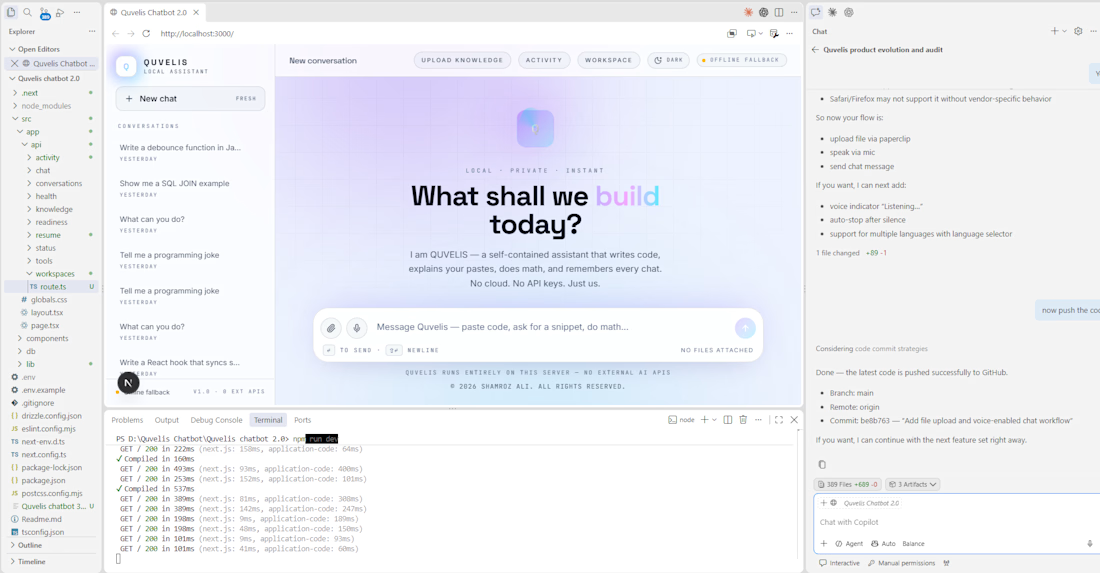

Self-hosting gives you control over where data lives, but uploads, temp files, logs and backups still define the privacy boundary. Are knowledge files kept on the same server as the model?

I’m running the server using Docker, so the knowledge files can be managed through Docker volumes and kept under our control. The exact storage location depends on how the containers and volumes are configured. Data privacy and secure file handling are important considerations.
The network for creativity
Join 1.25M professional creatives like you
Connect with clients, get discovered, and run your business 100% commission-free
Creatives on Contra have earned over $150M and we are just getting started







Related posts


100+ people already use my free skill file to stop their AI from making the same 25 design mistakes.
Drop it into your project and your agent gets better at typography, spacing, color, and dark mode. Link in the comments.


Most lead generation tools collect leads.
Mine scores them, analyzes them, and logs them automatically.
I built an AI Lead Intelligence Engine using n8n that triggers the moment a form is submitted. It normalizes the data, runs it through an AI scoring model, detects industry and buying intent using Gemini, assigns a HOT/WARM/COLD tier, and saves everything to a live CRM sheet.
Built for businesses that are tired of chasing cold leads manually.
This is Stage 1. Stage 2 adds automated personalized outreach. Stage 3 adds an AI voice call within 60 seconds.
If you run a business and lose leads because follow-up is slow, this system fixes that.


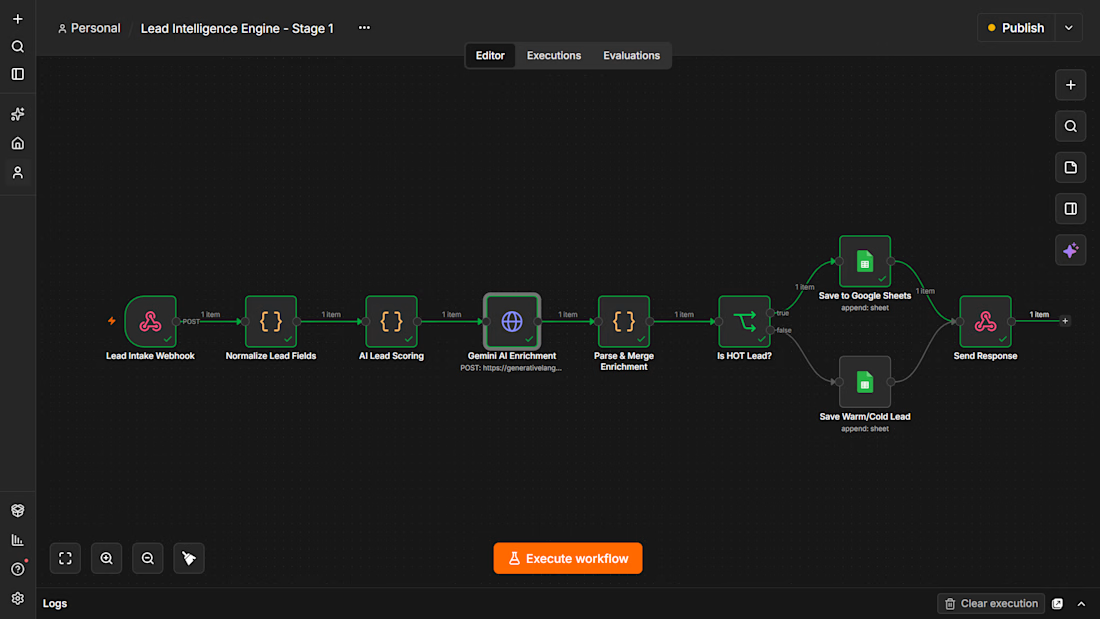

Love this Lead Intelligence flow! I also build lead scoring with n8n + OpenAI + Google Sheets. Clean execution — how do you handle duplicate leads? Let's connect!

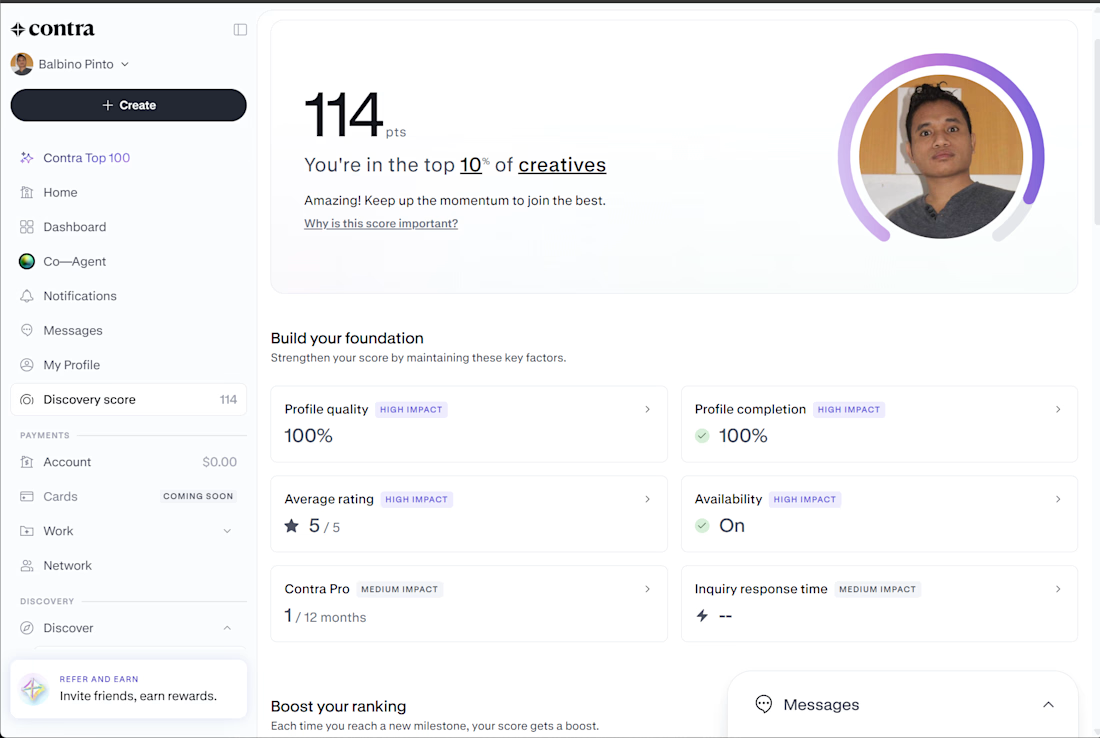
My Contra Discovery Score has reached 114 points, placing me in the top 10% of creatives on the platform. My profile quality and profile completion are both at 100%, with a 5/5 average rating and availability turned on.
As a software engineer specializing in React, .NET, API development, and SAP Business One, I'm continuing to strengthen my Contra presence, showcase my portfolio, and connect with potential clients for new freelance opportunities.