The network for creativity
Join 1.25M professional creatives like you
Connect with clients, get discovered, and run your business 100% commission-free
Creatives on Contra have earned over $150M and we are just getting started
Back to feedPost

Why 90% of retail traders fail in crypto:
• No risk engine
• No liquidity analysis
• No manipulation detection
• No automation
They trade blind.
I build systems that:
✔ Track whales
✔ Detect fake breakouts
✔ Filter bad entries
✔ Automate execution
Crypto is not gambling.
It’s infrastructure.
DM open for Web3 collaborations.
The network for creativity
Join 1.25M professional creatives like you
Connect with clients, get discovered, and run your business 100% commission-free
Creatives on Contra have earned over $150M and we are just getting started











Related posts


The internet doesn't need another “coming soon” page.
It needs products that actually work.
Meet HERODOT — where ideas become reality.
Four live products. Four problems worth solving.
TypeMic. RaptorCode. Vectorizer. StartupAccelerator.
Three brands. One ecosystem.
RaptorLabs builds. CyberLink Security secures. ResponseRed monitors.
No endless promises. No innovation theatre.
Just products. Full stop.
Explore what we've built: https://herodot.hr
And we're only getting started.


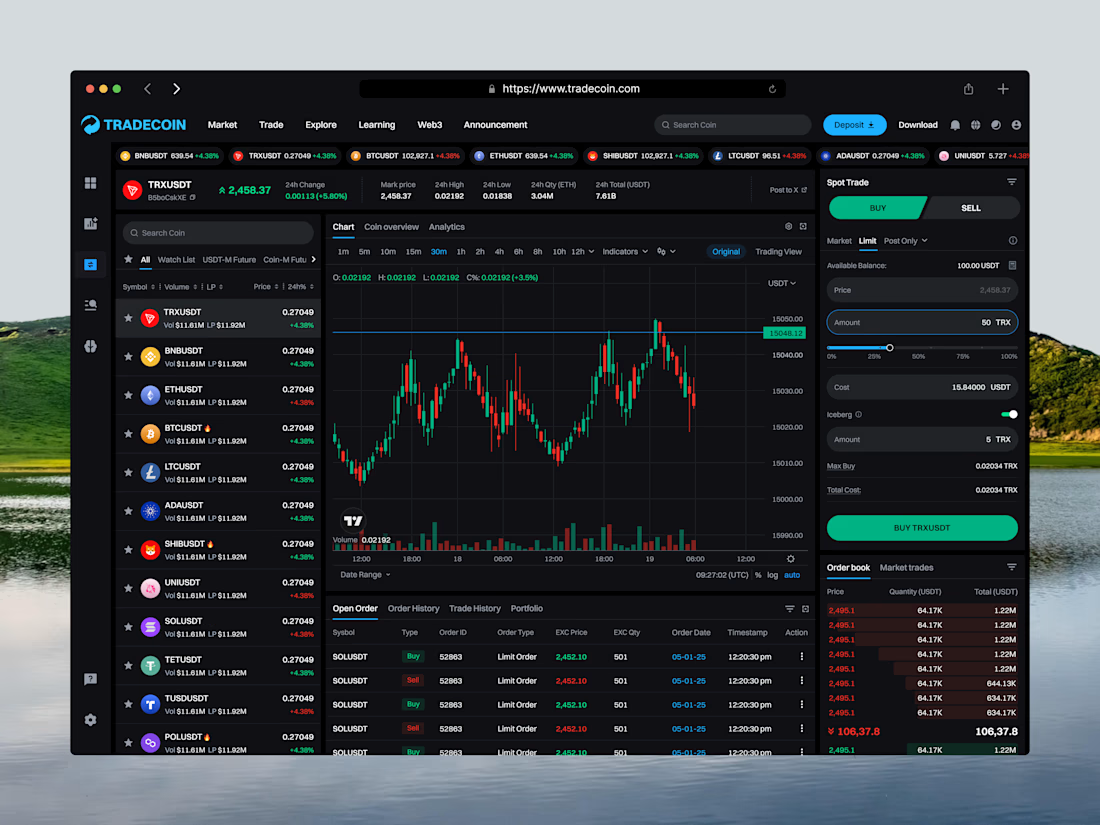
Tradecoin is a crypto trading web platform that helps users track the market and trade with confidence. This shot shows the Spot Trading screen in Buy mode, designed to let users analyze the market and place a buy order in one workspace.
The coin list on the left lets users switch pairs quickly, while the center holds a candlestick chart with timeframes, indicators, and volume. In Buy mode, the right panel turns green and shows Market, Limit, and Post Only orders, amount controls, and a live order book. Open orders, order history, trade history, and portfolio sit below the chart.
The Challenge
Trading screens can feel crowded and risky. Users switch between charts, order forms, and order books, and it’s easy to confuse a buy with a sell.
The goal was to create a focused trading experience with clear Buy and Sell states, so users always know what action they’re taking and can place orders with confidence.
Key Features
→ Green Buy mode with clear color feedback
→ Live ticker with top trading pairs
→ Coin list with search, filters & watchlist
→ Pair stats: price, 24h change, high, low & volume
→ Candlestick chart with timeframes & indicators
→ Market, Limit & Post Only order types
→ Amount slider with instant cost calculation
→ Iceberg order option
→ Max Buy & Total Cost details
→ Real-time order book & market trades
→ Open orders, history & portfolio tabs



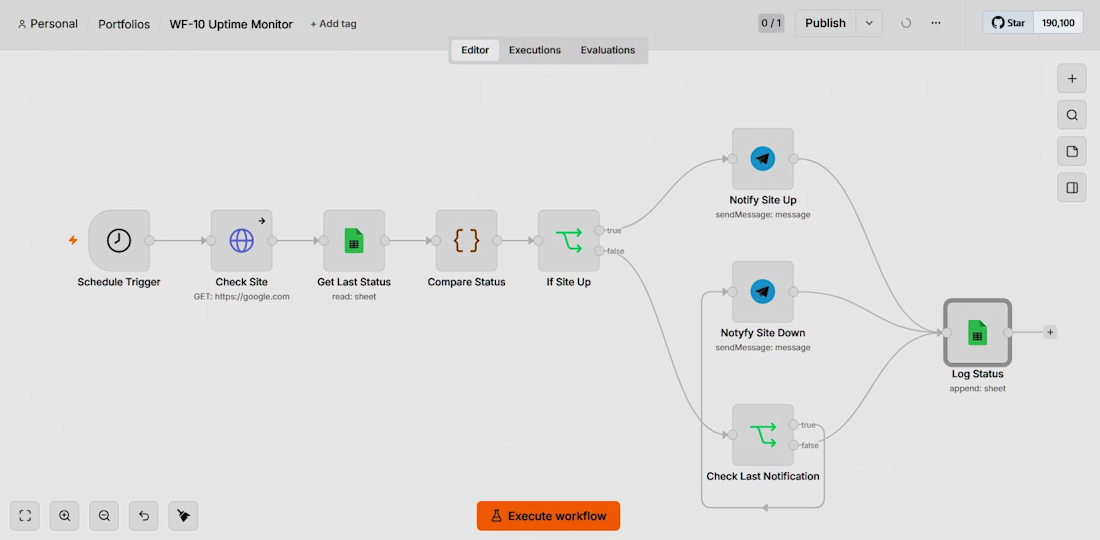
For a small e‑commerce client I built a monitoring automation that runs on n8n. Every five minutes a Schedule Trigger fires an HTTP Request to the storefront; an IF node evaluates the response and, on failure, pushes a Telegram message and logs the event in Google Sheets. The whole thing works unattended, giving the owner an early warning before customers notice downtime. It’s a lightweight, cost‑effective way to keep the shop visible.
Follow for more: https://go.phonezait.de/


Great automation! 👏 A simple, cost-effective monitoring system that helps businesses detect downtime early and maintain a better customer experience.